
Hey guys,
Goodnight.
In this quick post I will demonstrate how to compress directories and sub-directories by creating 1 zip file with all the content or 1 ZIP file per directory, using the 7-Zip, the best file compressor in my opinion, and the DOS prompt (CMD).
I use this little script a lot in my daily life, mainly to store the scripts and logs of the requests and projects I handle. This week, I had the need to use these scripts again when I generated large CSV files (over 2 GB per file) with various information extracted from the database, using the stored procedure stpExporta_Query_Txt, available in the post SQL Server – How to export database data to text file (CLR, OLE, BCP).
To make these files available to the requester, I wanted to compress them into 1 ZIP file for each file generated, but there were 65 CSV files, which would take a little time.
The solution to this problem was to use one of the scripts below, which I prepared for 3 types of needs. In these examples below, I will use the following structure:

Create 1 ZIP file for each subdirectory
In this first example, I will demonstrate how to read all directories in the current folder and create 1 zip file for each directory in the current folder. The subdirectories will be part of the created Zip file.
Source code:
for /d %X in (*) do "C:\Program Files\7-Zip\7z.exe" a "%X.zip" "%X\"
pause
Processing:
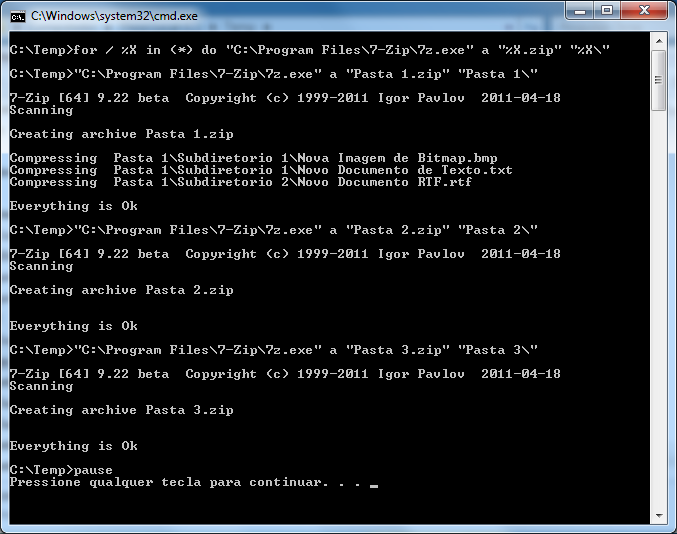
Final Result:

Create 1 ZIP file with the contents of the subdirectories
In this second example, I will demonstrate how to read all directories in the current folder and create 1 zip file with that content. The subdirectories will be part of the created ZIP file.
Source code:
for /d %X in (*) do "C:\Program Files\7-Zip\7z.exe" a "Arquivo.zip" "%X\"
pause
Processing:

Final Result:

Create 1 ZIP file for each root file
In this third and final example, I will demonstrate how to read the files in the current folder and create 1 zip file for archive. Directories and sub-directories are not considered, only the files that are in the root.
Source code:
for %X in (*.txt) do "C:\Program Files\7-Zip\7z.exe" a "%X.zip" "%X"
pause
Processing:

Final Result:

And that's it, folks!
I hope this post is useful for you too!
Hug!
how to compress directories batch files via command line command command line compress files directory folders shell cmd dos prompt
how to compress directories batch files via command line command command line compress files directory folders shell cmd dos prompt

Comentários (0)
Carregando comentários…