Warning: preg_match(): Unknown modifier 'b' in /mnt/datadisk/www/src/Controllers/PostController.php on line 206 Introduction to SQL CLR (Common Language Runtime) in SQL Server — Dirceu ResendeSkip to content
In this post, which will be the 100th blog post, I would like to talk about something that I particularly like about SQL Server, which is the creation of .NET routines within the SQL Server database. Yes, we are talking about the CLR (Common Language Runtime).
Introduction
Click here to view
Present in the SQL Server database since version 2005, the CLR is the heart of the Microsoft .NET Framework platform languages. The code that runs inside the CLR is known as managed code. The CLR provides several functions and services necessary for program execution, including just-in-time (JIT) compilation, memory allocation and management, type safety enforcement, exception handling, thread management, and security.
In other words, the CLR allows you to create routines (stored procedures, functions, triggers, etc.) written in C#, F# and VB.NET, compile them and execute them in the database natively, extending the capabilities of the DBMS, as it is possible to create a multitude of things that would not be possible using only Transact-SQL, such as file manipulation, uploading and downloading files via FTP, aggregation functions, integration with Webservices and much more.
Advantages and disadvantages
Click here to view
Just like any technology and tool, there are always strengths and weaknesses, where you should or shouldn't use the CLR. I will list a few:
Advantages of SQL CLR
Possibility of creating new resources, which would not be possible using just T-SQL
Possibility of working with regular expressions (RegExp) in the database
Performance optimization: The same function written in C# in the CLR is generally executed much faster than a T-SQL function, especially in cases of looping and calculations, since the .NET compiler is specialized for this type of operation, while the T-SQL compiler is for working with sets. In my work, I have seen several cases where the same CLR function performed 5x, 10x and some even 60x faster than the T-SQL function
Integration with Webservices via database
Security: One cool thing I like about the CLR is that we can define a fixed user to connect to the database. This way, we can free up access for it to execute SP’s and consult views and system tables and create functions and SP’s in the CLR for this. When an analyst needs to use these system SP's, simply release access to the SP/View/Function of the CLR, which will have indirect access to the system object, without needing to release access to it in the source object or create objects in system banks
Development tools: The tool used to develop CLR routines is Visual Studio. Management Studio is a very good IDE for creating Transact-SQL routines, especially with SQL Prompt installed, but it doesn't compare to the powerful Visual Studio, especially with ReSharper. Programming is much faster and more practical.
Source code versioning: Because we are using Visual Studio, the source code can be easily controlled and managed by TFS (Team Foundation Server), giving full control to the codes created, unlike Stored Procedures in the database, which do not have controls such as Merge, Diff, etc.
Replacement of xp_cmdshell: Despite being disabled by default, many people and companies end up enabling cmdshell in their instances, even in production, as some operations are not possible to be carried out using only Transact-SQL, such as file manipulation, for example. This feature is a big danger since it simply executes any command that is sent to it without any filters or restrictions. To do this, I recommend disabling this feature and using CLR procedures designed exclusively for each purpose, be it copying files or even uploading an instance.
Replacement of OLE Automation: A feature that is still widely used and is also disabled by default, OLE Automation procedures are C++ libraries that allow you to use Windows APIs to perform various operations, such as file manipulation, etc. The big problem is that by enabling this feature, any user can create anything with it, combined with the fact that the commands are not managed and are executed within the SQL Server process. In case of failure, the instance is shut down, as the SQL Server process is automatically closed by the operating system (!!!!)
Automation: With CLR procedures, you can automate a multitude of day-to-day processes, which previously could only be automated using Integration Services, which is a great tool, but ends up becoming a little limited in the world of CLR possibilities, since in MSIS you only have the resources that tools make available to you, while in CLR you can create anything that the .NET platform allows. Furthermore, the result of the CLR are database objects, whether Stored Prodecures, Functions, Triggers, etc., which can be freely used in other SP's, Jobs, and any other object in the database, while Packages can only be executed by the tool or by Jobs. (Note: CLR and MSIS are tools with different objectives, I just compared them because some Integration Services tasks can be easily replaced by the CLR)
Connectivity: Possibility of using .NET Framework connectors and accessing other DBMSs and other instances with a direct link, without the need for a LinkedServer, which executes the command remotely
Disadvantages of SQL CLR
Need to know SQL and programming language (C#, F# or VB.net)
Little documentation and people with knowledge on the subject
When publishing a new version, objects are removed and recreated, losing permissions and making objects unavailable during publishing
If poorly developed and implemented, it may present risks to the DBMS
Some functions may require a high CPU volume for processing
There are no optional parameters for procedures. All must be completed
Enabling the CLR on your SQL Server instance
Click here to view
By default, the CLR is disabled on SQL Server instances. To enable this feature, it's very simple, just use the sp_configure command:
sp_configure 'clr enabled'
GO
sp_configure 'clr enabled', 1
GO
RECONFIGURE
GO
sp_configure 'clr enabled'
GO
And we will have the following result: Enabling CLR in SQL Server
Otherwise, you will encounter this error message when trying to use the CLR:
Msg 6263, Level 16, State 1, Line 2
Execution of user code in the .NET Framework is disabled. Enable “clr enabled” configuration option.
Creating your first SQL CLR project in Visual Studio
Click here to view
The first step to creating our CLR project is obviously to download and install Visual Studio compatible with your version of SQL Server (I recommend Visual Studio 2015 Community Edition, as it is compatible with SQL Server 2005 to 2014 and free for developers).
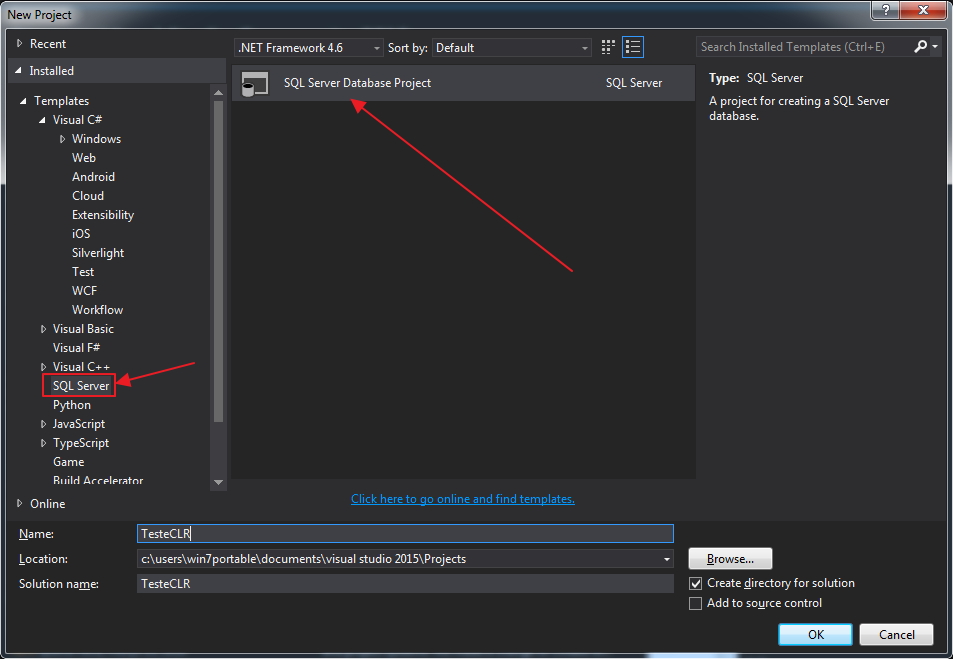
After that, open Visual Studio and access the File > New > Project menu. Select project type SQL Server > SQL Server Database Project
New CLR Project
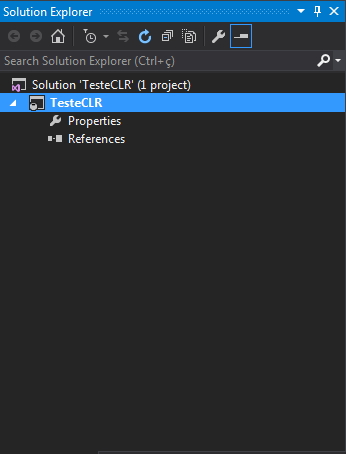
And it should initially look like this: CLR new project - Solution explorer
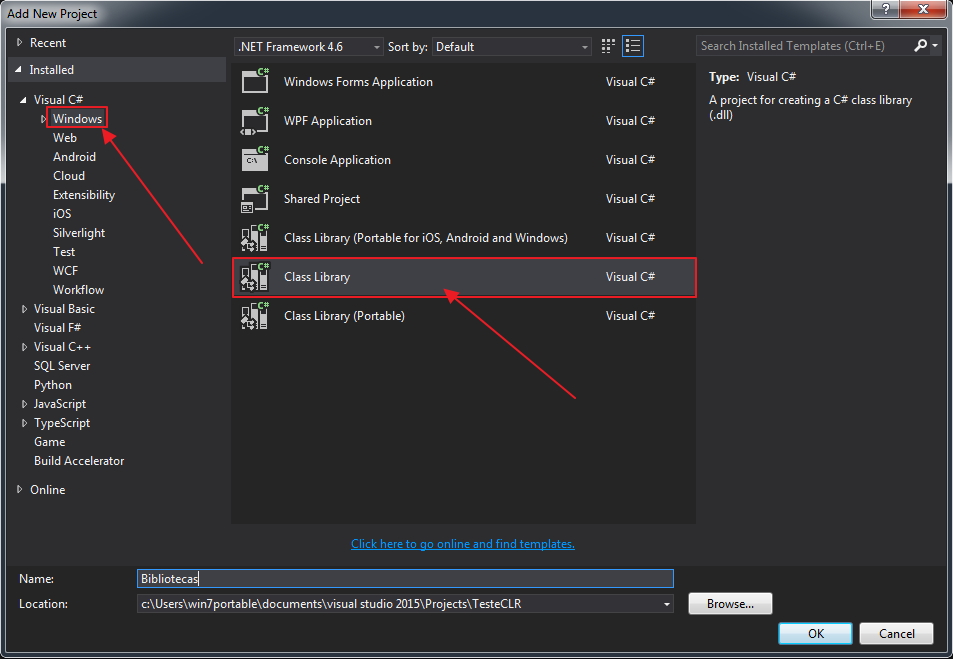
Now let's add a new Class Library project, which will contain our C# codes. To do this, right-click on the Solution and select the Add > New Project option. Select the Visual C# category > Windows > Class Library
CLR New Class Library
Once created, I generally create directories by object type in the Class Library to better organize the code. This is recommended but optional. You may want to organize your code by subject or as per your need.
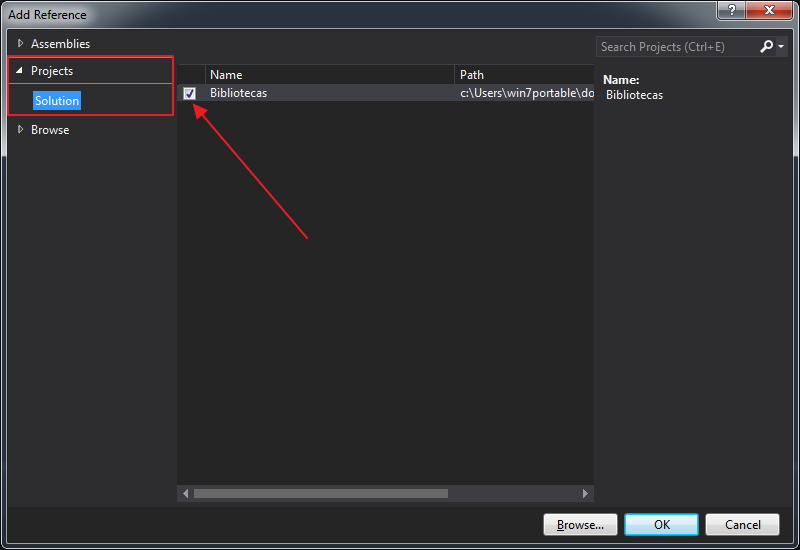
Some references may be removed as they will not be used in the examples. Right-click on “References” in the CLR project and select the “Add Reference…” option. On the screen that will open, select the Projects > Solutions category and check the Class Library project checkbox:
CLR Add Reference
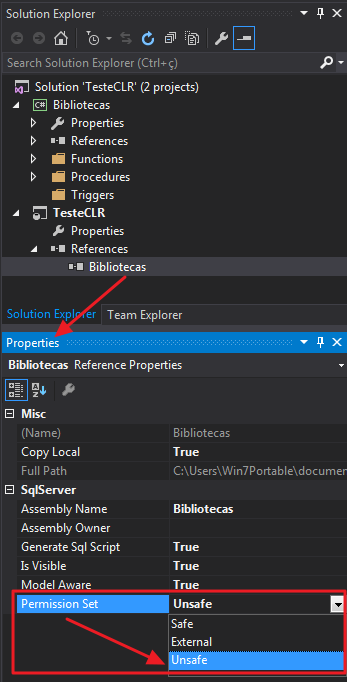
Don't forget to set the permission of the project that was imported, as shown in the figure below: CLR Assembly Permission Set 2
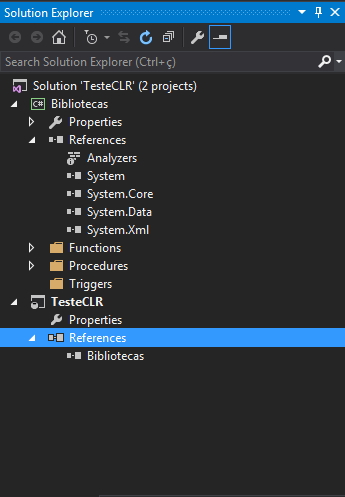
The Solution Explorer should look like the following: CLR new project with Class Library - Solution explorer
Creating a stored procedure without return
Right-click on the “Procedures” directory of the Libraries project and select the Add > Class… option. In the screen that opens, type the name of the file that will be created. I usually put the same name as the object that will be created in the database. In this example, I will create the file stpCopia_Arquivo.cs
Copy and paste the code below:
using System.IO;

public partial class StoredProcedures
{
    [Microsoft.SqlServer.Server.SqlProcedure]
    public static void stpCopia_Arquivo(string origem, string destino, bool sobrescrever)
    {
        File.Copy(origem, destino, sobrescrever);
    }
}
Creating a stored procedure with return from a select
Right-click on the “Procedures” directory of the Libraries project and select the Add > Class… option. In the screen that opens, type the name of the file that will be created. I usually put the same name as the object that will be created in the database. In this example, I will create the file stpImporta_Txt.cs
Copy and paste the code below:
using System.Data;
using System.Data.SqlTypes;
using Microsoft.SqlServer.Server;
using System.IO;

public partial class StoredProcedures
{
    [Microsoft.SqlServer.Server.SqlProcedure]
    public static void stpImporta_Txt(SqlString caminho)
    {

        if (caminho.IsNull) return;

        using (var sr = new StreamReader(caminho.Value))
        {

            // Define um novo objeto de metadados com 2 colunas
            var colunas = new SqlMetaData[2];

            // Define as colunas de retorno
            colunas[0] = new SqlMetaData("Nr_Linha", SqlDbType.Int);
            colunas[1] = new SqlMetaData("Ds_Linha", SqlDbType.NVarChar, 1024);

            var rec = new SqlDataRecord(colunas);

            // inicia o envio dos dados
            SqlContext.Pipe.SendResultsStart(rec);

            var contador = 1;
            while (sr.Peek() >= 0)
            {

                // define as colunas
                rec.SetInt32(0, contador);
                rec.SetString(1, sr.ReadLine());

                // Envia o registro para o banco de dados
                SqlContext.Pipe.SendResultsRow(rec);

                contador++;
            }

            // finaliza o envio dos dados
            SqlContext.Pipe.SendResultsEnd();

        }
    }
}
Creating a scalar function
Right-click on the “Functions” > “Scalar Function” directory of the Libraries project (Class Library) and select the Add > Class… option. In the screen that opens, type the name of the file that will be created. I usually put the same name as the object that will be created in the database. In this example, I will create the file fncArquivo_Existe.cs
Copy and paste the code below:
using System.Data.SqlTypes;
using System.IO;

public partial class UserDefinedFunctions
{
    [Microsoft.SqlServer.Server.SqlFunction]
    public static SqlBoolean fncArquivo_Existe(SqlString Ds_Arquivo)
    {
        return (File.Exists(Ds_Arquivo.ToString()));
    }
}
Note that, unlike procedures that always return void, functions must return data. In the case of the example, they return data of type SqlBoolean (bit = true/false)
Creating a table-valued function
Right-click on the “Procedures” directory of the Libraries project and select the Add > Class… option. In the screen that opens, type the name of the file that will be created. I usually put the same name as the object that will be created in the database. In this example, I will create the file fncArquivo_Ler.cs
Copy and paste the code below:
using System.IO;
using System.Collections;
using System.Data.SqlTypes;

public partial class UserDefinedFunctions
{

    // Classe que irá receber os dados processados através do construtor da Classe
    private class ArquivoLer
    {

        public SqlInt32 Nr_Linha;
        public SqlString Ds_Texto;

        public ArquivoLer(SqlInt32 nrLinha, SqlString dsTexto)
        {

            Nr_Linha = nrLinha;
            Ds_Texto = dsTexto;

        }

    }

    // Definição da função, contendo o método de preenchimento dos registros (FillRow)
    // e o retorno para o banco de dados
    [Microsoft.SqlServer.Server.SqlFunction(
        FillRowMethodName = "FillRow_Arquivo_Ler",
        TableDefinition = "Nr_Linha INT, Ds_Texto NVARCHAR(MAX)" /*,
        DataAccess = DataAccessKind.Read // Caso a função realize consultas no banco
        */
    )]
    public static IEnumerable fncArquivo_Ler(string Ds_Caminho)
    {

        var ArquivoLerCollection = new ArrayList();

        if (string.IsNullOrEmpty(Ds_Caminho))
            return ArquivoLerCollection;

        var contador = 1;

        using (var sr = new StreamReader(Ds_Caminho))
        {

            while (sr.Peek() >= 0)
            {

                ArquivoLerCollection.Add(new ArquivoLer(
                    contador,
                    sr.ReadLine()
                ));

                contador++;

            }

            sr.Close();

        }

        return ArquivoLerCollection;

    }


    /*

    Método de preenchimento dos dados. O parâmetro de entrada é sempre o objeto da classe
    criada no início do código e as variáveis que serão retornadas, todas como OUTPUT, pois
    seus valores originais serão alterados para o método IEnumerable que controla a função.

    */

    public static void FillRow_Arquivo_Ler(object objArquivoLer, out SqlInt32 nrLinha, out SqlString dsTexto)
    {

        var ArquivoLer = (ArquivoLer)objArquivoLer;

        nrLinha = ArquivoLer.Nr_Linha;
        dsTexto = ArquivoLer.Ds_Texto;

    }

}
This type of object is probably the most difficult to create in the CLR, since its result is a table and to fill this table, we need to create a class with sets/gets with the data that will be returned, define the output of the data to the database and the programming to populate/calculate the data.
string or SqlString?
Click here to view
As you may have noticed in the examples above, in some cases I use string, bool, int, etc.. and in others I use SqlString, SqlBoolean, SqlInt32, etc.. This difference is that the first cases are C# data types, while the others are aimed at the database itself and have more controls and ways of working.
Examples:
The SqlString type has the IsNull check method to determine whether a NULL value was passed as a parameter. This check is faster than using string.IsNullOrEmpty. However, using a string variable as a parameter, if the function or SP is called with a NULL value, it will be executed normally, whether or not it will be treated in the future in its source code. If you enter a NULL value for a variable of type SqlString and you have not carried out the treatment using the variavel.IsNull method, when retrieving the value entered using the variavel.Value attribute or the variavel.ToString() method, an ERROR exception will be generated in your routine.
Another cool example to illustrate the difference is between DateTime and SqlDateTime. If you pass a NULL date to DateTime, an ERROR exception will be generated in your routine. This data type does not accept NULL. If you need to use something like this, you should use the MinValue (1/1/0001 12:00:00 AM) or MaxValue (12/31/9999 23:59:59) method. The SqlDateTime data type accepts null values and has the variavel.Null method to define null values.
My recommendation is to always use the data types for the database (SqlString, SqlInt32, etc.) and ALWAYS remember to carry out the necessary treatments (mainly the variable.IsNull).
Which version of the .NET Framework should I use?
Click here to view
Identifying and deciding which version of the .NET Framework to use is a very simple task, but it has caused me a lot of headaches in the past due to the lack of documentation on the subject. Therefore, I will try to help you by simplifying:
– SQL Server 2005: You can only use .NET Framework 1.0 and 2.0
– SQL Server 2008: Supports up to .NET Framework 3.5
– SQL Server 2012 and 2014: Support up to .NET Framework 4.6.1
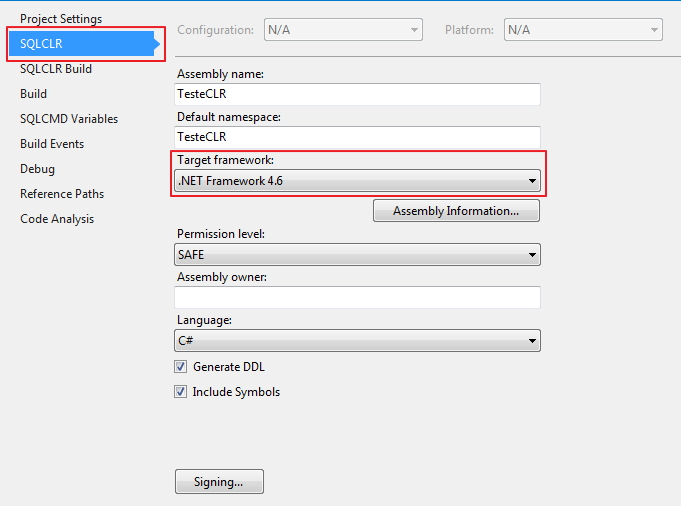
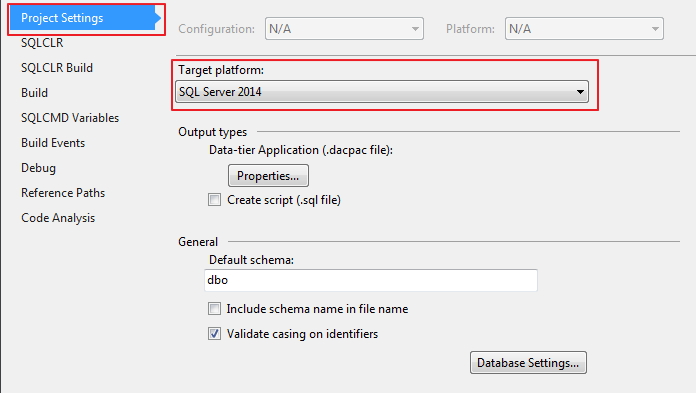
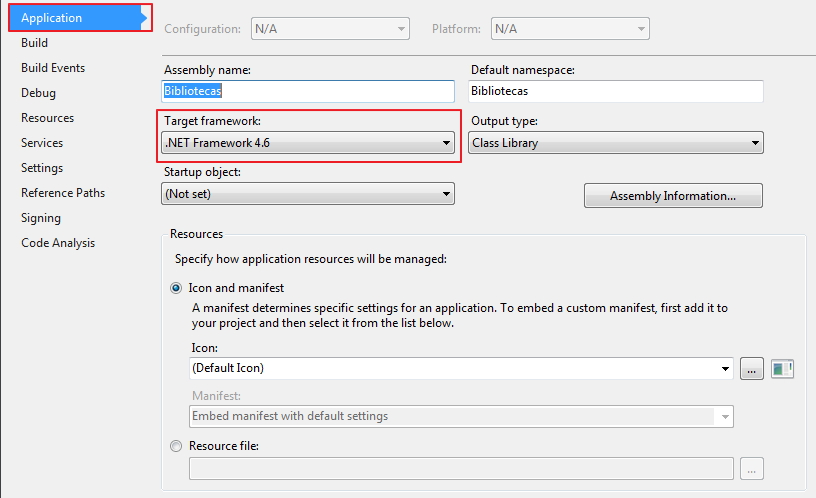
You can set the .NET Framework version when creating the project or by right-clicking on the Class Library project and selecting the “Properties” option. You need to do the same procedure for the CLR project too, which still gives you the possibility to define the database version:
CLR - Target Framework
CLR - Target Platform
CLR Class Library - .NET Framework Version
Compiling your project and publishing to the database
Click here to view
Once the codes have been developed, we will publish the generated assemblies in the database to start using the objects that will be created. You can set Visual Studio itself to create the target database (if it doesn't exist) or you can create the database manually first (I recommend this option) and then publish the assemblies.
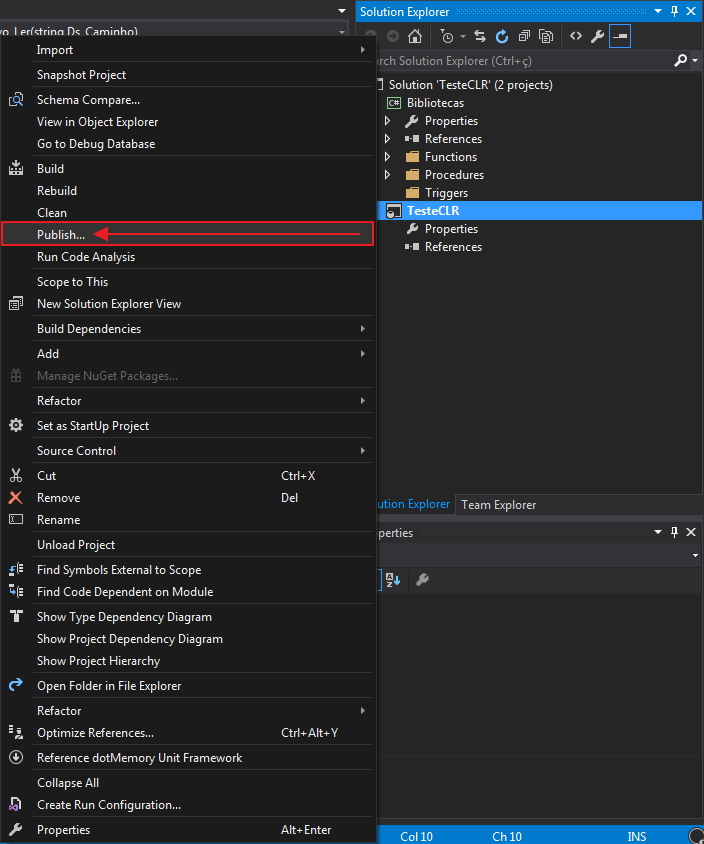
Once the database has been created, right-click on the CLR project and select the “Publish…” option. The “Build” and “Rebuild” buttons are used to simply compile the source code and validate whether there are syntax errors in the source, while the “Clean” button eliminates the generated files and the Visual Studio cache.
CLR - Publish
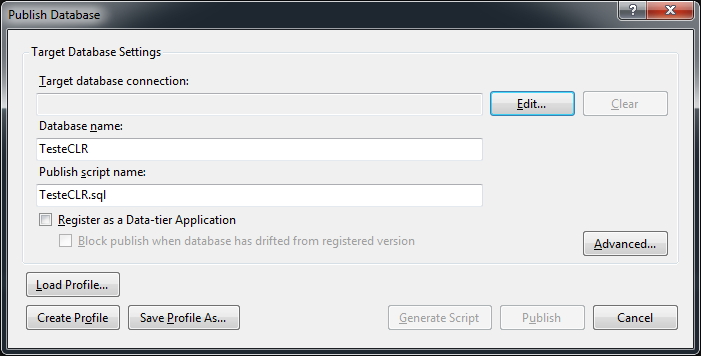
On the screen that will open, you must click on the “Edit…” button to enter the server and how to connect to the database.
CLR - Publish Database 2
You can create/upload profiles to facilitate publishing in more than one environment. The “Generate Scripts” button will generate a SQL script, which must be executed by SQLCMD to publish the CLR and the “Publish” button will generate the script and execute it in the database.
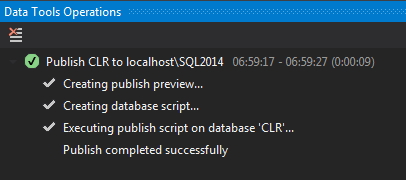
CLR Publish successfully completed
Assembly permission level
In SQLCLR, there are 3 levels of permissions for created assemblies:
SAFE: Assembly methods can do more than Transact-SQL methods with the same logic and are executed with the credentials of the calling user
EXTERNAL ACCESS: Methods can perform file manipulation and I/O operations over the network. The methods are executed using the SQL Server service account, inheriting its Active Directory privileges
UNSAFE / UNRESTRICTED: Extends EXTERNAL ACCESS privileges, allowing the CLR to execute commands without any restrictions
If the assembly needs to use the EXTERNAL ACCESS or UNRESTRICTED permission levels, it will be necessary to define the database in which it will be published as TRUSTWORTY:
ALTER DATABASE [Nome_do_Database] SET TRUSTWORTHY ON
Permissions required to compile the CLR
For a user to have permission to publish a CLR to the database, they will need to meet one of the requirements below:
Member of the sysadmin role
If the assembly permission level is SAFE, the user will need CREATE ASSEMBLY and DROP ASSEMBLY permission
If the assembly permission level is EXTERNAL ACCESS, the user will need CREATE ASSEMBLY, DROP ASSEMBLY and EXTERNAL ACCESS ASSEMBLY permissions.
If the assembly permission level is UNRESTRICTED, the user will need CREATE ASSEMBLY, DROP ASSEMBLY and UNSAFE ASSEMBLY permission
End result:
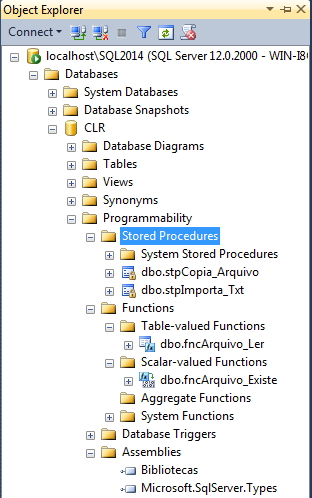
CLR - Object Explorer
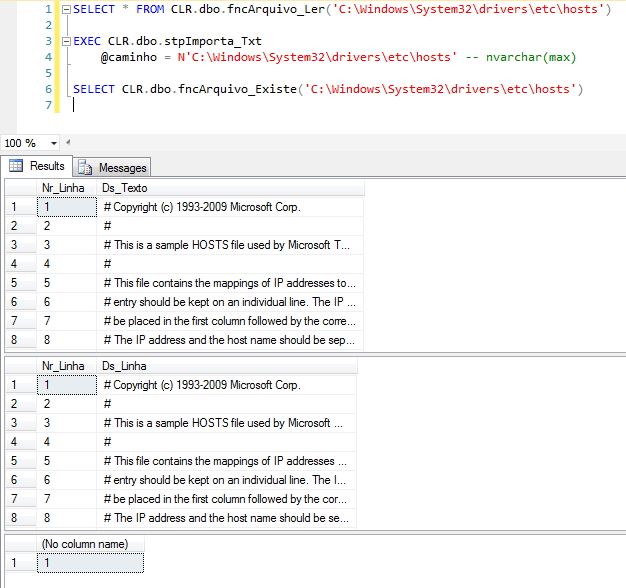
SQLCLR
Restrictions on assemblies: Supported and Unsupported DLLs
Click here to view
SQL Server places certain restrictions on managed code in assemblies to verify that they can be executed in a safe and scalable manner. This means that certain operations that could compromise server robustness are not allowed in SAFE and EXTERNAL_ACCESS assemblies.
Custom attributes not allowed
Assemblies cannot be annotated with the following custom attributes:
– System.ContextStaticAttribute
– System.MTAThreadAttribute
– System.Runtime.CompilerServices.MethodImplAttribute
– System.Runtime.CompilerServices.CompilationRelaxationsAttribute
– System.Runtime.Remoting.Contexts.ContextAttribute
– System.Runtime.Remoting.Contexts.SynchronizationAttribute
– System.Runtime.InteropServices.DllImportAttribute
– System.Security.Permissions.CodeAccessSecurityAttribute
– System.STAThreadAttribute
– System.ThreadStaticAttribute
Additionally, SAFE and EXTERNAL_ACCESS assemblies cannot be annotated with the following custom attributes:
– System.Security.SuppressUnmanagedCodeSecurityAttribute
– System.Security.UnverifiableCodeAttribute
Disallowed .NET Framework APIs
Any Microsoft .NET Framework API annotated with one of the HostProtectionAttributes prohibitions cannot be called from the SAFE and EXTERNAL_ACCESS assemblies.
– eSelfAffectingProcessMgmt
– eSelfAffectingThreading
– eSynchronization
– eSharedState
– eExternalProcessMgmt
– eExternalThreading
– eSecurityInfrastructure
– eMayLeakOnAbort
– IUI
Supported .NET Framework assemblies
Any assembly referenced by your custom assembly must be loaded into SQL Server using CREATE ASSEMBLY. The following .NET Framework assemblies are already loaded in SQL Server and therefore can be queried for custom assemblies without having to use CREATE ASSEMBLY.
– CustomMarshalers.dll
– Microsoft.VisualBasic.dll
– Microsoft.VisualC.dll
– mscorlib.dll
– System.dll
– System.Configuration
– System.Core.dll (supported from SQL Server 2008)
– System.Data.dll
– System.Data.OracleClient
– System.Data.SqlXml.dll
– System.Deployment
– System.Security.dll
– System.Transactions
– System.Web.Services.dll
– System.Xml.dll
– System.Xml.Linq.dll (supported from SQL Server 2008)
Views and SP’s of the Catalog
Click here to view
-- SYS.ASSEMBLIES
-- Name, Assembly ID, security and “is_visible” flag
SELECT * FROM sys.assemblies


-- SYS.ASSEMBLY_FILES
-- Assembly ID, name of each file & assembly contents
SELECT * FROM sys.assembly_files


-- SYS.ASSEMBLY_MODULES
-- Sql ObjectID, Assembly ID, name & assembly method
SELECT * FROM sys.assembly_modules


-- SYS.ASSEMBLY_REFERENCES
-- Links between assemblies on Assembly ID
SELECT * FROM sys.assembly_references


-- SYS.MODULE_ASSEMBLY_USAGES
-- Partial duplicate of SYS.ASSEMBLY_MODULES
-- Links SQL Object ID to an Assembly ID
SELECT * FROM sys.module_assembly_usages


-- CLR STORED PROCEDURES
SELECT
    SCHEMA_NAME(sp.schema_id) + '.' + sp.[name] AS [Name],
    sp.create_date,
    sp.modify_date,
    sa.permission_set_desc AS [Access],
    sp.is_auto_executed
FROM
    sys.procedures AS sp
    INNER JOIN sys.module_assembly_usages AS sau ON sp.object_id = sau.object_id
    INNER JOIN sys.assemblies AS sa ON sau.assembly_id = sa.assembly_id
WHERE
    sp.type_desc = N'CLR_STORED_PROCEDURE';


-- CLR TRIGGERS
SELECT
    SCHEMA_NAME(so.schema_id) + '.' + tr.[name] AS [Name],
    SCHEMA_NAME(so.schema_id) + '.' + OBJECT_NAME(tr.parent_id) AS [Parent],
    te.type_desc AS [Fired On],
    te.is_first,
    te.is_last,
    tr.create_date,
    tr.modify_date,
    sa.permission_set_desc AS [Access],
    tr.is_disabled,
    tr.is_not_for_replication,
    tr.is_instead_of_trigger
FROM
    sys.triggers AS tr
    INNER JOIN sys.objects AS so ON tr.[object_id] = so.[object_id]
    INNER JOIN sys.trigger_events AS te ON tr.[object_id] = te.[object_id]
    INNER JOIN sys.module_assembly_usages AS mau ON tr.object_id = mau.object_id
    INNER JOIN sys.assemblies AS sa ON mau.assembly_id = sa.assembly_id
WHERE
    tr.type_desc = N'CLR_TRIGGER'


-- CLR Scalar Functions
SELECT
    SCHEMA_NAME(so.schema_id) + N'.' + so.[name] AS [Name],
    so.create_date,
    so.modify_date,
    sa.permission_set_desc AS [Access]
FROM
    sys.objects AS so
    INNER JOIN sys.module_assembly_usages AS sau ON so.object_id = sau.object_id
    INNER JOIN sys.assemblies AS sa ON sau.assembly_id = sa.assembly_id
WHERE
    so.type_desc = N'CLR_SCALAR_FUNCTION'


-- CLR Table-valued Functions
SELECT
    SCHEMA_NAME(so.schema_id) + N'.' + so.[name] AS [Name],
    so.create_date,
    so.modify_date,
    sa.permission_set_desc AS [Access]
FROM
    sys.objects AS so
    INNER JOIN sys.module_assembly_usages AS sau ON so.object_id = sau.object_id
    INNER JOIN sys.assemblies AS sa ON sau.assembly_id = sa.assembly_id
WHERE
    so.type_desc = N'CLR_TABLE_VALUED_FUNCTION'


-- CLR Aggregate Function
SELECT
    SCHEMA_NAME(so.schema_id) + N'.' + so.[name] AS [Name],
    so.create_date,
    so.modify_date,
    sa.permission_set_desc AS [Access]
FROM
    sys.objects AS so
    INNER JOIN sys.module_assembly_usages AS mau ON so.object_id = mau.object_id
    INNER JOIN sys.assemblies AS sa ON mau.assembly_id = sa.assembly_id
WHERE
    so.type_desc = N'AGGREGATE_FUNCTION'


EXEC sys.sp_assemblies_rowset N'<AssemblyName>'
EXEC sys.sp_assembly_dependencies_rowset <AssemblyID>
CLR SQL Server SQLCLR how to activate enable how to use how to active enable how to create sp how to create procedure how to program how to start introduction starting where to start how to code coding programming procedures table-valued functions scalar c# csharp programming database database programming
CLR SQL Server SQLCLR how to activate enable how to use how to active enable how to create sp how to create procedure how to program how to start introduction starting where to start how to code coding programming procedures table-valued functions scalar c# csharp programming database database programming
Dirceu Resende
Database & BI Architect · Microsoft MVP · MCSE, MCSA, MCT, MTA, MCP.



Comentários (0)
Carregando comentários…