
Hello readers,
Good afternoon!
In this post I will demonstrate how to monitor the automatic growth of space in a database (autogrowth) in SQL Server, so that it is possible to identify the user who caused the growth and when the automatic growth events occurred in the database.
Obtaining these results is possible thanks to the system function ::fn_trace_gettable, which allows you to query the trace events that are executed by default on all SQL Server instances.
Creating a test bench
Before we test the query that shows us the database's AutoGrowth events, let's create a test bench, with the default SQL Server options (initial size 5 MB and autogrowth every 1 MB) and insert some records to force the space to run out and the database to have to grow automatically.
CREATE DATABASE [AutoGrowth]
GO

ALTER DATABASE [AutoGrowth] SET RECOVERY FULL
GO

USE [AutoGrowth]
GO

IF (OBJECT_ID('dbo.Teste') IS NOT NULL) DROP TABLE dbo.Teste
CREATE TABLE dbo.Teste (
    ID INT IDENTITY(1, 1) PRIMARY KEY,
    Nome CHAR(8000),
    Profissao VARCHAR(8000)
)
GO


DECLARE @Contador INT = 1

WHILE (@Contador < 100000)
BEGIN

    INSERT INTO dbo.Teste(Nome, Profissao)
    VALUES ('Dirceu', 'DBA')

    SET @Contador = @Contador + 1

END
Your database should now be 788 MB and have automatically grown in space hundreds of times. Let's now find out when these events took place and who caused the increase in space.
To make the test better, I suggest opening two connections with different users and entering the data at the same time.
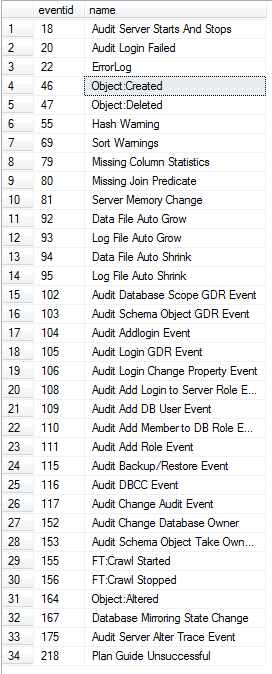
Identifying trace event types
Using the query below, we can quickly identify all EventClass that we can use in the ::fn_trace_gettable function:
DECLARE @id INT = ( SELECT id FROM sys.traces WHERE is_default = 1 )

SELECT DISTINCT
    eventid,
    name
FROM
    fn_trace_geteventinfo(@id) A
    JOIN sys.trace_events B ON A.eventid = B.trace_event_id
Checking the growth events
Now that our test base is done and the data has been inserted, let's analyze the database's AutoGrowth events using the query below:
DECLARE
    @Ds_Database sysname = 'AutoGrowth',
    @Ds_Arquivo_Trace VARCHAR(500) = (SELECT [path] FROM sys.traces WHERE is_default = 1)

DECLARE
    @Index INT = PATINDEX('%\%', REVERSE(@Ds_Arquivo_Trace))

DECLARE
    @Nm_Arquivo_Trace VARCHAR(500) = LEFT(@Ds_Arquivo_Trace, LEN(@Ds_Arquivo_Trace) - @Index) + '\log.trc'


SELECT
    A.DatabaseName,
    A.[Filename],
    ( A.Duration / 1000 ) AS 'Duration_ms',
    A.StartTime,
    A.EndTime,
    ( A.IntegerData * 8.0 / 1024 ) AS 'GrowthSize_MB',
    A.ApplicationName,
    A.HostName,
    A.LoginName
FROM
    ::fn_trace_gettable(@Nm_Arquivo_Trace, DEFAULT)		A
    LEFT JOIN sys.databases					B	ON ( B.name = @Ds_Database )
WHERE
    A.EventClass >= 92
    AND A.EventClass <= 95
    AND A.ServerName = @@servername
    AND A.DatabaseName = @Ds_Database
    AND B.create_date < EndTime
ORDER BY
    A.StartTime DESC
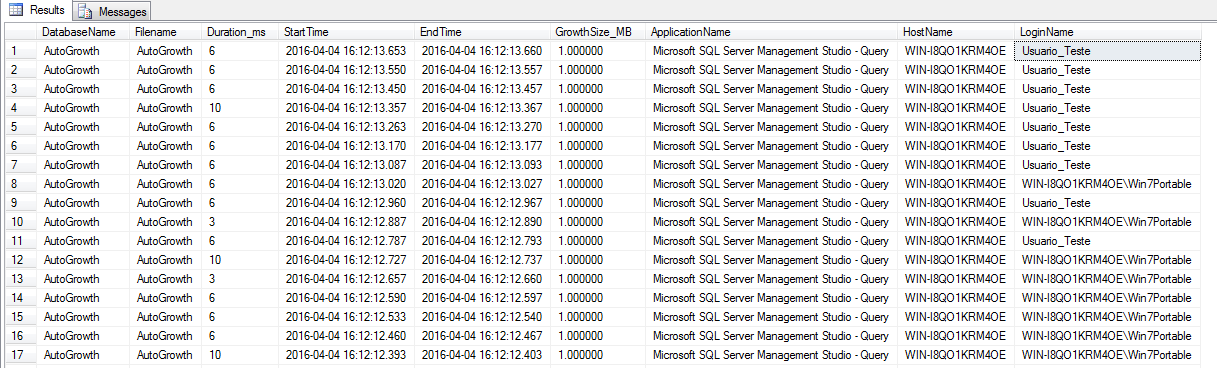
With this we were able to analyze which database suffered the autogrowth event, which specific file, how long the server took to increase the space, how much space was increased, which software is processing the query that caused the increase in space, hostname and login of the user who is executing this query.
That's it, folks!
I hope this tip helps you in some way.
Hugs and see you in the next post!

Comentários (0)
Carregando comentários…