
Hey guys,
Good afternoon!
In this post I will demonstrate how to identify the DDL and DCL events that occur in the SQL Server instance. This allows us to identify which user created/changed/deleted an object, or who added/removed a user in a system role or database role and several other things without the need to create any internal control or monitoring, using only the standard SQL Server trace, where we will query your data through the function fn_trace_gettable.
A while ago I published the post here How to create an Audit trigger to log object manipulation in SQL Server which allowed creating a server trigger that performs this audit. Although the fn_trace_gettable function returns much of the information available in this internal control, this trigger allows versioning of changed objects, such as procedures, functions, tables, etc. In other words, if you want to automate the source code versioning of objects in the database, the best post is the one mentioned above.
Remembering the concepts of DDL and DCL
I believe that these concepts are already well known to most of you, but I will reinforce what each thing is so there is no doubt:
DDL (Data Definition Language) Operations
They are used to define or change database structures or schemas
CREATE – Used to create objects in the database
ALTER – Changes the structure of an object
DROP – Removes an object from the database
TRUNCATE – Deletes all records from a table, including the allocated space.
COMMENT – Adds comments to objects
RENAME – Renames an object
DCL (Data Control Language) Operations
They are used to manage user permissions and privileges on certain objects in the SQL Server instance
GRANT – Grants access to a user on a given object
REVOKE – Removes a user’s access to a given object
Identifying trace event types
Using the query below, we can quickly identify all EventClass that we can use in the ::fn_trace_gettable function:
DECLARE @id INT = ( SELECT id FROM sys.traces WHERE is_default = 1 )

SELECT DISTINCT
    eventid,
    name
FROM
    fn_trace_geteventinfo(@id) A
    JOIN sys.trace_events B ON A.eventid = B.trace_event_id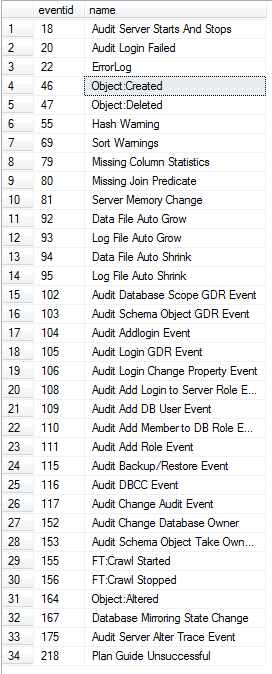
Identifying DDL and DCL events in SQL Server instance
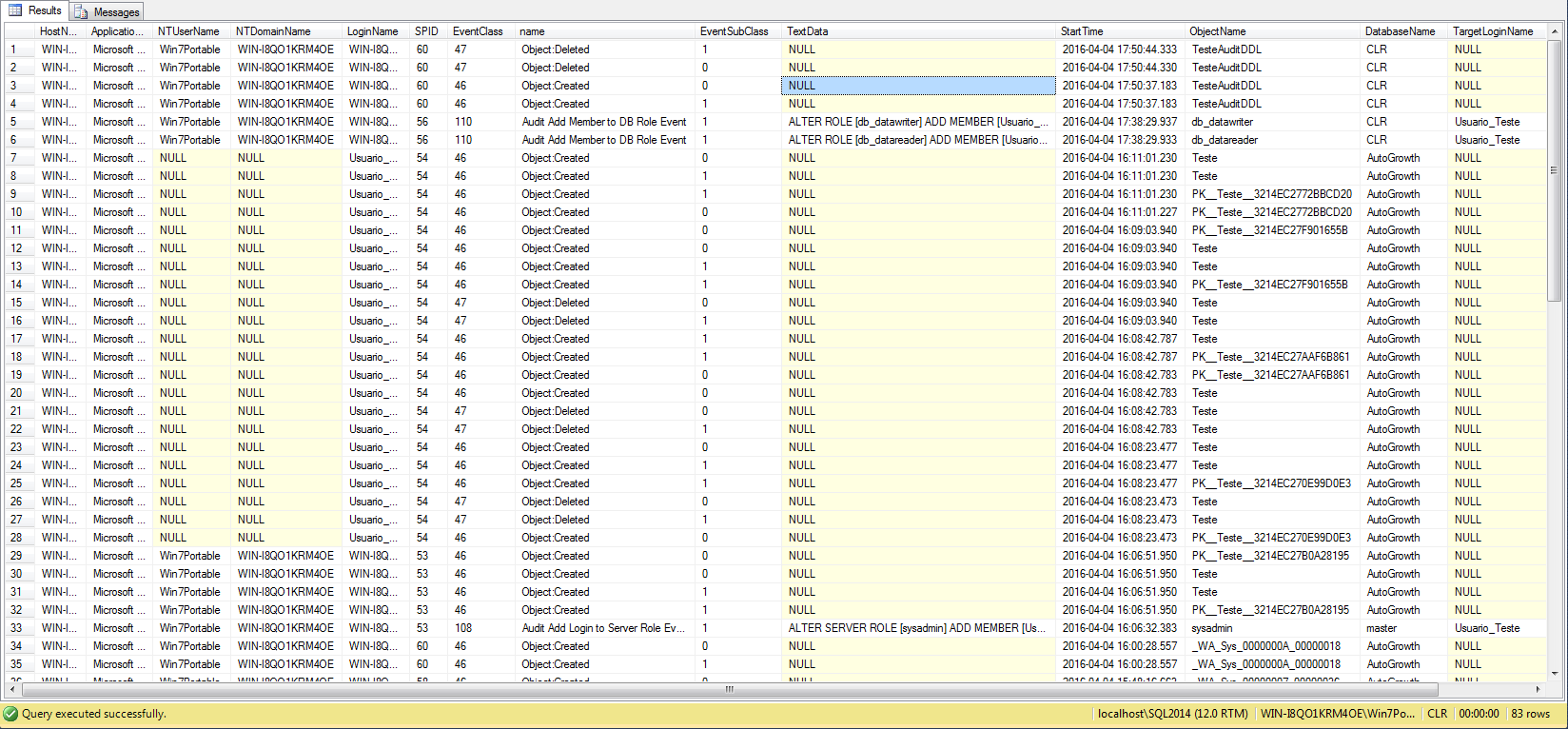
With the query below, it is possible to identify who was the last person to change a specific object in the instance (Ex: Stored Procedure), who added a specific user to a role, who deleted a table, who executed a TRUNCATE command, etc., and all this without having to create any control other than those already available and activated by default in SQL Server.
DECLARE @Ds_Arquivo_Trace VARCHAR(255) = (SELECT SUBSTRING([path], 0, LEN([path])-CHARINDEX('\', REVERSE([path]))+1) + '\Log.trc' FROM sys.traces WHERE is_default = 1)

SELECT
    A.HostName,
    A.ApplicationName,
    A.NTUserName,
    A.NTDomainName,
    A.LoginName,
    A.SPID,
    A.EventClass,
    B.name,
    A.EventSubClass,
    A.TextData,
    A.StartTime,
    A.ObjectName,
    A.DatabaseName,
    A.TargetLoginName,
    A.TargetUserName
FROM
    [fn_trace_gettable](@Ds_Arquivo_Trace, DEFAULT) A
    JOIN master.sys.trace_events B ON A.EventClass = B.trace_event_id
WHERE
    A.EventClass IN ( 164, 46, 47, 108, 110, 152 )
    AND A.StartTime >= GETDATE()-7
    AND A.LoginName NOT IN ( 'NT AUTHORITY\NETWORK SERVICE' )
    AND A.LoginName NOT LIKE '%SQLTELEMETRY$%'
    AND A.DatabaseName != 'tempdb'
    AND NOT (B.name LIKE 'Object:%' AND A.ObjectName IS NULL )
    AND NOT (A.ApplicationName LIKE 'Red Gate%' OR A.ApplicationName LIKE '%Intellisense%' OR A.ApplicationName = 'DacFx Deploy')
ORDER BY
    StartTime DESC
That's it, folks!
Thanks for visiting and see you in the next post.

Comentários (0)
Carregando comentários…