
Hey guys,
Goodnight!
In this post I will demonstrate how to validate through SQL Server if a server is responding to the network, using the CLR (C#) and the PING class, which simulates a ping request that you make at the DOS prompt in Windows or in the Unix Shell.
On a daily basis, I use this function a lot to check whether a file sharing server, for example, is available to write database routine files. Otherwise, I can have my routine send an email or even write these files to another directory. We can use this function to create server monitoring as well. Anyway, the possibilities are many, and vary according to your needs and creativity.
CLR function source code (C#):
using System;
using System.Data.SqlTypes;
using System.Net.NetworkInformation;

public partial class UserDefinedFunctions
{
    [Microsoft.SqlServer.Server.SqlFunction]
    public static SqlBoolean fncMaquina_Ligada(SqlString Ds_Hostname)
    {

        try
        {
            var ping = new Ping();
            var reply = ping.Send(Ds_Hostname.Value, 5); //timeout em segundos

            return (reply != null) && (reply.Status == IPStatus.Success);
        }
        catch (Exception e)
        {
            return false;
        }

    }
}
Once compiled in the database, we can use the function like this:

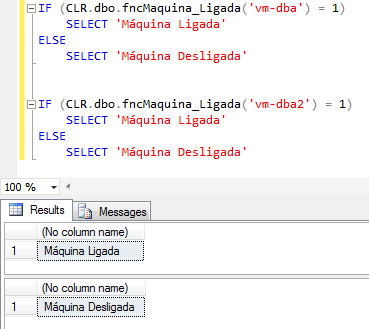
And that's it, folks!
Big hug and see you in the next post.
SQL Server – How to check if the machine is on check computer server is online ping
SQL Server – How to check if the machine is on check computer server is online ping

Comentários (0)
Carregando comentários…