
Hey guys!
On 04/07 I saw a question in a Whatsapp group about the possibility that SQL Server has a native function to write numbers in words, which does not exist.
I started looking for some T-SQL functions on the internet that do this and I was only able to find a function that can meet this objective and I would like to share with you an altered version of this function (original function link) that I improved the code and made some corrections, in addition to creating an English version of this function as well.
Portuguese version:
Using this function, it will be easy to return numbers in extended form, with or without currency. See the code below and some examples to understand how to use this function in your daily life:
CREATE OR ALTER FUNCTION dbo.fncNumeroPorExtenso (
    @valor DECIMAL(20, 2),
    @incluirMoeda BIT
)
RETURNS VARCHAR(8000)
AS
BEGIN

    ---------------------------------------
    -- Define as variáveis
    ---------------------------------------

    DECLARE
        @valorCentavos TINYINT = CONVERT(INT, (ABS(@valor) - CONVERT(BIGINT, ABS(@valor))) * 100),
        @valorStr VARCHAR(20) = CONVERT(VARCHAR(20), CONVERT(BIGINT, ABS(@valor))),
        @pedacoStr1 VARCHAR(20),
        @pedacoStr2 VARCHAR(20),
        @pedacoStr3 VARCHAR(20),
        @valorInt BIGINT = CONVERT(BIGINT, ABS(@valor)),
        @pedacoInt1 INT,
        @pedacoInt2 INT,
        @pedacoInt3 INT,
        @menorNumero INT,
        @retorno VARCHAR(8000) = '';


    IF (@valor = 0)
    BEGIN
        SET @retorno = 'Zero' + (CASE WHEN @incluirMoeda = 1 THEN ' Reais' ELSE '' END);
        RETURN @retorno;
    END;


    ---------------------------------------
    -- Cria as tabelas com os intervalos
    ---------------------------------------

    DECLARE @tabelaNumeros TABLE
    (
        descricao VARCHAR(50) NOT NULL,
        menor INT NOT NULL,
        maior INT NOT NULL
    );

    DECLARE @tabelaMilhares TABLE
    (
        descricaoUm VARCHAR(50) NOT NULL,
        descricaoPl VARCHAR(50) NOT NULL,
        menor INT NOT NULL,
        maior INT NOT NULL
    );


    INSERT INTO @tabelaNumeros
    VALUES
        ( 'Um', 1, 1 ),
        ( 'Dois', 2, 2 ),
        ( 'Três', 3, 3 ),
        ( 'Quatro', 4, 4 ),
        ( 'Cinco', 5, 5 ),
        ( 'Seis', 6, 6 ),
        ( 'Sete', 7, 7 ),
        ( 'Oito', 8, 8 ),
        ( 'Nove', 9, 9 ),
        ( 'Dez', 10, 10 ),
        ( 'Onze', 11, 11 ),
        ( 'Doze', 12, 12 ),
        ( 'Treze', 13, 13 ),
        ( 'Catorze', 14, 14 ),
        ( 'Quinze', 15, 15 ),
        ( 'Dezesseis', 16, 16 ),
        ( 'Dezessete', 17, 17 ),
        ( 'Dezoito', 18, 18 ),
        ( 'Dezenove', 19, 19 ),
        ( 'Vinte', 20, 20 ),
        ( 'Vinte e', 21, 29 ),
        ( 'Trinta', 30, 30 ),
        ( 'Trinta e', 31, 39 ),
        ( 'Quarenta', 40, 40 ),
        ( 'Quarenta e', 41, 49 ),
        ( 'Cinquenta', 50, 50 ),
        ( 'Cinquenta e', 51, 59 ),
        ( 'Sessenta', 60, 60 ),
        ( 'Sessenta e', 61, 69 ),
        ( 'Setenta', 70, 70 ),
        ( 'Setenta e', 71, 79 ),
        ( 'Oitenta', 80, 80 ),
        ( 'Oitenta e', 81, 89 ),
        ( 'Noventa', 90, 90 ),
        ( 'Noventa e', 91, 99 ),
        ( 'Cem', 100, 100 ),
        ( 'Cento e', 101, 199 ),
        ( 'Duzentos', 200, 200 ),
        ( 'Duzentos e', 201, 299 ),
        ( 'Trezentos', 300, 300 ),
        ( 'Trezentos e', 301, 399 ),
        ( 'Quatrocentos', 400, 400 ),
        ( 'Quatrocentos e', 401, 499 ),
        ( 'Quinhentos', 500, 500 ),
        ( 'Quinhentos e', 501, 599 ),
        ( 'Seiscentos', 600, 600 ),
        ( 'Seiscentos e', 601, 699 ),
        ( 'Setecentos', 700, 700 ),
        ( 'Setecentos e', 701, 799 ),
        ( 'Oitocentos', 800, 800 ),
        ( 'Oitocentos e', 801, 899 ),
        ( 'Novecentos', 900, 900 ),
        ( 'Novecentos e', 901, 999 );


    INSERT INTO @tabelaMilhares
    VALUES
        ('Mil', 'Mil', 4, 6),
        ('Milhão', 'Milhões', 7, 9),
        ('Bilhão', 'Bilhões', 10, 12),
        ('Trilhão', 'Trilhões', 13, 15),
        ('Quatrilhão', 'Quatrilhões', 16, 18);


    ---------------------------------------
    -- Gera os valores por extenso dos reais
    ---------------------------------------

    -- Busca o número de casas
    SELECT TOP(1)
        @menorNumero = menor - 1
    FROM
        @tabelaMilhares
    WHERE
        menor > LEN(@valorStr);


    -- Adiciona casas a esquerda (tratando sempre de 3 em 3 casas)
    SET @valorStr = REPLICATE('0', @menorNumero - LEN(@valorStr)) + @valorStr;


    -- Loop para converter por extenso por cada bloco de 3 casas
    WHILE (LEN(@valorStr) > 0)
    BEGIN

        -- Atribui em variáveis os caracteres do bloco de 3 em 3
        SET @pedacoStr1 = LEFT(@valorStr, 3)
        SET @pedacoStr2 = RIGHT(@pedacoStr1, 2)
        SET @pedacoStr3 = RIGHT(@pedacoStr2, 1)

        SELECT
            @pedacoInt1 = CONVERT(INT, @pedacoStr1),
            @pedacoInt2 = CONVERT(INT, @pedacoStr2),
            @pedacoInt3 = CONVERT(INT, @pedacoStr3)


        -- Busca a centena
        SELECT
            @retorno += descricao + ' '
        FROM
            @tabelaNumeros
        WHERE
            (
                LEN(@pedacoInt1) = 3
                AND @pedacoStr1 BETWEEN menor AND maior
            )
            OR (
                @pedacoInt2 <> 0
                AND LEN(@pedacoInt2) = 2
                AND @pedacoInt2 BETWEEN menor AND maior
            )
            OR (
                @pedacoInt3 <> 0
                AND ( @pedacoInt2 < 10 OR @pedacoInt2 > 20 )
                AND @pedacoInt3 BETWEEN menor AND maior
            )
        ORDER BY
            maior DESC;


        -- Define o milhar (se foi escrito algum valor para ele)
        IF (@pedacoInt1 > 0)
        BEGIN

            SELECT
                @retorno += (CASE WHEN @pedacoInt1 > 1 THEN descricaoPl ELSE descricaoUm END)
            FROM
                @tabelaMilhares
            WHERE
                LEN(@valorStr) BETWEEN menor AND maior

        END


        -- Remove os pedaços efetuados
        SET @valorStr = RIGHT(@valorStr, LEN(@valorStr) - 3);


        IF (CONVERT(INT, LEFT(@valorStr, 3)) > 0)
            SET @retorno += ', ';
        ELSE IF (CONVERT(INT, @valorStr) = 0 AND LEN(@valorStr) = 6)
            SET @retorno += ' de ';


    END;


    -- Somente coloca se tiver algum valor.
    IF (LEN(@retorno) > 0 AND @incluirMoeda = 1)
        SET @retorno += (CASE WHEN RIGHT(@retorno, 1) <> ' ' THEN ' ' ELSE '' END) + (CASE WHEN @valorInt > 1 THEN 'Reais ' ELSE 'Real ' END);


    ---------------------------------------
    -- Gera os centavos
    ---------------------------------------

    SET @valorStr = CONVERT(VARCHAR(2), @valorCentavos);


    -- Adiciona casas a esquerda
    SET @valorStr = REPLICATE('0', 2 - LEN(@valorStr)) + @valorStr;
    SET @pedacoStr1 = @valorStr;
    SET @pedacoStr2 = RIGHT(@valorStr, 1);

    SELECT
        @pedacoInt1 = CONVERT(INT, @pedacoStr1),
        @pedacoInt2 = CONVERT(INT, @pedacoStr2);


    -- Adiciona o separador de centavos (se houver)
    IF (@pedacoInt1 > 0 AND (LEN(@retorno) > 0))
        SET @retorno += 'e ';


    -- Gera o extenso dos centavos
    SELECT
        @retorno += descricao + ' '
    FROM
        @tabelaNumeros
    WHERE
        (
            @pedacoInt1 <> 0
            AND LEN(@pedacoInt1) = 2
            AND @pedacoInt1 BETWEEN menor AND maior
        )
        OR (
            @pedacoInt2 <> 0
            AND (
                @pedacoInt1 < 10
                OR @pedacoInt1 > 20
            )
            AND @pedacoInt2 BETWEEN menor AND maior
        )
    ORDER BY
        maior DESC;


    -- Coloca os centavos no plural ou não
    IF (@pedacoInt1 > 0 AND @incluirMoeda = 1)
        SELECT @retorno += 'Centavo' + (CASE WHEN @pedacoInt1 > 1 THEN 's' ELSE '' END)


    RETURN @retorno;


END;
GO
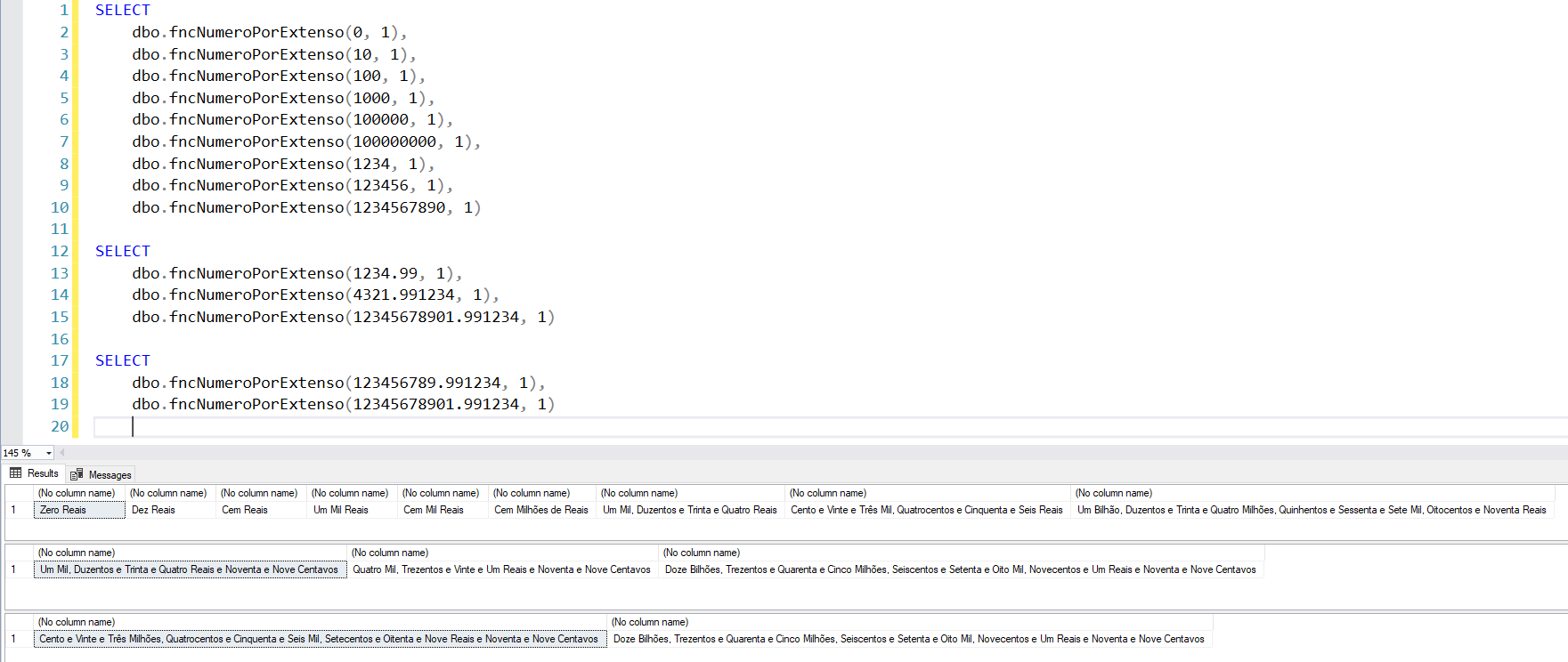
Examples of use – With currency:
SELECT
    dbo.fncNumeroPorExtenso(0, 1),
    dbo.fncNumeroPorExtenso(10, 1),
    dbo.fncNumeroPorExtenso(100, 1),
    dbo.fncNumeroPorExtenso(1000, 1),
    dbo.fncNumeroPorExtenso(100000, 1),
    dbo.fncNumeroPorExtenso(100000000, 1),
    dbo.fncNumeroPorExtenso(1234, 1),
    dbo.fncNumeroPorExtenso(123456, 1),
    dbo.fncNumeroPorExtenso(1234567890, 1)

SELECT
    dbo.fncNumeroPorExtenso(1234.99, 1),
    dbo.fncNumeroPorExtenso(4321.991234, 1),
    dbo.fncNumeroPorExtenso(12345678901.991234, 1)

SELECT
    dbo.fncNumeroPorExtenso(123456789.991234, 1),
    dbo.fncNumeroPorExtenso(12345678901.991234, 1)
Result:
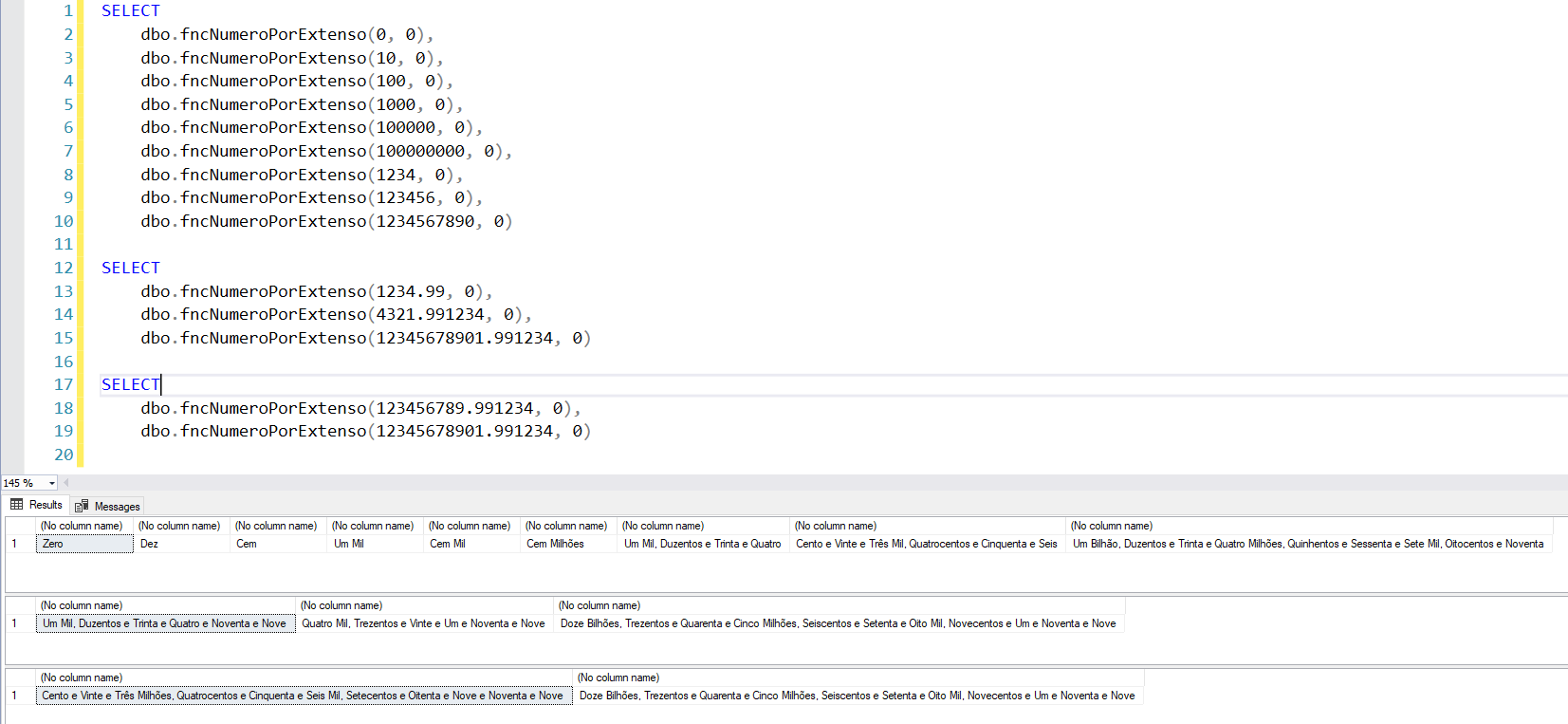
Examples of use – WITHOUT currency:
SELECT
    dbo.fncNumeroPorExtenso(0, 0),
    dbo.fncNumeroPorExtenso(10, 0),
    dbo.fncNumeroPorExtenso(100, 0),
    dbo.fncNumeroPorExtenso(1000, 0),
    dbo.fncNumeroPorExtenso(100000, 0),
    dbo.fncNumeroPorExtenso(100000000, 0),
    dbo.fncNumeroPorExtenso(1234, 0),
    dbo.fncNumeroPorExtenso(123456, 0),
    dbo.fncNumeroPorExtenso(1234567890, 0)

SELECT
    dbo.fncNumeroPorExtenso(1234.99, 0),
    dbo.fncNumeroPorExtenso(4321.991234, 0),
    dbo.fncNumeroPorExtenso(12345678901.991234, 0)

SELECT
    dbo.fncNumeroPorExtenso(123456789.991234, 0),
    dbo.fncNumeroPorExtenso(12345678901.991234, 0)
Result:
English version
If you need to return the number in full in English, you can also use this adapted version of the script above.
CREATE FUNCTION dbo.fncFullNumber (
    @value DECIMAL(20, 2),
    @includeCurrency BIT = 1
)
RETURNS VARCHAR(8000)
AS
BEGIN

    ---------------------------------------
    -- Define variables
    ---------------------------------------

    DECLARE
        @valueCents TINYINT = CONVERT(INT, (ABS(@value) - CONVERT(BIGINT, ABS(@value))) * 100),
        @valueStr VARCHAR(20) = CONVERT(VARCHAR(20), CONVERT(BIGINT, ABS(@value))),
        @chunkStr1 VARCHAR(20),
        @chunkStr2 VARCHAR(20),
        @chunkStr3 VARCHAR(20),
        @valueInt BIGINT = CONVERT(BIGINT, ABS(@value)),
        @chunkInt1 INT,
        @chunkInt2 INT,
        @chunkInt3 INT,
        @lowestNumber INT,
        @counter INT = 1,
        @numberOfChunks INT,
        @return VARCHAR(8000) = '';

    SET @numberOfChunks = LEN(@valueInt) / 3


    IF (@value = 0)
    BEGIN
        SET @return = 'Zero' + (CASE WHEN @includeCurrency = 1 THEN ' Dollars' ELSE '' END);
        RETURN @return;
    END;


    ---------------------------------------
    -- Creates tables with ranges
    ---------------------------------------

    DECLARE @tableNumbers TABLE
    (
        [description] VARCHAR(50) NOT NULL,
        [lower] INT NOT NULL,
        [higher] INT NOT NULL
    );

    DECLARE @tableThousands TABLE
    (
        descriptionSingular VARCHAR(50) NOT NULL,
        descriptionPlural VARCHAR(50) NOT NULL,
        [lower] INT NOT NULL,
        [higher] INT NOT NULL
    );


    INSERT INTO @tableNumbers
    VALUES
        ('One', 1, 1),
        ('Two', 2, 2),
        ('Three', 3, 3),
        ('Four', 4, 4),
        ('Five', 5, 5),
        ('Six', 6, 6),
        ('Seven', 7, 7),
        ('Eight', 8, 8),
        ('Nine', 9, 9),
        ('Ten', 10, 10),
        ('Eleven', 11, 11),
        ('Twelve', 12, 12),
        ('Thirteen', 13, 13),
        ('Fourteen', 14, 14),
        ('Fifteen', 15, 15),
        ('Sixteen', 16, 16),
        ('Seventeen', 17, 17),
        ('Eighteen', 18, 18),
        ('Nineteen', 19, 19),
        ('Twenty', 20, 20),
        ('Twenty-', 21, 29),
        ('Thirty', 30, 30),
        ('Thirty-', 31, 39),
        ('Forty', 40, 40),
        ('Forty-', 41, 49),
        ('Fifty', 50, 50),
        ('Fifty-', 51, 59),
        ('Sixty', 60, 60),
        ('Sixty-', 61, 69),
        ('Seventy', 70, 70),
        ('Seventy-', 71, 79),
        ('Eighty', 80, 80),
        ('Eighty-', 81, 89),
        ('Ninety', 90, 90),
        ('Ninety-', 91, 99),
        ('A Hundred', 100, 100),
        ('One hundred ', 101, 199),
        ('Two hundred', 200, 200),
        ('Two hundred and ', 201, 299),
        ('Three hundred', 300, 300),
        ('Three hundred and ', 301, 399),
        ('Four hundred', 400, 400),
        ('Four hundred and ', 401, 499),
        ('Five hundred', 500, 500),
        ('Five hundred and ', 501, 599),
        ('Six hundred', 600, 600),
        ('Six hundred and ', 601, 699),
        ('Seven hundred', 700, 700),
        ('Seven hundred and ', 701, 799),
        ('Eight hundred', 800, 800),
        ('Eight hundred and ', 801, 899),
        ('Nine hundred', 900, 900),
        ('Nine hundred and ', 901, 999);


    INSERT INTO @tableThousands
    VALUES
        ('Thousand', 'Thousand', 4, 6),
        ('Million', 'Millions', 7, 9),
        ('Billion', 'Billion', 10, 12),
        ('Trillion', 'Trillions', 13, 15),
        ('Quadrillion', 'Quadrillions', 16, 18);


    ---------------------------------------
    -- Generates the full values
    ---------------------------------------

    SELECT TOP(1)
        @lowestNumber = [lower] - 1
    FROM
        @tableThousands
    WHERE
        [lower] > LEN(@valueStr);


    SET @valueStr = REPLICATE('0', @lowestNumber - LEN(@valueStr)) + @valueStr;


    WHILE (LEN(@valueStr) > 0)
    BEGIN

        SET @chunkStr1 = LEFT(@valueStr, 3)
        SET @chunkStr2 = RIGHT(@chunkStr1, 2)
        SET @chunkStr3 = RIGHT(@chunkStr2, 1)

        SELECT
            @chunkInt1 = CONVERT(INT, @chunkStr1),
            @chunkInt2 = CONVERT(INT, @chunkStr2),
            @chunkInt3 = CONVERT(INT, @chunkStr3)


        SELECT
            @return += [description] + ''
        FROM
            @tableNumbers
        WHERE
            (
                LEN(@chunkInt1) = 3
                AND @chunkStr1 BETWEEN [lower] AND [higher]
            )
            OR (
                @chunkInt2 <> 0
                AND LEN(@chunkInt2) = 2
                AND @chunkInt2 BETWEEN [lower] AND [higher]
            )
            OR (
                @chunkInt3 <> 0
                AND ( @chunkInt2 < 10 OR @chunkInt2 > 20 )
                AND @chunkInt3 BETWEEN [lower] AND [higher]
            )
        ORDER BY
            [higher] DESC;


        IF (@chunkInt1 > 0)
        BEGIN

            SELECT
                @return += ' ' + (CASE WHEN @chunkInt1 > 1 THEN descriptionPlural ELSE descriptionSingular END)
            FROM
                @tableThousands
            WHERE
                LEN(@valueStr) BETWEEN [lower] AND [higher]

        END


        SET @valueStr = RIGHT(@valueStr, LEN(@valueStr) - 3);


        IF (CONVERT(INT, LEFT(@valueStr, 3)) > 0)
            SET @return += ', ';
        ELSE IF (CONVERT(INT, @valueStr) = 0 AND LEN(@valueStr) = 6)
            SET @return += ' of ';


        ---- Add an "and" expression on the last chunk
        --IF (@counter = @numberOfChunks AND CONVERT(INT, LEFT(@valueStr, 3)) > 0)
        --	SET @return += 'and '


        SET @counter += 1


    END;


    IF (LEN(@return) > 0)
    BEGIN

        IF (@includeCurrency = 1)
            SET @return += (CASE WHEN RIGHT(@return, 1) <> ' ' THEN ' ' ELSE '' END) + (CASE WHEN @valueInt > 1 THEN 'Dollars ' ELSE 'Dollar ' END);
        ELSE
            SET @return += ' '

    END


    ---------------------------------------
    -- Generate the decimal part
    ---------------------------------------

    SET @valueStr = CONVERT(VARCHAR(2), @valueCents);


    SET @valueStr = REPLICATE('0', 2 - LEN(@valueStr)) + @valueStr;
    SET @chunkStr1 = @valueStr;
    SET @chunkStr2 = RIGHT(@valueStr, 1);

    SELECT
        @chunkInt1 = CONVERT(INT, @chunkStr1),
        @chunkInt2 = CONVERT(INT, @chunkStr2);


    IF (@chunkInt1 > 0 AND (LEN(@return) > 0))
        SET @return += 'and ';


    SELECT
        @return += [description] + ''
    FROM
        @tableNumbers
    WHERE
        (
            @chunkInt1 <> 0
            AND LEN(@chunkInt1) = 2
            AND @chunkInt1 BETWEEN [lower] AND [higher]
        )
        OR (
            @chunkInt2 <> 0
            AND (
                @chunkInt1 < 10
                OR @chunkInt1 > 20
            )
            AND @chunkInt2 BETWEEN [lower] AND [higher]
        )
    ORDER BY
        [higher] DESC;


    IF (@chunkInt1 > 0 AND @includeCurrency = 1)
        SELECT @return += ' Cent' + (CASE WHEN @chunkInt1 > 1 THEN 's' ELSE '' END)


    RETURN @return;


END;
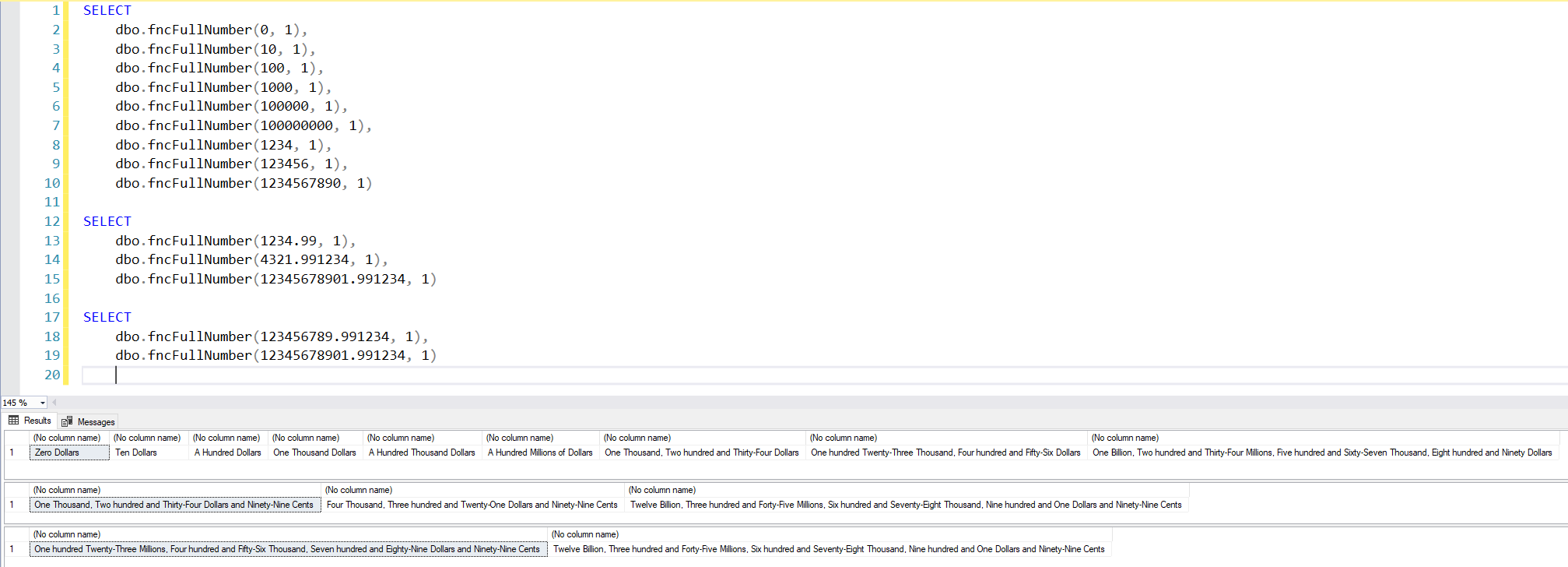
Examples of use – With currency:
SELECT
    dbo.fncFullNumber(0, 1),
    dbo.fncFullNumber(10, 1),
    dbo.fncFullNumber(100, 1),
    dbo.fncFullNumber(1000, 1),
    dbo.fncFullNumber(100000, 1),
    dbo.fncFullNumber(100000000, 1),
    dbo.fncFullNumber(1234, 1),
    dbo.fncFullNumber(123456, 1),
    dbo.fncFullNumber(1234567890, 1)

SELECT
    dbo.fncFullNumber(1234.99, 1),
    dbo.fncFullNumber(4321.991234, 1),
    dbo.fncFullNumber(12345678901.991234, 1)

SELECT
    dbo.fncFullNumber(123456789.991234, 1),
    dbo.fncFullNumber(12345678901.991234, 1)
Result:
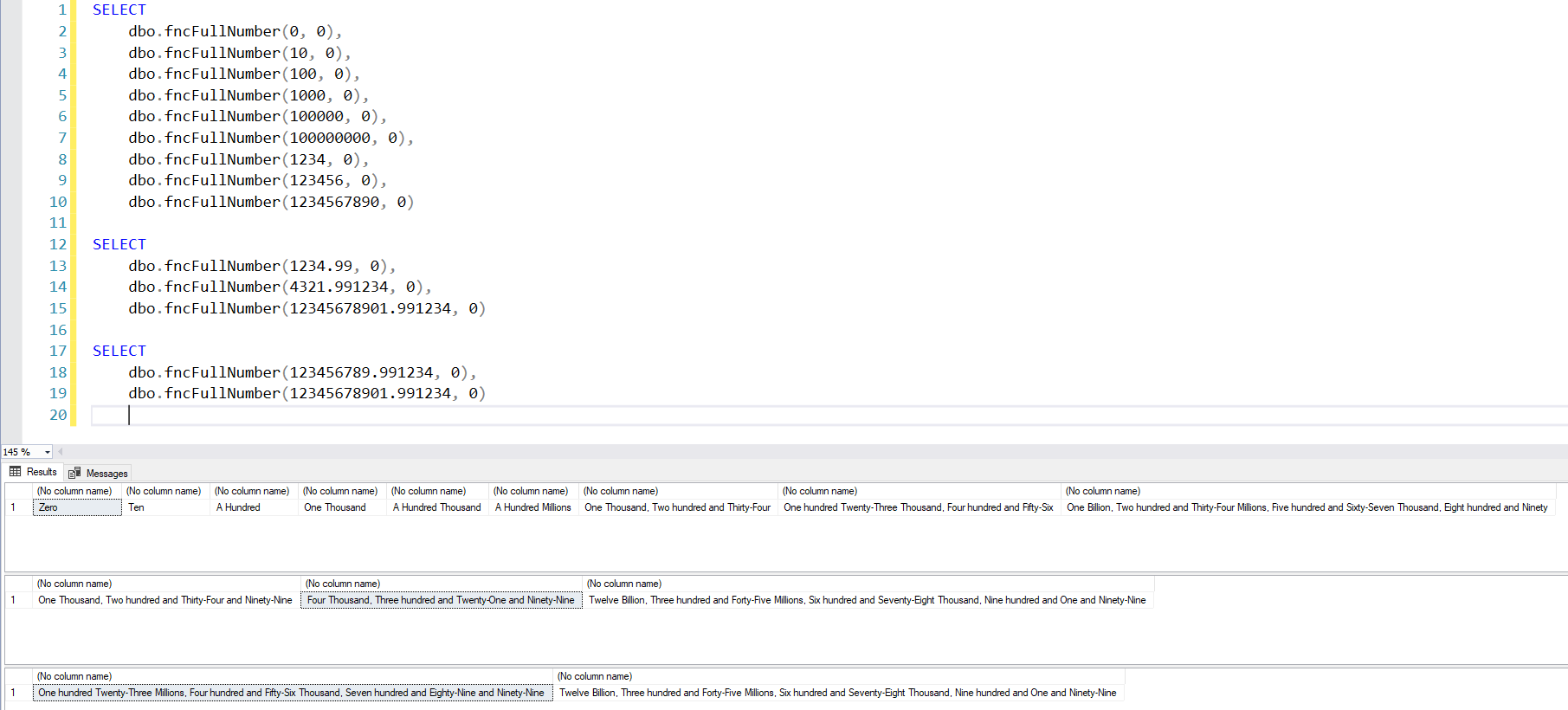
Examples of use – WITHOUT currency:
SELECT
    dbo.fncFullNumber(0, 0),
    dbo.fncFullNumber(10, 0),
    dbo.fncFullNumber(100, 0),
    dbo.fncFullNumber(1000, 0),
    dbo.fncFullNumber(100000, 0),
    dbo.fncFullNumber(100000000, 0),
    dbo.fncFullNumber(1234, 0),
    dbo.fncFullNumber(123456, 0),
    dbo.fncFullNumber(1234567890, 0)

SELECT
    dbo.fncFullNumber(1234.99, 0),
    dbo.fncFullNumber(4321.991234, 0),
    dbo.fncFullNumber(12345678901.991234, 0)

SELECT
    dbo.fncFullNumber(123456789.991234, 0),
    dbo.fncFullNumber(12345678901.991234, 0)
Result:
And that's it, folks!
I hope you liked this tip and that it is useful in your projects.
A big hug and see you next time!

Comentários (0)
Carregando comentários…