
Hey guys,
How are you?
Lately, I have seen a considerable number of DBA's with doubts about permissions and SQL Server Agent roles and many doubts arise about this topic in Whatsapp groups, including:
- How do I make it so that a non-sysadmin user can view jobs?
- How do I make it so that a non-sysadmin user can create and run jobs?
- How do I make it so that a non-sysadmin user can run any job?
- How do I make it so that a non-sysadmin user can change SQL Agent settings?
- Can a non-sysadmin user change any job?
My intention in this post is to explain the roles of SQL Server Agent and answer these questions.
Knowing the fixed roles of SQL Server Agent (MSDB)
The first step to answering the questions asked above is to explain what they are and the differences between the fixed SQL Server Agent roles.
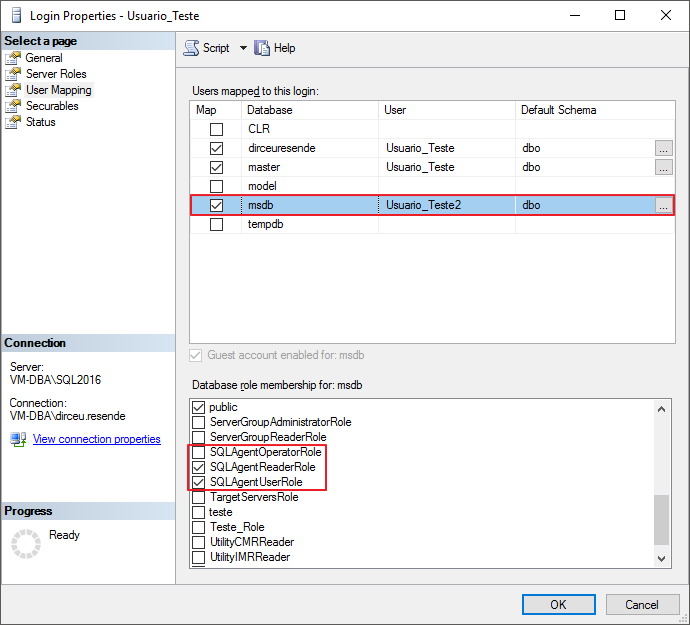
SQLAgentUserRole
This is the least privileged role of SQL Agent and allows its users to create jobs and deactivate/change/execute jobs where your user is the owner of the job (that is, that he created or that some sysadmin assigns to him), but cannot delete the job execution history, even if he is the owner of this job.
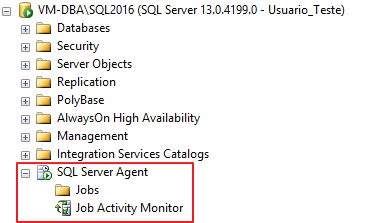
Due to this restriction, members of this role can only view their jobs and only view the Jobs folder and the Job Activity Monitor.
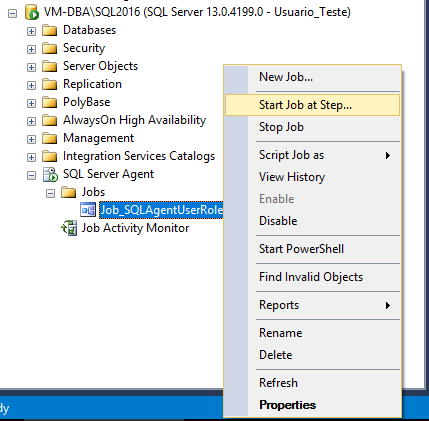
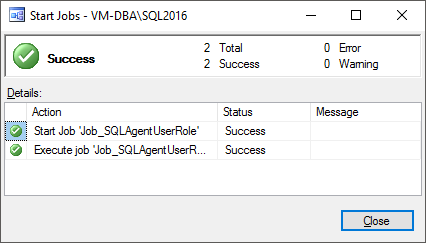
Even with this role, I can create/delete/run jobs:
SQLAgentReaderRole
To view the effects of the role SQLAgentReaderRole, I added the user “Usuario_Teste” to this role. Members of this role have the same permissions as the role SQLAgentUserRole, but being able to view all jobs in the instance, even those where the logged in user is not the owner.
This permission only applies to displaying/viewing jobs. The role members SQLAgentReaderRole They can also only execute/change/delete jobs that they own.
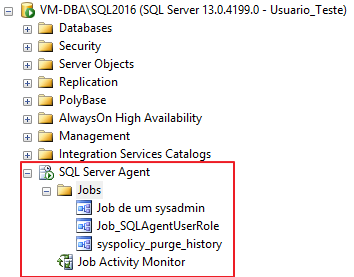
If you try to run a job where your user is not the owner, even though you can view the job, you will encounter the error message below:

SQLAgentOperatorRole
This is the most privileged role of SQL Agent. Members of this role can view all SQL Server Agent information and view all instance jobs, as you can see below:
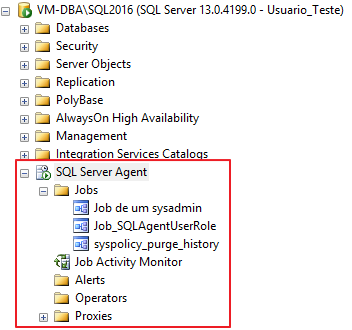
Furthermore, members of this role can add Operators, configure alerts, manage Proxy settings, in addition to being able to create jobs and execute/activate/deactivate any job on the instance, even those for which they are not the owner.
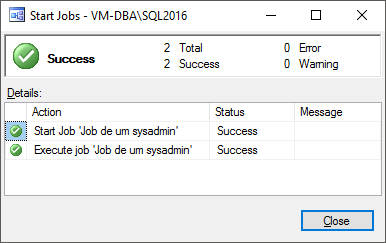
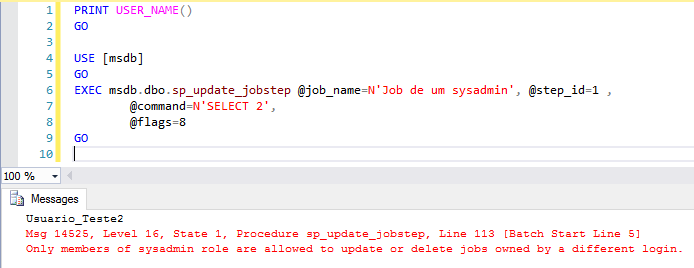
However, even members of this role cannot make changes to jobs in which they are not the owner, such as changing the job schedule, modifying the Steps tab settings or any other change.
Even if you try to make changes using the command line, you will not be able to make changes to jobs where the user is not the owner. Role members only sysadmin They can make changes to any job in the instance, even those they are not the owner of.
Answering the questions
Now that I've explained the roles of SQL Agent, let's answer the main questions about this subject and eliminate these doubts once and for all from DBA's minds.
How do I make it so that a non-sysadmin user can view jobs?
So that a user can view the jobs created by him, simply add him to the role SQLAgentUserRole. So that he can view all the jobs in the instance, he will need to be added to the role SQLAgentReaderRole. With this, he will also be able to create jobs and execute/delete/change the jobs created by him.
How do I make it so that a non-sysadmin user can create and run jobs?
If the user's need is just to create and execute the jobs he creates, just add him to the role SQLAgentUserRole, which is the role with the least privileges.
How do I make it so that a non-sysadmin user can run any job?
For the user to be able to run any job on the instance, including jobs where he is not the owner, he will need to be in the role SQLAgentOperatorRole, which is the role with the highest level of privilege. Keep in mind that with this, it will also be able to delete the job history, deactivate any job, add/change/delete operators and Proxy settings.
How do I make it so that a non-sysadmin user can change SQL Agent settings?
Even the members of the role SQLAgentOperatorRole cannot make changes to SQL Agent settings. If you try to make any changes to the Agent settings, you will see this error message:
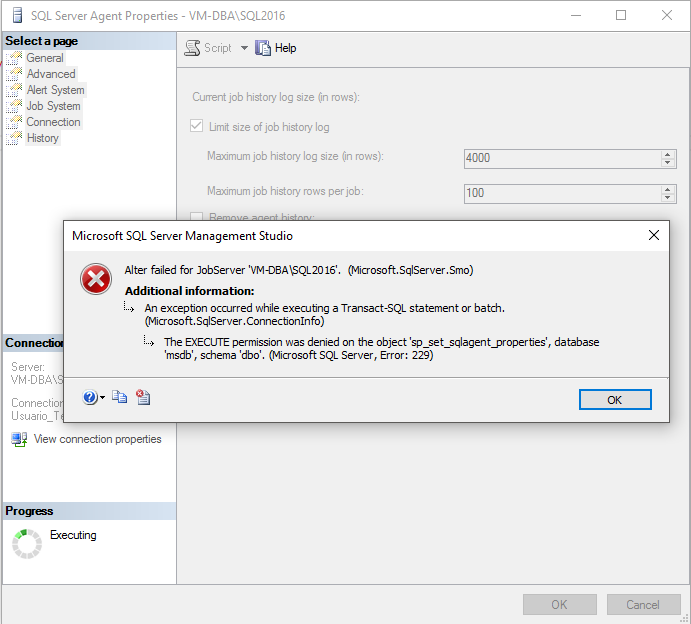
However, this can be circumvented if a member of the sysadmin role gives EXECUTE access to the procedure sp_set_sqlagent_properties:
USE [msdb]
GO

GRANT EXECUTE ON dbo.sp_set_sqlagent_properties TO [Usuario_Teste2]
GO
If this permission is granted, the user will be able to make changes to the SQL Agent settings, even without being in the sysadmin role.
How can I make it so that a user can only view SQL Agent jobs and cannot create or change them?
In many situations, you need to grant access so that other users can view the jobs but you do not want them to be able to create or change jobs, even if they are using the user himself as the owner of these jobs. In this case, which role allows you to do this? Unfortunately, none. The least privileged role in SQL Agent, which is SQLAgentUserRole, already allows the user to create and change jobs where they are the owner.
Given this scenario, the DBA Caroline Goltara found a creative way to achieve this goal. She gave me the tip to add the user or group to the SQLAgentReaderRole role, so that he can view all jobs, and then deny permission in the SP's for handling jobs, using the commands below:
USE [msdb]
GO

-- Bloquear criação
DENY EXECUTE ON dbo.sp_add_job TO [Usuario_Teste2]
DENY EXECUTE ON dbo.sp_add_jobschedule TO [Usuario_Teste2]
DENY EXECUTE ON dbo.sp_add_jobserver TO [Usuario_Teste2]
DENY EXECUTE ON dbo.sp_add_jobstep TO [Usuario_Teste2]
DENY EXECUTE ON dbo.sp_agent_add_job TO [Usuario_Teste2]
DENY EXECUTE ON dbo.sp_agent_add_jobstep TO [Usuario_Teste2]

-- Bloquear alteração
DENY EXECUTE ON dbo.sp_update_job TO [Usuario_Teste2]
DENY EXECUTE ON dbo.sp_update_jobschedule TO [Usuario_Teste2]
DENY EXECUTE ON dbo.sp_update_category TO [Usuario_Teste2]
DENY EXECUTE ON dbo.sp_update_jobstep TO [Usuario_Teste2]
DENY EXECUTE ON dbo.sp_update_schedule TO [Usuario_Teste2]

-- Bloquear exclusão
DENY EXECUTE ON dbo.sp_agent_delete_job TO [Usuario_Teste2]
DENY EXECUTE ON dbo.sp_delete_job TO [Usuario_Teste2]
DENY EXECUTE ON dbo.sp_delete_jobschedule TO [Usuario_Teste2]
DENY EXECUTE ON dbo.sp_delete_jobserver TO [Usuario_Teste2]
DENY EXECUTE ON dbo.sp_delete_jobstep TO [Usuario_Teste2]
DENY EXECUTE ON dbo.sp_delete_jobsteplog TO [Usuario_Teste2]
DENY EXECUTE ON dbo.sp_purge_jobhistory TO [Usuario_Teste2]

-- Bloquear execução
DENY EXECUTE ON dbo.sp_agent_start_job TO [Usuario_Teste2]
DENY EXECUTE ON dbo.sp_stop_job TO [Usuario_Teste2]
DENY EXECUTE ON dbo.sp_start_job TO [Usuario_Teste2]
As a result, the user will not be able to create/change/delete/run/stop any job, but he will be able to view all of them.
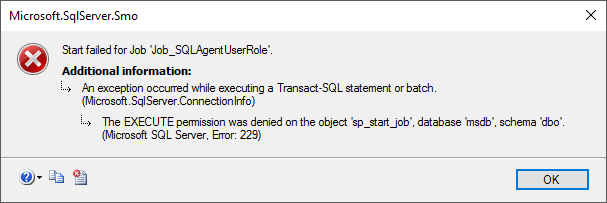
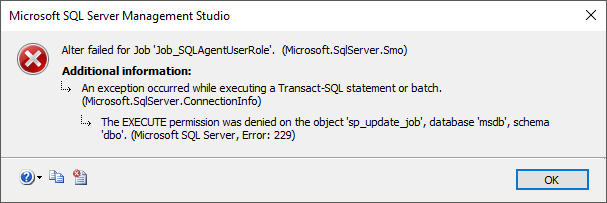
How do I make it possible for a non-sysadmin user to change any job?
No, it's not possible. By security definition, only members of the sysadmin role can make changes to jobs that were created by other users and change the owner of a job.
If it were possible for another user to have this power, it would be a major security flaw in SQL Agent, since jobs are executed using the job owner's user, with their privileges. If this job performs any audited action, it is the job user who will be recorded in this audit routine.
Imagine what a security breach if a user who is a member of the role SQLAgentOperatorRole, but which is not a sysadmin could change the owner of a job and add any other user, even a sysadmin, and this job would change incorrect data in Production. The user that would be recorded in the logs would be the user who owned the job and not the person who executed the job.
Another serious security flaw could occur where there is a job that runs in production using a login with db_owner privileges in the database. If a user, who is not in the sysadmin role, could freely edit Jobs in which he is not the owner, he could very well change the step of one of the jobs that are automatically executed in production by a schedule and insert any code there, even granting access to himself in this database.
For these reasons mentioned above, Only members of the sysadmin role can edit other users' jobs, as well as change the job owner, not even with the CONTROL SERVER privilege on the instance a user who does not belong to the sysadmin role can do this.
The only alternative I see for a non-sysadmin user to be able to edit other users' jobs is by creating an application (Web or Desktop) to create this job management interface, where the application's database user has sysadmin privileges on the instance. In this way, access control and permissions would be the responsibility of the application and users will be able to manage jobs, since the application user will be a member of the sysadmin role.
That's it, folks.
I hope you have cleared up all your doubts on this subject.
If you have any questions, leave them here in the comments.
Hug!

Comentários (0)
Carregando comentários…