
Hey guys,
All very well ?
Today I got to know Microsoft SQL Server Service Broker and learned a lot by reading the blog. Junior Galvão, where I got this post from. I don't think it would be worth writing much about this topic, if he has already covered it (in a very didactic way) extensively. So let's get to know this important feature of MS SQL Server, which was made available from version 2005 onwards.
Introduction
Launched together with Microsoft SQL Server 2005, Service Broker was one of the highlights of this version of SQL Server, being treated as one of the product's main innovations in 2005.
Since then, much has been said about this feature, which has been maintained and evolved in later versions and editions of Microsoft SQL Server. Existing as a feature and functionality of the Database Engine, Service Broker enables database developers and professionals to create reliable queuing and messaging applications for exchanging data in SQL Server. Basically, through this service, it is possible for an application connected to a single instance of SQL Server to distribute work and messages among several other database instances.
Through this ability to exchange information, the Service Broker established an asynchronous form of communication between database applications that make use of this functionality, thus, the response time for exchanging information is much shorter, more interactive and simplified, which makes the use of this resource more reliable.
Furthermore, Service Broker provides reliable message exchange between database instances distributed across an enterprise, helping developers compose applications structured or recognized as independent services, making use of the same communication instance.
By default, Service Broker uses the TCP/IP protocol and its set of existing protocols for exchanging messages, containing features that can prevent unauthorized access to a network at any time, establishing standards for encryption of messages sent by applications between SQL Server instances.
How Service Broker works
As its objective is to create a simplified, secure and decoupled way of exchanging messages, the Service Broker has a set of tasks necessary to carry out this messaging process, between applications and Database Server instances. The Service Broker architecture is made up of the following components, tasks and characteristics:
- Conversations;
- Ordering and coordination of messages;
- Transactional asynchronous programming;
- Support for loosely coupled applications; and
- Service Broker components.
Below I describe this architecture, briefly highlighting each task.
Conversation
Designed as a basic resource for sending and receiving messages, the Service Broker presents a task called “Conversation” carried out during the message exchange process. Each conversation task is recognized and treated as a reliable and persistent communication channel, the messages present a specific type of conversation that is treated by the Service Broker individually, which makes it possible to reinforce and guarantee security in the recording of data exchanged by the applications.
During this exchange of messages, the “Conversation” task allows the applications involved in this process to establish this communication channel within a “queue” that represents a display of an internal table related to the database that the Service Broker is using.
For each conversation handled by the Service Broker, a sequence and ordering of Messages is established through the “Message Ordering and Coordination” task, this guarantees that each message is part of a single and exclusive conversation, that is, the same exchanged message will be handled by the same task and conversation.
A simpler way to represent and illustrate how a Service Broker works is to think about how a postal service works. To maintain a conversation with a distant colleague, you can communicate by sending letters via postal service.
The postal service sorts and delivers letters. You and your colleague then retrieve the letters from the mailboxes, read them, write responses, and send new letters until the conversation ends. Letter delivery happens asynchronously while you and your colleague handle other tasks.
THE Figure 1 presents the process of exchanging messages, based on a Postal Service.
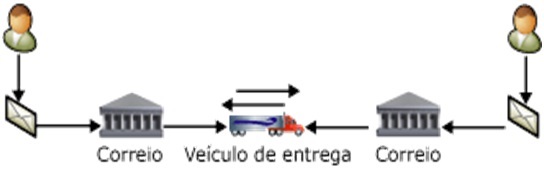
Figure 1: Representation of the message exchange process carried out by the Service Broker.
When analyzing the functioning of the Service Broker, we can understand that the programs involved in this scenario must understand that this service will operate in a similar way to the Postal Service or Correios, giving full support to asynchronous messages exchanged between applications.
Service Broker messages work like letters. The Service Broker service is treated as the address where the post office delivers letters. Queues are the mailboxes that hold letters after they are delivered. Applications receive messages, act on messages, and send responses.
Observation: As long as there is a message exchange process through the Service Broker, the queue process will be maintained and fed until the application receiving the data is capable of handling these messages, while this does not happen, the message queue will have its size increased and its queuing process expanded.
Message Ordering and Coordination
The entire control and maintenance process of message queues is carried out by the Service Broker directly in the Database Engine, adopting a traditional treatment through two aspects:
- The queues managed by the Service Broker are directly integrated with the database to which the service is involved.
- Queues are responsible for coordinating and ordering messages in transit.
Through strong control over sending and receiving messages, the task of “Message Ordering and Coordination” provides the Service Broker with guarantees in the message exchange flow, establishing two sides in the communication process, called:
- Starting side called the initiator; and
- Destination side of the message called the receiver.
A basic Service Broker message exchange process consists of:
Below is an illustration of the exchange of messages in a typical dialogue:
- In the launcher:
- A program starts the conversation.
- The program creates a message that contains the data needed to perform a task.
- The program sends the message to the destination service.
- On the receiver:
- The message is placed on the queue associated with the destination service.
- A program receives the message from the queue and performs the work.
- The program responds by sending a message to the initiating service.
- In the launcher:
- The response message is placed on the queue associated with the initiating service.
- A program receives the response and processes it.
Until the end of sending and receiving messages, this cycle repeats itself cyclically and continuously.
This cycle repeats until the initiator ends the conversation because it has no more requests to send to the destination.
Transactional asynchronous programming
The “Transactional asynchronous programming” component is completely related to the Service Broker operating infrastructure, serving as a message transfer area, treating each process in a transactional way, which allows it to be reversed at any time.
In this component, the Service Broker controls the data that is being exchanged, establishing a scalability process, which ensures that the service can be automated and grows according to the situation, one of which is the ability to automatically start the processes that process a queue, so it is possible for the application that is using the sending/receiving process to identify the moment in which the message is running or in the processing queue.
Asynchronous programming allows developers to create software solutions capable of writing data to message queues, making use of the database itself through one or more tables as internal message queue repositories.
Support for loosely coupled applications
Considered as a feature and not a component or task, “Support for flexibly coupled applications” guarantees and enables the Service Broker to work with a very distinct set of independent applications that can be identified as possible message exchange components. These applications must internally contain the same structure and mechanism for exchanging messages that exists in the Service Broker, which in some situations allows this component to be coupled to the messaging service.
Service Broker Components
The Service Broker is made up of three basic components, existing according to the task being performed:
- Conversational components: Known as dialogue, it is any conversation carried out through the Service Broker during the messaging process, allowing groups of conversions, conversations and messages to be handled by your applications by establishing the participants.
- Service definition components: Responsible for establishing the flow of the conversation, storing data in a database, this component defines the basic structure of the conversation carried out between the Service Broker and the application.
- Network and security components: Through this component, the Service Broker allows database administrators to manage their environments without impacting the application's source code, focusing on changes or changes in scenario, establishing a secure and reliable message exchange channel for the applications that are consuming the Service Broker.
Observation: Service definition components, network components, and security components are part of the database and SQL Server instance metadata. Talkgroups, conversations, and messages are part of the data that the database contains.
Well, after this long walk, I'm going to add a little pepper to this sauce, starting the creation of our study environment, through Code 1 presented below:
–- Código 1 – Criando o Banco de Dados MyDatabaseServiceBroker
Use Master
Go


/* 1 – Criação do banco de dados */
CREATE DATABASE MyDatabaseServiceBroker
Go


/* 2 – Ativação do recurso de Service Broker */
ALTER DATABASE MyDatabaseServiceBroker
SET ENABLE_BROKER
Go

/* 3- Verificação do Status */
SELECT Name, is_broker_enabled
FROM sys.databases
WHERE Name = 'MyDatabaseServiceBroker'
Go
Note that after creating the database, we use the command Alter Databasethrough the directive Set Enable_Broker to activate and indicate to SQL Server that this database should allow the use of the messaging service.
Notes:
- To execute ENABLE_BROKER, SQL Server requests an exclusive database lock. If other sessions have locked resources in the database, ENABLE_BROKER will wait until the other sessions release the locks.
- To enable Service Broker on a user database, verify that no other sessions are using the database before running the ALTER DATABASE SET ENABLE_BROKER statement, for example, placing the database in single-user mode.
Then we execute the Select command to validate the column status Is_Broker_Enabled existing in the System Table Sys.Databases, which should return a value of 1 for this column, which guarantees that the Service Broker is configured correctly.
Message Types
To make communication possible, applications that use Service Broker use the concept of messages through the sending and receiving function, something very similar to email. Those involved in the message exchange process are responsible for agreeing to the exchange of content, as well as recognizing the name of each message.
The message type object defines a name for the message type and the type of data that the message should contain. Message types persist in the databases in which they are created. You can create an identical message type in each database that participates in a conversation.
Each message type is responsible for specifying the validation that SQL Server must perform for messages, according to the data type. SQL Server can check whether the message contains valid XML, whether it contains XML that conforms to a particular schema, or whether it simply contains no data.
Validation is performed when the destination service receives the message, if the message content does not match the specified validation, the Service Broker will return an error message to the service that sent the message.
Well, our scenario will basically consist of two types of messages:
- mtSendMessage; and
- mtReceiptMessage.
To create our Message Types, we will use the Code Block 1, shown below:
/* Código 1 – Criando os Tipos de Mensagens */
Use MyDatabaseServiceBroker
Go

CREATE MESSAGE TYPE [mtEnvioMensagem]
VALIDATION = WELL_FORMED_XML
Go

CREATE MESSAGE TYPE [mtRecebimentoMensagem]
VALIDATION = WELL_FORMED_XML
Go
Note that I am specifying in the argument Validation, the option =Well_FORMED_XML, this will indicate to SQL Server that our body must contain a well-formatted XML file as a message validation mechanism.
THE Table 1 presented below, illustrates the types of messages that exist in Service Broker:
|
Arguments |
Description |
| NONE | Specifies that no validation is performed. The message body can contain data or can be NULL. |
| EMPTY | Specifies that the message body must be NULL. |
| WELL_FORMED_XML | Specifies that the message body must contain well-formed XML. |
| VALID_XML WITH SCHEMA COLLECTION | Specifies that the message body must contain XML that conforms to a schema in the specified schema collection. schema_collection_name must be the name of an existing XML schema collection. |
Table 1 – List of arguments in the Create Message Type command.
We can observe the Figure 1 which illustrates the structure of our database, after creating the two types of messages:
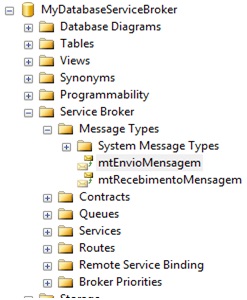
If you want to consult the list of messages created at this time, use the System Table: Sys.Service_Message_Types
Our next step is to create Contracts, let's learn a little about Contracts and then create this resource.
Contracts
A contract defines what type of message an application uses to perform a particular task. A contract is an agreement between two services about which messages each service aims to accomplish a particular task.
The contract specifies which message types can be used to accomplish the desired work. The contract also specifies which participant in the conversation can use each type of message.
Service Broker also includes an internal contract called DEFAULT. This contains only the message type SENT BY ANY. If no contract is specified in the instruction, the Service Broker will use the DEFAULT contract.
To create a new contract, we will use the Code Block 2presented below, note that we will use the Create Contract command, specifying the Message Type that will be the Target and which will be the Initiator.
/* Código 2 – Criando contrato e definido o Target e Initiator */
Use MyDatabaseServiceBroker
Go

CREATE CONTRACT [cProcessaMensagens] (
   [mtEnvioMensagem] SENT BY initiator,
   [mtRecebimentoMensagem] SENT BY target
);
Go;
Note that we define it as initiator(initializer) mtSendingMessage and howTarget(target) the mtReceiptMessageTherefore, from the moment we start the dialogue process, the Service Broker will be able to understand which Type of Message will send and which will receive the message.
THE Figure 2 presented below, illustrates the structure of our MyDatabaseServiceBroker Database, after creating the contract cProcessMessages:

Figure 2 – Structure of the MyDatabaseServiceBroker Database, showing the contract created previously.
If you want to consult the list of contracts created at this time, use the System Table: Sys.Service_Contracts
At this moment, our database has the following components in its structure:
- Message Types: mtSendMessage and mtReceiveMessage; and
- Contract: cProcessaMensagens.
We are going to evolve a little more in the structure of our environment, now creating another very important resource so that it is possible to use the Service Broker, and of great importance so that messages can be exchanged, this one referring to QUEUE (Queues), keeping the rule, I will present the concepts about Queue and then the code that we should use to create our queues.
QUEUE (Queues)
Queues, or queues, have the function of enabling a communication channel between those involved in the message exchange process, creating the so-called Message Queue.
When the Service Broker receives a message from a service, it inserts it into that service's queue. In this way, to receive messages sent to the service, an application receives messages from the queue, enabling the Service Broker to manage and control the flow of messages being processed in each queue.
During message processing, queues are filled by creating a sequence of lines that represent the messages being used.
The line has the message content and information about the message type, the service intended by the message, the contract the message follows, the validation performed on the message, the conversation the message is part of, and the internal information for the queue.
Queues do not return messages in a strict first-in, first-out order; instead, queues return messages for each conversation in the order in which the messages were sent. Therefore, an application does not need to include code to recover the original order of messages.
Moving forward, we will create the queues that we will use in our environment, for this we will create two children, called: qOrigem and qDestino, used as communication channels and queued in the processing of messages, for this we will make use of Code Block 3, shown below:
/* Código 3 – Criando as Filas qOrigem e qDestino */
Use MyDatabaseServiceBroker
Go

CREATE QUEUE [qOrigem]
Go

CREATE QUEUE [qDestino]
Go
If we look at the process of creating a queue, it is very simple and without any type of secrets. Quite the contrary, one of the most peculiar features of Service Broker is related to its configuration process, carried out in a very clear, calm and very simplified way.
We currently have another component created in our database, as shown in the Figure 3, which shows how Management Studio presents the queues created for our Service Broker:

Figure 3: Database Structure, showing the qOrigem and qDestino queues created previously.
If you want to see the list of queues created at this time, use the System Table:Sys.Service_Queues
Our last component that will be created to compose the structure of our Database MyDatabaseServiceBroker, known as Service, and as its own description presents, the Service will be the element involved in the message exchange process carried out by Service Broker.
Services
An element that makes up the architecture of a Service Broker, services are defined and treated as tasks that have a specific purpose, enabling conversations (dialogues) to occur in the Service Broker. Through the services, the Service Broker was able to correctly deliver messages to the queues within a database, route messages, enforce the contract for a conversation and determine the remote security of a new conversation.
Each service specifies a queue to contain incoming messages, making use of contracts associated with the service that define the specific tasks for which the service accepts new conversations.
Continuing along this long road, we will create our services, in the same way we did for Queues, we will be creating two services called: sOrigin and sDestino, as shown in the Code Block 4 below:
/* Código 4 – Criação dos Serviços sOrigem e sDestino */
Use MyDatabaseServiceBroker
Go

CREATE SERVICE [sDestino] ON QUEUE [qDestino] ([cProcessaMensagens])
Go

CREATE SERVICE [sOrigem] ON QUEUE [qOrigem]
Go
It is important to highlight that the service sDestination is linked to the queue qDestination and for this same service we specify that the contract will be usedcProcessMessages, therefore, when using this service, SQL Server must call the contract cProcessMessages as an element of validation and guarantee of the type of message being exchanged.
THE Figure 4, illustrates the structure of the MyDatabaseServiceBroker database, after creating our services:
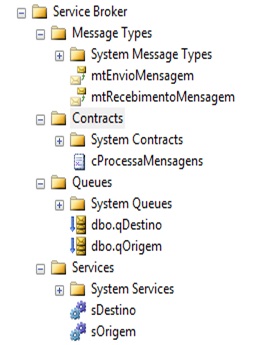
Figure 4 – MyDatabaseServiceBroker Database Structure after creating the sDestino and sOrigem services.
If you want to consult the list of services currently configured, use the System Table: Sys.Services.
Message Sending Process
As presented in Part I, the Communication Process (Conversation) between the Service Broker and the applications that make use of it is very similar to how the Post Office works, where there is an Exchange of Data (messages) involving the sender and the recipient.
In Service Broker this communication process occurs through the use of commandsBegin Dialog Conversation and Send, where the process begins through the use of Begin Dialog and Send will occur through Send.
Begin Dialog Conversation command
The Begin Dialog Conversation command basically directs SQL Server to start a conversation block between one or more services, which normally occurs by exchanging messages with at least two services.
The information specified in the BEGIN DIALOG CONVERSATION statement is similar to the address in a letter; the Service Broker uses the information to deliver messages to the correct service. This command presents a unique set of arguments to best determine the conversation process. Below I present the list of arguments:
- @dialog_handle: Variable used to store the identifier of the generated dialog returned by the BEGIN DIALOG CONVERSATION statement. This variable must be of type Uniqueidentifier.
- From Service initiator_service_name: Determines the service that initiates the dialog. The name specified must be the name of a service in the current database. The queue specified for the initiating service receives messages returned by the destination service and messages created by the Service Broker for this conversation.
- To Service ‘target_service_name’: Specifies the target service with which to initiate the dialog. The target_service_name is of type nvarchar(256). Service Broker uses a byte-by-byte comparison of the set of characters in the message. This comparison is case sensitive and does not take into account the current collation.
- Service_broker_guid: Informs the database that hosts the target service. The service_broker_guid is of type nvarchar(128). Through the System Table Sys.Databases it is possible to obtain the service_broker_guid.
- ‘CURRENT DATABASE’: Shows that the conversation uses the service_broker_guid in the current database.
- ON CONTRACT contract name: Specifies the contract that this conversation should use and involve in the exchange process. When this argument is omitted, the conversation will use the contract called DEFAULT.
- RELATED_CONVERSATION = related_conversation_handle: Specifies the existing conversation group to which a dialog is added. When this clause is present, the dialog will belong to the same conversation group involved in the dialog specified in the related_conversation_handle arguments
- RELATED_CONVERSATION_GROUP =related_conversation_group_id: Determines the existing conversation group to which a new dialog is added. When this clause is present, the new dialog box will be added to the conversation group specified by related_conversation_group_id.
- LIFETIME = dialog_lifetime: Declares the maximum time limit that the dialog will remain open. For the dialog to complete successfully, endpoints must explicitly end the dialog before its lifetime expires. The dialog_lifetime value must be expressed in seconds. The lifespan is like int. When no clause LIFETIME is specified, the lifetime of the dialog box is the maximum value of the data type int.
- ENCRYPTION: Specifies whether or not messages sent and received in the dialog are encrypted when they are sent to an instance of Microsoft SQL Server. When ENCRYPTION = ON and the certificates required to support encryption are not configured, Service Broker returns an error message in the conversation. If ENCRYPTION = OFF, encryption is used if a remote service binding is configured for the target_service_name; otherwise, messages will be sent unencrypted. If this clause is not present, the default value is ON.
Important: All messages are part of a conversation. Therefore, an initiating service must start a conversation with the target service before sending it a message.
The service specified in the TO SERVICE clause is the address to which messages are sent. The service specified in the FROM SERVICE clause is the return address used for response messages. Starting a dialog creates a conversation endpoint in the database for the initiating service, but does not create a network connection to the instance hosting the target service. The Service Broker does not establish communication with the dialog destination until the first message is sent.
After knowing a little about this command, let's work on our first block of code, called Code 1, where we will be starting our dialogue process for subsequent exchange of messages.
/* Código 1 – Iniciando o Diálogo entre os Serviços */
USE MyDatabaseServiceBroker
GO

Declare @MyConversationHandle Uniqueidentifier

Begin Transaction

-– Iniciando um novo diálogo entre os serviços da sOrigem e sDestino –
BEGIN DIALOG  @MyConversationHandle
FROM SERVICE    [sOrigem]
TO SERVICE      'sDestino'
ON CONTRACT     [cOProcessaMensagens]
WITH ENCRYPTION = OFF,
LIFETIME = 600;
Where
– @MyConversationHandle: Variable used to store the Handle_id created by SQL Server to be used in this dialog;
– From Service: we inform the sOrigem Service as our origin service for exchanging messages;
– To Service: Declared the sDestino Service as the destination service involved in our exchange of messages;
– On Contract: We declare our agreement that we will use in this Dialogue for the services involved;
– Encryption = Off: We are informing SQL Server that the message that will be exchanged in this dialog does not need to be encrypted; and
– Lifetime = 600: Inform the Service Broker that this dialog will have a maximum lifetime of 600 seconds, when this time is up and the dialog still exists, it must be terminated.
Notice: When executing this block of code you will observe that Microsoft SQL Server will practically not be performing any procedures or exchanging messages. The objective of Code 1 is to illustrate and present how we can create a new dialogue, and this same block will be used later.
Okay, our dialogue has started and now the Service Broker starts working, waiting for the data that will be added to be part of the message that will then be sent.
So let's learn a little about the Send Command, directly responsible for the process of sending messages by the Service Broker.
Send command
In the same way as the Begin Dialog Conversation Command, the Send command is also involved in the process of exchanging messages between services that are connected to the Service Broker.
Send's main function is to enable the sending of messages between one or more existing conversations. Through Send, SQL Server is instructed to perform the so-called PULL (Push), pushing the data that is stored in the structure that makes up the message to be moved between the source and destination services, passing internally in the structure of the database to which it is related.
This command also presents a unique set of arguments that can be used to determine a better way to send data, as highlighted below:
- ON CONVERSATION conversation_handle: Specifies the conversations the message belongs to. The conversation_handle must contain a valid conversation handle. The same conversation identifier cannot be used more than once.
- MESSAGE TYPE: Informs the type of message sent. This type of message must be included in the service contracts used for these conversations. These contracts must allow for the type of message to be sent on that side of the conversation. If this clause is omitted, the message will be of type DEFAULT.
- message_body_expression: Provides an expression that represents the message body. The message_body_expression is optional. However, if message_body_expression is present, the expression must be of a type that can be converted to varbinary(max). The expression cannot be NULL. If this clause is omitted, the message body will be empty.
Now we can carry out the process of creating and sending our message, for this we will use the Block Code 2 presented below.
/* Código 2 – Criando e Enviando a Mensagem */
USE MyDatabaseServiceBroker
GO

Declare @MyConversationHandle Uniqueidentifier

Begin Transaction

/* Inicia um diálogo entre os serviços da origem e destino */

BEGIN DIALOG  @MyConversationHandle
FROM SERVICE    [sOrigem]
TO SERVICE      'sDestino'
ON CONTRACT     [cProcessaMensagens]
WITH ENCRYPTION = OFF,
LIFETIME = 600;

/* Declarando a Estrutura e Conteúdo da Mensagem */
Declare @MyMensagemServiceBroker XML

SET @MyMensagemServiceBroker = N'<!--?xml version=”1.0″?-->
Minha mensagem
Olá esta é uma mensagem de teste no Service Broker';


/* Enviando uma mensagem no Diálogo */
SEND ON CONVERSATION @MyConversationHandle
MESSAGE TYPE [mtEnvioMensagem] (@MyMensagemServiceBroker)
Commit Transaction
Notes:
– Note that in order to carry out the entire Dialogue and Message Sending process, we are required to execute Code Block 1 again within the Code Block 2.
– Another important point is the use of the command Commit Transaction to force SQL Server to process and confirm the instructions that make up this block of code, in this way, we will be ensuring that the message was sent and closing the transaction block.
Show de Bola, our message has been sent and now that question that cannot be missed. Where did our message end up, it is precisely this response that I will present in the Block Code 3, as if it were an appetizer that we added to our lunch and that will be revealed in the next part of this article.
/* Código 3 – Localizando – Mensagem */
Select Cast(message_body as xml) from qDestino
Processing Incoming Messages
The process for receiving messages handled by applications that use Service Broker, or directly in Management Studio, is basically carried out through the use of the Receive command, together with the Top clause.
The main function of the Receive command is to retrieve one or more messages that may exist in the queue that the Service invoked by the Service Broker is currently using. Normally this command should remove the message from your queue or update its Status, depending on how this is configured for the queue in use.
Receive command
The Receive command has a simple function to read the queue that is being processed in order to identify the set of messages that are within this repository, passing an order to update the status or remove the message from the queue. For this simple procedure to be carried out, there is a set of arguments that can be used in conjunction with the command, which will be recognized by SQL Server as guiding the action and treatment that must be done with the captured message or set of messages. Below I present the list of arguments:
- Waitfor: Directs the RECEIVE statement to wait for a message to arrive in the queue if there is no message currently.
- Top (n): Indicates the maximum number of messages to be retrieved and subsequently returned. If this clause is not specified, all messages that meet the statement's criteria are returned. For this argument, it is allowed to use some options: Column_Name, Expression or Column_Alias, as possible data filters.
- From: Informs the queue that it should be used and contain the set of captured messages. In conjunction with this argument, we can use the options: Database_Name, Schema_Name and Queue_Name, as possible owners of the queue.
- Into table_variable: Indicates to SQL Server that the return messages should be stored possibly in a table type variable, where the table must have the same number of columns as the messages. The data type of each column in the table variable must be able to be implicitly converted to the data type of the corresponding column in messages. If this option is omitted, SQL Server will return messages in the standard format, identifying each value as a possible result.
- Where: Displays the conversation or conversation group of received messages. If omitted, messages will be returned from the next available chat group. For this argument, we can use the options: Conversation_Handle and Conversation_Group_Id, to help the Service Broker identify the message handler or conversation group that we are capturing within the queue. It is worth highlighting that the values passed for these two options are treated as Unique Identifiers orUniqueIdentifier.
- TimeOut: Determines the amount of time, in milliseconds, that the instruction waits for a message. By default, this clause can only be used with the WAITFOR clause. If this clause is not specified or if the timeout is -1, the waiting time will be unlimited. At the end of the timeout, RECEIVE will return an empty result set.
Important: The RECEIVE statement reads messages from a queue and returns a result set. This set consists of zero or more lines, each of which contains a message. If the instruction INTO is not used and column_specifier If you do not assign the values to local variables, the instruction will return a result set to the calling program.
The RECEIVE statement removes received messages from the queue unless the queue specifies message retention. When the configuration of RETENTION of the queue is ON, the RECEIVE statement will update the column status to 0, and will leave the messages in the queue. When a transaction that contains a RECEIVE statement is rolled back, any changes made to the queue in the transaction are also rolled back, returning messages to the queue.
Very cool, we already know a little about the Receive command, its arguments, options and mainly the way this command works, we can evolve a little further and start the process of receiving messages, starting by identifying which messages are in our Queue.
But as we are at the end of this journey, a lot has already been presented previously and as memory is currently something that is normally missing in our heads, I will refresh our memories by presenting our scenario again, with all the resource structure, through Table 1 below:
|
Resource Name |
Functionality |
|
MyDatabaseServiceBroker |
Database – Database |
|
mtSendingMessage |
Message Type – Message Type |
|
mtReceiptMessage |
Message Type – Message Type |
|
cProcessMessages |
Contract – Contract |
|
qDestination |
Queue – Queue |
|
qOrigin |
Queue – Queue |
|
sDestination |
Service – Service |
|
sOrigin |
Service – Service |
|
AutoCreatedLocal |
Route – Route |
Table 1 – Structure and Resources – Service Broker.
Now you can't complain, I believe you've already managed to remember our scenario, structure and especially the resources we are using.
An important detail, you can see that Table 1 presents a Route type resource, at no time was this resource addressed in this scenario, but it is present and is possibly of great importance.
When a Service Broker application is created by default, Microsoft SQL Server creates a route called AutoCreatedLocal, which is addressed as a Local Route and is responsible for allowing the traffic of data that the Service Broker is processing. If you would like to know more about this element and its functionality, consult the Microsoft SQL Server Manuals (Books Online), searching for Create Route.
Let's then work with our first block of code, called Code 1,looking for the list of messages that may exist in our queue, called qDestination, as shown below:
/* Código 1 – Procurando a relação de Mensagens na Fila – qDestino */
USE MyDatabaseServiceBroker
GO

SelectCast(Message_Body asXml)from qDestino
Go
Note that after Code 1 is executed, Management Studio should display our list of messages stored in the Queue qDestination, where the result should be in XML format, as our messages were created and sent in this format. Figure 1 presented below illustrates this result:

Figure 1 – List of Messages stored in the qDestino Queue.
We already know which messages are present in this queue, and now the next step is to read and receive the data contained in our message. To do this, we will use code block 2, presented in the sequence:
/* Código 2 – Realizando a Leitura e Recebimento de Dados */
USE MyDatabaseServiceBroker
GO

Declare @MyConversationHandle UniqueIdentifier,
@MyMessage_Body XML,
@MyMessage_Type_Name sysname;

/* Iniciando o Bloco de Transação */
BeginTransaction;

/* Realizando o Recebimento da Mensagem */
RECEIVETOP(1)
@MyMessage_Type_Name = message_type_name,
@MyConversationHandle = conversation_handle,
@MyMessage_Body = message_body
FROM [qDestino]

/* Apresentando o Retorno da Mensagem */
SELECT @MyMessage_Body As MyMessage

/* Confirmando o Bloco de Transação */
Commit
Well, you saw how simple and easy it was to obtain the data in our Message that was stored in the qDestino Queue, at no point did we need to carry out any type of complex configuration or require external resources.
The Service Broker is fully capable of returning data, the secret is to use the Receive command in conjunction with the Top clause, where we inform the number of messages that should be returned, then through the Select command we present the contents of the variable @MyMessage_Body. To further illustrate, Figure 2 shows the content of the message we just retrieved:

Figure 2 – Message content retrieved using the Receive command.
At this moment, if you want to consult the existing content in the qDestino queue, you will notice that this message is no longer present.
After everything has gone normally and as expected, the last step we will perform basically consists of analyzing a message that we will consult within our queue qDestination, based on your feedback, interact with our dialog and return a message to the queue qOrigin, completing the process of sending and receiving messages. For this purpose we will use Code Blocks 3 and 4, presented below:
/* Código 3 – Enviando Mensagem */
USE MyDatabaseServiceBroker
GO

Declare @MyConversationHandle Uniqueidentifier

BeginTransaction

/* Inicia um diálogo entre os serviços da origem e destino */
BEGIN DIALOG @MyConversationHandle
FROMSERVICE [sOrigem]
TOSERVICE 'sDestino'
ONCONTRACT [cProcessaMensagens]
WITHENCRYPTION=OFF,
LIFETIME= 600;

/* Declarando a Estrutura e Conteúdo da Mensagem */
Declare @MyMensagemServiceBroker XML
SET @MyMensagemServiceBroker = N'<!--?xml version=”1.0″?-->
Minha segunda mensagem
Olá esta é a segunda mensagem de teste no Service Broker
';

/* Enviando uma mensagem no Diálogo */
SENDONCONVERSATION @MyConversationHandle
MESSAGETYPE [mtEnvioMensagem](@MyMensagemServiceBroker)

Commit Transaction

/* Código 4 – Respondendo a Mensagem – Interagindo com o Diálogo */
USE MyDatabaseServiceBroker
GO

Declare @MyConversationHandle UniqueIdentifier,
@MyMessage_Body XML,
@MyMessage_Type_Name sysname;

/* Iniciando o Bloco de Transação */
BeginTransaction;

/* Realizando o Recebimento da Mensagem */
RECEIVETOP(1)
@MyMessage_Type_Name = message_type_name,
@MyConversationHandle = conversation_handle,
@MyMessage_Body = message_body
FROM [qDestino]

/* Verifica se a mensagem foi enviada através da Message Type – mtEnviomensagem */

if @MyMessage_Type_Name = N’mtEnvioMensagem’
Begin
    DECLARE @MySourceMessage XML
    SET @MySourceMessage = 'Retorno da Mensagem de Destino foi respondida para Origem.';
    SENDONCONVERSATION @MyConversationHandle –- Interage no mesmo diálogo
    MESSAGETYPE [mtEnvioMensagem](@MySourceMessage)

    /* Finaliza o diálogo encerrando a conversação */
    ENDCONVERSATION @MyConversationHandle

End

/* Finaliza o Bloco de Transação */
COMMITTransaction
When executing these two code blocks we carry out the complete process of sending and receiving messages through the resources we configured for the Service Broker, our last step is to check the messages in the Queue qOrigin, as a way of guaranteeing and making sure that the return message was received, we will then make use of the Code Block 5, presented below.
/* Código 5 – Consultando as Mensagens de Retorno na Fila qOrigem */
USE MyDatabaseServiceBroker
GO

SELECT cast(message_body asXML) FROM [qOrigem];
Go

RECEIVE Cast(message_body asxml) FROM [qOrigem];
Go
When executing this block of code, you will be able to see that we are not doing anything different, simply using the command Select to consult the information in the qOrigem Queue, then receiving the data using the command Receive.
Happy New Year!!!

Comentários (0)
Carregando comentários…