
Hey guys,
Goodnight!
In this post I will show you how to identify the last access date of a table or view and the last execution date of a procedure in SQL Server. This is especially useful for identifying tables that are not being used or even understanding how much they are used.
For this, SQL Server provides us with the excellent DMV sys.dm_db_index_usage_stats, which despite its name, works both for tables with indexes (clustered and non-clustered) and for HEAP tables (without indexes).
A point of attention for anyone using this view is that when the instance is restarted the data is reset.
How to find out the date and time of the last access of a table or view
With a somewhat simple query, we can easily observe the date of the last access of the object, the date of the last access by type of reading and the types of readings that were identified by the view
To identify tables or views that have not been read since the instance was restarted, simply check the records where the last_access column is empty (last_access IS NULL).
SELECT
    A.name AS [object_name],
    A.type_desc,
    B.database_id,
    C.name AS index_name,
    (
        SELECT MAX(Ultimo_Acesso)
        FROM (VALUES (B.last_user_seek),(B.last_user_scan),(B.last_user_lookup),(B.last_user_update)) AS DataAcesso(Ultimo_Acesso)
    ) AS last_access,
    B.last_user_seek,
    B.last_user_scan,
    B.last_user_lookup,
    B.last_user_update,
    NULLIF(
        (CASE WHEN B.last_user_seek IS NOT NULL THEN 'Seek, ' ELSE '' END) +
        (CASE WHEN B.last_user_scan IS NOT NULL THEN 'Scan, ' ELSE '' END) +
        (CASE WHEN B.last_user_lookup IS NOT NULL THEN 'Lookup, ' ELSE '' END) +
        (CASE WHEN B.last_user_update IS NOT NULL THEN 'Update, ' ELSE '' END)
    , '') AS operations
FROM
    sys.objects                                 A
    LEFT JOIN sys.dm_db_index_usage_stats       B	ON	B.[object_id] = A.[object_id] AND B.[database_id] = DB_ID()
    LEFT JOIN sys.indexes                       C	ON	C.index_id = B.index_id AND C.[object_id] = B.[object_id]
WHERE
    A.[type_desc] IN ('VIEW', 'USER_TABLE')
ORDER BY
    A.name,
    B.index_id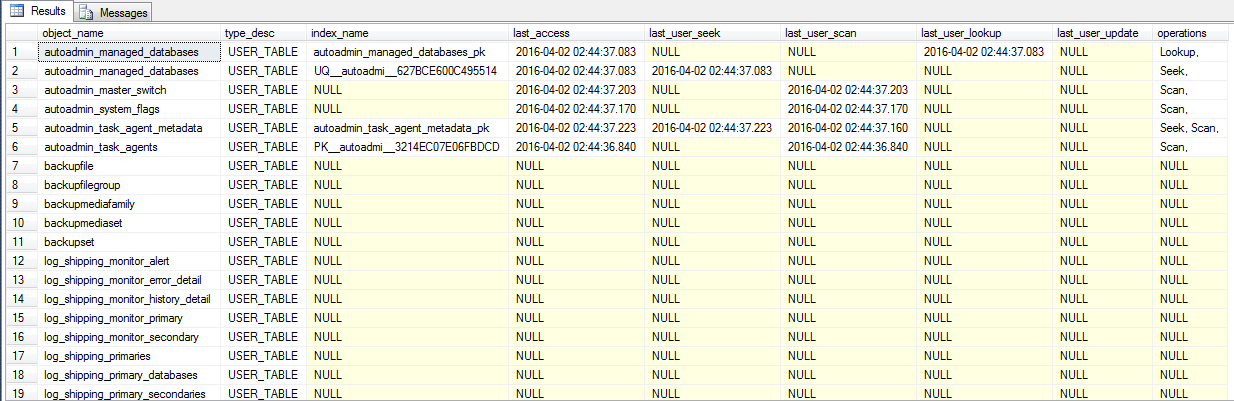
When testing the example above, remember to change the msdb database to the one you need or leave it without the database specified if you use the database in your connection context.
How to find out the date and time of the last execution of a stored procedure
To obtain this view, we use the sys.objects DMV to obtain the list of procedures and functions from the msdb database, we do a LEFT JOIN with the sys.dm_exec_query_stats, which is where the instance's cached execution plans are stored, and we perform a CROSS APPLY with the sys.dm_exec_sql_text DMV, which is the DMV responsible for storing the commands executed by the execution plans. cache execution.
SELECT
    A.name AS [object_name],
    A.type_desc,
    MAX(B.last_execution_time) AS last_execution_time
FROM
    sys.objects	A
    LEFT JOIN (
        sys.dm_exec_query_stats B
        CROSS APPLY sys.dm_exec_sql_text(B.sql_handle) C
    ) ON A.[object_id] = C.objectid
WHERE
    A.type_desc LIKE '%_PROCEDURE'
GROUP BY
    A.name,
    A.type_desc
ORDER BY
    3 DESC,
    1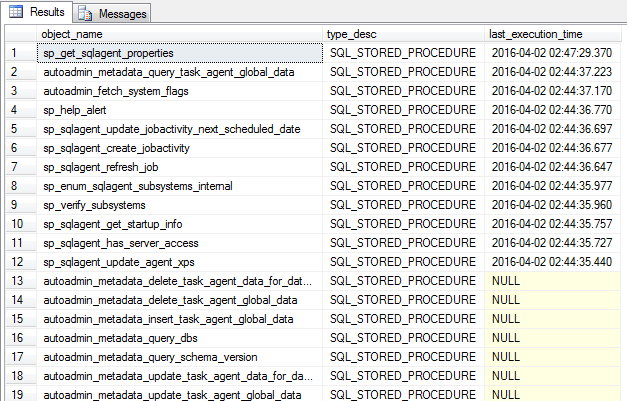
That's it, readers!
Two simple, quick and useful queries in everyday life.
Hug!
sql sql server how to find out the date of the last access last read of the view table how to find out the execution date of a stored procedure
sql sql server how to find out the date of the last access last read of the view table how to find out the execution date of a stored procedure
sql server how to discover unread tables accessed unused tables not used last access date table stored procedure unused not used
sql server how to discover unread tables accessed unused tables not used last access date table stored procedure unused not used

Comentários (0)
Carregando comentários…