
Hey guys,
Good morning.
In this quick post, I will demonstrate once again the use of OLE Automation procedures to consume information on the Web and bring it to our SQL Server database, so that we can work with this information as we need. If you want to use the Bemean API, which returns data in JSON format, see more in the post SQL Server 2016 – How to query information from a CEP using the Bemean API and the JSON_VALUE function
This time, I will show you how to consult city, state, neighborhood, complement and IBGE code information from an entered zip code.
Querying zip code data
To carry out this operation, I will use the great service on the page viacep.com.br to view zip code information.
I will filter the input ZIP code, so that it only contains numbers. After that, we make a GET request to the viacep URL and then process the return via XQuery.
CREATE PROCEDURE dbo.stpConsulta_CEP (
    @Nr_CEP VARCHAR(20)
)
AS BEGIN

    DECLARE
        @obj INT,
        @Url VARCHAR(255),
        @resposta VARCHAR(8000),
        @xml XML


    -- Recupera apenas os números do CEP
    DECLARE @startingIndex INT = 0

    WHILE (1=1)
    BEGIN

        SET @startingIndex = PATINDEX('%[^0-9]%', @Nr_CEP)

        IF (@startingIndex <> 0)
            SET @Nr_CEP = REPLACE(@Nr_CEP, SUBSTRING(@Nr_CEP, @startingIndex, 1), '')
        ELSE
            BREAK

    END


    SET @Url = 'http://viacep.com.br/ws/' + @Nr_CEP + '/xml'

    EXEC sys.sp_OACreate 'MSXML2.ServerXMLHTTP', @obj OUT
    EXEC sys.sp_OAMethod @obj, 'open', NULL, 'GET', @Url, FALSE
    EXEC sys.sp_OAMethod @obj, 'send'
    EXEC sys.sp_OAGetProperty @obj, 'responseText', @resposta OUT
    EXEC sys.sp_OADestroy @obj

    SET @xml = @resposta COLLATE SQL_Latin1_General_CP1251_CS_AS

    SELECT
        @xml.value('(/xmlcep/cep)[1]', 'varchar(9)') AS CEP,
        @xml.value('(/xmlcep/logradouro)[1]', 'varchar(200)') AS Logradouro,
        @xml.value('(/xmlcep/complemento)[1]', 'varchar(200)') AS Complemento,
        @xml.value('(/xmlcep/bairro)[1]', 'varchar(200)') AS Bairro,
        @xml.value('(/xmlcep/localidade)[1]', 'varchar(200)') AS Cidade,
        @xml.value('(/xmlcep/uf)[1]', 'varchar(200)') AS UF,
        @xml.value('(/xmlcep/ibge)[1]', 'varchar(200)') AS IBGE

END
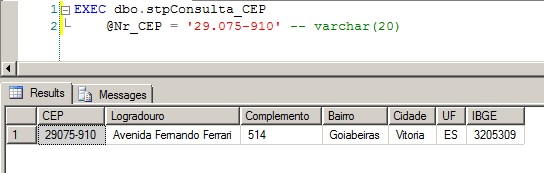
After creating the function, let's use it to test the result:
That's it!
Thank you and see you next time!

Comentários (0)
Carregando comentários…