
Hello, Blog visitors!
Good afternoon!
In this post I will demonstrate how to identify inactive sessions, that is, those that are not executing a query and that have open transactions.
This situation can generate a series of problems in your database, from blocking other sessions that are trying to access the same resource to preventing the automatic backup of the database transaction log and thus gradually increasing until the tempdb overflows (READ DISASTER).
How to identify inactive sessions with open transactions in SQL Server
To demonstrate this situation, I will open a SQL Server tab and start a transaction. Note that I will not execute COMMIT or ROLLBACK, thus leaving this transaction open:
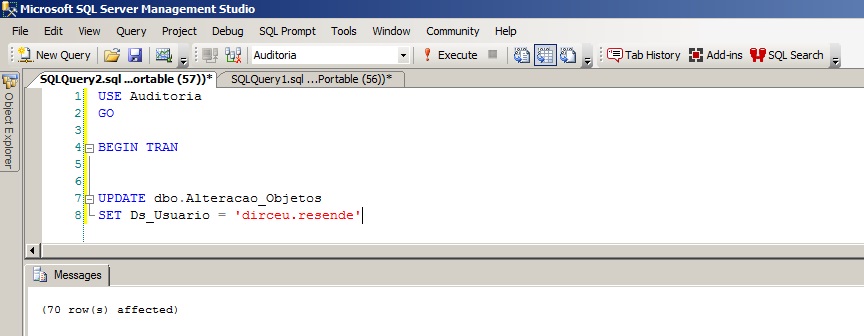
Now let's identify this session:
SELECT
    A.session_id,
    A.login_time,
    A.host_name,
    A.program_name,
    A.login_name,
    A.status,
    A.cpu_time,
    A.memory_usage,
    A.last_request_start_time,
    A.last_request_end_time,
    A.transaction_isolation_level,
    A.lock_timeout,
    A.deadlock_priority,
    A.row_count,
    C.text
FROM
    sys.dm_exec_sessions			A	WITH(NOLOCK)
    JOIN sys.dm_exec_connections		B	WITH(NOLOCK)	ON	A.session_id = B.session_id
    CROSS APPLY sys.dm_exec_sql_text(most_recent_sql_handle)	C
WHERE
    EXISTS (SELECT * FROM sys.dm_tran_session_transactions AS t WITH(NOLOCK) WHERE t.session_id = A.session_id)
    AND NOT EXISTS (SELECT * FROM sys.dm_exec_requests AS r WITH(NOLOCK) WHERE r.session_id = A.session_id)
Query result:

How to identify open transactions on the instance
While the query above shows all sessions that have open transactions, the query below shows the transactions that are open:
SELECT
    A.session_id,
    A.transaction_id,
    C.name AS database_name,
    B.database_transaction_begin_time,
    (CASE B.database_transaction_type
        WHEN 1 THEN 'Read/write transaction'
        WHEN 2 THEN 'Read-only transaction'
        WHEN 3 THEN 'System transaction'
    END) AS database_transaction_type,
    (CASE B.database_transaction_state
        WHEN 1 THEN 'The transaction has not been initialized.'
        WHEN 3 THEN 'The transaction has been initialized but has not generated any log records.'
        WHEN 4 THEN 'The transaction has generated log records.'
        WHEN 5 THEN 'The transaction has been prepared.'
        WHEN 10 THEN 'The transaction has been committed.'
        WHEN 11 THEN 'The transaction has been rolled back.'
        WHEN 12 THEN 'The transaction is being committed. In this state the log record is being generated, but it has not been materialized or persisted.'
    END) AS database_transaction_state,
    B.database_transaction_log_record_count
FROM
    sys.dm_tran_session_transactions A
    JOIN sys.dm_tran_database_transactions B ON A.transaction_id = B.transaction_id
    JOIN sys.databases C ON B.database_id = C.database_id
Query result:

With this, we can make a decision if it is impacting our database (delete the session, ask the responsible user for explanations, etc.)
Thanks for visiting and see you next time!

Comments (0)
Loading comments...