
Hey guys,
Good afternoon!!
In this post, I want to show you something new that I managed to develop this week and that I thought was really cool, which is sending SMS text messages from practically any current programming language (C#, VB.NET, Java, PHP, etc.) and even from the SQL Server database using SQL CLR (it can also be done using xp_cmdshell).
This is especially useful for creating alerts and monitoring in production environments, where in case of any serious problem, you can be notified, wherever you are, even if you have no 3G or Wi-FI signal at the time.
This can be used to send an SMS to a company's commercial department when a customer sends a quote request. If you have an online store, you can send text messages to your customers with changes to the status of an order, for example. The possibilities are many!
What is Pushbullet?
Pushbullet is a simple app with one main purpose: transferring things from your smartphone to your computer and vice versa. You can send files and links to your cell phone, and receive notifications from any smartphone associated with your PC account, such as when a friend checks in to Swarm, when someone is calling you or when your calendar reminds you about an appointment.
You can also send and receive SMS and reply to WhatsApp, Facebook Messager, Hangouts and other messages without touching your smartphone. It's easy: when someone sends a message via WhatsApp, an interactive notification will appear on your computer. Click Reply, type your message and click Send.
Pushbullet also has some pretty cool tricks, like syncing your clipboard between devices, so you can cut text on your computer and paste it on your smartphone.
How does this solution work? How is the torpedo sent?
The basic functioning of this functionality is as follows:
- Using a programming language of your choice, you will send the request to the Pushbullet API, requesting the sending of the SMS and informing the recipient's number and the message
- The Pushbullet server will receive this request and direct it to the application associated with the device requested in your request
- The application on your selected cell phone will receive the request from the server and use the SMS sending feature on your cell phone
- Torpedo SMS successfully sent to the recipient!
What are the requirements for this API to work?
As the sending is actually done via your cell phone, messages sent via the API are available on your smartphone's SMS screen. In addition, you will need to have credit to send the SMS, just like any normal SMS, or have a package with your mobile operator that allows you to send these text messages.
In my tests, I used my cell phone, where I have a 1 GB Vivo control plan and unlimited text messages for any operator, in any area code, so this plan suits me perfectly. There are even some exclusive SMS packages that allow you to send unlimited text messages for an even lower cost.
As you may have noticed, for this feature to work, the cell phone that will be responsible for sending the text messages will need to always be on and have internet access.
What is the cost of this solution? Is there a shipping limit?
An important point that I must comment on is that the Pushbullet Free account only allows you to send 500 requests (pushes) per month. To remove this limit and turn it into unlimited sending, you will need to upgrade your Pushbullet account to the PRO version (https://www.pushbullet.com/pro), which costs $4.99 per month or $3.33 per month if you opt for the annual plan. I think the price is very fair and affordable.
I believe it is a very interesting solution with ZERO cost, for those who need a few messages per month and already have a data package with support for unlimited text messages on their cell phone.
Even if you need to send a lot of SMS text messages and need to purchase a data package with unlimited text messages + 1 GB of 4G internet (40 reais per month) and upgrade your Pushbullet account to the PRO version (10 reais per month), the monthly cost for this solution is very small (52 reais per month) and much lower than the business solutions that operators and other companies offer on the market (and with a limit on the number of text messages sent).
I did a quick search on the internet and saw that some companies charge 100 reais per month to be entitled to send 1,000 text messages/month and some charge R$0.16 per text message (500 text messages per month = 80 reais).
Creating your account and adding devices
To carry out this activity, I will use the Pushbullet API, which is well documented and easy to use (https://docs.pushbullet.com/) to use to access all these features using your favorite programming language.
The first step is to create your account on the application website (https://www.pushbullet.com/). It supports integration with Facebook and Google, allowing the service to read your data from one of these two services and save you time entering registration data.
Once registered, add your mobile devices by downloading and installing the Pushbullet app on them. Once installed and logged into Pushbullet via the app on your phone, it will be added to your list of devices in your account.
Retrieving the Access Token, User ID and Device ID
Once you have created your account and added the devices, go to the Preferences screen (Settings – https://www.pushbullet.com/#settings) and in the “Access Tokens” section click on the “Create Access Tokens” button

After clicking the button, a code will be shown on your screen. Write down this code, as it will be the access code to authenticate the requests we will send.
Now that you have your Pushbullet account and your Access Token, we need to retrieve your user ID and the ID of your mobile device that will be used to send the text messages.
To retrieve this information, I recommend downloading the cURL binary, available at this link (Windows) or at this link (Any OS) or the use of the extension Postman, from Google Chrome (more practical and better visualization of results)
Once downloaded and installed (on Windows, copy the executable to the C:\Windows directory), we will use cURL to retrieve our account ID, using the command below:
curl --header "Access-Token: <seu_access_token>" https://api.pushbullet.com/v2/users/me -k
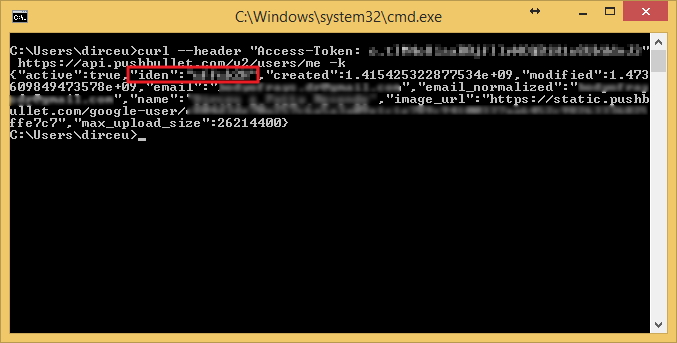
or making the same request with Postman:
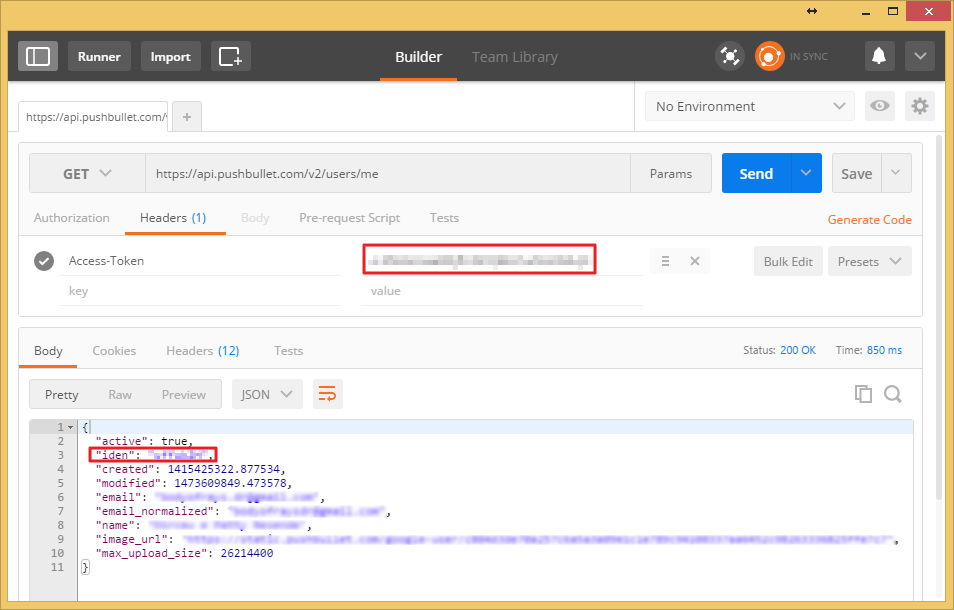
With this, write down the returned iden code. This is your user ID, as you can have multiple users associated with your account.
Now let's retrieve the ID of our cellular device, which will send the SMS, using the command below in cURL:
curl --header "Access-Token: <seu_access_token>" https://api.pushbullet.com/v2/devices -k
or via Postman:
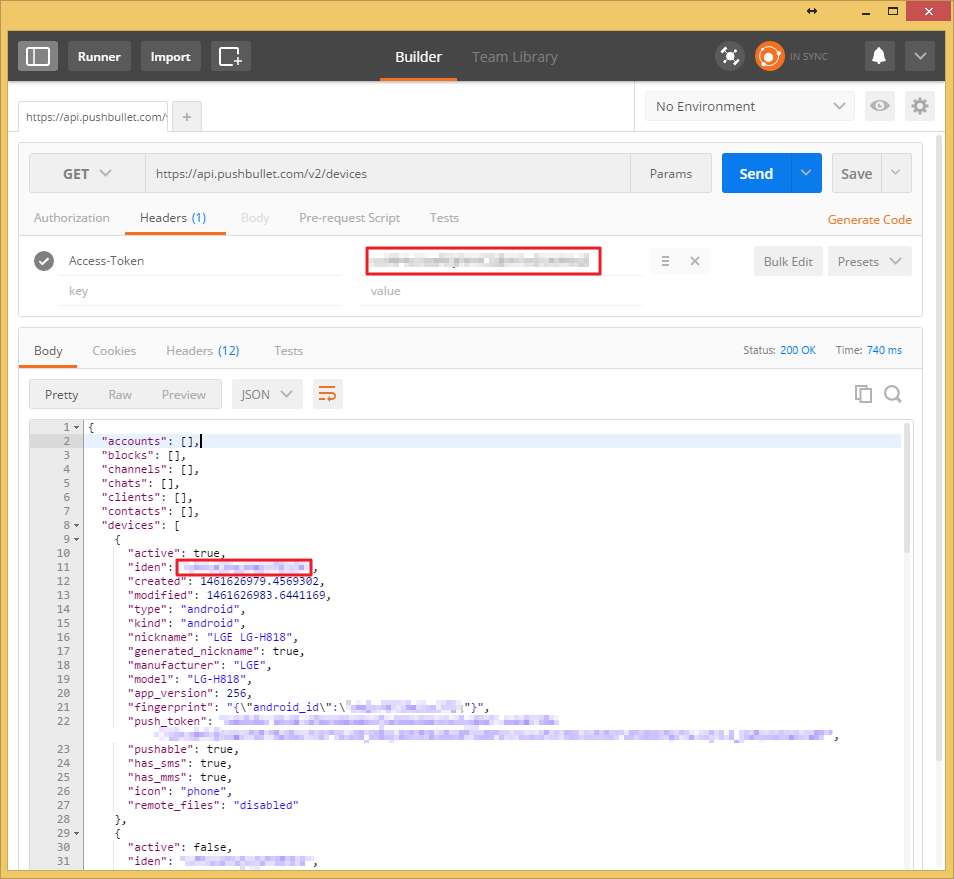
Note the iden code returned from your device. This is the device ID.
Developing SMS sending solution with Pushbullet API
Now that we have the necessary IDs to send the text message, we can start our SMS sending routine.
Solution written in the C# programming language, to be used in SQL Server via the CLRExample:
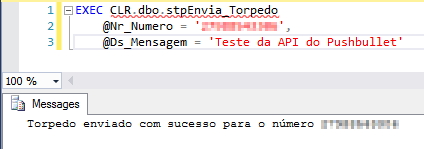
Source code:
using System;
using System.Data.SqlTypes;
using System.IO;
using System.Net;
using System.Text;
using Bibliotecas.Model;

public partial class StoredProcedures
{
    [Microsoft.SqlServer.Server.SqlProcedure]
    public static void stpEnvia_Torpedo(SqlString Nr_Numero, SqlString Ds_Mensagem)
    {


        if (Nr_Numero.IsNull)
            Retorno.Erro("Favor informar o número de telefone que irá receber a mensagem");

        if (Nr_Numero.Value.Length <= 9)
            Retorno.Erro("Favor informar o número de telefone com DDD");

        if (Ds_Mensagem.IsNull)
            Retorno.Erro("Favor informar a mensagem que será enviada");

        if (Ds_Mensagem.Value.Length > 160)
            Retorno.Erro("O tamanho máximo da mensagem a ser enviada por SMS é de 160 caracteres");


        try
        {


            const string AccessToken = "seu_access_token"; //https://www.pushbullet.com/#settings
            const string UserIdentity = "token_usuario"; //curl --header "Access-Token: access_token" https://api.pushbullet.com/v2/users/me
            const string DeviceIdentity = "token_do_dispositivo"; //curl--header "Access-Token: access_token" https://api.pushbullet.com/v2/devices


            var dsScript = @"{
    ""push"": {
        ""type"": ""messaging_extension_reply"",
        ""package_name"": ""com.pushbullet.android"",
        ""source_user_iden"": """ + UserIdentity + @""",
        ""target_device_iden"": """ + DeviceIdentity + @""",
        ""conversation_iden"": """ + ((Nr_Numero.Value.Length <= 11) ? "+55" + Nr_Numero.Value : Nr_Numero.Value) + @""",
        ""message"": """ + Ds_Mensagem.Value.Replace('\\', '/') + @"""
    },""type"": ""push""
}";

            var request = (HttpWebRequest) WebRequest.Create("https://api.pushbullet.com/v2/ephemerals");

            request.Method = "POST";
            request.Headers.Add("Access-Token", AccessToken);
            request.UserAgent = "curl/7.37.0";
            request.ContentType = "application/json";

            var buffer = Encoding.GetEncoding("UTF-8").GetBytes(dsScript);
            using (var reqstr = request.GetRequestStream())
            {
                reqstr.Write(buffer, 0, buffer.Length);

                using (var response = request.GetResponse())
                {
                    var dataStream = response.GetResponseStream();

                    var reader = new StreamReader(dataStream);
                    var responseFromServer = reader.ReadToEnd();

                    if (responseFromServer == "{}")
                        Retorno.Mensagem(responseFromServer);
                    else
                        Retorno.Erro(responseFromServer);
                }

            }

        }
        catch (Exception e)
        {
            Retorno.Erro("Erro : " + e.Message);
        }

    }

}
In this script, I used the class Return, which aims to send information messages and error messages to the database through the CLR. Its source code is available in the post SQL Server – How to send warnings and error messages to the database using the CLR (C#).
Example:
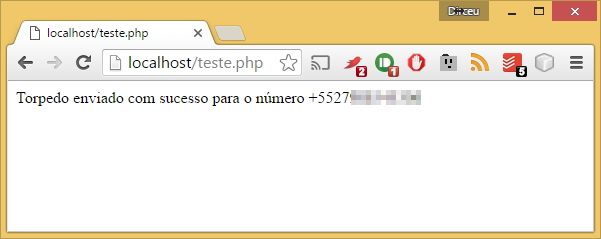
Source code:
<?php

// Variáveis
$Nr_Numero = "+5527912345678";
$Ds_Mensagem = "Teste da API com o PHP";

$Nr_Numero = (strlen( $Nr_Numero ) <= 11) ? "+55" . $Nr_Numero : $Nr_Numero;
$Ds_Mensagem = str_replace( "\\", "/", $Ds_Mensagem );


// Parâmetros
$strUrl = "https://api.pushbullet.com/v2/ephemerals";
$AccessToken = "seu_access_token";
$UserIdentity = "seu_token_usuario";
$DeviceIdentity = "seu_token_dispositivo";


$requisicao = [
    'type' => 'push',
    'push' => [
        'type' => 'messaging_extension_reply',
        'package_name' => 'com.pushbullet.android',
        'source_user_iden' => $UserIdentity,
        'target_device_iden' => $DeviceIdentity,
        'conversation_iden' => $Nr_Numero,
        'message' => $Ds_Mensagem
    ]
];


$headers = array(
    "Content-type: application/json",
    "Access-Token: " . $AccessToken,
);


$ch = curl_init();


curl_setopt( $ch, CURLOPT_URL, $strUrl );

// Cabeçalhos e configurações
curl_setopt( $ch, CURLOPT_HEADER, 1 );
curl_setopt( $ch, CURLOPT_HTTPHEADER, $headers );
curl_setopt( $ch, CURLOPT_RETURNTRANSFER, 1 );
curl_setopt( $ch, CURLOPT_USERAGENT, "curl/7.37.0" );
curl_setopt( $ch, CURLOPT_FOLLOWLOCATION, TRUE );
curl_setopt( $ch, CURLOPT_MAXREDIRS, 2 );

// Desativa a verificaçõo de certificado SSL
curl_setopt( $ch, CURLOPT_SSL_VERIFYHOST, 0 );
curl_setopt( $ch, CURLOPT_SSL_VERIFYPEER, 0 );

// Envia os dados
curl_setopt( $ch, CURLOPT_POST, 1 );
curl_setopt( $ch, CURLOPT_POSTFIELDS, json_encode( $requisicao ) );


$retorno = curl_exec( $ch );
curl_close( $ch );

if ( substr( $retorno, -2 ) == "{}" )
{
    echo "Torpedo enviado com sucesso para o número " . $Nr_Numero;
}
else
{
    echo "Erro: " . $retorno;
}
?>
That's it, folks!
I hope you liked this post.
If you have any questions, leave them here in the comments!
sql sql server send text send sms php java c# clr .net csharp ruby curl command line code script snipplet script
sql sql server send text send sms php java c# clr .net csharp ruby curl command line code script snipplet script

Comentários (0)
Carregando comentários…