Warning: preg_match(): Unknown modifier 'b' in /mnt/datadisk/www/src/Controllers/PostController.php on line 206 SQL Server 2019 - List of new features and resources — Dirceu ResendeSkip to content
Hey guys!
In this long-awaited post, I will comment on the new features we can expect from SQL Server 2019, which long ago stopped being a DBMS (Database Management System) to become a true Microsoft data platform, uniting databases, BI, Machine Learning and Big Data/Analytics.
Would you like to see news about previous versions?
The institutional video at the beginning of this post already has some highlights from SQL Server 2019 (which I will comment on below) and which shows us how Microsoft is keeping an eye on the Big Data market and also bringing significant improvements to its data platform.
Video Transcription – SQL Server 2019 + Polybase + Spark + Big Data + HDFS
View content
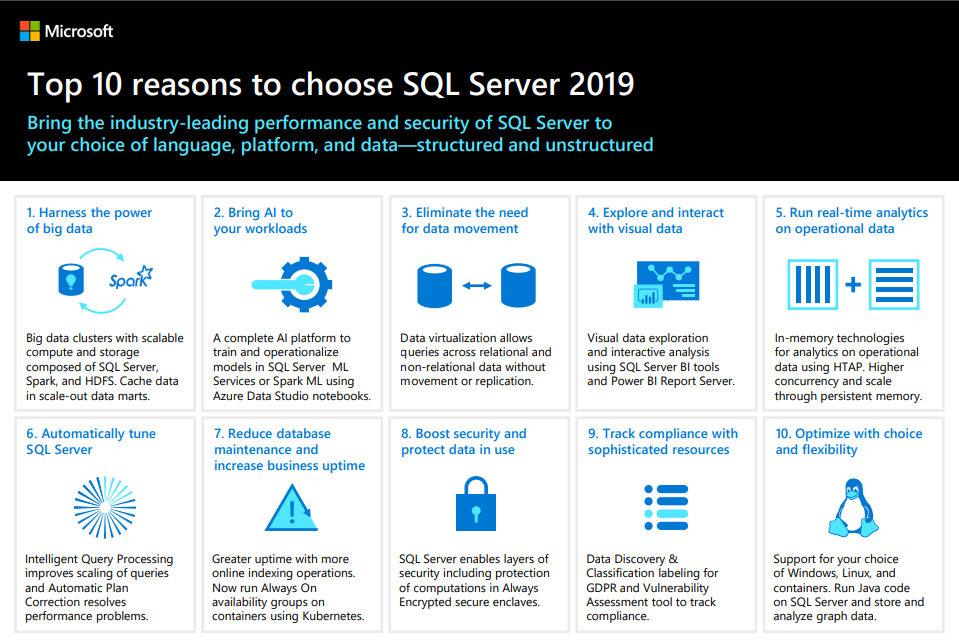
The growing volume of data creates vast seas of opportunities for those who can navigate it. SQL Server 2019 helps you stay ahead of changing times by making data integration, management, and intelligence easier and more intuitive than ever.
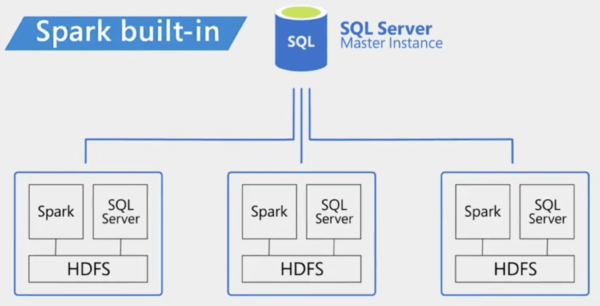
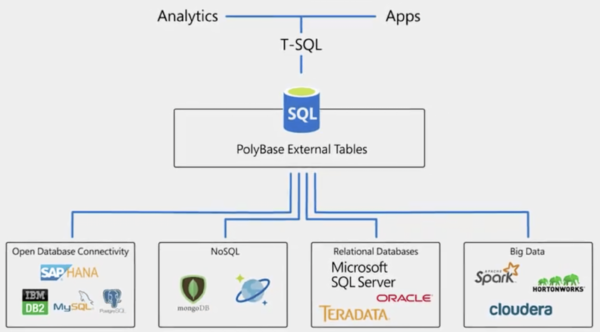
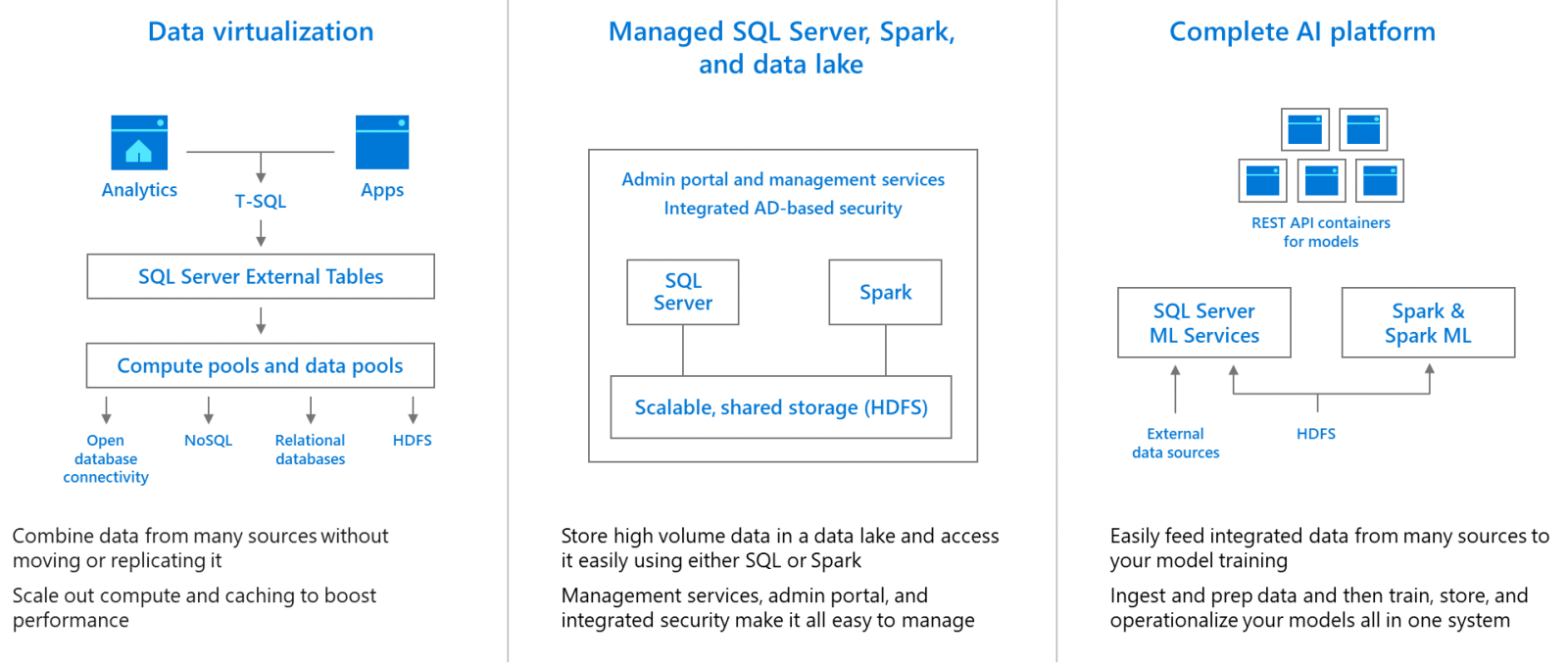
With SQL Server 2019, you can create a single virtual data layer that is accessible to almost any application. Polybase data virtualization handles the complexity of integrating all of your data sources and formats without requiring you to replicate or move them. You can simplify data management by using SQL Server 2019 Big Data Clusters deployed on Kubernetes. Each node of a Big Data Cluster includes the SQL Server relational engine, HDFS storage, and Spark, which allows you to store and manage your data using the tools of your choice.
SQL Server 2019 makes it easy to build intelligent applications with big data. Now you can run Spark jobs to analyze structured and unstructured data, train models on data from anywhere with SQL Server Machine Learning Services or Spark ML, and query data from anywhere using a rich notebook experience built into Azure Data Studio. The data stream isn't slowing down, but it doesn't need to sink your business. Navigate with SQL Server 2019 and shorten the distance between data and action.
SQL Server 2019 - List of What's New and New Features 8
SQL Server 2019 - List of What's New and New Features 7
Big Data + Analytics
View content
SQL Server continues to embrace open source, from supporting SQL Server 2017 for Linux and containers to SQL Server 2019, now encompassing Spark and HDFS to provide a unified data platform. With SQL Server 2019, all the components needed to perform analytics on your data are built into a managed cluster, which is easy to deploy and scales according to your business needs. HDFS, Spark, Knox, Ranger, Livy all come bundled with SQL Server and are quickly and easily deployed as Linux containers on Kubernetes. SQL Server simplifies the management of all your corporate data by removing any barriers that currently exist between structured and unstructured data.
See how we can make it easier to eliminate barriers to insight into all of your data by providing an organization-wide view of your data:
Simplify big data analysis for SQL Server users. SQL Server 2019 makes it easier to manage big data environments. It comes with everything you need to create a data lake, including Microsoft-powered HDFS and Spark and analytics tools, all deeply integrated with SQL Server and fully supported by Microsoft. Now, you can run applications, analytics, and AI on structured and unstructured data – using familiar T-SQL queries, or people familiar with Spark can use Python, R, Scala, or Java to run Spark tasks for data preparation or analysis. the same integrated cluster.
Give developers, data analysts, and data engineers a single source for all their data – structured and unstructured – using their favorite tools. With SQL Server 2019, data scientists can easily analyze data in SQL Server and HDFS through Spark jobs. Analysts can perform advanced analytics on big data using SQL Server Machine Learning Services: train large datasets in Hadoop and operationalize in SQL Server. Data scientists can use a new notebook experience running on the Jupyter notebook engine in a new Azure Data Studio extension to interactively perform advanced data analysis and easily share the analysis with their colleagues.
Break down data silos and provide a view into all your data using data virtualization. Starting with SQL Server 2016, PolyBase allowed you to run a T-SQL query within SQL Server to extract data from your Data Lake and return it in a structured format – all without moving or copying the data. Now, in SQL Server 2019, we are expanding this data virtualization concept to additional data sources, including Oracle, Teradata, MongoDB, PostgreSQL, and others. Using the new PolyBase, you can break down data silos and easily combine data from multiple sources using virtualization to avoid the time, effort, security risks, and duplicate data created by data movement and replication. New elastically scalable “data pools” and “data pools” make querying virtualized data faster by caching data and distributing query execution across many SQL Server instances.
Performance Improvements
View content
Industry-leading performance – the intelligent database
The resource family Intelligent Query Processing builds on SQL Server 2017 Adaptive Query Processing performance tuning features, including memory grant feedback in Row mode, approximate COUNT DISTINCT, Batch mode in rowstore
THE persistent memory support has been enhanced in this release with a new optimized I/O path available for interacting with the persistent memory store.
The Lightweight query profiling infrastructure is now enabled by default to provide per-query operator statistics anytime, anywhere you need it.
Changes in row estimation when using variable tables (deferred table variable compilation). Until SQL Server 2019, the query optimizer ALWAYS estimated 1 row returned when using table-type variables, often generating incorrect operators when large masses of data were used in this type of object and having very poor performance. This caused many people to use temporary tables or the hint OPTION (RECOMPILE) to avoid this type of behavior. In version 2019, the query optimizer will try to estimate a number closer to the real one, meaning that results using table-type variables are generally better than results in previous versions. To learn more about this new feature, see this post by Brent Ozar
Row mode memory grant feedback. SQL Server 2017 introduced Row mode memory grant feedback, which is described in detail here. Essentially, for any memory grant involved with a plan that involves batch mode operators, SQL Server will evaluate the memory used by the query and compare it to the requested memory. If the requested memory is too low or too high, leading to spills or wasted memory, it will adjust the memory grant associated with the execution plan the next time it runs. This will either reduce the grant to allow for greater competition or increase it to improve performance.
We now also get this behavior for queries in row mode, under compatibility level 150. If a query is found on a disk, the memory grant is increased for subsequent executions. If the actual memory used by the query is less than half the memory granted, subsequent grant requests will be smaller. Brent Ozar goes into more detail in his post about Adaptive Memory Grants.
Batch mode over rowstore – Since SQL Server 2012, queries against tables with columnstore indexes have benefited from batch mode performance improvements. The improvements are due to the query processor performing batch processing instead of row by row. Rows also arise from the batching mechanism and parallelism switch operators can be avoided.
Under compatibility level 150, SQL Server 2019 will automatically choose batch mode in certain cases, even when there is no columnstore index, which often cannot be created due to various technical and/or conceptual constraints, such as lack of trigger support
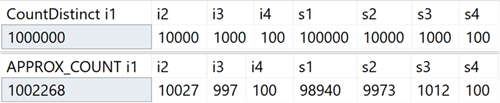
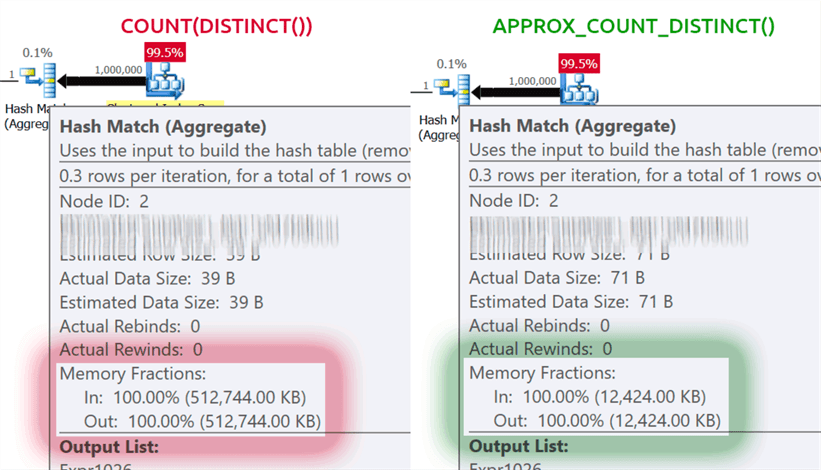
New aggregation function APPROX_COUNT_DISTINCT – This new aggregation function is designed for data warehouse scenarios and is equivalent to COUNT(DISTINCT()). Instead of running expensive discrete sorting operations to determine actual counts, it relies on statistics to get something relatively accurate. You should find that the margin of error is within 2% of the accurate count 97% of the time, which is generally sufficient for high-level analysis and the savings in memory usage are quite considerable.
Test results:
SQL Server 2019 - List of What's New and New Features 11
SQL Server 2019 - List of What's New and New Features 12
SQL Server 2019 - List of What's New and New Features 13
Query-scoped compatibility level hints – Do you have a specific query that works best at a certain compatibility level that is not the same as the current database? Now you can do this with new query hints, supporting six different compatibility levels and five different cardinality estimation models. Below are the available compatibility levels, the example syntax and the CE model used in each case. You can see how this can affect estimates, even for system catalog views:
To view all available hints, you can query the DMV sys.dm_exec_valid_use_hints.
Columnstore index compression estimates – In current versions, the sys.sp_estimate_data_compression_savings procedure has a check for the compression type (NONE, ROW and PAGE). In SQL Server 2019, this check was changed to allow estimation of columnstore indexes.
This is great news, as it allows you to predict the impact of adding a columnstore index to a table that doesn't have one, or convert a table or partition to the more aggressive columnstore format, without having to restore the table to another system and actually apply it in practice to do this analysis.
New function to retrieve page information – DBCC PAGE and DBCC IND have been used for a long time to gather information about the pages that make up a partition, index or table. But they are undocumented and unsupported commands and can be very tedious for automating solutions around problems involving more than one index or page.
Along came sys.dm_db_database_page_allocations, a dynamic management function that returns a set representing all pages in the specified object. Not yet documented, this function exhibits a predicate pushdown problem that can be a real problem in larger tables: even to get the information about a single page, it needs to read the entire structure, which can be quite prohibitive.
SQL Server 2019 introduces another DMF, sys.dm_db_page_info. This returns basically all the information on one page, without the overhead of DMF allocations. In current versions, however, you must already know the page number you are looking for to use the function. This may be intentional as it may be the only way to guarantee performance. Therefore, if you are trying to determine all pages in an index or table, you still need to use DMF allocations.
Advanced Security – Confidential Computing
View content
Always Encrypted with secure enclaves extends the client-side encryption technology introduced in SQL Server 2016. Secure enclaves protect sensitive data in a hardware or software-created enclave within the database, protecting it from malware and privileged users, enabling advanced operations on encrypted data. Today, Always Encrypted protects sensitive data by encrypting/decrypting at each end of the process. Unfortunately, this introduces often critical processing restrictions, such as not being able to perform calculations and filtering – meaning the entire dataset must be sent to perform, say, a range search.
An enclave is a protected area of memory to which these calculations and filtering can be delegated (on Windows, this uses virtualization-based security) – the data remains encrypted in the engine, but can be securely encrypted or decrypted within the enclave. Just add the ENCLAVE_COMPUTATIONS option to the master key, which you can do in SSMS by checking the “Allow enclave computations” checkbox when creating the Master Key for a column
the resource SQL Data Discovery and Classification is now built into the SQL Server engine with new metadata and auditing support to help with GDPR and other compliance needs. In SSMS 17.5, the SQL Server team added the ability to sort data in SSMS, so you can identify columns that could contain sensitive information or interfere with compliance with various standards (HIPAA, SOX, PCI, and, of course, GDPR). The wizard uses an algorithm to suggest columns that are likely to cause compliance issues, but you can add your own, adjust its suggestions, and eliminate any columns from the list. It stores these classiciations using extended properties; an SSMS-based report uses this same information to display the columns that have been identified. Outside of the report, these properties are not highly visible.
In SQL Server 2019, there is a new command for this metadata, now available in Azure SQL Database, called ADD SENSITIVITY CLASSIFICATION. This allows you to do the same kind of wizard as SSMS, but the information is no longer stored as an extended property, and any access to this data is automatically displayed in audits in a new XML column called data_sensitivity_information. Contains all types of information that were accessed during the audited event.
Now, the certificate management It's now easier using SQL Server Configuration Manager. Managing SSL and TLS certificates has always been laborious, and many people have to do a lot of tedious work and internal scripting to deploy and maintain certificates across the enterprise. With SQL Server 2019, updates to SQL Server Configuration Manager will help you quickly view and validate certificates for any instance, find certs nearing expiration, and synchronize certificate deployments across all replicas in an Availability Group (primary) or all nodes in a Failover Cluster Instance (active node).
Mission critical availability – high uptime
View content
Always On Availability Groups have been enhanced to include automatic redirection of connections to the primary based on read/write intent. This feature allows you to configure redirects without a listener, so you can switch a connection to the primary even if a secondary is explicitly named in the connection string. You can use this feature when the clustering technology does not support a listener, or when you are using non-clustered AGs, or when you have a complex redirection scheme in a multi-subnet scenario. This will prevent a connection, for example, from trying to write operations to a read-only replica (and failing).
High availability configurations for SQL Server running in containers can be enabled with Always On Availability Groups using Kubernetes.
Resumable online indexes were improved in SQL Server 2019 and can now be used to create the index (which will be created ONLINE and RESUMABLE) and also in indexes of the COLUMNSTORE type. Additionally, the Database scoped configuration can be changed so that indexes are created this way by default.
Usage example:
CREATE INDEX Idx01 ON dbo.Teste(Nome)
WITH (ONLINE = ON, RESUMABLE = ON, MAX_DURATION = 10 MINUTES);
Better user experience for developers
View content
You SQL Graph enhancements include matching support with T-SQL MERGE and edge constraints.
THE new UTF-8 support offers customers the ability to reduce SQL Server storage space for data using UTF-8. SQL Server 2012 added support for UTF-16 and supplementary characters through a set of collations with a _SC suffix, such as Latin1_General_100_CI_AI_SC, for use with Unicode columns (nchar/nvarchar). In SQL Server 2017, you can import and export data in UTF-8 format to and from these columns, through facilities such as BCP and BULK INSERT.
In SQL Server 2019, there are new collations to natively support storing UTF-8 data in SQL Server. Thus, you can create a char or varchar column to properly store UTF-8 data using new collations with a _SC_UTF8 suffix, such as Latin1_General_100_CI_AI_SC_UTF8. This can help improve compatibility with external applications and other database platforms and systems, without paying the performance and storage penalties of nvarchar.
The new Java language extension will allow you to invoke a pre-compiled Java program and securely execute Java code on the same server as SQL Server. This reduces the need to move data and improves application performance by bringing your workloads closer to your data.
THE Machine Learning Services has several enhancements, including support for Windows Failover clustering, partitioned models, and support for SQL Server on Linux.
Multiplatform Improvements
View content
Additional Resources for SQL Server on Linux include distributed transactions, replication, Polybase, Machine Learning Services, memory notifications, and OpenLDAP support.
Containers have new enhancements, including use of the new Microsoft Container Registry, with support for RedHat Enterprise Linux images and Always On Availability Groups for Kubernetes.
SQL Server 2019 support in Azure Data Studio
View content
Expanded support for more data workloads in SQL Server requires expanded tooling. As Microsoft worked with users of its data platform, we saw the coming together of previously disparate personas: database administrators, data scientists, data developers, data analysts, and new roles still being defined.
Increasingly, these users want to use the same tools to work together seamlessly on-premises and in the cloud, using relational and unstructured data, working across OLTP, ETL, analytics, and streaming workloads.
Azure Data Studio (formerly SQL Operations Studio) offers a modern editor experience with lightning-fast IntelliSense, code snippets, source code integration, and an integrated terminal. It is designed with a data platform user in mind, allowing you to generate graphs and insights from queries, an integrated notebook and customizable dashboards. Therefore, Microsoft has been focusing on this profile in Azure Data Studio, and keeping SQL Server Management Studio focused on the profile of Database Administrators (DBAs)
Azure Data Studio currently offers built-in support for SQL Server on-premises and in the cloud (Azure SQL Database), in addition to (still beta) support for Azure Managed Instance and Azure SQL Data Warehouse.
Azure Data Studio is introducing a new preview extension today to add support for some SQL Server 2019 features. The extension provides connectivity and tools for SQL Server big data clusters, including a first-look preview of the annotations feature in the SQL Server toolset and the new “PolyBase Create External Table” wizard, which makes it easier to access data from remote SQL Server and Oracle instances.
As pointed out by Brent Ozar in this post here, SQL Server 2019 brings us a series of changes to traditional error messages and alerts (in addition to new error messages for new features).
Among the extensive list of changes and new features in the messages, I highlight some of them:
3911 – Persistent version store is full. New version(s) could not be added. A transaction that needs to access the version store may be rolled back. Please refer to BOL on how to increase database max size.
10661 – The refresh operation for all snapshot views failed because there was another refresh operation (either for all or a single snapshot view) in progress.
9113 – Warning: Creating and updating statistics will force FULL SCAN in this version of SQL Server. If persisting sample percentage, persisted_sample_percent will be 100.
12112 – Warning: %ls statement is being forced to run WITH (%S_MSG = ON) because the ELEVATE_%S_MSG database scoped configuration is set to FAIL_UNSUPPORTED. The statement may fail. See the SQL Server error log for more information.
5871 – Cannot set the column encryption enclave type to Virtual Secure Mode (VSM) – the operating system does not support VSM.
2628 – String or binary data would be truncated in table ‘%.*ls’, column ‘%.*ls’. Truncated value: ‘%.*ls’.
Yes, you saw that right! Who has never wasted precious minutes trying to identify which column and which value exceeded the limit of a varchar field? In SQL Server 2019 this should no longer happen (Note: I did a test and it still happens... let's wait for the final version).
New system objects and DMV’s
View content
As expected, with new features and improvements, new system objects such as Stored Procedures and DMV's are created/changed to support these changes to the product. With that, Brent Ozar wrote this article here with a summary of these changes made to system objects, which I highlight the new objects created:
New Stored Procedures
sys.sp_add_feature_restriction
sys.sp_autoindex_cancel_dta
sys.sp_autoindex_invoke_dta
sys.sp_cloud_update_blob_tier
sys.sp_configure_automatic_tuning
sys.sp_diagnostic_showplan_log_dbid
sys.sp_drop_feature_restriction
sys.sp_execute_remote
sys.sp_force_slog_truncation
sys.sp_internal_alter_nt_job_limits
sys.sp_rbpex_exec_cmd
sys.sp_set_distributed_query_context
sys.sp_set_session_resource_group
sys.sp_showinitialmemo_xml
sys.sp_xa_commit
sys.sp_xa_end
sys.sp_xa_forget
sys.sp_xa_forget_ex
sys.sp_xa_init
sys.sp_xa_init_ex
sys.sp_xa_prepare
sys.sp_xa_prepare_ex
sys.sp_xa_recover
sys.sp_xa_rollback
sys.sp_xa_rollback_ex
sys.sp_xa_start
sys.xp_copy_file
sys.xp_copy_files
sys.xp_delete_files
sys.sp_change_repl_serverport
sys.sp_getdistributorplatform
sys.sp_MSget_server_portinfo
sys.sp_MSset_repl_serveroptions
sys.sp_persistent_version_cleanup
sys.sp_persistent_version_store
sys.sp_sqljdbc_xa_install
sys.sp_sqljdbc_xa_uninstall
New tables/views
sys.dm_column_encryption_enclave
sys.dm_column_encryption_enclave_operation_stats
sys.dm_db_missing_index_group_stats_query
sys.dm_distributed_exchange_stats
sys.dm_hadr_ag_threads
sys.dm_hadr_db_threads
sys.dm_os_job_object
sys.dm_tran_aborted_transactions
sys.edge_constraint_clauses
sys.edge_constraints
sys.external_libraries_installed
sys.sensitivity_classifications
sys._trusted_assemblies
sys.persistent_version_store
sys.persistent_version_store_long_term
sys.tbl_server_resource_stats
New functions
sys.dm_db_page_info
sys.fn_dbslog
sys.fn_getproviderstring
Here's another video with a summary of the resources presented:




Comentários (0)
Carregando comentários…