
Hey guys!
All very well ?
In today's post, I'm going to share with you research that I've been doing for some time now, about the new features of SQL Server in each version, with a focus on query developers and database routines. In the environments I work in, I see that many end up “reinventing the wheel” or creating UDF functions to perform certain tasks (which we know are terrible for performance) when SQL Server itself already provides native solutions for this.
My goal in this post is to help you, who are using old versions of SQL Server, to evaluate the advantages and new features (only from the developer's perspective) that you will have access to when updating your SQL Server.
My initial idea was to create a post just with everything that was changed from 2008 to 2019, but after talking and receiving some feedback from great professionals that I consider, such as Edvaldo Castro, Nilton Pinheiro, Caio Amante and the Ariel Fernandez, for the first time on the blog, I am going to start a series of posts, so that the article does not become too long and tiring to read..
Therefore, I start the series “What changed in SQL Server
SQL Server – What changed in T-SQL in version 2008?
New data types: date, time, datetime2, datetimeoffset
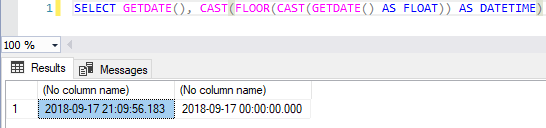
View contentTo take a DATETIME field and return only the date part, without the time, one of the solutions (and a very common one) was to use the CFC (Cast, Floor, Cast) technique:
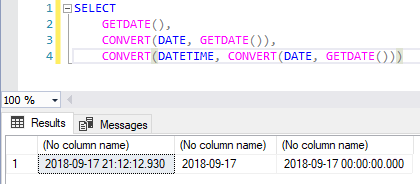
Currently, this is much simpler using the DATE type:
And I will demonstrate a little about the other types of data:
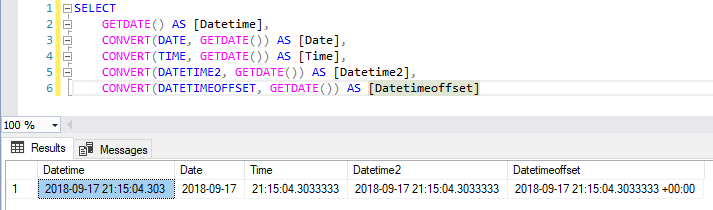
New data types: date, team, datetime2, datetimeoffset.
Data types in table format
View content-- Cria o tipo tpPessoa
CREATE TYPE dbo.tpPessoa AS TABLE (
Nome varchar(100),
Idade INT,
Dt_Nascimento DATE
)
GO
-- Cria uma procedure que você irá receber como parâmetro uma variável do tipo tpPessoa
CREATE PROCEDURE dbo.stpExibe_Pessoa (
@Pessoa tpPessoa READONLY
)
AS
BEGIN
SELECT *
FROM @Pessoa
END
GO
-- Instancia uma variável @Variavel_Pessoa, do tipo tpPessoa, popula os dados e executa a SP stpExibe_Pessoa
DECLARE @Variavel_Pessoa AS tpPessoa
INSERT INTO @Variavel_Pessoa
(
Nome,
Idade,
Dt_Nascimento
)
VALUES
( 'Dirceu Resende', 31, '1987-05-28'),
( 'Patrícia', 31, '1987-01-15'),
( 'Letícia', 21, '1997-04-15')
EXEC dbo.stpExibe_Pessoa
@Pessoa = @Variavel_Pessoa -- tpPessoaResult:
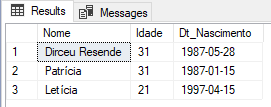
To learn more about this, visit the post SQL Server – How to pass a table as a parameter to Stored Procedures and Functions.
Assigning values during variable declaration
View contentUsage examples:
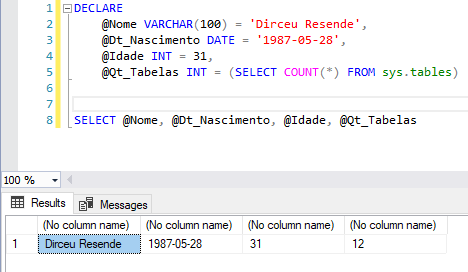
Note: This functionality is not applied to variables of type TEXT, NTEXT and IMAGE.
Grouping data with GROUPING SETs
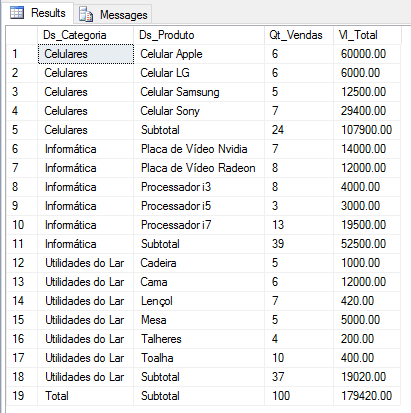
View contentExample of use – ROLLUP
SELECT
    ISNULL(B.Ds_Categoria, 'Total') AS Ds_Categoria,
    ISNULL(B.Ds_Produto, 'Subtotal') AS Ds_Produto,
    COUNT(*) AS Qt_Vendas,
    SUM(B.Preco) AS Vl_Total
FROM
    #Vendas A
    JOIN #Produtos B ON A.Cd_Produto = B.Codigo
GROUP BY
    ROLLUP(B.Ds_Categoria, B.Ds_Produto)
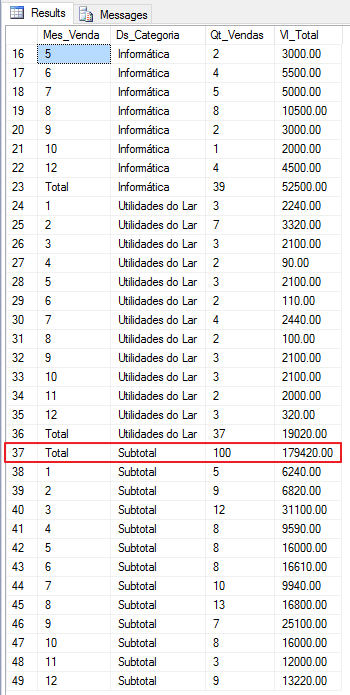
Example of use – CUBE
SELECT
    ISNULL(CONVERT(VARCHAR(10), MONTH(A.Dt_Venda)), 'Total') AS Mes_Venda,
    ISNULL(B.Ds_Categoria, 'Subtotal') AS Ds_Categoria,
    COUNT(*) AS Qt_Vendas,
    SUM(B.Preco) AS Vl_Total
FROM
    #Vendas A
    JOIN #Produtos B ON A.Cd_Produto = B.Codigo
GROUP BY
    CUBE(MONTH(A.Dt_Venda), B.Ds_Categoria)
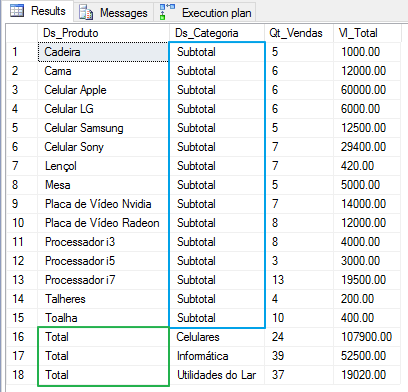
Usage example – GROUPING SETS
SELECT
    ISNULL(B.Ds_Produto, 'Total') AS Ds_Produto,
    ISNULL(B.Ds_Categoria, 'Subtotal') AS Ds_Categoria,
    COUNT(*) AS Qt_Vendas,
    SUM(B.Preco) AS Vl_Total
FROM
    #Vendas A
    JOIN #Produtos B ON A.Cd_Produto = B.Codigo
GROUP BY
    GROUPING SETS(B.Ds_Categoria, B.Ds_Produto)
Want to know more about this feature? Don't forget to access the post SQL Server – Grouping data using ROLLUP, CUBE and GROUPING SETS.
Using MERGE for INSERT, DELETE and UPDATE with just 1 command
View contentMultiple INSERT’s with 1 single command
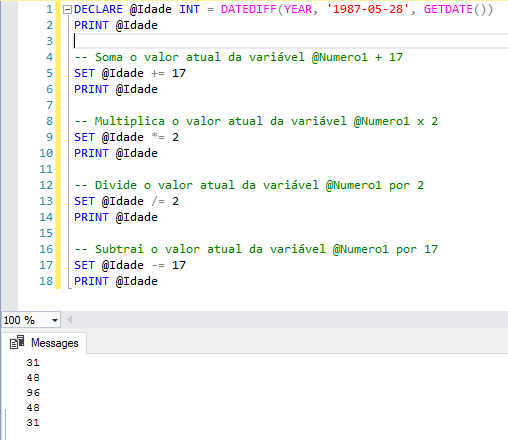
View contentUsing compound value assignment operators
View content- += Add and assign value
- -= Subtract and assign value
- *= Multiply and assign value
- /= Split and assign value
- %= Module and assign value
- &= Bitwise AND and assign value
- ^= Bitwise XOR and assign value
- |= Bitwise OR and assign value
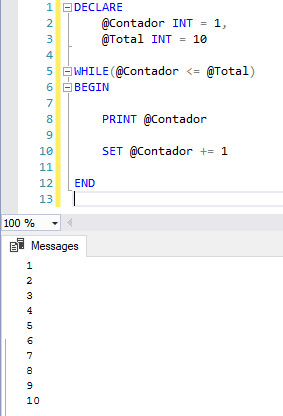
Usage examples:
Spatial data types
View contentExample 1:
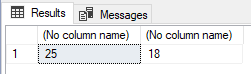
DECLARE @point geometry;
SET @point = geometry::STGeomFromText ('POINT (25 18)', 0);

SELECT
    @point.STX, @point.STY
Result
Example 2
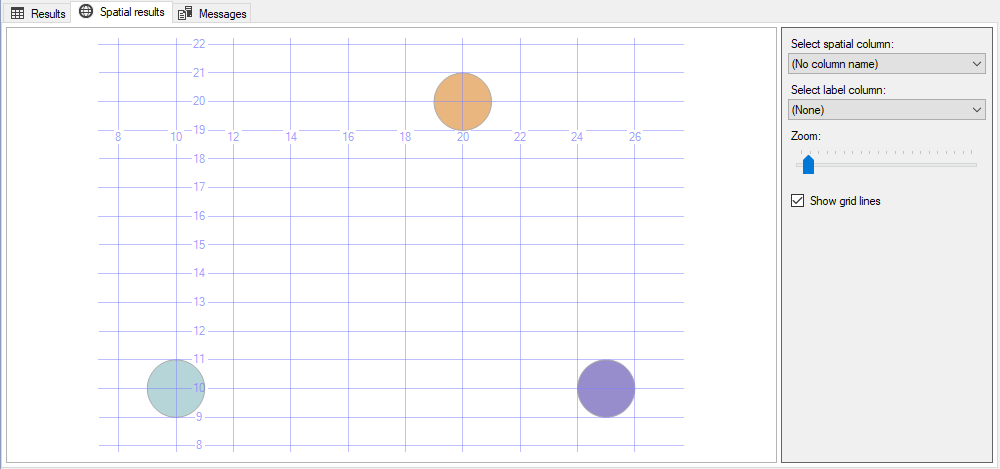
SELECT geometry::Point(10,10,0).STBuffer(1)
UNION ALL
SELECT geometry::Point(20,20,0).STBuffer(1)
UNION ALL
SELECT geometry::Point(25,10,0).STBuffer(1)
Result
Available methods:
- STLength
- STStartPoint
- STEndPoint
- STPointN
- STNumPoints
- STIsSimple
- STIsClosed
- STIsRing
I hope you like this theme, the series I'm starting and leave your questions in the comments.
Hug!

Comments (0)
Loading comments...