
Hey guys!
A little more than 5 years after sharing the function code with you Split, which allows you to recover a part of the string broken by a delimiter, this time I share a new function, called charindexada, written by Brunno Araújo and who kindly gave me the “copyright rights” to share it here on the blog.
Interested in learning more about splits?
- Breaking strings into sub-strings using split string
- Table-valued function to break a string into lines up to N characters long
- How to break a string into a substring table using a delimiter in SQL Server
This function has the basic objective of allowing some specialized queries using separators in a string.
Its parameters are:
- @delimitador_left: String representing the left delimiter of the string. You can use the same delimiter at the beginning and end or they can be different delimiters.
- @posicao_initial: Initial delimiter number. Specifies from which part of the string text extraction will begin.
- @delimitador_right: String representing the right delimiter of the string. If it is different from the initial delimiter, you can extract the text that is between the two delimiters. If it is equal to the initial delimiter, you can extract parts of the string (middle)
- @posicao_fim: End delimiter number. Specifies how many parts will be extracted from the text.
- @string: The string itself that will be parsed and extracted
- @type: Indicates the return type of the function. Type = 0 returns the position of the localized string. Type = 1 (default), returns the localized string.
Below, I will show some examples of how it can be useful.
Example 1 – Text between delimiters
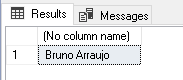
In the example below, I want to return the string that is between the “/” and “\” delimiters:
DECLARE @String VARCHAR(MAX) = 'Teste da charindexa do /Bruno Arraujo\ aqui no blog'
SELECT dbo.charindexada('/', 1, '\', 1, @String, 1)
Result:
Example 2 – Retrieving the beginning of a delimited string
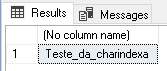
In the example below, I want to return the first 3 parts of a string delimited by an underscore (_):
DECLARE @String VARCHAR(MAX) = 'Teste_da_charindexa_do_/Brunno_Arraujo\_aqui_no_blog_'

SELECT dbo.charindexada('_', 0, '_', 3, @String, 1)
Result:
Example 3 – Retrieving the middle of a delimited string
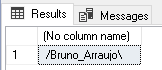
In the example below, I will show how to retrieve 2 parts of a string delimited by an underscore (_), starting from the 4th part:
DECLARE @String VARCHAR(MAX) = 'Teste_da_charindexa_do_/Bruno_Arraujo\_aqui_no_blog_'

SELECT dbo.charindexada('_', 4, '_', 2, @String, 1)
Result:
Example 4 – Retrieving the end of a delimited string
In the example below, I will show how to retrieve the end of a string (99 parts lol) from the 4th part of a string delimited by an underscore (_):
DECLARE @String VARCHAR(MAX) = 'Teste_da_charindexa_do_/Brunno_Araujo\_aqui_no_blog_'

SELECT dbo.charindexada('_', 4, '_', 99, @String, 1)
Result:

Example 5 – Retrieve only part of the delimited string
In the example below, I will show how to retrieve only a part (4th part) of a string delimited by a semicolon (;):
DECLARE @String VARCHAR(MAX) = 'Teste;da;charindexa;do;Brunno;Araujo;aqui;no;blog;'

SELECT dbo.charindexada(';', 4, ';', 1, @String, 1)
Result:

Indexed char source code:
And here, I will make the code of the charindexed function available for you to use in your projects, studies and tests:
CREATE FUNCTION [dbo].[charindexada] (
    @delimitador_esquerda VARCHAR(20) = '',
    @posicao_inicial BIGINT = 0,
    @delimitador_direita VARCHAR(20) = '',
    @posicao_fim BIGINT = 0,
    @string VARCHAR(8000)= '',
    @tipo BIT = 1
)
RETURNS VARCHAR(8000)
AS
BEGIN

    DECLARE
        @string_AUX		VARCHAR(8000),
        @CONT_AUX		BIGINT	= 0,
        @CONT_POS_INI	BIGINT	= 0,
        @DELIM_POS_INI	BIGINT	= 0,
        @POSINI_CONT	BIGINT	= 0,
        @CONT_POS_FIM	BIGINT	= 0,
        @DELIM_POS_FIM	BIGINT	= 0,
        @TAM_D_INI		BIGINT,
        @TAM_D_FIM		BIGINT,
        @tipo_FIM		VARCHAR(8000)

    SET @string_AUX = LTRIM(RTRIM(@string))
    SET @TAM_D_INI =  (CASE @delimitador_esquerda WHEN '' THEN 1 ELSE LEN(@delimitador_esquerda) END)
    SET @TAM_D_FIM =  (CASE @delimitador_direita WHEN '' THEN 1 ELSE LEN(@delimitador_direita) END)

-- ############################ CAPTURA DAS POSIÇÕES ############################

    -- ### POSIÇÃO DO 1º DELIMITADOR ###

    WHILE (@CONT_AUX < @posicao_inicial)
    BEGIN

        SET @DELIM_POS_INI	= CHARINDEX(@delimitador_esquerda,@string_AUX,0)
        SET @string_AUX		= SUBSTRING(@string_AUX,@DELIM_POS_INI+@TAM_D_INI,LEN(@string_AUX))
        SET @CONT_AUX		= @CONT_AUX + 1
        SET @CONT_POS_INI	= @CONT_POS_INI + @DELIM_POS_INI

    END

    SET @CONT_AUX = 0

    -- ### POSIÇÃO DO 2º DELIMITADOR ###

    WHILE (@CONT_AUX < @posicao_fim)
    BEGIN

        SET @DELIM_POS_FIM 	= CHARINDEX(@delimitador_direita,@string_AUX)
        SET @string_AUX    	= SUBSTRING(@string_AUX,@DELIM_POS_FIM+@TAM_D_INI,LEN(@string_AUX))
        SET @CONT_AUX	 	= @CONT_AUX + 1
        SET @CONT_POS_FIM 	= @CONT_POS_FIM + @DELIM_POS_FIM

    END

    SET @DELIM_POS_FIM = LEN(SUBSTRING(@string_AUX,0,CHARINDEX(@delimitador_direita,@string_AUX)))

-- ############################ VALIDAÇÕES ############################

    IF (@tipo = 0 AND @delimitador_esquerda <> '') -- ### POSICAO DO DELIMITADOR ###
    BEGIN
        SELECT @tipo_FIM = @CONT_POS_INI
    END

    IF (@tipo = 1)
    BEGIN

        IF (@delimitador_direita = '' AND @posicao_fim = 0) -- ### POS_INI até FINAL ###
            SET @tipo_FIM = SUBSTRING(@string,@CONT_POS_INI+@TAM_D_INI,LEN(@string))

        IF (@delimitador_esquerda <> '' AND @delimitador_direita <> '')	-- ### POS_INI até POS_FIM ###
            SET @tipo_FIM = SUBSTRING(@string,@CONT_POS_INI+@TAM_D_INI,@CONT_POS_FIM-1)

        IF (@delimitador_esquerda = '' AND @posicao_inicial = 0) -- ### INICIO até POS_FIM ###
            SET @tipo_FIM = SUBSTRING(@string,0,@CONT_POS_FIM)

    END

    RETURN ISNULL(@tipo_FIM, @tipo)

END
That's it, folks!
I hope you enjoyed this really cool function and it promises to really help people who have needs similar to those I demonstrated here in the article and thank you again to Brunno Araújo for the time spent developing this function and letting me post it here on the blog.
A big hug and see you next time!

Comentários (0)
Carregando comentários…