
Hey guys,
Goodnight!
In today's post I will talk about a not very common error that occurs in SQL Server when trying to execute queries using Linked Server or instructions between servers (Ex: OPENROWSET, OPENQUERY, etc.) and SQL Server returns the following message:
Msg 7405, Level 16, State 1, Line 45
Heterogeneous queries require the ANSI_NULLS and ANSI_WARNINGS options to be set for the connection. This ensures consistent query semantics. Enable these options and then reissue your query.
The first time I saw this error was when my colleague Henry Mauri, the guy who is giving me the most post ideas lately, tried create a sequence and use it in a scalar function which was called from a stored procedure within an application written in C# and encountered this error message.
This problem occurs especially when you manually disable the ANSI_NULLS and ANSI_WARNINGS statements before using a linked server in SQL Server. Let's understand why this happens and how to solve it.
Why use ANSI_NULLS and ANSI_WARNINGS?
First of all, I need to make it clear that the problem reported in this post only occurs when at least one of these two settings is disabled (OFF). I already talked about both in my post SQL Server SET commands. The SQL Server default is for them to be activated (ON), but many people end up disabling them to avoid alerts when using some queries in the database WRONG.
Examples of use:
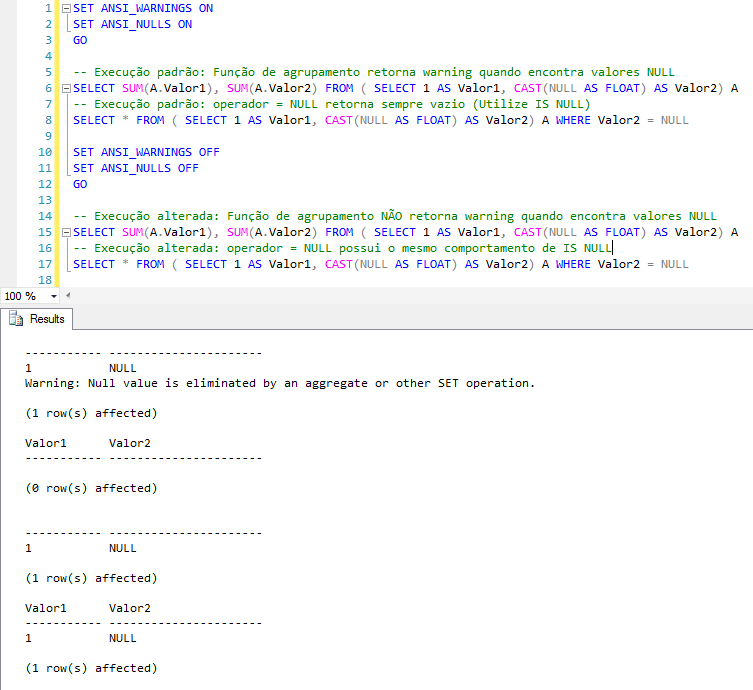
I strongly recommend that you DO NOT disable ANSI_NULLS and ANSI_WARNINGS in your routines. In fact, I don't even remember the last time I needed to change the default behavior of a query using SET commands (except using SET LANGUAGE and SET DATEFORMAT).
According to Microsoft's own website, in a future version of SQL Server, ANSI_NULLS will always be ON and any applications that explicitly set the option to OFF will generate an error. Avoid using this feature in new development work and plan to modify applications that currently use it.
Simulating the problem
To simulate this problem, I will provide a script below that will show exactly this error message. Remember to change the LinkedServer name to the name of your SQL Server instance.
----------------------------------
-- CRIAÇÃO DO LINKED SERVER
----------------------------------

USE [master]
GO

DECLARE @instancia NVARCHAR(200) = N'127.0.0.1\SQL2014'

IF ((SELECT COUNT(*) FROM sys.servers WHERE name = @instancia) > 0)
    EXEC master.dbo.sp_dropserver @server=@instancia, @droplogins='droplogins'

EXEC master.dbo.sp_addlinkedserver @server = @instancia, @srvproduct=N'SQL Server'
EXEC master.dbo.sp_addlinkedsrvlogin @rmtsrvname=@instancia,@useself=N'True',@locallogin=NULL,@rmtuser=NULL,@rmtpassword=NULL


----------------------------------
-- CRIAÇÃO DA TABELA DE TESTES
----------------------------------

IF (OBJECT_ID('Testes.dbo.Teste') IS NOT NULL) DROP TABLE Testes.dbo.Teste
SELECT 12456.74 AS Valor, 'Teste 1' AS Tipo
INTO Testes.dbo.Teste
UNION
SELECT 1314.00, 'Teste 2'
UNION
SELECT 745.99, 'Teste 2'
UNION
SELECT 1587.90, 'Teste 1'
UNION
SELECT 100, NULL
UNION
SELECT NULL, NULL


----------------------------------
-- SIMULAÇÃO DO ERRO
----------------------------------

SET ANSI_NULLS OFF
GO

SELECT SUM(Valor), Tipo
FROM [127.0.0.1\SQL2014].Testes.dbo.Teste
GROUP BY Tipo
Solving the problem
Guys, the solution to this problem is extremely simple and it's already clear from the error message and everything I've already said in the post. Just activate the SET ANSI_WARNINGS AND SET ANSI_NULLS parameters.
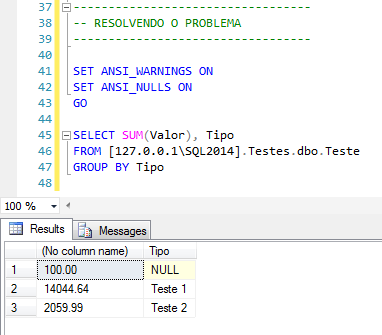
If you've already done this and keep getting this error message, look through your entire source code, because that's definitely the problem. See if there is no SP running and it is disabling one of the two options or some ad-hoc code in your application or in your database access layer. Also check the creation command of the Stored Procedures involved, as these options may have been disabled in the CREATE/ALTER PROCEDURE command.
I hope you liked the post.
Until next time!

Comentários (0)
Carregando comentários…