
Hey guys,
Good afternoon!
In this post I will talk about a highly requested feature for Microsoft, which it has not yet created natively in SQL Server, which is data concatenation using groupings, already present in other DBMSs such as MySQL (GROUP_CONCAT), Oracle (XMLAGG) and PostgreeSQL (STRING_AGG or ARRAY_TO_STRING(ARRAY_AGG())).
Many people think that this feature is the CONCAT() function, introduced in SQL Server 2012, but it only allows the concatenation of multiple columns of a row into one column and not the concatenation of multiple rows into one column.
Concatenating columns into grouped strings consists of transforming lines into a concatenated string, so that you can group the values by some field, and the other column is concatenated, as shown below:
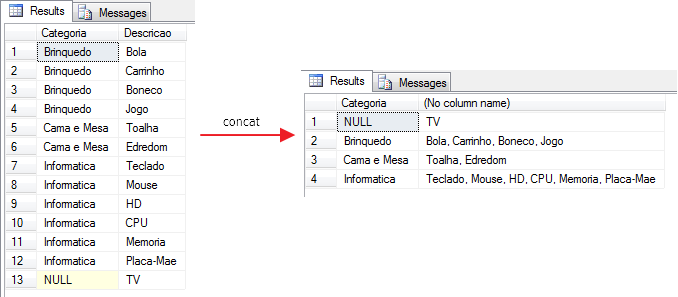
To create our test table, use the commands below:
IF (OBJECT_ID('dbo.Teste_Group_Concat') IS NOT NULL) DROP TABLE dbo.Teste_Group_Concat
CREATE TABLE dbo.Teste_Group_Concat(
    Categoria VARCHAR(100),
    Descricao VARCHAR(100)
)

INSERT INTO dbo.Teste_Group_Concat( Categoria, Descricao )
VALUES ('Brinquedo', 'Bola'),
('Brinquedo', 'Carrinho'),
('Brinquedo', 'Boneco'),
('Brinquedo', 'Jogo'),
('Cama e Mesa', 'Toalha'),
('Cama e Mesa', 'Edredom'),
('Informatica', 'Teclado'),
('Informatica', 'Mouse'),
('Informatica', 'HD'),
('Informatica', 'CPU'),
('Informatica', 'Memoria'),
('Informatica', 'Placa-Mae'),
(NULL, 'TV')How to concatenate columns into grouped strings using COALESCE
DECLARE @Nomes VARCHAR(MAX)

SELECT
    @Nomes = COALESCE(@Nomes + ', ', '') + Descricao
FROM
    dbo.Teste_XML

SELECT @Nomes
As we can see above, using the COALESCE function, we always need to store the results in a variable, and for this reason, we are unable to obtain the results grouped by category, as we need. If you just want to convert columns into a string, without grouping, this solution will suit you, but not what we need for this post.
How to concatenate columns into grouped strings using STUFF + FOR XML PATH
A practical and performative way to solve this problem is to use FOR XML PATH and STUFF to perform grouped concatenation, so that the result is exactly what we expected:
SELECT
    Categoria,
    STUFF((
        SELECT ', ' + B.Descricao
        FROM dbo.Teste_Group_Concat B
        WHERE ISNULL(B.Categoria, '') = ISNULL(A.Categoria, '')
        ORDER BY B.Descricao
        FOR XML PATH('')), 1, 2, ''
    ) AS Descricao
FROM
    dbo.Teste_Group_Concat A
GROUP BY
    Categoria
ORDER BY
    Categoria
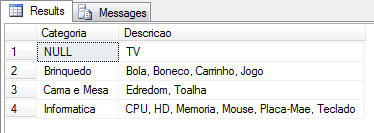
How to concatenate columns into grouped strings using UPDATE
DECLARE
    @Categoria VARCHAR(MAX),
    @Descricoes VARCHAR(MAX)

DECLARE @Tabela TABLE (
    Categoria VARCHAR(200),
    Descricao VARCHAR(200),
    Descricoes VARCHAR(200)
)

INSERT @Tabela (
    Categoria,
    Descricao
)
SELECT
    Categoria,
    Descricao
FROM
    dbo.Teste_Group_Concat
ORDER BY
    Categoria,
    Descricao


UPDATE
    @Tabela
SET
    @Descricoes = Descricoes = COALESCE(CASE COALESCE(@Categoria, '')
                                WHEN Categoria THEN @Descricoes + ', ' + Descricao
                                ELSE Descricao
                            END, ''),
    @Categoria = ISNULL(Categoria, '')


SELECT
    Categoria,
    Descricoes = MAX(Descricoes)
FROM
    @Tabela
GROUP BY
    Categoria
ORDER BY
    Categoria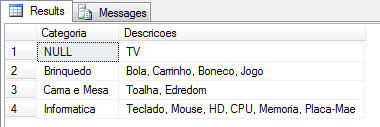
Another solution that allowed us to generate data as our needs demand.
How to concatenate columns into grouped strings using LOOPING with CURSOR
DECLARE @Tabela TABLE (
    Categoria VARCHAR(MAX),
    Descricoes VARCHAR(MAX)
)

INSERT @Tabela (
    Categoria,
    Descricoes
)
SELECT
    Categoria,
    ''
FROM
    dbo.Teste_Group_Concat
GROUP BY
    Categoria


DECLARE
    @Categoria VARCHAR(MAX),
    @Descricao VARCHAR(MAX),
    @Descricoes VARCHAR(MAX)

DECLARE c CURSOR LOCAL FAST_FORWARD
FOR

    SELECT
        Categoria,
        Descricao
    FROM
        dbo.Teste_Group_Concat
    ORDER BY
        Categoria,
        Descricao


OPEN c

FETCH c INTO @Categoria, @Descricao

WHILE @@FETCH_STATUS = 0
BEGIN

    UPDATE  @Tabela
    SET     Descricoes += ', ' + @Descricao
    WHERE   ISNULL(Categoria, '') = ISNULL(@Categoria, '')

    FETCH c INTO @Categoria, @Descricao
END

CLOSE c
DEALLOCATE c

SELECT
    Categoria,
    Descricoes = STUFF(Descricoes, 1, 1, '')
FROM
    @Tabela
ORDER BY
    Categoria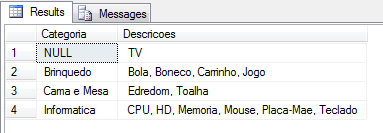
This solution also met what we needed, but like all looping, it is not performant. I personally abhor creating cursors (unless you are STILL on SQL Server 2000), in the latter case, I prefer to use WHILE, but we have better solutions here in this post.
How to concatenate columns into grouped strings using LOOPING with WHILE
DECLARE @Tabela_Original TABLE (
    Id INT IDENTITY(1, 1),
    Categoria VARCHAR(MAX),
    Descricao VARCHAR(MAX)
)
INSERT @Tabela_Original (
    Categoria,
    Descricao
)
SELECT
    Categoria,
    Descricao
FROM
    dbo.Teste_Group_Concat
ORDER BY
    Categoria


DECLARE @Tabela TABLE (
    Id INT IDENTITY(1, 1),
    Categoria VARCHAR(MAX),
    Descricoes VARCHAR(MAX)
)

INSERT @Tabela (
    Categoria,
    Descricoes
)
SELECT
    Categoria,
    ''
FROM
    dbo.Teste_Group_Concat
GROUP BY
    Categoria

DECLARE
    @Categoria VARCHAR(MAX),
    @Descricao VARCHAR(MAX),
    @Descricoes VARCHAR(MAX),
    @Contador INT = 1,
    @Numero_Linhas INT = (SELECT COUNT(*) FROM @Tabela_Original)

 WHILE(@Contador <= @Numero_Linhas)
 BEGIN

    SELECT
        @Categoria = ISNULL(Categoria, ''),
        @Descricao = Descricao
    FROM
        @Tabela_Original
    WHERE
        Id = @Contador
    ORDER BY
        Categoria,
        Descricao


    UPDATE  @Tabela
    SET     Descricoes += ', ' + @Descricao
    WHERE   ISNULL(Categoria, '') = ISNULL(@Categoria, '')


    SET @Contador = @Contador + 1

END


SELECT
    Categoria,
    Descricoes = STUFF(Descricoes, 1, 1, '')
FROM
    @Tabela
ORDER BY
    Categoria
Solution met, but like all looping, it is not performant.
How to concatenate columns into grouped strings using Recursive CTE
;WITH Dados as
(
    SELECT
        Categoria,
        CONVERT(NVARCHAR(MAX), Descricao) AS Descricao,
        ROW_NUMBER() OVER (PARTITION BY Categoria ORDER BY Descricao) AS Linha
    FROM
        dbo.Teste_Group_Concat
),
Tabela1 AS
(
    SELECT Categoria, Descricao, Linha FROM Dados WHERE Linha = 1
),
Resultado AS
(
    SELECT Categoria, Descricao, Linha FROM Tabela1 WHERE Linha = 1

    UNION ALL

    SELECT Dados.Categoria, Resultado.Descricao + N', ' + Dados.Descricao, Dados.Linha
    FROM Dados
    JOIN Resultado ON Resultado.Categoria = Dados.Categoria AND Dados.Linha = Resultado.Linha + 1
)
SELECT
    Categoria,
    Descricoes = MAX(Descricao)
FROM
    Resultado
GROUP BY
    Categoria
ORDER BY
    Categoria
OPTION (MAXRECURSION 0);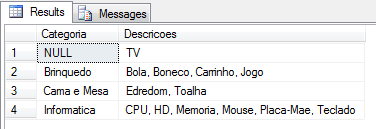
This solution uses the recursion technique to solve our problem without needing looping. Although it is not very easy to understand at first, it is a practical and very interesting solution.
How to concatenate columns into grouped strings using Scalar Function (UDF)
CREATE FUNCTION dbo.fncConcatCategoria (
    @Ds_Categoria VARCHAR(MAX)
)
RETURNS VARCHAR(MAX)
WITH SCHEMABINDING
AS
BEGIN

    DECLARE @Retorno VARCHAR(MAX);

    SELECT
        @Retorno = COALESCE(@Retorno + ', ', '') + Descricao
    FROM
        dbo.Teste_Group_Concat
    WHERE
        ISNULL(Categoria, '') = ISNULL(@Ds_Categoria, '')
    ORDER BY
        Descricao

    RETURN @Retorno

END
GO

SELECT
    Categoria,
    dbo.fncConcatCategoria(Categoria) AS Descricao
FROM
    dbo.Teste_Group_Concat
GROUP BY
    Categoria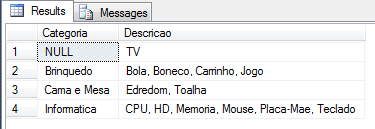
Very useful function and once created, it becomes very practical to use. The problem with this solution is that it is not very performant and requires you to create a function for each table that you need to carry out this solution, in other words, it ends up not being very generic and you would need to create several functions that do practically the same thing in your database.
How to concatenate columns into grouped strings using SCL CLR (C#)
using System;
using System.Data.SqlTypes;
using Microsoft.SqlServer.Server;
using System.Text;

[Serializable]
[SqlUserDefinedAggregate(
    Format.UserDefined,
    IsInvariantToNulls = false,
    IsInvariantToDuplicates = false,
    IsInvariantToOrder = true,
    MaxByteSize = -1)]
public struct concat : IBinarySerialize, INullable
{
    private StringBuilder _accumulator;
    private string _delimiter;

    public bool IsNull { get; private set; }

    public void Init()
    {
        _accumulator = new StringBuilder();
        _delimiter = string.Empty;
        this.IsNull = true;
    }

    public void Accumulate([SqlFacet(MaxSize = -1)]SqlString Value, [SqlFacet(MaxSize = -1)]SqlString Delimiter)
    {

        if (Value.IsNull) return;

        if (!Delimiter.IsNull & Delimiter.Value.Length > 0)
        {
            _delimiter = Delimiter.Value;
            if (_accumulator.Length > 0)
                _accumulator.Append(Delimiter.Value);

        }

        _accumulator.Append(Value.Value);
        IsNull = false;
    }

    public void Merge(concat Group)
    {
        if (_accumulator.Length > 0
            & Group._accumulator.Length > 0) _accumulator.Append(_delimiter);

        _accumulator.Append(Group._accumulator.ToString());

    }

    public SqlString Terminate()
    {
        return new SqlString(_accumulator.ToString());
    }

    void IBinarySerialize.Read(System.IO.BinaryReader r)
    {
        _delimiter = r.ReadString();
        _accumulator = new StringBuilder(r.ReadString());

        if (_accumulator.Length != 0) this.IsNull = false;
    }

    void IBinarySerialize.Write(System.IO.BinaryWriter w)
    {
        w.Write(_delimiter);
        w.Write(_accumulator.ToString());
    }
}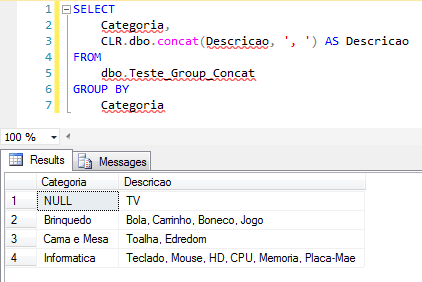
My favorite solution. Practical, extremely fast, generic and solves our problem. Don't know what CLR is or do you know, but don't know how to implement it in your database? Find out more by visiting my post Introduction to SQL CLR (Common Language Runtime) in SQL Server.
Performance Considerations
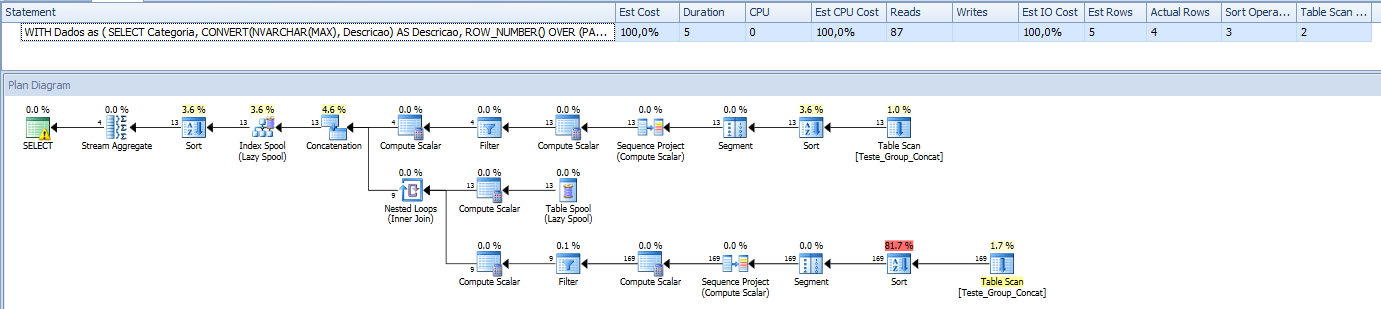
Let's now measure our solutions and find out which are the fastest and which are the slowest.
CLR

STUFF + FOR XML PATH

UPDATE

Recursive CTE
UDF scalar function

Loop While
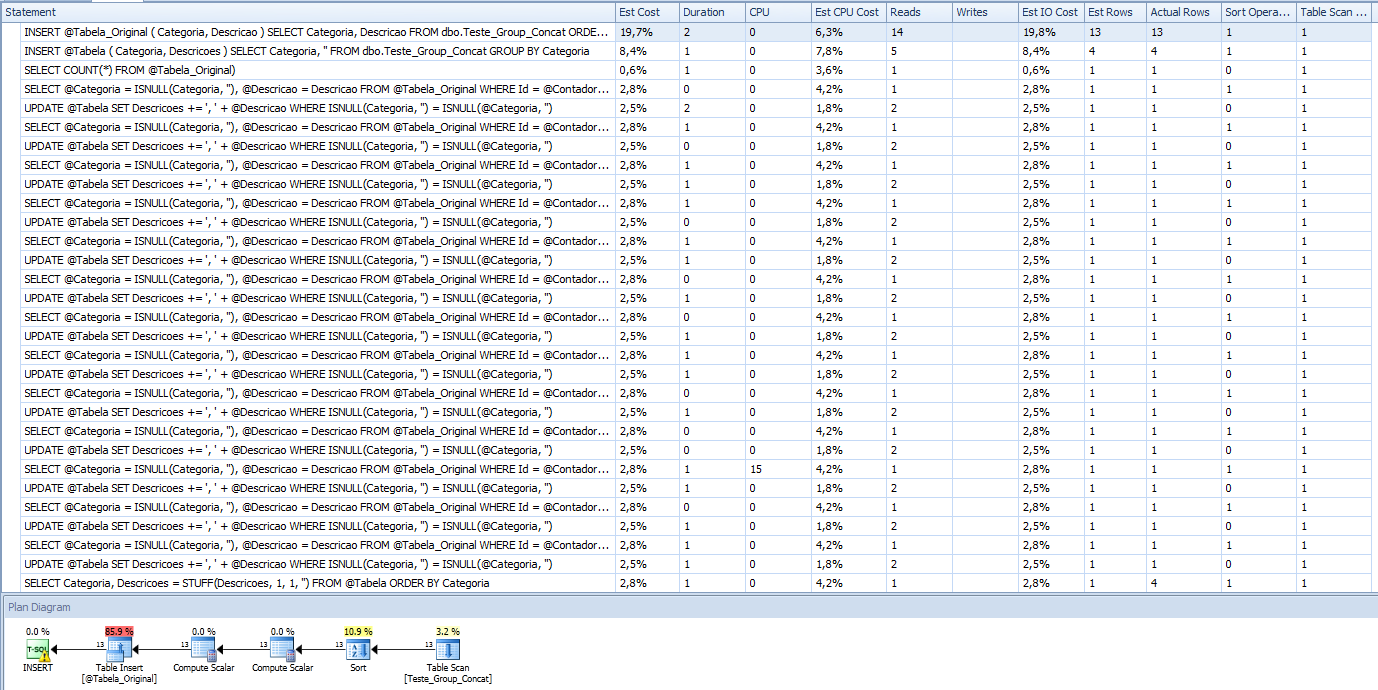
Loop with Cursor
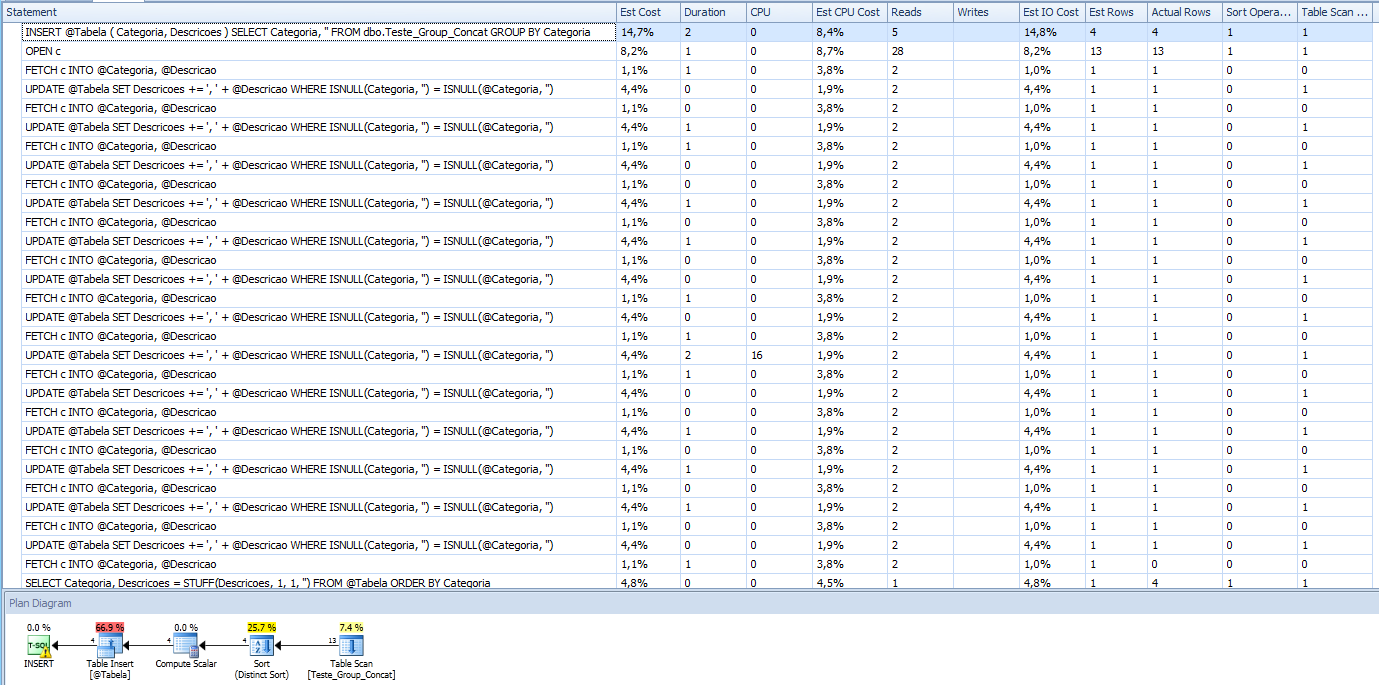
Right away we can eliminate loopings, which were much worse. What happens if we insert more records? Like 850,000 lines... How will the performance be?
CLR

STUFF + FOR XML PATH
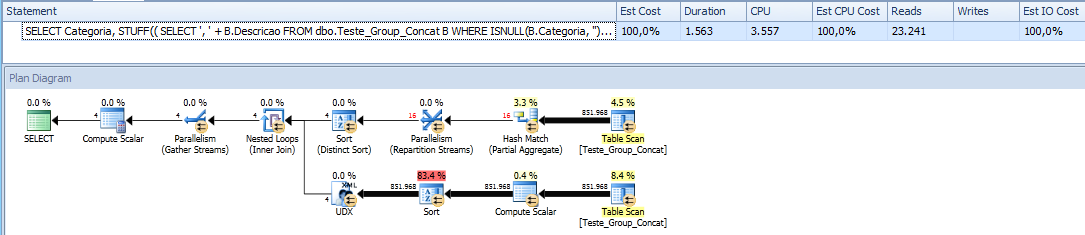
As no other method was able to finish processing in less than 1 minute, despite having used 850,000 lines with the CLR and FOR XML PATH, I will only use 158,000 lines (27%) for the rest of the methods to try to analyze the results. Let's see.
UPDATE

The UPDATE time wasn't that bad... 5.7s for 158,000 lines is a reasonable time.
UDF scalar function

Recursive CTE

Well, I tried waiting for the Recursive CTE... I even went to lunch and left it running here, but after 2 hours and 22 minutes I couldn't wait any longer to finish processing the 158 thousand lines (remembering that the CLR processed 850,000 in 3s and the FOR XML in 1.5s)..
Apparently, our winner was FOR XML PATH, but if we analyze the results, the CLR delivered the correct result, even with all this absurd number of lines:
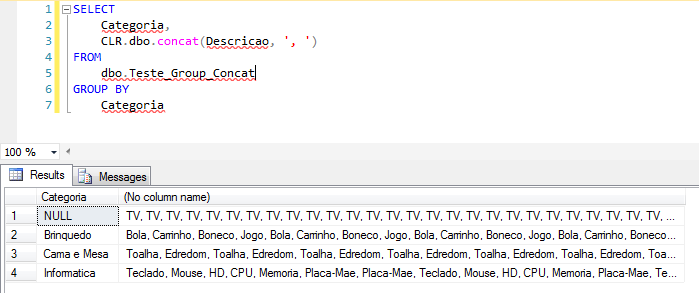
As for FOR XML PATH… It ended up getting lost and the results were not in the correct order.
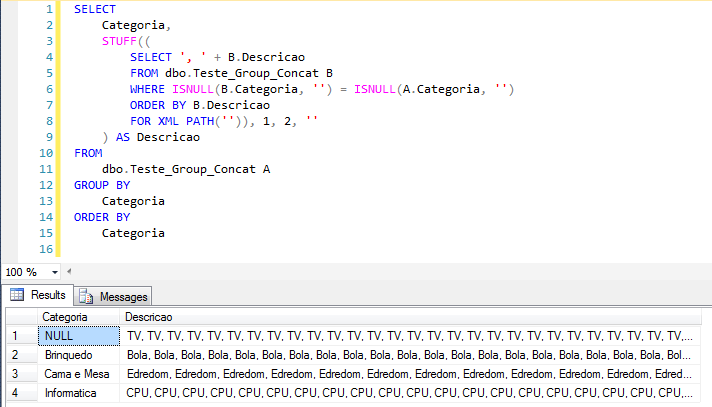
Therefore, the solution that I recommend as the best of all for this type of situation is SQL CLR!
That's it, folks!
Thanks for visiting and see you in the next post.
sql server clr function stuff for xml path recursive cte convert columns rows grouped concat concatenation string how to convert concatenate columns to string
sql server clr function stuff for xml path recursive cte convert columns rows grouped concat concatenation string how to convert concatenate columns to string
Concatenate many rows into a single text string
Concatenate many rows into a single text string

Comentários (0)
Carregando comentários…