
Hey guys,
All good?
In this article, I will demonstrate to you how to convert an RTF string to text (Remove RTF tags) using the CLR (C#) or Powershell, which was a need I had last week, where a system recorded the information in a table and the data was in RTF (Rich Text Format). I searched a lot on the internet to find solutions that would help me convert RTF to text directly through the database and I didn't find many alternatives that I liked and that motivated me to write this post for you.
If you don't know CLR or want to know more about it, understand how it works, its limitations, advantages, disadvantages and how to create and publish a new CLR project, read the post Introduction to SQL CLR (Common Language Runtime) in SQL Server.
The trivial solution with C#
If you do this search on Google, probably the most common solution you will find is this:
System.Windows.Forms.RichTextBox rtBox = new System.Windows.Forms.RichTextBox();
string rtfText = "{\rtf1\ansi\ansicpg1252\fromhtml1 \fbidis \deff0{\fonttbl {\f0\fswiss Arial;} {\f1\fmodern Courier New;} {\f2\fnil\fcharset2 Symbol;} {\f3\fmodern\fcharset0 Courier New;} {\f4\fswiss Segoe UI;}} {\colortbl\red0\green0\blue0;\red0\green0\blue255;\red0\green0\blue0;} \uc1\pard\plain\deftab360 \f0\fs24  {\*\htmltag0 \par } {\*\htmltag48 }{\*\htmltag64}\htmlrtf {\htmlrtf0  {\*\htmltag148 }\htmlrtf {\cf2 \fs20 \f4 \htmlrtf0  {\*\htmltag4 \par }\htmlrtf }\htmlrtf0 {\*\htmltag72}\htmlrtf}\htmlrtf0  {\*\htmltag96 }\htmlrtf {\ltrpar\ltrch\ql \htmlrtf0 {\*\htmltag64}\htmlrtf {\htmlrtf0 \htmlrtf {\cf2 \fs20 \f4 \htmlrtf0 Dirceu Resende\htmlrtf }\htmlrtf0 {\*\htmltag72}\htmlrtf\par}\htmlrtf0  {\*\htmltag104 }\htmlrtf }\htmlrtf0  {\*\htmltag248 } {\*\htmltag58 }}";
rtBox.Rtf = rtfText;
string plainText = rtBox.Text;
Which is a really simple solution and it really works. However, I would like to use this solution through the database and therefore, using the System.Windows.Forms library is not a very interesting idea, since this library is not loaded by default by SQL Server and therefore, I would have to import its assembly and its dependencies (which are not few) manually into the database, as shown below:
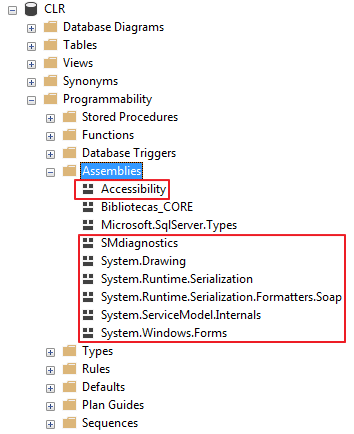
This would increase the complexity of your CLR (and also in publications) and could have negative effects on the stability of your instance and therefore, I do not recommend this practice.
The solution with C# using the RichTextStripper Helper
After much research on the internet for similar solutions, I found a class called RichTextStripper, written in C# and developed by Chris Benard, which does exactly that. He found Python code that does this job and converted the code to C#.
Function source code in CLR
This is the function that will be generated in the database and you will use it to remove RTF formatting from strings and columns in SQL Server, after publishing your CLR and using the RichTextStripper class.
using System.Collections.Generic;
using System.Text.RegularExpressions;

public partial class UserDefinedFunctions
{
    [Microsoft.SqlServer.Server.SqlFunction]
    public static string fncRemove_RTF_String(string Ds_String_Rtf)
    {
        return RichTextStripper.StripRichTextFormat(Ds_String_Rtf).Trim();
    }
}


/// <summary>
/// Rich Text Stripper
/// </summary>
/// <remarks>
/// Translated from Python located at:
/// http://stackoverflow.com/a/188877/448
/// https://chrisbenard.net/2014/08/20/extract-text-from-rtf-in-c-net/
/// </remarks>
public static class RichTextStripper
{

    private class StackEntry
    {
        public int NumberOfCharactersToSkip { get; set; }
        public bool Ignorable { get; set; }

        public StackEntry(int numberOfCharactersToSkip, bool ignorable)
        {
            NumberOfCharactersToSkip = numberOfCharactersToSkip;
            Ignorable = ignorable;
        }
    }

    private static readonly Regex _rtfRegex = new Regex(@"\\([a-z]{1,32})(-?\d{1,10})?[ ]?|\\'([0-9a-f]{2})|\\([^a-z])|([{}])|[\r\n]+|(.)", RegexOptions.Singleline | RegexOptions.IgnoreCase);

    private static readonly List<string> destinations = new List<string>
    {
        "aftncn","aftnsep","aftnsepc","annotation","atnauthor","atndate","atnicn","atnid",
        "atnparent","atnref","atntime","atrfend","atrfstart","author","background",
        "bkmkend","bkmkstart","blipuid","buptim","category","colorschememapping",
        "colortbl","comment","company","creatim","datafield","datastore","defchp","defpap",
        "do","doccomm","docvar","dptxbxtext","ebcend","ebcstart","factoidname","falt",
        "fchars","ffdeftext","ffentrymcr","ffexitmcr","ffformat","ffhelptext","ffl",
        "ffname","ffstattext","field","file","filetbl","fldinst","fldrslt","fldtype",
        "fname","fontemb","fontfile","fonttbl","footer","footerf","footerl","footerr",
        "footnote","formfield","ftncn","ftnsep","ftnsepc","g","generator","gridtbl",
        "header","headerf","headerl","headerr","hl","hlfr","hlinkbase","hlloc","hlsrc",
        "hsv","htmltag","info","keycode","keywords","latentstyles","lchars","levelnumbers",
        "leveltext","lfolevel","linkval","list","listlevel","listname","listoverride",
        "listoverridetable","listpicture","liststylename","listtable","listtext",
        "lsdlockedexcept","macc","maccPr","mailmerge","maln","malnScr","manager","margPr",
        "mbar","mbarPr","mbaseJc","mbegChr","mborderBox","mborderBoxPr","mbox","mboxPr",
        "mchr","mcount","mctrlPr","md","mdeg","mdegHide","mden","mdiff","mdPr","me",
        "mendChr","meqArr","meqArrPr","mf","mfName","mfPr","mfunc","mfuncPr","mgroupChr",
        "mgroupChrPr","mgrow","mhideBot","mhideLeft","mhideRight","mhideTop","mhtmltag",
        "mlim","mlimloc","mlimlow","mlimlowPr","mlimupp","mlimuppPr","mm","mmaddfieldname",
        "mmath","mmathPict","mmathPr","mmaxdist","mmc","mmcJc","mmconnectstr",
        "mmconnectstrdata","mmcPr","mmcs","mmdatasource","mmheadersource","mmmailsubject",
        "mmodso","mmodsofilter","mmodsofldmpdata","mmodsomappedname","mmodsoname",
        "mmodsorecipdata","mmodsosort","mmodsosrc","mmodsotable","mmodsoudl",
        "mmodsoudldata","mmodsouniquetag","mmPr","mmquery","mmr","mnary","mnaryPr",
        "mnoBreak","mnum","mobjDist","moMath","moMathPara","moMathParaPr","mopEmu",
        "mphant","mphantPr","mplcHide","mpos","mr","mrad","mradPr","mrPr","msepChr",
        "mshow","mshp","msPre","msPrePr","msSub","msSubPr","msSubSup","msSubSupPr","msSup",
        "msSupPr","mstrikeBLTR","mstrikeH","mstrikeTLBR","mstrikeV","msub","msubHide",
        "msup","msupHide","mtransp","mtype","mvertJc","mvfmf","mvfml","mvtof","mvtol",
        "mzeroAsc","mzeroDesc","mzeroWid","nesttableprops","nextfile","nonesttables",
        "objalias","objclass","objdata","object","objname","objsect","objtime","oldcprops",
        "oldpprops","oldsprops","oldtprops","oleclsid","operator","panose","password",
        "passwordhash","pgp","pgptbl","picprop","pict","pn","pnseclvl","pntext","pntxta",
        "pntxtb","printim","private","propname","protend","protstart","protusertbl","pxe",
        "result","revtbl","revtim","rsidtbl","rxe","shp","shpgrp","shpinst",
        "shppict","shprslt","shptxt","sn","sp","staticval","stylesheet","subject","sv",
        "svb","tc","template","themedata","title","txe","ud","upr","userprops",
        "wgrffmtfilter","windowcaption","writereservation","writereservhash","xe","xform",
        "xmlattrname","xmlattrvalue","xmlclose","xmlname","xmlnstbl",
        "xmlopen"
    };

    private static readonly Dictionary<string, string> specialCharacters = new Dictionary<string, string>
    {
        { "par", "\n" },
        { "sect", "\n\n" },
        { "page", "\n\n" },
        { "line", "\n" },
        { "tab", "\t" },
        { "emdash", "\u2014" },
        { "endash", "\u2013" },
        { "emspace", "\u2003" },
        { "enspace", "\u2002" },
        { "qmspace", "\u2005" },
        { "bullet", "\u2022" },
        { "lquote", "\u2018" },
        { "rquote", "\u2019" },
        { "ldblquote", "\u201C" },
        { "rdblquote", "\u201D" },
    };
    /// <summary>
    /// Strip RTF Tags from RTF Text
    /// </summary>
    /// <param name="inputRtf">RTF formatted text</param>
    /// <returns>Plain text from RTF</returns>
    public static string StripRichTextFormat(string inputRtf)
    {
        if (inputRtf == null)
        {
            return null;
        }

        string returnString;

        var stack = new Stack<StackEntry>();
        var ignorable = false;              // Whether this group (and all inside it) are "ignorable".
        var ucskip = 1;                      // Number of ASCII characters to skip after a unicode character.
        var curskip = 0;                     // Number of ASCII characters left to skip
        var outList = new List<string>();    // Output buffer.

        var matches = _rtfRegex.Matches(inputRtf);

        if (matches.Count > 0)
        {
            foreach (Match match in matches)
            {
                var word = match.Groups[1].Value;
                var arg = match.Groups[2].Value;
                var hex = match.Groups[3].Value;
                var character = match.Groups[4].Value;
                var brace = match.Groups[5].Value;
                var tchar = match.Groups[6].Value;

                if (!string.IsNullOrEmpty(brace))
                {
                    curskip = 0;
                    if (brace == "{")
                    {
                        // Push state
                        stack.Push(new StackEntry(ucskip, ignorable));
                    }
                    else if (brace == "}")
                    {
                        // Pop state
                        var entry = stack.Pop();
                        ucskip = entry.NumberOfCharactersToSkip;
                        ignorable = entry.Ignorable;
                    }
                }
                else if (!string.IsNullOrEmpty(character)) // \x (not a letter)
                {
                    curskip = 0;
                    if (character == "~")
                    {
                        if (!ignorable)
                        {
                            outList.Add("\xA0");
                        }
                    }
                    else if ("{}\\".Contains(character))
                    {
                        if (!ignorable)
                        {
                            outList.Add(character);
                        }
                    }
                    else if (character == "*")
                    {
                        ignorable = true;
                    }
                }
                else if (!string.IsNullOrEmpty(word)) // \foo
                {
                    curskip = 0;
                    if (destinations.Contains(word))
                    {
                        ignorable = true;
                    }
                    else if (ignorable)
                    {
                    }
                    else if (specialCharacters.ContainsKey(word))
                    {
                        outList.Add(specialCharacters[word]);
                    }
                    else if (word == "uc")
                    {
                        ucskip = int.Parse(arg);
                    }
                    else if (word == "u")
                    {
                        var c = int.Parse(arg);
                        if (c < 0)
                        {
                            c += 0x10000;
                        }
                        outList.Add(char.ConvertFromUtf32(c));
                        curskip = ucskip;
                    }
                }
                else if (!string.IsNullOrEmpty(hex)) // \'xx
                {
                    if (curskip > 0)
                    {
                        curskip -= 1;
                    }
                    else if (!ignorable)
                    {
                        var c = int.Parse(hex, System.Globalization.NumberStyles.HexNumber);
                        outList.Add(char.ConvertFromUtf32(c));
                    }
                }
                else if (!string.IsNullOrEmpty(tchar))
                {
                    if (curskip > 0)
                    {
                        curskip -= 1;
                    }
                    else if (!ignorable)
                    {
                        outList.Add(tchar);
                    }
                }
            }
        }
        else
        {
            // Didn't match the regex
            returnString = inputRtf;
        }

        returnString = string.Join(string.Empty, outList.ToArray());

        return returnString;
    }
}
Demonstration of using the function
As you can see below, the result of the function is the same as what you will see when opening the document (or string) in Microsoft Word.

Using the CLR function to remove RDF tags from the string and return the text
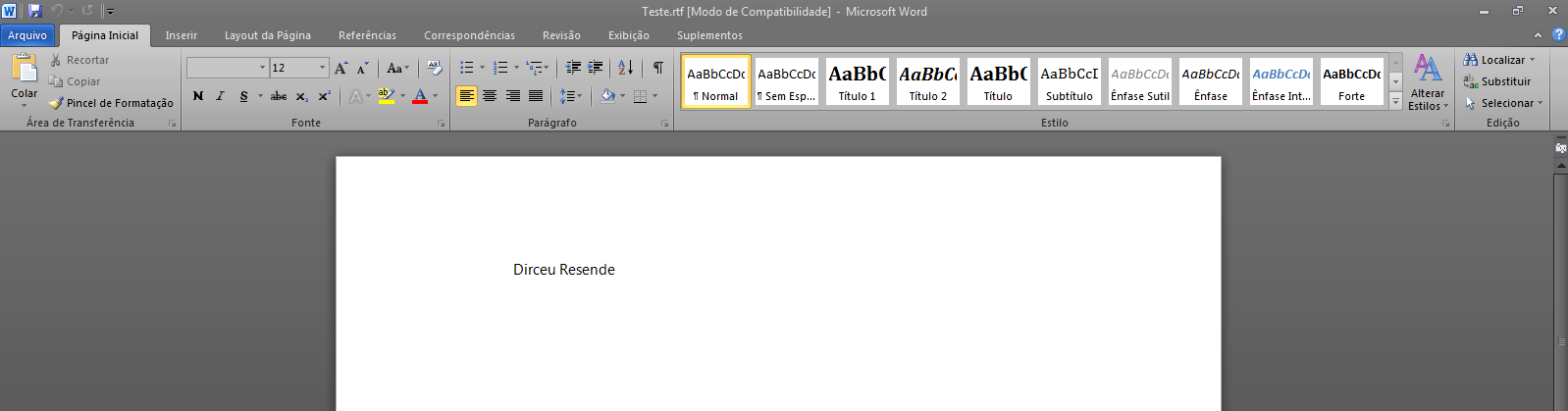
Viewing RTF content in Word
The solution with Powershell
If you don't want to use the CLR (C#) to perform this task, don't worry. It is also possible to do this using Powershell (Posh) and you can integrate it with SQL Server in several ways using xp_cmdshell and exporting the result to text or capturing the powershell return.
The Powershell script is very simple. Remember that simple C# script that I posted at the beginning of the post and that I didn't want to implement in the CLR pro because of the Windows.Forms dependencies? So.. In powershell this is not a problem.. 🙂
Powershell source code:
[Reflection.Assembly]::LoadWithPartialName("System.Windows.Forms") | Out-Null
$Rtb = New-Object -TypeName System.Windows.Forms.RichTextBox

$stringRTF = "{\rtf1\ansi\ansicpg1252\fromhtml1 \fbidis \deff0{\fonttbl {\f0\fswiss Arial;} {\f1\fmodern Courier New;} {\f2\fnil\fcharset2 Symbol;} {\f3\fmodern\fcharset0 Courier New;} {\f4\fswiss Segoe UI;}} {\colortbl\red0\green0\blue0;\red0\green0\blue255;\red0\green0\blue0;} \uc1\pard\plain\deftab360 \f0\fs24  {\*\htmltag0 \par } {\*\htmltag48 }{\*\htmltag64}\htmlrtf {\htmlrtf0  {\*\htmltag148 }\htmlrtf {\cf2 \fs20 \f4 \htmlrtf0  {\*\htmltag4 \par }\htmlrtf }\htmlrtf0 {\*\htmltag72}\htmlrtf}\htmlrtf0  {\*\htmltag96 }\htmlrtf {\ltrpar\ltrch\ql \htmlrtf0 {\*\htmltag64}\htmlrtf {\htmlrtf0 \htmlrtf {\cf2 \fs20 \f4 \htmlrtf0 Dirceu Resende\htmlrtf }\htmlrtf0 {\*\htmltag72}\htmlrtf\par}\htmlrtf0  {\*\htmltag104 }\htmlrtf }\htmlrtf0  {\*\htmltag248 } {\*\htmltag58 }}"
$Rtb.Rtf = $stringRTF
$Retorno = $Rtb.Text

Write-Host($Retorno)
Powershell execution result
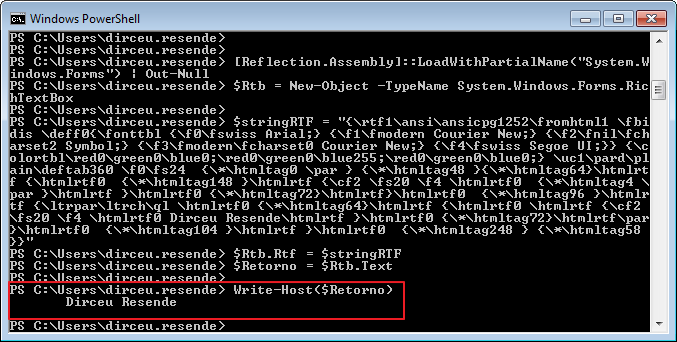
Example 1:
With this, you can use xp_cmdshell to run your Powershell as needed:
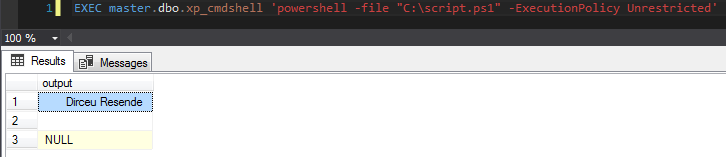
Example using PowerShell's -File and entering the path of a file that I previously created with the Posh commands demonstrated above
Example 2
DECLARE
    @StringRTF VARCHAR(MAX),
    @Posh VARCHAR(8000)

SET @StringRTF = '{\rtf1\ansi\ansicpg1252\fromhtml1 \fbidis \deff0{\fonttbl {\f0\fswiss Arial;} {\f1\fmodern Courier New;} {\f2\fnil\fcharset2 Symbol;} {\f3\fmodern\fcharset0 Courier New;} {\f4\fswiss Segoe UI;}} {\colortbl\red0\green0\blue0;\red0\green0\blue255;\red0\green0\blue0;} \uc1\pard\plain\deftab360 \f0\fs24  {\*\htmltag0 \par } {\*\htmltag48 }{\*\htmltag64}\htmlrtf {\htmlrtf0  {\*\htmltag148 }\htmlrtf {\cf2 \fs20 \f4 \htmlrtf0  {\*\htmltag4 \par }\htmlrtf }\htmlrtf0 {\*\htmltag72}\htmlrtf}\htmlrtf0  {\*\htmltag96 }\htmlrtf {\ltrpar\ltrch\ql \htmlrtf0 {\*\htmltag64}\htmlrtf {\htmlrtf0 \htmlrtf {\cf2 \fs20 \f4 \htmlrtf0 Dirceu Resende\htmlrtf }\htmlrtf0 {\*\htmltag72}\htmlrtf\par}\htmlrtf0  {\*\htmltag104 }\htmlrtf }\htmlrtf0  {\*\htmltag248 } {\*\htmltag58 }}'
SET @Posh = 'powershell.exe -ExecutionPolicy ByPass -Command "Add-Type -AssemblyName System.Windows.Forms; $Rtb = New-Object -TypeName System.Windows.Forms.RichTextBox; $stringRTF = ''' + @StringRTF + '''; $Rtb.Rtf = $stringRTF; $Retorno = $Rtb.Text; Write-Host($Retorno);"'


IF (OBJECT_ID('tempdb..#Retorno') IS NOT NULL) DROP TABLE #Retorno
CREATE TABLE #Retorno (
    Texto VARCHAR(MAX)
)

INSERT INTO #Retorno
EXEC master.dbo.xp_cmdshell @Posh

SELECT *
FROM #Retorno
Result:
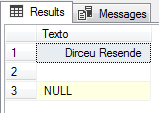
Example using PowerShell's -Command and entering the parameters manually
That's it, folks!
I hope you enjoyed the post and see you next time.
sql server clr convert convert remove remove rdf rich text format tags strings to plain text plain text c# csharp powershell posh ps
sql server clr convert convert remove remove rdf rich text format tags strings to plain text plain text c# csharp powershell posh ps

Comentários (0)
Carregando comentários…