
Hey guys,
Good afternoon!
In this post I will demonstrate to you how to find out when the SQL Server instance was installed (installation date), information that is very useful for system inventory or for you to know when the evaluation version you installed will expire.
There are several ways to identify the SQL Server installation date, but I will only demonstrate the most popular ones.
-- Utilizando a server_principals
SELECT create_date AS 'SQL Server Installation Date'
FROM sys.server_principals
WHERE sid = 0x010100000000000512000000 -- NT AUTHORITY\SYSTEM


-- Utilizando a syslogins
SELECT createdate as 'SQL Server Installation Date'
FROM sys.syslogins
WHERE sid = 0x010100000000000512000000 -- NT AUTHORITY\SYSTEM


-- Obtendo mais informações da instalação
SELECT
    SERVERPROPERTY('productversion') AS ProductVersion,
    SERVERPROPERTY('productlevel') AS ProductLevel,
    SERVERPROPERTY('edition') AS Edition,
    SERVERPROPERTY('MachineName') AS MachineName,
    SERVERPROPERTY('LicenseType') AS LicenseType,
    SERVERPROPERTY('NumLicenses') AS NumLicenses,
    create_date AS 'SQL Server Installation Date'
FROM
    sys.server_principals
WHERE
    sid = 0x010100000000000512000000; -- NT AUTHORITY\SYSTEM
Result of queries:
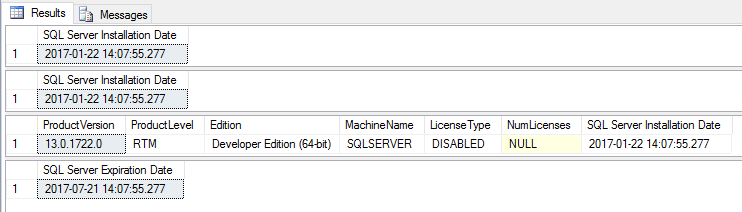
If you want to know when your trial version of SQL Server will expire, just run the query below:
-- Verificando a data de expiração do SQL Server (180 dias após instalação)
SELECT
    @@SERVERNAME AS Server_Name,
    create_date as 'SQL Server Installation Date',
    DATEADD(DAY, 180, create_date) as 'SQL Server Expiration Date',
    DATEDIFF(DAY, create_date, GETDATE()) AS Days_Used,
    DATEDIFF(DAY, GETDATE(), DATEADD(DAY, 180, create_date)) AS Days_Left
FROM
    sys.server_principals
WHERE
    sid = 0x010100000000000512000000 -- NT AUTHORITY\SYSTEM
Query result:

That's it, folks!
A hug and see you in the next post.

Comentários (0)
Carregando comentários…