
Hey guys!
Good morning.
In this post I will demonstrate how to export the result of a query to a string in HTML format, so that you can send the query result by email in a way that is visually nice. I had already done something similar in the post How to export data from a SQL Server table to HTML, but in this post I will bring an even more complete, customizable and practical solution, using the CLR.
I ended up choosing to use the CLR for this solution because I prefer to work with a function instead of a Stored Procedure when I need to format and convert strings, precisely because I can use it in SELECT, UPDATE, etc. more easily. As I need to use dynamic query for this, it is not possible to do it with a scalar-function in Transact-SQL, while in a CLR Scalar-function this is possible.
Prerequisites for using the function
Utils.cs Class
In this class, I will add some generic functions, which I use in several other SP’s and CLR routines and therefore, can be reused.
using System.Data;
using System.Data.SqlClient;
namespace Bibliotecas.Model
{
    public static class Utils
    {

        public static bool QueryPerigosa(string dsQuery)
        {

            var query = dsQuery.ToUpper();

            if (query.Contains("INSERT "))
                return true;

            if (query.Contains("INTO "))
                return true;

            if (query.Contains("DELETE "))
                return true;

            if (query.Contains("TRUNCATE "))
                return true;

            if (query.Contains("UPDATE "))
                return true;

            if (query.Contains("DROP "))
                return true;

            if (query.Contains("ALTER "))
                return true;

            if (query.Contains("CREATE "))
                return true;

            if (query.Contains("DBCC "))
                return true;

            if (query.Contains("EXEC "))
                return true;

            if (query.Contains("BACKUP "))
                return true;

            if (query.Contains("RESTORE "))
                return true;

            if (query.Contains("GRANT "))
                return true;

            if (query.Contains("REVOKE "))
                return true;

            if (query.Contains("DISABLE "))
                return true;

            if (query.Contains("sp_"))
                return true;


            return false;

        }


        public static DataTable ExecutaQueryRetornaDataTable(string dsServidor, string dsQuery)
        {

            using (var con = new SqlConnection(Servidor.Localhost.Replace("LOCALHOST", dsServidor)))
            {

                con.Open();

                using (var cmd = new SqlCommand(dsQuery, con))
                {

                    using (var sda = new SqlDataAdapter(cmd))
                    {

                        var dt = new DataTable();
                        sda.Fill(dt);

                        return dt;

                    }

                }

            }

        }


        public static string ExecutaQueryScalar(string dsServidor, string dsQuery)
        {

            string retorno;

            using (var con = new SqlConnection(Servidor.Localhost.Replace("LOCALHOST", dsServidor)))
            {

                con.Open();

                using (var cmd = new SqlCommand(dsQuery, con))
                {
                    retorno = (cmd.ExecuteScalar() == null) ? "" : cmd.ExecuteScalar().ToString();
                }
            }

            return retorno;

        }

    }

}
Server.cs Class
In this class, I use configurations to store connection strings and general methods for identifying the server I am currently connected to using the CLR.
using System;
using System.Collections.Generic;
using System.Data.SqlClient;

namespace Bibliotecas.Model
{

    public class ServidorAtual
    {

        public string NomeServidor { get; set; }

        public ServidorAtual()
        {

            try
            {

                using (var conn = new SqlConnection(Servidor.Context))
                {

                    conn.Open();

                    using (var cmd = conn.CreateCommand())
                    {
                        cmd.CommandText = "SELECT @@SERVERNAME AS InstanceName";
                        NomeServidor = (string) cmd.ExecuteScalar();
                    }

                    var partes = NomeServidor.Split('\\');

                    if (partes.Length <= 1) return;
                    if (string.Equals(partes[0], partes[1], StringComparison.CurrentCultureIgnoreCase))
                        NomeServidor = partes[0];
                }

            }
            catch (Exception ex)
            {
                throw ex;
            }
        }

    }


    public static class Servidor
    {

        public static string Ds_Usuario => "usuario";
        public static string Ds_Senha => "senha";

        public static string Context => "context connection=true";
        public static string Localhost => "data source=LOCALHOST;initial catalog=CLR;Application Name=SQLCLR;persist security info=False;Enlist=False;packet size=4096;user id='" + Ds_Usuario + "';password='" + Ds_Senha + "'";

        public static string getLocalhost()
        {

            var servidorAtual = new ServidorAtual().NomeServidor;
            return "data source=" + servidorAtual + ";initial catalog=CLR;Application Name=SQLCLR;persist security info=False;Enlist=False;packet size=4096;user id='" + Ds_Usuario + "';password='" + Ds_Senha + "'";

        }

        public static List<string> Servidores
        {
            get
            {
                var servidores = new List<string>
                {
                    Localhost
                };

                return servidores;

            }
        }

    }

}
How to export the result of a query to HTML
Now that the prerequisites have been met, let's move on to the source code of the main class, which is the reason for this post.
fncExporta_Query_HTML.cs
using System.Data;
using System.Data.SqlTypes;
using Bibliotecas.Model;
using Microsoft.SqlServer.Server;

public partial class UserDefinedFunctions
{
    [Microsoft.SqlServer.Server.SqlFunction(
        DataAccess = DataAccessKind.Read,
        SystemDataAccess = SystemDataAccessKind.Read
    )]
    public static SqlString fncExporta_Query_HTML(SqlString Ds_Query, SqlString Ds_Titulo, SqlInt32 Fl_Estilo, SqlBoolean Fl_Html_Completo)
    {

        if (Ds_Query.IsNull)
            return SqlString.Null;


        var titulo = Ds_Titulo.IsNull ? "" : Ds_Titulo.Value;


        if (Utils.QueryPerigosa(Ds_Query.Value))
            return "Query perigosa";


        var estilo = 1;

        if (!Fl_Estilo.IsNull)
            estilo = Fl_Estilo.Value;


        var servidor = new ServidorAtual().NomeServidor;

        using (var dados = Utils.ExecutaQueryRetornaDataTable(servidor, Ds_Query.Value))
        {

            var retorno = criaHtmlCabecalho(estilo, Fl_Html_Completo.Value);


            retorno += @"
        <table>";


            if (titulo.Length > 0)
            {

                retorno += @"
            <tbody>

                <tr>
                    <th colspan='" + dados.Columns.Count + @"'>" + titulo + @"</th>
                </tr>

                <tr class='subtitulo'>";


                for (var i = 0; i < dados.Columns.Count; i++)
                {
                    retorno += @"
                    <td>" + dados.Columns[i].ColumnName + "</td>";
                }

                retorno += @"
                </tr>";


            }
            else
            {


                retorno += @"
            <thead>
                <tr>";


                for (var i = 0; i < dados.Columns.Count; i++)
                {
                    retorno += @"
                    <th>" + dados.Columns[i].ColumnName + "</th>";
                }


                retorno += @"
                </tr>
            </thead>

            <tbody>";


            }


            foreach (DataRow linha in dados.Rows)
            {

                retorno += @"
                <tr>";


                foreach (DataColumn coluna in dados.Columns)
                {

                    retorno += @"
                    <td>" + linha[coluna.ColumnName] + "</td>";

                }


                retorno += @"
                </tr>";


            }


            retorno += @"
            </tbody>
        </table>";


            retorno += criaHtmlRodape(Fl_Html_Completo.Value);


            return retorno;

        }

    }


    private static string aplicaEstilo(int estilo)
    {

        var servidor = new ServidorAtual().NomeServidor;
        var dsQuery = "SELECT Ds_CSS FROM dbo.HTML_Layout_CSS WHERE Id_Layout = " + estilo;
        var html = Utils.ExecutaQueryScalar(servidor, dsQuery);

        if (string.IsNullOrEmpty(html))
        {

            html = @"
	table { padding:0; border-spacing: 0; border-collapse: collapse; }
	thead { background: #00B050; border: 1px solid #ddd; }
	th { padding: 10px; font-weight: bold; border: 1px solid #000; color: #fff; }
	tr { padding: 0; }
	td { padding: 5px; border: 1px solid #cacaca; margin:0; }";

        }


        return html;

    }


    private static string criaHtmlCabecalho(int estilo, bool Fl_Html_Completo)
    {

        var retorno = "";

        if (Fl_Html_Completo)
        {

            retorno = @"<html>
    <head>
	    <title>Titulo</title>";

        }


        retorno += @"
        <style type='text/css'>";


        retorno += aplicaEstilo(estilo);


        retorno += @"
        </style>";


        if (Fl_Html_Completo)
        {

            retorno += @"
    </head>

    <body>";

        }

        return retorno;

    }


    private static string criaHtmlRodape(bool Fl_Html_Completo)
    {

        var retorno = "";

        if (Fl_Html_Completo)
        {

            retorno += @"
    </body>

</html>";

        }

        return retorno;

    }

}
The cool thing about this function is that the style of the generated HTML is customizable through a table in the database, which is dbo.HTML_Layout_CSS. You can create various formatting using CSS rules and use them in this function to generate personalized emails. If the table does not have any records, the function already applies a default style (but you need to at least create this table in the database that your CLR will use).
Below is the table creation script and some examples of how to customize the styles:
CREATE TABLE dbo.HTML_Layout_CSS (
    Id_Layout INT IDENTITY(1, 1) NOT NULL PRIMARY KEY,
    Nm_Layout VARCHAR(100) NOT NULL UNIQUE,
    Ds_CSS VARCHAR(MAX) NOT NULL
)

INSERT INTO dbo.HTML_Layout_CSS ( Nm_Layout, Ds_CSS )
SELECT 'Layout Fundo Preto Letra Branca', '
table { padding:0; border-spacing: 0; border-collapse: collapse; }
th { padding: 10px; font-weight: bold; border: 1px solid #cacaca; color: #fff; background: #000; }
tr { padding: 0; }
.subtitulo td { border: 1px solid #cacaca; color: #fff; background: #8c8989; }
td { padding: 5px; border: 1px solid #cacaca; margin:0; }'


INSERT INTO dbo.HTML_Layout_CSS ( Nm_Layout, Ds_CSS )
SELECT 'Layout Fundo Verde Letra Branca', '
table { padding:0; border-spacing: 0; border-collapse: collapse; }
th { padding: 10px; font-weight: bold; border: 1px solid #000; color: #fff; background: #67ca1c; }
tr { padding: 0; }
.subtitulo td { border: 1px solid #cacaca; color: #fff; background: #000000; }
td { padding: 5px; border: 1px solid #cacaca; margin:0; }'
Function usage parameters
– Ds_Query: Query that will be used to query the results that will be exported to HTML
– Ds_Titulo: String that will be used as the title of the generated HTML table. If you don't want to use it, just enter the empty string
– Fl_Style: Number that indicates the Id_Layout of the dbo.HTML_Layout_CSS table that will be used to format the generated HTML
– Fl_Html_Complete: Boolean flag (0 or 1) that indicates whether the complete HTML (html, body, etc.) or just the table HTML will be generated
Usage examples
Simple use – Just generating the HTML
DECLARE
    @HTML VARCHAR(MAX),
    @Query VARCHAR(MAX) = 'SELECT * FROM msdb.INFORMATION_SCHEMA.TABLES WHERE TABLE_TYPE = ''VIEW'' ORDER BY TABLE_NAME'

SET @HTML = CLR.dbo.fncExporta_Query_HTML(@Query, 'Teste com Titulo', 1, 1)

PRINT @HTML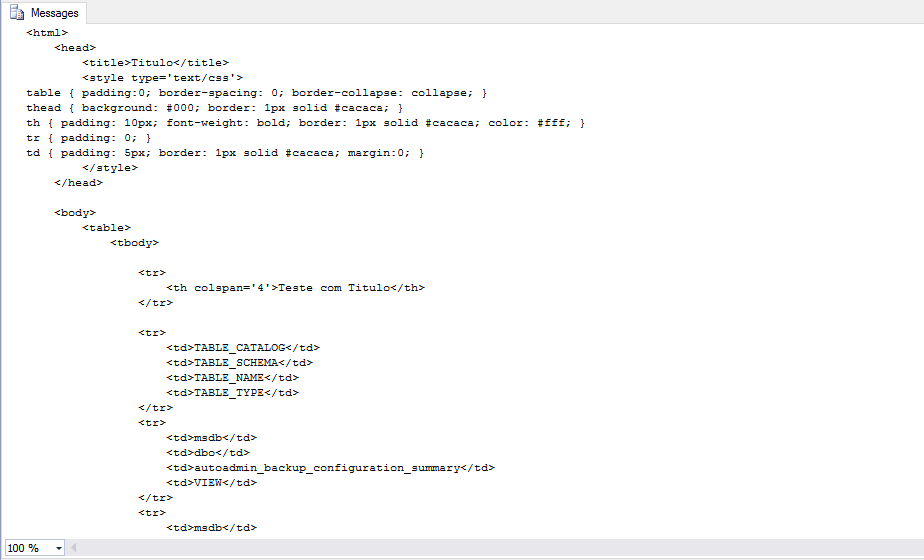
Writing generated HTML to disk
DECLARE
    @HTML VARCHAR(MAX),
    @Query VARCHAR(MAX) = 'SELECT * FROM msdb.INFORMATION_SCHEMA.TABLES WHERE TABLE_TYPE = ''VIEW'' ORDER BY TABLE_NAME'

SET @HTML = CLR.dbo.fncExporta_Query_HTML(@Query, 'Teste com Titulo', 2, 1)

EXEC CLR.dbo.stpEscreve_Arquivo
    @Ds_Texto = @HTML, -- nvarchar(max)
    @Ds_Caminho = N'C:\Users\dirceu\Documents\Teste.html', -- nvarchar(max)
    @Ds_Codificacao = N'UTF-8', -- nvarchar(max)
    @Ds_Formato_Quebra_Linha = N'windows', -- nvarchar(max)
    @Fl_Append = 0 -- bit
* The code of stpWrite_File you can find it in the post SQL Server – How to list, read, write, copy, delete and move files with the CLR (C#).

Writing the HTML of two queries to disk
-- Executa a 1a query
DECLARE
    @HTML VARCHAR(MAX),
    @Query VARCHAR(MAX) = 'SELECT TOP 5 * FROM msdb.INFORMATION_SCHEMA.TABLES WHERE TABLE_TYPE = ''VIEW'' ORDER BY TABLE_NAME'

SET @HTML = CLR.dbo.fncExporta_Query_HTML(@Query, 'Views do MSDB', 2, 1)

-- Adiciona espaçamento
SET @HTML += '<br/><br/>'

-- Executa a 2a query
SET @Query = 'SELECT TOP 5 * FROM msdb.INFORMATION_SCHEMA.TABLES WHERE TABLE_TYPE = ''BASE TABLE'' ORDER BY TABLE_NAME'
SET @HTML += CLR.dbo.fncExporta_Query_HTML(@Query, 'Tabelas do MSDB', 2, 0) -- na 2a query não precisa do HTML completo

-- Grava a string HTML no disco
EXEC CLR.dbo.stpEscreve_Arquivo
    @Ds_Texto = @HTML, -- nvarchar(max)
    @Ds_Caminho = N'C:\Users\dirceu\Documents\Teste.html', -- nvarchar(max)
    @Ds_Codificacao = N'UTF-8', -- nvarchar(max)
    @Ds_Formato_Quebra_Linha = N'windows', -- nvarchar(max)
    @Fl_Append = 0 -- bit
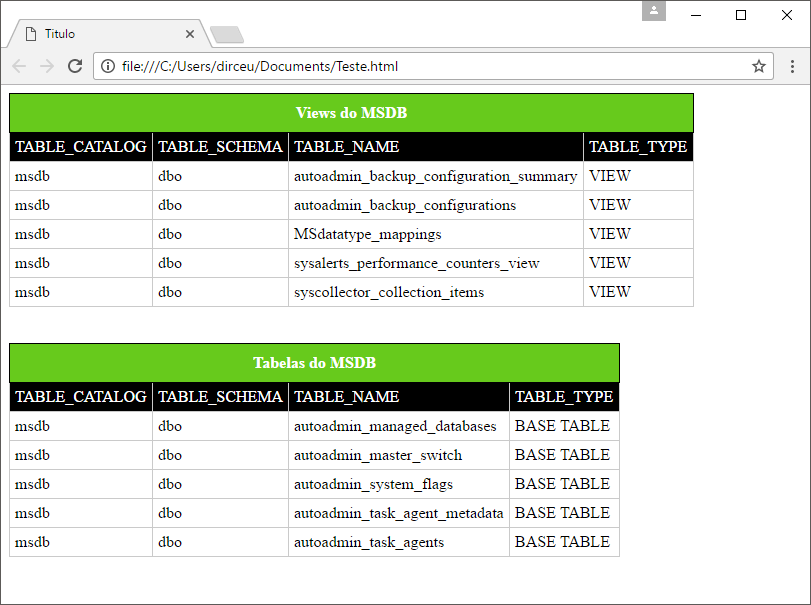
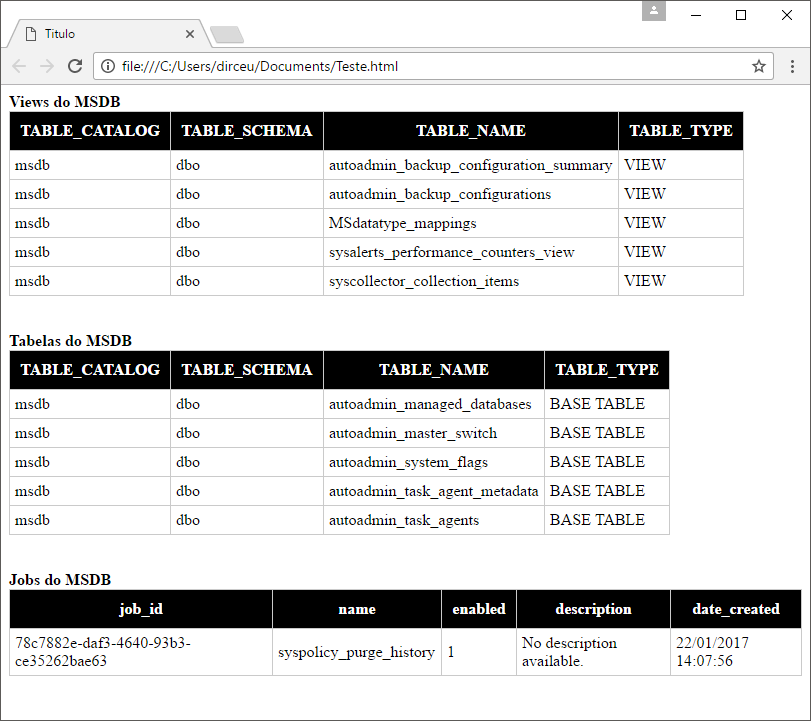
Saving the HTML of three queries to disk, without a title, using another style and sending it by email
DECLARE @Query VARCHAR(MAX)

-- Executa a 1a query
SET @Query = 'SELECT TOP 5 * FROM msdb.INFORMATION_SCHEMA.TABLES WHERE TABLE_TYPE = ''VIEW'' ORDER BY TABLE_NAME'
DECLARE @HTML1 VARCHAR(MAX) = CLR.dbo.fncExporta_Query_HTML(@Query, '', 1, 1)

-- Executa a 2a query
SET @Query = 'SELECT TOP 5 * FROM msdb.INFORMATION_SCHEMA.TABLES WHERE TABLE_TYPE = ''BASE TABLE'' ORDER BY TABLE_NAME'
DECLARE @HTML2 VARCHAR(MAX) = CLR.dbo.fncExporta_Query_HTML(@Query, '', 1, 0) -- na 2a query não precisa do HTML completo

-- Executa a 3a query
SET @Query = 'SELECT TOP 5 job_id, name, enabled, description, date_created FROM msdb.dbo.sysjobs ORDER BY name'
DECLARE @HTML3 VARCHAR(MAX) = CLR.dbo.fncExporta_Query_HTML(@Query, '', 1, 0)

-- Monta o HTML
DECLARE @HTML VARCHAR(MAX) = '
<strong>Views do MSDB</strong>' + @HTML1 + '

<br/><br/>

<strong>Tabelas do MSDB</strong>' + @HTML2 + '

<br/><br/>

<strong>Jobs do MSDB</strong>' + @HTML3

-- Grava a string HTML no disco
EXEC CLR.dbo.stpEscreve_Arquivo
    @Ds_Texto = @HTML, -- nvarchar(max)
    @Ds_Caminho = N'C:\Users\dirceu\Documents\Teste.html', -- nvarchar(max)
    @Ds_Codificacao = N'UTF-8', -- nvarchar(max)
    @Ds_Formato_Quebra_Linha = N'windows', -- nvarchar(max)
    @Fl_Append = 0 -- bit

-- Envia o e-mail
EXEC msdb.dbo.sp_send_dbmail
    @profile_name = 'ProfileEnvioEmail', -- sysname
    @recipients = '[email protected]', -- varchar(max)
    @subject = N'Teste de e-mail', -- nvarchar(255)
    @body = @HTML, -- nvarchar(max)
    @body_format = 'HTML'
If you haven't configured your instance's Database Mail or need help configuring it, see more by accessing the post SQL Server – How to activate and configure Database mail to send and monitor emails through the database (sp_send_dbmail).
I hope you enjoyed this post and until the next one.

Comments (0)
Loading comments...