
Hey guys,
How are you?
In this post, I will demonstrate how to identify and monitor the total, free and used disk space of your instance's databases. This post is a complement to my post SQL Server – How to identify and monitor disks, total, free and used disk space, where I demonstrated how to identify, analyze, and monitor disk space on disk drives.
How to identify the total, free and used space of databases
For this need, I will use views:
- sys.master_files: Information from your database datafiles
- sys.databases: Database information
- sys.dm_os_volume_stats: DMV that shows information about the physical disks of a datafile
To create the script below, I decided to do some validations on the information in the view, since some situations end up generating imprecise and incorrect information when monitoring. These validations are:
- If the maximum datafile size is greater than the maximum disk size, the actual maximum datafile size will be the maximum disk size and not the datafile size
- If the maximum datafile size is set to “Unlimited”, the actual maximum datafile size will be the maximum disk size and the datafile free space will be the free space of the disk where the datafile is located
- If the datafile growth is configured as a percentage, some columns will not be calculated, leaving the value NULL (growth_times)
View source code
IF (OBJECT_ID('tempdb..#Datafile_Size ') IS NOT NULL) DROP TABLE #Datafile_Size
SELECT
    B.database_id AS database_id,
    B.[name] AS [database_name],
    A.state_desc,
    A.[type_desc],
    A.[file_id],
    A.[name],
    A.physical_name,
    CAST(C.total_bytes / 1073741824.0 AS NUMERIC(18, 2)) AS disk_total_size_GB,
    CAST(C.available_bytes / 1073741824.0 AS NUMERIC(18, 2)) AS disk_free_size_GB,
    CAST(A.size / 128 / 1024.0 AS NUMERIC(18, 2)) AS size_GB,
    CAST(A.max_size / 128 / 1024.0 AS NUMERIC(18, 2)) AS max_size_GB,
    CAST(
        (CASE
	    WHEN A.growth <= 0 THEN A.size / 128 / 1024.0
            WHEN A.max_size <= 0 THEN C.total_bytes / 1073741824.0
            WHEN A.max_size / 128 / 1024.0 > C.total_bytes / 1073741824.0 THEN C.total_bytes / 1073741824.0
            ELSE A.max_size / 128 / 1024.0
        END) AS NUMERIC(18, 2)) AS max_real_size_GB,
    CAST(NULL AS NUMERIC(18, 2)) AS free_space_GB,
    (CASE WHEN A.is_percent_growth = 1 THEN A.growth ELSE CAST(A.growth / 128 AS NUMERIC(18, 2)) END) AS growth_MB,
    A.is_percent_growth,
	(CASE WHEN A.growth <= 0 THEN 0 ELSE 1 END) AS is_autogrowth_enabled,
    CAST(NULL AS NUMERIC(18, 2)) AS percent_used,
    CAST(NULL AS INT) AS growth_times
INTO
    #Datafile_Size
FROM
    sys.master_files        A   WITH(NOLOCK)
    JOIN sys.databases      B   WITH(NOLOCK)    ON  A.database_id = B.database_id
    CROSS APPLY sys.dm_os_volume_stats(A.database_id, A.[file_id]) C


UPDATE A
SET
    A.free_space_GB = (
    (CASE
        WHEN max_size_GB <= 0 THEN A.disk_free_size_GB
        WHEN max_real_size_GB > disk_free_size_GB THEN A.disk_free_size_GB
        ELSE max_real_size_GB - size_GB
    END)),
    A.percent_used = (size_GB / (CASE WHEN max_real_size_GB > disk_total_size_GB THEN A.disk_total_size_GB ELSE max_real_size_GB END)) * 100
FROM
    #Datafile_Size A


UPDATE A
SET
    A.growth_times =
    (CASE
        WHEN A.growth_MB <= 0 THEN 0
        WHEN A.is_percent_growth = 0 THEN (A.max_real_size_GB - A.size_GB) / (A.growth_MB / 1024.0)
        ELSE NULL
    END)
FROM
    #Datafile_Size A


SELECT *
FROM #Datafile_Size
Script result:

Columns returned:
| Column | Description |
|---|---|
| database_id | Database ID generated by the SQL Server engine |
| database_name | Database name |
| state_desc | Database status. Possible values: 0 = ONLINE 1 = RESTORING 2 = RECOVERING | SQL Server 2008 to current version 3 = RECOVERY_PENDING | SQL Server 2008 to current version 4 = SUSPECT 5 = EMERGENCY | SQL Server 2008 to current version 6 = OFFLINE | SQL Server 2008 to current version 7 = COPYING | Azure SQL Database 10 = OFFLINE_SECONDARY | Azure SQL Database |
| type_desc | Datafile type: ROWS = Data Datafile LOG = Datafile of transaction log data |
| file_id | Datafile ID generated by the SQL Server engine |
| name | Datafile name |
| physical_name | Physical path of the datafile on disk |
| disk_total_size_GB | Total size in GB of the physical disk where the datafile is located |
| disk_free_size_GB | Free space in GB of the physical disk where the datafile is located |
| size_GB | Current (used) size in GB of the database |
| max_size_GB | Maximum size in GB of the datafile, as configured in Autogrowth. If Autogrowth is disabled, it will show 0.00. If the Autogrowth limit is configured as "Unlimited", this column will display negative values or 2048 GB, depending on the version of your SQL Server. |
| max_real_size_GB | REAL maximum size in GB of the datafile. As already explained above, some validations are carried out to obtain the real size of the datafile, as in some situations, the maximum size of the datafile that the view returns is not the real one. |
| free_space_GB | Free size in GB of the datafile |
| growth_MB | Size in MB that the datafile will grow due to Autogrowth events. If Autogrowth is disabled, it will show 0.00. |
| is_percent_growth | Boolean column that informs whether the datafile growth format is configured for a size in MB (value 0) or a value in percentage (value 1) |
| is_autogrowth_enabled | Boolean column that informs whether the datafile's Autogrowth is enabled (value 1) or disabled (value 0) |
| percent_used | Returns the percentage value of datafile space usage |
| growth_times | Returns the number of times the datafile can grow through autogrowth events. This column is only calculated if the autogrowth type is set to grow by size. If autogrowth is configured to grow by percentage, this column will have the value filled with NULL. |
How to monitor total, free and used space in databases
Guys, now that I've demonstrated how to check the disk space of your datafiles (there are several others on the internet), I'm going to show you how to monitor the disk space of your instances' datafiles and send alerts via email.
To help generate HTML codes, I will use stpExporta_Table_HTML_Output, but I could also use fncExporta_Query_HTML, available at:
- SQL Server – How to send the result of a query by email in HTML format using the CLR (C#)
- How to export data from a SQL Server table to HTML
To send the email, I will use the Stored Procedure msdb.dbo.sp_send_dbmail, from SQL Server DatabaseMail. If you haven't configured it yet or didn't know how to do it, find out more by accessing the post SQL Server – How to activate and configure Database mail to send and monitor emails through the database (sp_send_dbmail).
Monitoring source code
IF (OBJECT_ID('dbo.stpMonitoramento_Tamanho_Datafiles') IS NULL) EXEC('CREATE PROCEDURE dbo.stpMonitoramento_Tamanho_Datafiles AS SELECT 1')
GO

ALTER PROCEDURE dbo.stpMonitoramento_Tamanho_Datafiles (
    @Vl_Limite FLOAT = 80
)
AS BEGIN

    ------------------------------------------------------------------------------------------------
    -- IDENTIFICAÇÃO DO ESPAÇO UTILIZADO PELOS DATAFILES
    ------------------------------------------------------------------------------------------------

    IF (OBJECT_ID('tempdb..#Monitor_Datafile_Size') IS NOT NULL) DROP TABLE #Monitor_Datafile_Size
    SELECT
        B.database_id AS database_id,
        B.[name] AS [database_name],
        A.state_desc,
        A.[type_desc],
        A.[file_id],
        A.[name],
        A.physical_name,
        CAST(C.total_bytes / 1073741824.0 AS NUMERIC(18, 2)) AS disk_total_size_GB,
        CAST(C.available_bytes / 1073741824.0 AS NUMERIC(18, 2)) AS disk_free_size_GB,
        CAST(A.size / 128 / 1024.0 AS NUMERIC(18, 2)) AS size_GB,
        CAST(A.max_size / 128 / 1024.0 AS NUMERIC(18, 2)) AS max_size_GB,
        CAST(
            (CASE
                WHEN A.growth <= 0 THEN A.size / 128 / 1024.0
                WHEN A.max_size <= 0 THEN C.total_bytes / 1073741824.0
                WHEN A.max_size / 128 / 1024.0 > C.total_bytes / 1073741824.0 THEN C.total_bytes / 1073741824.0
                ELSE A.max_size / 128 / 1024.0
            END) AS NUMERIC(18, 2)) AS max_real_size_GB,
        CAST(NULL AS NUMERIC(18, 2)) AS free_space_GB,
        (CASE WHEN A.is_percent_growth = 1 THEN A.growth ELSE CAST(A.growth / 128 AS NUMERIC(18, 2)) END) AS growth_MB,
        A.is_percent_growth,
        (CASE WHEN A.growth <= 0 THEN 0 ELSE 1 END) AS is_autogrowth_enabled,
        CAST(NULL AS NUMERIC(18, 2)) AS percent_used,
        CAST(NULL AS INT) AS growth_times
    INTO
        #Monitor_Datafile_Size
    FROM
        sys.master_files        A   WITH(NOLOCK)
        JOIN sys.databases      B   WITH(NOLOCK)    ON  A.database_id = B.database_id
        CROSS APPLY sys.dm_os_volume_stats(A.database_id, A.[file_id]) C


    UPDATE A
    SET
        A.free_space_GB = (
        (CASE
            WHEN max_size_GB <= 0 THEN A.disk_free_size_GB
            WHEN max_real_size_GB > disk_free_size_GB THEN A.disk_free_size_GB
            ELSE max_real_size_GB - size_GB
        END)),
        A.percent_used = (size_GB / (CASE WHEN max_real_size_GB > disk_total_size_GB THEN A.disk_total_size_GB ELSE max_real_size_GB END)) * 100
    FROM
        #Monitor_Datafile_Size A


    UPDATE A
    SET
        A.growth_times =
        (CASE
            WHEN A.growth_MB <= 0 THEN 0
            WHEN A.is_percent_growth = 0 THEN (A.max_real_size_GB - A.size_GB) / (A.growth_MB / 1024.0)
            ELSE NULL
        END)
    FROM
        #Monitor_Datafile_Size A


    IF (OBJECT_ID('tempdb..##Monitoramento_Datafile_Size') IS NOT NULL) DROP TABLE ##Monitoramento_Datafile_Size
    SELECT
        A.[database_name],
        A.[name],
        A.[type_desc],
        A.size_GB,
        A.max_real_size_GB ,
        A.free_space_GB,
        A.growth_MB,
        A.growth_times,
        A.percent_used
    INTO
        ##Monitoramento_Datafile_Size
    FROM
        #Monitor_Datafile_Size A
    WHERE
        percent_used >= @Vl_Limite


    ------------------------------------------------------------------------------------------------
    -- GERAÇÃO DOS ALERTAS
    ------------------------------------------------------------------------------------------------

    IF (OBJECT_ID('dbo.Historico_Tamanho_Datafile') IS NULL)
    BEGIN

        CREATE TABLE dbo.Historico_Tamanho_Datafile (
            Id_Evento INT IDENTITY(1, 1) NOT NULL,
            Dt_Evento DATETIME DEFAULT GETDATE() NOT NULL,
            Nm_Database VARCHAR(256) NOT NULL,
            Nm_Datafile VARCHAR(256) NOT NULL,
            Ds_Tipo VARCHAR(10) NOT NULL,
            Qt_Tamanho NUMERIC(18, 2) NOT NULL,
            Qt_Tamanho_Maximo NUMERIC(18, 2) NOT NULL,
            Qt_Espaco_Livre NUMERIC(18, 2) NOT NULL,
            Qt_Aumento_Autogrowth INT NOT NULL,
            Qt_Vezes_Autogrowth INT NULL,
            Pr_Utilizacao NUMERIC(5, 2)
        )

    END


    IF ((SELECT COUNT(*) FROM ##Monitoramento_Datafile_Size) > 0)
    BEGIN


        INSERT INTO dbo.Historico_Tamanho_Datafile (
            Nm_Database,
            Nm_Datafile,
            Ds_Tipo,
            Qt_Tamanho,
            Qt_Tamanho_Maximo,
            Qt_Espaco_Livre,
            Qt_Aumento_Autogrowth,
            Qt_Vezes_Autogrowth,
            Pr_Utilizacao
        )
        SELECT
            A.[database_name],
            A.[name],
            A.[type_desc],
            A.size_GB,
            A.max_real_size_GB ,
            A.free_space_GB,
            A.growth_MB,
            A.growth_times,
            A.percent_used
        FROM
            ##Monitoramento_Datafile_Size A


        DECLARE
            @Ds_Saida VARCHAR(MAX),
            @Assunto VARCHAR(200) = @@SERVERNAME + ' - Monitoramento de Espaço dos Datafiles',
            @Destinatario VARCHAR(MAX) = 'meu_email@gmail.com',
            @Mensagem VARCHAR(MAX)


        EXEC dbo.stpExporta_Tabela_HTML_Output
            @Ds_Tabela = '##Monitoramento_Datafile_Size', -- varchar(max)
            @Fl_Aplica_Estilo_Padrao = 1 , -- bit
            @Ds_Saida = @Ds_Saida OUTPUT -- varchar(max)


        SET @Mensagem = '
Prezado DBA,<br/>
Foi identificado um ou mais problemas de espaço em disco nos datafiles da instância ' + @@SERVICENAME + ' no servidor ' + @@SERVERNAME + ':<br/><br/>' + ISNULL(@Ds_Saida, '')


        -- Envia o e-mail
        EXEC msdb.dbo.sp_send_dbmail
            @profile_name = 'ProfileEnvioEmail' , -- sysname
            @recipients = @Destinatario , -- varchar(max)
            @subject = @Assunto, -- nvarchar(255)
            @body = @Mensagem, -- nvarchar(max)
            @body_format = 'HTML'

    END


END
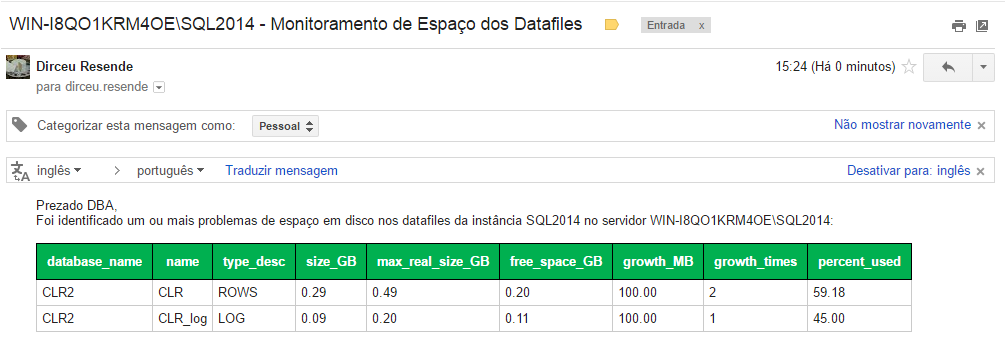
Usage example:
EXEC dbo.stpMonitoramento_Tamanho_Datafiles
    @Vl_Limite = 40 -- float
Result:
I hope this post was useful for you.
Hug!

Comentários (0)
Carregando comentários…