
Hey guys,
How are you today?
In this post, I will demonstrate how to use the XLMA language (XML for Analysis) to backup and restore Analysis Services cubes and dimensions through Transact-SQL (T-SQL) queries, which can be used in a SQL Agent job to automate this process, allowing you to automate the backup/restore routines of your Analysis Services cubes.
To be able to carry out the routines described in this post, you will need to have created a Linked Server for integration between SQL Server and Analysis Services (Here in the example, I call this object INTERFACE_CUBOS).
If you haven't created this Linked Server and don't know how to do it, access the post Analysis Services (SSAS) – How to query information and process commands via command line (XLMA) through SQL Server and follow the step by step to create it.
How to Backup SSAS Cubes via T-SQL and XLMA
Now that we have created our connection Linked Server, which we call “INTERFACE_CUBOS”, let’s generate a backup of our Analysis Services cube. To do this, simply run the XLMA command below, using the Linked Server connection.
DECLARE
    @DatabaseId VARCHAR(128) = 'Cubo_Venda',
    @DatabaseName VARCHAR(128) = 'Cubo_Venda',
    @Ds_Data VARCHAR(10) = CONVERT(VARCHAR(10), GETDATE(), 112)


DECLARE @CmdBackup varchar(max) = '
<Backup xmlns="http://schemas.microsoft.com/analysisservices/2003/engine">
    <Object>
        <DatabaseID>' + @DatabaseId + '</DatabaseID>
    </Object>
    <File>C:\Backups\OLAP\' + @DatabaseName + '_' + @Ds_Data + '.abf</File>
    <AllowOverwrite>true</AllowOverwrite>
</Backup>'


EXEC(@CmdBackup) AT INTERFACE_CUBOS
Result after execution:
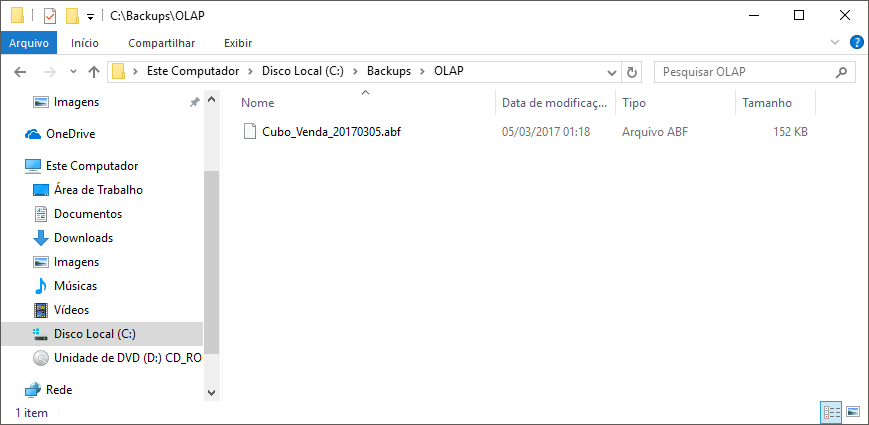
Note: By default, backups are already generated using compression. If you do NOT want to compress the generated backup files, use the
How to restore SSAS cubes via T-SQL and XLMA
Just as we did with the cube backup using XLMA and the Linked Server “INTERFACE_CUBOS”, we will execute a query to perform the restore from a backup made.
DECLARE
    @DatabaseName VARCHAR(128) = 'Cubo_Venda_Restaurado',
    @Ds_Caminho VARCHAR(255) = 'C:\Backups\OLAP\Cubo_Venda_20170305.abf'

DECLARE @CmdRestore varchar(max) = '
<Restore xmlns="http://schemas.microsoft.com/analysisservices/2003/engine">
    <DatabaseName>' + @DatabaseName + '</DatabaseName>
    <File>' + @Ds_Caminho + '</File>
    <AllowOverwrite>true</AllowOverwrite>
</Restore>'

EXEC(@CmdRestore) AT INTERFACE_CUBOS
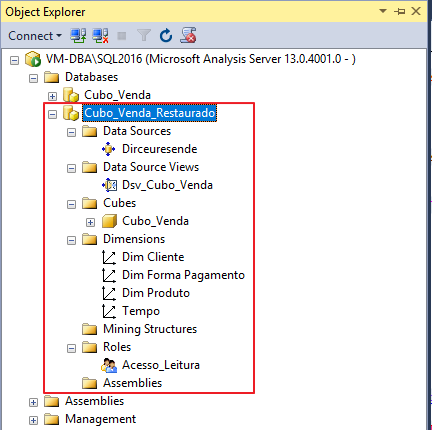
If you want to restore the backup file by replacing the original Backup cube, simply omit the
Restore Result:
How to list Analysis Services instance cubes
In this post, I demonstrated how to backup and restore an Analysis Services cube using only Transact-SQL, a Linked Server to connect to Analysis Services and an XLMA query. Many DBA's need to automate the backup of all cubes in the instance and it would be very interesting if it were possible to list which cubes are so that it is possible to create a truly automatic process.
To do this, a simple query is enough to list the Analysis Services cubes:
SELECT * FROM OPENQUERY(INTERFACE_CUBOS, 'SELECT * FROM $System.DBSCHEMA_CATALOGS')
Query result:

How to create a backup of all instance cubes
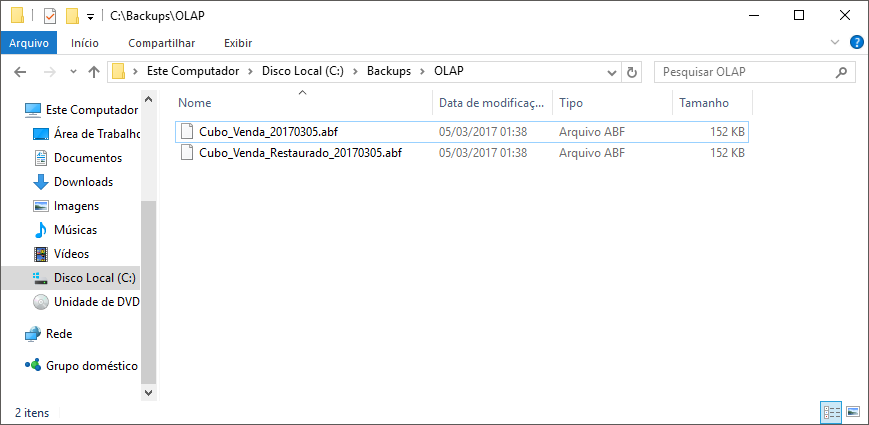
To create a backup of all cubes in your Analysis Services instance using Transact-SQL, simply run the script below:
IF (OBJECT_ID('tempdb..#Lista_Cubos') IS NOT NULL) DROP TABLE #Lista_Cubos
SELECT *, ROW_NUMBER() OVER(ORDER BY CAST(CATALOG_NAME AS VARCHAR(256))) AS Ranking
INTO #Lista_Cubos
FROM OPENQUERY(INTERFACE_CUBOS, 'SELECT * FROM $System.DBSCHEMA_CATALOGS')


DECLARE
    @Contador INT = 1,
    @Total INT = (SELECT COUNT(*) FROM #Lista_Cubos),
    @Nm_Cubo VARCHAR(256),
    @CmdBackup VARCHAR(MAX),
    @Ds_Data VARCHAR(10) = CONVERT(VARCHAR(10), GETDATE(), 112)


WHILE(@Contador <= @Total)
BEGIN

    SELECT @Nm_Cubo = CATALOG_NAME
    FROM #Lista_Cubos
    WHERE Ranking = @Contador


    SET @CmdBackup = '
<Backup xmlns="http://schemas.microsoft.com/analysisservices/2003/engine">
    <Object>
        <DatabaseID>' + @Nm_Cubo + '</DatabaseID>
    </Object>
    <File>C:\Backups\OLAP\' + @Nm_Cubo + '_' + @Ds_Data + '.abf</File>
    <AllowOverwrite>true</AllowOverwrite>
</Backup>'


    EXEC(@CmdBackup) AT INTERFACE_CUBOS


    SET @Contador += 1


END
Result:
And that's it, folks!
I hope you liked this post.
Hug!

Comments (0)
Loading comments...