
Hey guys,
How are you?
Today I'm going to present an interesting feature of SQL Server that many people don't know about, which is the use of Window functions to perform cumulative calculations in a result set in SQL Server, similar to the Auto Sum feature in Excel.
This need arose for me through a request similar to the one I will present in this post, where we have a sales base with a date and I want to select the months where the accumulated sales quantity for the year was less than 40. If this value is reached during the month, that month should not be selected.
To get this information, I thought about grouping the data by month and creating a cumulative sum of the amount of sales. With a small amount of data, we can create a WHILE loop to go through all the rows in the table, retrieve the quantity of that row, add it to a variable and update this record again to make the sum, but when we apply this to a table with millions of records, this process can take hours to process.
If you want to know more about different ways to group data, visit the postSQL Server – Grouping data using ROLLUP, CUBE and GROUPING SETS.
Test Base
Use this script to set up the test base for this post.
IF (OBJECT_ID('tempdb..#Produtos') IS NOT NULL) DROP TABLE #Produtos
CREATE TABLE #Produtos (
    Codigo INT IDENTITY(1, 1) NOT NULL PRIMARY KEY,
    Ds_Produto VARCHAR(50) NOT NULL,
    Ds_Categoria VARCHAR(50) NOT NULL,
    Preco NUMERIC(18, 2) NOT NULL
)

IF (OBJECT_ID('tempdb..#Vendas') IS NOT NULL) DROP TABLE #Vendas
CREATE TABLE #Vendas (
    Codigo INT IDENTITY(1, 1) NOT NULL PRIMARY KEY,
    Dt_Venda DATETIME NOT NULL,
    Cd_Produto INT NOT NULL
)


INSERT INTO #Produtos ( Ds_Produto, Ds_Categoria, Preco )
VALUES
    ( 'Processador i7', 'Informática', 1500.00 ),
    ( 'Processador i5', 'Informática', 1000.00 ),
    ( 'Processador i3', 'Informática', 500.00 ),
    ( 'Placa de Vídeo Nvidia', 'Informática', 2000.00 ),
    ( 'Placa de Vídeo Radeon', 'Informática', 1500.00 ),
    ( 'Celular Apple', 'Celulares', 10000.00 ),
    ( 'Celular Samsung', 'Celulares', 2500.00 ),
    ( 'Celular Sony', 'Celulares', 4200.00 ),
    ( 'Celular LG', 'Celulares', 1000.00 ),
    ( 'Cama', 'Utilidades do Lar', 2000.00 ),
    ( 'Toalha', 'Utilidades do Lar', 40.00 ),
    ( 'Lençol', 'Utilidades do Lar', 60.00 ),
    ( 'Cadeira', 'Utilidades do Lar', 200.00 ),
    ( 'Mesa', 'Utilidades do Lar', 1000.00 ),
    ( 'Talheres', 'Utilidades do Lar', 50.00 )


DECLARE @Contador INT = 1, @Total INT = 100

WHILE(@Contador <= @Total)
BEGIN

    INSERT INTO #Vendas ( Cd_Produto, Dt_Venda )
    SELECT
        (SELECT TOP 1 Codigo FROM #Produtos ORDER BY NEWID()) AS Cd_Produto,
        DATEADD(DAY, (CAST(RAND() * 364 AS INT)), '2017-01-01') AS Dt_Venda

    SET @Contador += 1

END

SELECT * FROM #Vendas
Example of a populated Sales table:
Implementing the AutoSum feature in SQL Server
To implement the AutoSum feature in SQL Server, we will use the SUM() aggregation function in conjunction with a Window function, in addition to some parameters specially created for this need.
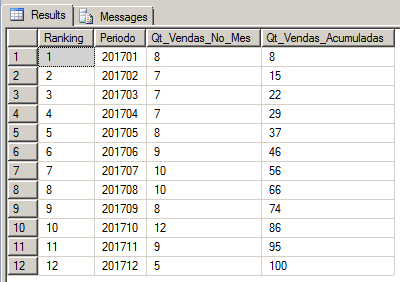
If you want to implement this using the WHILE solution I mentioned above, you can do it the way I demonstrated below. I needed to do something similar in a table with 1.4 million records and according to my calculations, it would take a few hours just to process this, which ended up making me look for a new solution.
IF (OBJECT_ID('tempdb..#Vendas_Agrupadas') IS NOT NULL) DROP TABLE #Vendas_Agrupadas
SELECT
    IDENTITY(INT, 1, 1) AS Ranking,
    CONVERT(VARCHAR(6), Dt_Venda, 112) AS Periodo,
    COUNT(*) AS Qt_Vendas_No_Mes,
    NULL AS Qt_Vendas_Acumuladas
INTO
    #Vendas_Agrupadas
FROM
    #Vendas
GROUP BY
    CONVERT(VARCHAR(6), Dt_Venda, 112)


DECLARE
    @Contador INT = 1,
    @Total INT = (SELECT COUNT(*) FROM #Vendas_Agrupadas),
    @Qt_Vendas_Acumuladas INT = 0,
    @Qt_Vendas_No_Mes INT = 0


WHILE(@Contador <= @Total)
BEGIN

    SELECT @Qt_Vendas_No_Mes = Qt_Vendas_No_Mes
    FROM #Vendas_Agrupadas
    WHERE Ranking = @Contador


    SET @Qt_Vendas_Acumuladas += @Qt_Vendas_No_Mes


    UPDATE #Vendas_Agrupadas
    SET Qt_Vendas_Acumuladas = @Qt_Vendas_Acumuladas
    WHERE Ranking = @Contador


    SET @Contador += 1

END


SELECT * FROM #Vendas_Agrupadas
Example of a populated grouped Sales table:
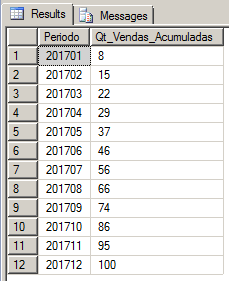
To do this in a much faster and more practical way, we will use an aggregation function and Window function. In the example I gave above, in a table with 1.4 million records (already grouped), this query took 8 seconds to process.
IF (OBJECT_ID('tempdb..#Vendas_Agrupadas') IS NOT NULL) DROP TABLE #Vendas_Agrupadas
SELECT
    CONVERT(VARCHAR(6), Dt_Venda, 112) AS Periodo,
    COUNT(*) AS Qt_Vendas_No_Mes,
    NULL AS Qt_Vendas_Acumuladas
INTO
    #Vendas_Agrupadas
FROM
    #Vendas
GROUP BY
    CONVERT(VARCHAR(6), Dt_Venda, 112)


SELECT
    Periodo,
    SUM(Qt_Vendas_No_Mes) OVER(ORDER BY Periodo ROWS BETWEEN UNBOUNDED PRECEDING AND CURRENT ROW) AS Qt_Vendas_Acumuladas
FROM
    #Vendas_Agrupadas
Result:
That's it, folks.
I hope you liked this post.
Hug!
SQL Server – How to create an AutoSum autosum (same as Excel) like excel excel-like using Window functions running totals running totals
SQL Server – How to create an AutoSum autosum (same as Excel) like excel excel-like using Window functions running totals running totals

Comments (0)
Loading comments...