
Hey guys,
Good morning!
In this post I will demonstrate how to integrate the database with the Telegram and send messages using CLR (C#), which is Whatsapp's main competitor. Previously, I demonstrated how to do this same integration in the posts:
- SQL Server – How to integrate the database with Slack and send messages using Python and sp_execute_external_script
- SQL Server – How to integrate the database with Slack and send messages using the CLR (C#)
If you don't know or don't know how to use the CLR in SQL Server, find out how by accessing the post Introduction to SQL CLR (Common Language Runtime) in SQL Server.
What is Telegram?
For those who don't know, the Telegram is one of the most famous and used communicators around the world, Whatsapp's main competitor and aims to allow fast, safe and easy communication between people from anywhere in the world.
You can create public groups, where anyone can join and interact, or private groups, where only those in the group can view the messages. Telegram has a Portuguese version, an open API that allows you to integrate with your applications and send automated messages. Its appearance is very similar to Whatsapp and it is safer, faster and has more features than its main competitor and market leader, but it has a much smaller number of users, especially in Brazil.
Where and how can I use Telegram in my company?
This feature is especially useful for creating teams in your company and generating alerts and monitoring per team, where each team only receives alerts relating to their activities. Additionally, you can use open groups to send newsletters and notifications that are relevant to the entire company. All this, at no cost and you can receive it by email, view it on the web and on your smartphone.
Another cool way to use Telegram is to send sales target tracking to the commercial sector, so that regional and local managers can monitor the sales team's performance in real time, without having to consult and open reports, wherever they are, even outside the company.
If your company adopts Telegram, the HR sector can use the service to send messages and newsletters to employees. Send Christmas messages, a special message on the employee's birthday, etc.
Anyway, the advantage of Telegram is that it can be sent in several different ways (Web, Smartphone), wherever you are, inside or outside the company and represents a major revolution in the way people interact with information.
You can use Telegram as a communication, monitoring and alerting tool for IT routines, such as critical job failures, backup problems, database corruption, slow queries, locks, etc. Whenever a critical routine fails, an internal email and a notification are sent via Telegram, where a Push notification arrives on my cell phone (just like Whatsapp) and wherever I am, I am aware of this failure.
The disadvantage of Telegram (and Whatsapp) in relation to Slack and Ryver is that the first 2 communicators are open to the world, and can be used for personal and private conversations with anyone, which can lead to deconcentration and loss of focus. Slack and Ryver are much more focused on the corporate environment, so much so that the people who will interact need an invitation.
How to activate the Telegram API
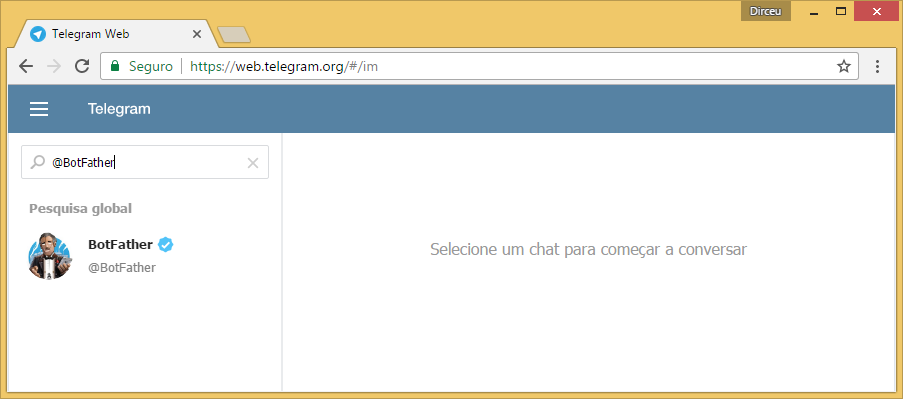
To start using the Telegram API you will need to create a new BOT, which will be responsible for sending messages. To do this, log into your Telegram account, whether on the web or on your cell phone, and start a conversation with the user @BotFather
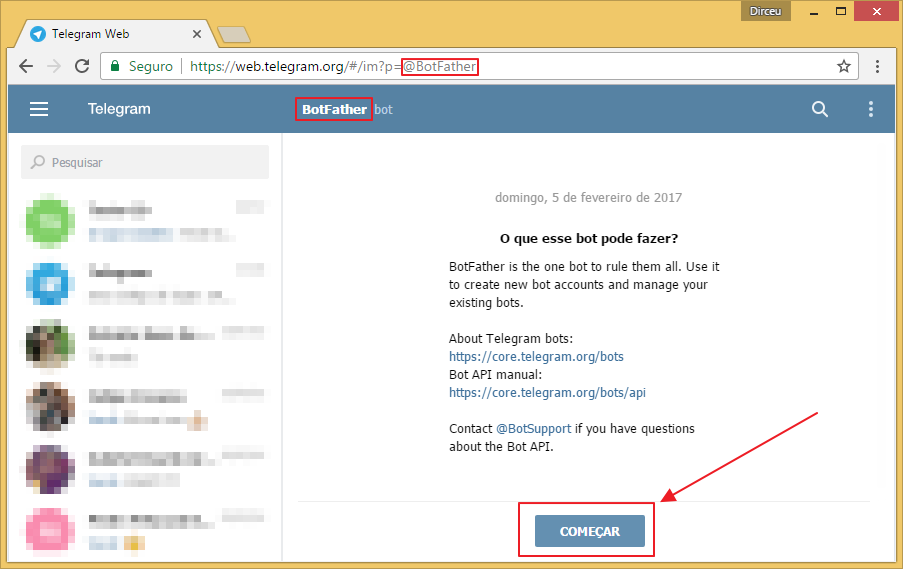
Click the “Start” button.
As soon as you click the “Start” button, the Bot will send a list of commands:
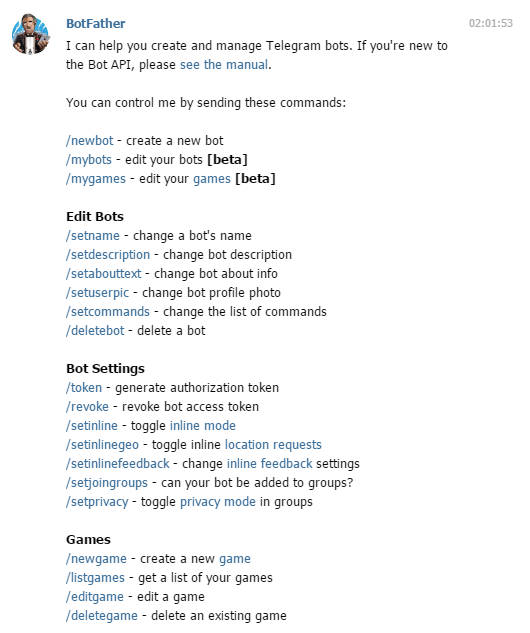
Telegram – Bot Options
Select the option /newbot and then choose the bot name and user, as shown in the print below:
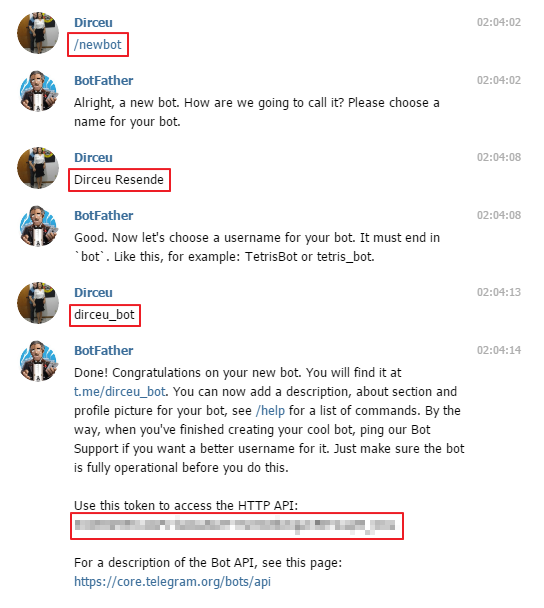
Note the generated token, as it will be used by the Stored Procedure to send messages.
How to identify channel or user ID?
Like Ryver, the Telegram API requires you to enter the channel ID instead of an easy-to-memorize and use name, as is the Slack API. Despite being safer, having to store channel and user IDs is a somewhat annoying and unproductive task.
I will demonstrate here how to identify channel and user IDs to send private messages.
How to identify a group ID:
To identify the ID of a Telegram group, simply access Telegram Web, click on the desired group and observe the group's URL. Remember that the BOT must be invited to the group where you want to send the message.
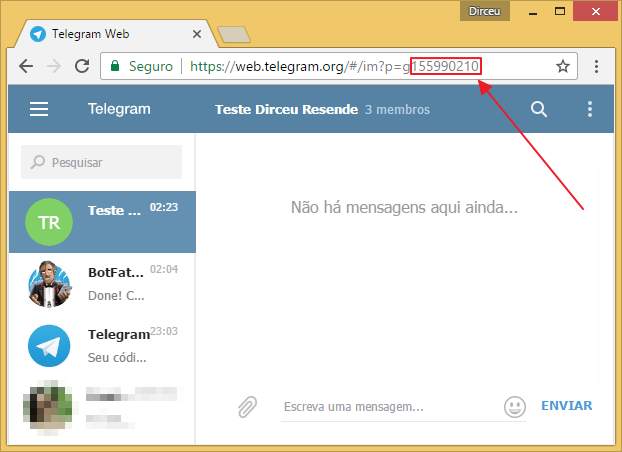
If you don't invite the BOT and try to send a message to the group, you will see this error message:
Error: The remote server returned an error: (400) Bad Request.
When using the user ID in your Stored Procedure call, the value is usually NEGATIVE.
How to identify a user ID:
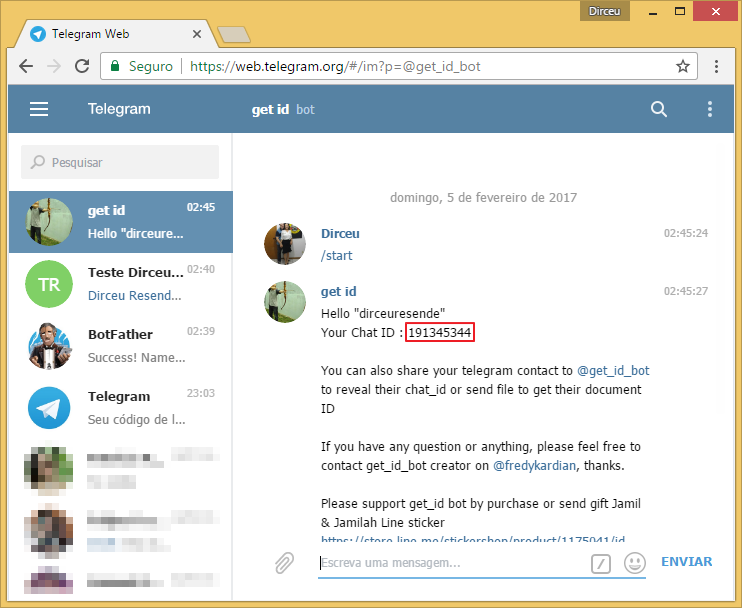
Identifying the ID of a Telegram group is a little more difficult, as the user himself will have to send you this information. To do this, he will have to start a conversation with the BOT @get_id
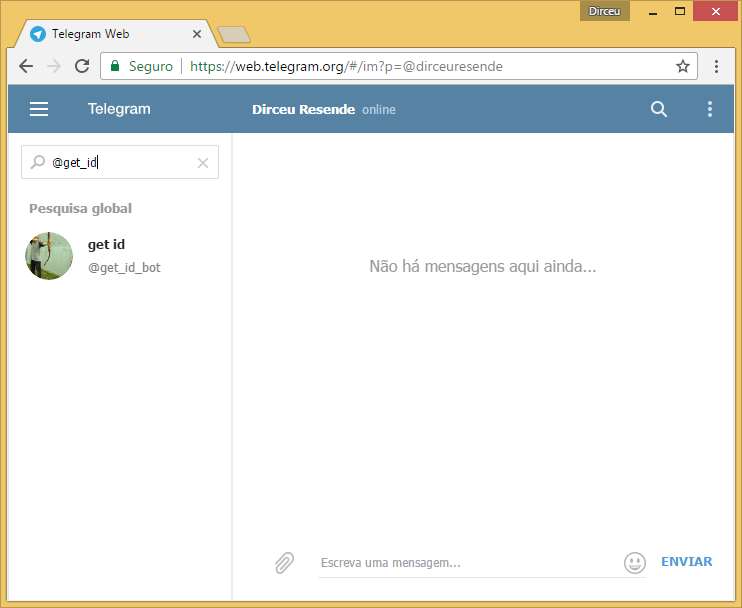
After starting the conversation, the BOT will send the user code to the user, and he must inform him of this ID to be able to send private messages (DMs).
How to identify a user's ID using the getUpdates API
Another way to do this is using the getUpdates method of the Telegram API. After the user starts a conversation with your BOT, this action is recorded in this method, which retrieves all the “news” that interact with your BOT.
Using a tool like Postman, you can use this API and easily view the ID of the user who started the conversation with your BOT.
Remember that the URL for this method is: https://api.telegram.org/botSEU_TOKEN_AQUI/getUpdates
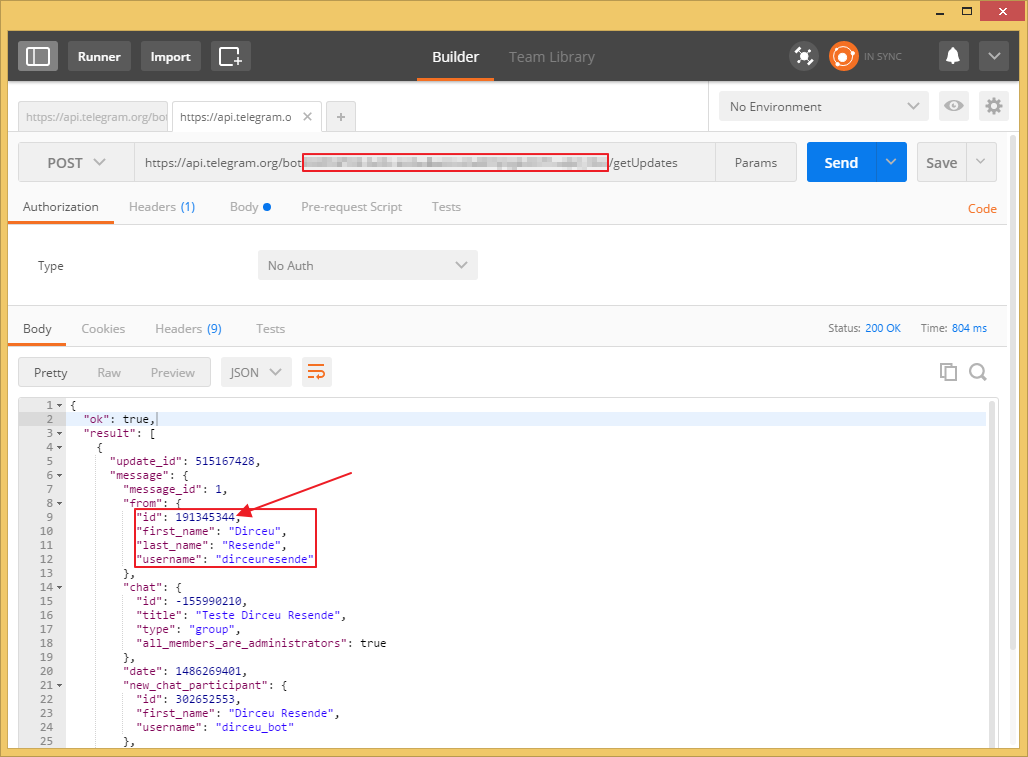
In any of the above methods, the user will need to start a conversation with your BOT, so that it can send the messages to your user. This is a Telegram API security setting to prevent SPAM.
When using the user ID in your Stored Procedure call, the value is generally POSITIVE.
How to integrate the database with Telegram
Once you have already created your account on Telegram and created the bot that you will use to send messages to the groups, let's get to the interesting part: Creating the .NET (C#) code that will integrate the SQL Server database with the Telegram API.
As a prerequisite to using this procedure, you will need to create the Return class, available in the post SQL Server – How to send warnings and error messages to the database using the CLR (C#) to use the method Return.Error and thus, send error messages, if they occur. You can also choose to comment the code and remove calls to this method (and also comment using Bibliotecas.Model), but I don't advise it, as you won't know when an error occurred in your call to the SP for sending messages to Telegram.
As with Ryver and Slack, in order to be able to send messages, the BOT user must be added to all groups, private and public, as he is the one sending the messages and it is not possible to send the messages if he is not in the group.
Now that we have the account created, the BOT user is in the desired groups and we have generated our token, it is time to send the messages through the database with the CLR.
using System;
using System.Data.SqlTypes;
using System.IO;
using System.Net;
using System.Text;
using Bibliotecas.Model;

public partial class StoredProcedures
{
    [Microsoft.SqlServer.Server.SqlProcedure]
    public static void stpEnvia_Mensagem_Telegram(SqlString Ds_Canal, SqlString Ds_Mensagem)
    {


        const string token = "seu_token_telegram";


        try
        {

            var mensagem = Ds_Mensagem.Value;
            var canais = Ds_Canal.Value.Split(';');

            foreach (var canal in canais)
            {

                var dsScript = $"chat_id={canal.Trim()}&text={mensagem}&parse_mode=Markdown";

                var url = $"https://api.telegram.org/bot{token}/sendMessage";

                var request = (HttpWebRequest) WebRequest.Create(url);

                request.Method = "POST";
                request.UserAgent = "curl/7.45.0";
                request.ContentType = "application/x-www-form-urlencoded";

                var buffer = Encoding.GetEncoding("UTF-8").GetBytes(dsScript);
                using (var reqstr = request.GetRequestStream())
                {

                    reqstr.Write(buffer, 0, buffer.Length);

                    using (var response = request.GetResponse())
                    {

                        using (var dataStream = response.GetResponseStream())
                        {

                            if (dataStream == null) return;

                            using (var reader = new StreamReader(dataStream))
                            {
                                var responseFromServer = reader.ReadToEnd();
                                Retorno.Mensagem(responseFromServer);
                            }
                        }

                    }

                }

            }

        }
        catch (Exception e)
        {
            Retorno.Erro("Erro : " + e.Message);
        }

    }

};
Usage examples
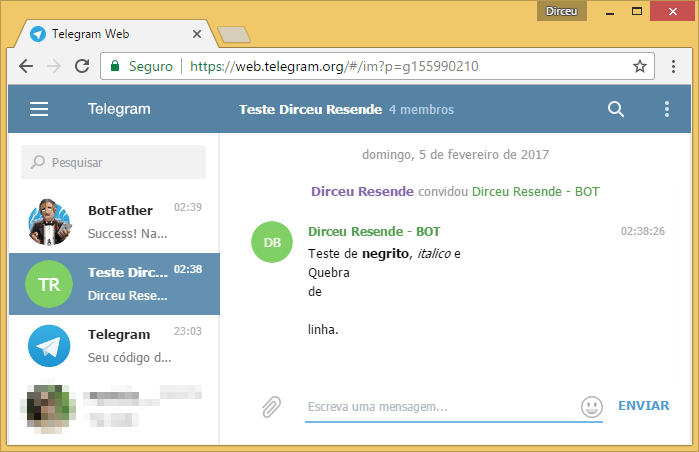
Sending a message to the group “Teste Dirceu Resende”
EXEC CLR.dbo.stpEnvia_Mensagem_Telegram
    @Ds_Canal = N'-155990210', -- nvarchar(max) | grupos = ID negativo / DM = ID positivo
    @Ds_Mensagem = N'Teste de *negrito*, _italico_ e
Quebra
de

linha.' -- nvarchar(max)
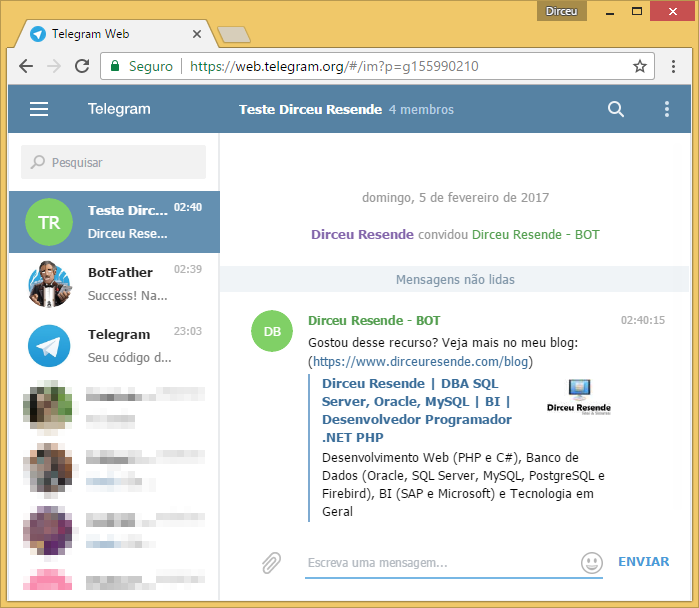
Sending a message to the group “Teste Dirceu Resende” with external URL
-- Enviando mensagem para o grupo "Teste Dirceu Resende" com URL
EXEC CLR.dbo.stpEnvia_Mensagem_Telegram
    @Ds_Canal = N'-155990210', -- nvarchar(max) | grupos = ID negativo / DM = ID positivo
    @Ds_Mensagem = N'Gostou desse recurso? Veja mais no meu blog: (https://dirceuresende.com/blog)' -- nvarchar(max)
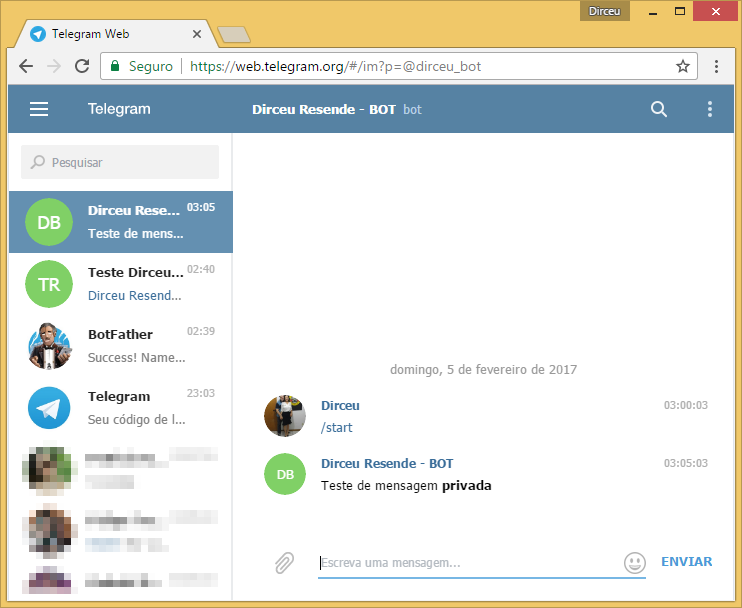
Sending private message (DM)
Once you have the user ID, simply start a conversation with the BOT so that it has permission to send you messages. If you don't do this, you will receive this error message when trying to send the message:
Error: The remote server returned an error: (400) Bad Request.
After starting a conversation with your BOT, simply execute the SP below:
EXEC CLR.dbo.stpEnvia_Mensagem_Telegram
    @Ds_Canal = N'191345344', -- nvarchar(max) | grupos = ID negativo / DM = ID positivo
    @Ds_Mensagem = N'Teste de mensagem *privada*' -- nvarchar(max)
That's it, folks!
I hope you liked this post.
A hug and see you next time.
sql server clr .net dotnet framework c# csharp integration how to create database integration database how to send messages how to send messages notifications private group notifications dm Telegram
sql server clr .net dotnet framework c# csharp integration how to create database integration database how to send messages how to send messages notifications private group notifications dm Telegram

Comentários (0)
Carregando comentários…