
Hey guys,
Good morning!
In this post I will demonstrate how to integrate the database with the Slack and send messages using CLR (C#), which is Ryver's main competitor, in which I have already demonstrated how to do this same integration in the post SQL Server – How to integrate the database with Ryver and send messages using CLR (C#).
If you don't know or don't know how to use the CLR in SQL Server, find out how by accessing the post Introduction to SQL CLR (Common Language Runtime) in SQL Server.
If you are using SQL Server 2017 and want to use only native DBMS commands instead of having to create a SQLCLR library (C#), you can still create your alerts using Slack with the Python solution that I shared in the post SQL Server – How to integrate the database with Slack and send messages using Python and sp_execute_external_script.
What is Slack?
For those who don't know, the Slack is one of the most famous and used corporate communicators around the world, Ryver's main competitor and aims to replace communication via email with private and public groups (within the team) focused on certain teams and/or subjects. You can create public groups, where your entire team can interact and collaborate, and private groups for each sector, where only those in the group can view the messages.
Slack allows you to respond to emails through the tool itself, send and share files, send private messages, install various plugins to add new features and much more.
In the free plan, message search only retrieves the last 10 thousand messages, the storage limit is 5 GB and some other limitations that you can check in this link.
Where and how can I use Slack in my company?
This feature is especially useful for creating teams in your company and generating alerts and monitoring per team, where each team only receives alerts relating to their activities. Additionally, you can use open groups to send newsletters and notifications that are relevant to the entire company. All this, at no cost and you can receive it by email, view it on the web and on your smartphone.
Another cool way to use Slack is to send sales target tracking to the commercial sector, so that regional and local managers can monitor the sales team's performance in real time, without having to consult and open reports, wherever they are, even outside the company.
If your company adopts Slack, the HR department can use the service to send messages and newsletters to employees. Send Christmas messages, a special message on the employee's birthday, etc.
Anyway, the advantage of Slack is that it can be sent in several different ways (Email, Web, Smartphone), wherever you are, inside or outside the company and represents a major revolution in the way people interact with information.
I use Slack where I work as a communication, monitoring and alerting tool for IT routines, such as critical job failures, backup problems, database corruption, slow queries, locks, etc. Whenever a critical routine fails, an internal email and a notification are sent via Slack, where a Push notification arrives on my cell phone (just like WhatsApp) and wherever I am, I am aware of this failure.
How to add users to Slack
The first step to creating the integration is to create your Slack account, accessing this link. Once created, you will receive an email to log into your account.

Slack home screen, with some groups I created for this post
To add new users, simply click on the menu (Your name) and select the “Invite people” option

You can add your contacts from your Google account, import multiple contacts in CSV format, and more. Once you invite other people, they will receive a link to join your team and after completing the registration, they will be able to view the data via the web browser or mobile app.
How to enable the Slack API
To be able to send messages via Slack, we need to create a custom integration. To do this, access the URL https://api.slack.com/docs/oauth-test-tokens logged into the user account that will serve as a BOT and send automatic messages.
Click on the “Create token” button.
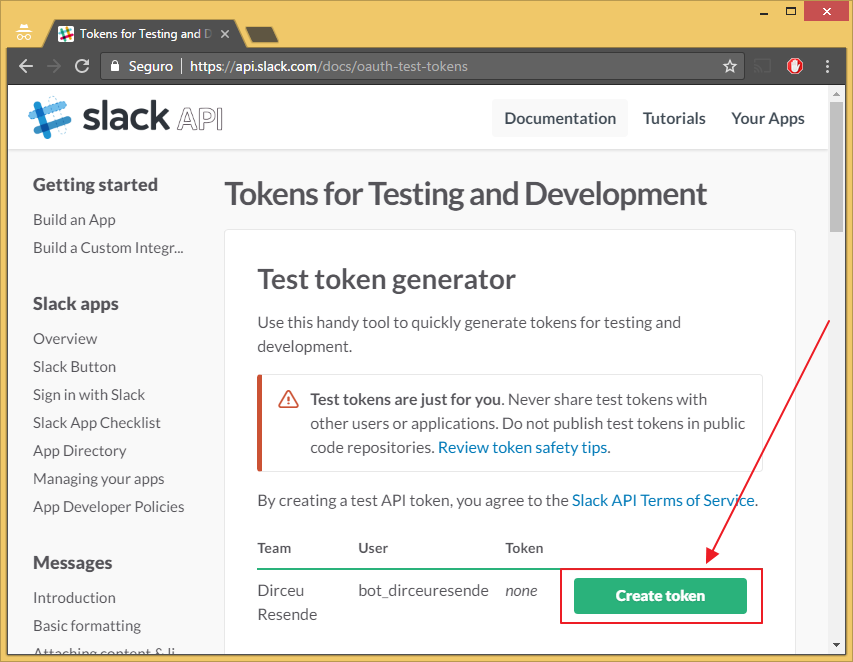
Copy the generated token to your application. It is with this huge code (76 characters in my case) that you will authenticate with the API and be able to send your messages through the CLR (C#).

How to integrate the database with Slack
Once you have already created your Slack account and registered the user that you will use to send messages to the teams, let's get to the interesting part: Creating the .NET (C#) code that will integrate the SQL Server database with the Slack API.
Prerequisite: Utils.cs
using System;

namespace Bibliotecas.Model
{

    public static class Utils
    {

        public static string converteStringWebService(string Ds_Texto)
        {

            // Recomendação do site do Slack
            var retorno = Ds_Texto.Replace("<", "<").Replace("&", "&").Replace(">", ">");

            // Quebra de linha
            retorno = retorno.Replace("\\n", "\n");

            // Tratamento do caractere "\"
            retorno = retorno.Replace(@"\", @"\\");

            // Tratamento de Aspas duplas
            retorno = retorno.Replace(@"""", @"\""");

            // Resultado final
            return Uri.EscapeDataString(retorno);
        }

    }

}
As a prerequisite to using this procedure, you will need to create the Return class, available in the post SQL Server – How to send warnings and error messages to the database using the CLR (C#) to use the method Return.Error and thus, send error messages, if they occur. You can also choose to comment the code and remove calls to this method (and also comment using Bibliotecas.Model), but I don't advise it, as you won't know when an error occurred in your call to SP for sending messages to Slack.
As with Ryver, in order to be able to send messages, the BOT user must be added to all groups, private and public, as he is the one sending the messages and it is not possible to send the messages if he is not in the group.
Now that we have the account created, the BOT user is in the desired groups and we have generated our token, it is time to send the messages through the database with the CLR.
stpEnvia_Mensagem_Slack source code:
using System;
using System.Data.SqlTypes;
using System.IO;
using System.Net;
using System.Text;
using Bibliotecas.Model;

public partial class StoredProcedures
{
    [Microsoft.SqlServer.Server.SqlProcedure]
    public static void stpEnvia_Mensagem_Slack(SqlString Ds_Canal, SqlString Ds_Mensagem)
    {

        const string slackToken = "seu_token_personalizado";
        const string usuario = "BOT Dirceu Resende";

        try
        {

            var mensagem = Utils.converteStringWebService(Ds_Mensagem.Value);


            if (mensagem.Length > 4000)
                Retorno.Erro("O tamanho máximo da mensagem deve ser inferior a 4.000 caracteres");


            var canal = Ds_Canal.Value;
            var canais = canal.Split(';');

            foreach (var nomeCanal in canais)
            {

                var request = (HttpWebRequest) WebRequest.Create("https://slack.com/api/chat.postMessage");

                request.Method = "POST";

                request.UserAgent = "curl/7.45.0";
                request.ContentType = "application/x-www-form-urlencoded";

                var parametros = $"token={slackToken}&channel={nomeCanal.Trim()}&text={mensagem}&username={usuario}&as_user=false";

                var buffer = Encoding.GetEncoding("UTF-8").GetBytes(parametros);
                using (var reqstr = request.GetRequestStream())
                {

                    reqstr.Write(buffer, 0, buffer.Length);

                    using (var response = request.GetResponse())
                    {

                        using (var dataStream = response.GetResponseStream())
                        {

                            if (dataStream == null) return;

                            using (var reader = new StreamReader(dataStream))
                            {
                                var responseFromServer = reader.ReadToEnd();

                                if (responseFromServer.Contains("\"ok\":false"))
                                    Retorno.Erro(responseFromServer);
                                else
                                    Retorno.Mensagem(responseFromServer);

                            }
                        }

                    }

                }

            }

        }
        catch (Exception e)
        {
            Retorno.Erro("Erro : " + e.Message);
        }
    }

};
Usage examples for groups (public or private)
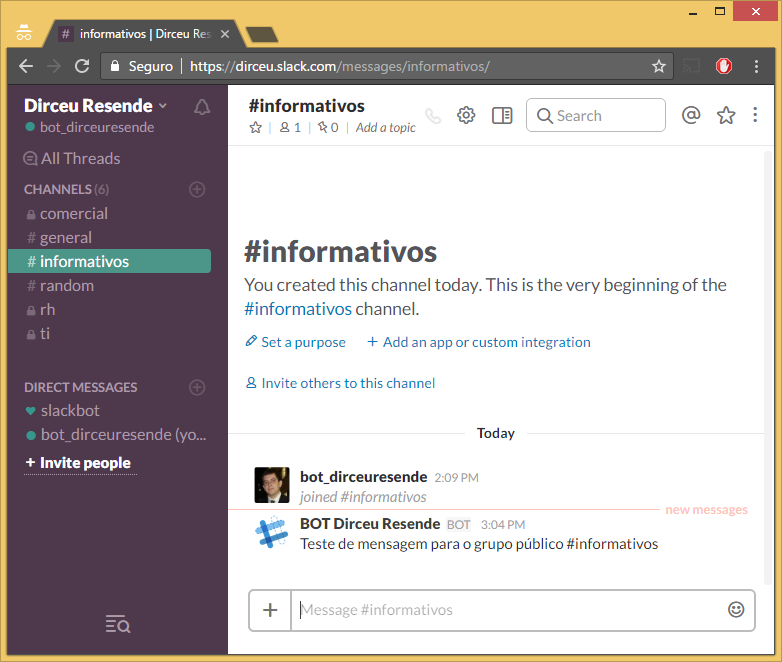
Unlike what happens in Ryver, where you need to get the ID of each group, whether private or public, to be able to send messages, where Ryver's API differentiates between sending to a private group and a public group, in Slack sending is done using the group name itself, with no difference between private or public when sending.
EXEC CLR.dbo.stpEnvia_Mensagem_Slack
    @Ds_Canal = N'informativos', -- nvarchar(max)
    @Ds_Mensagem = N'Teste de mensagem para o grupo público #informativos' -- nvarchar(max)
Usage examples for private messages (DM)
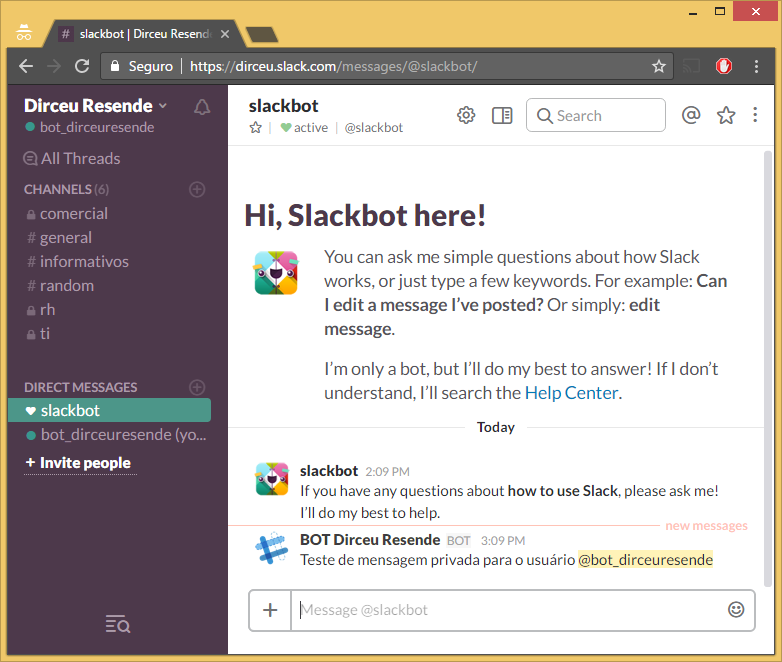
To send direct messages (DM) or private calls, simply enter @name_do_usuario.
EXEC CLR.dbo.stpEnvia_Mensagem_Slack
    @Ds_Canal = N'@bot_dirceuresende', -- nvarchar(max)
    @Ds_Mensagem = N'Teste de mensagem privada para o usuário @bot_dirceuresende' -- nvarchar(max)
Sending Colorful Messages on Slack
A really cool feature of the Slack API is called attachments, which allows you to improve the formatting and visualization of messages sent via the API, making the information clearer and more elegant. Let's see how it works:
Stored Procedure Code stpEnvia_Mensagem_Slack_Completa
using System;
using System.Data.SqlTypes;
using System.IO;
using System.Net;
using System.Text;
using Bibliotecas.Model;

public partial class StoredProcedures
{
    [Microsoft.SqlServer.Server.SqlProcedure]
    public static void stpEnvia_Mensagem_Slack_Completa(SqlString Ds_Canal, SqlString Ds_Mensagem, SqlString Ds_Cor_Hexa, SqlString Ds_Titulo, SqlString Ds_Link, SqlString Ds_Mensagem_Interna)
    {


        try
        {

            const string slackToken = "seu_token_slack";
            const string usuario = "BOT Dirceu Resende";

            var mensagem = Utils.converteStringWebService(Ds_Mensagem.Value);
            var mensagemInterna = Utils.converteStringWebService(Ds_Mensagem_Interna.Value);
            var titulo = Utils.converteStringWebService(Ds_Titulo.Value);
            var link = Utils.converteStringWebService(Ds_Link.Value);
            var cor = (!string.IsNullOrEmpty(Ds_Cor_Hexa.Value.Trim()) ? Ds_Cor_Hexa.Value : "");
            var canal = Ds_Canal.Value;

            if (string.IsNullOrEmpty(mensagem) && string.IsNullOrEmpty(mensagemInterna))
                Retorno.Erro("O valor do parâmetro @Ds_Mensagem E @Ds_Mensagem_Interna não pode ser vazio. Pelo menos um dos dois deve ser preenchido.");

            var texto = @"
[
    {
        ""fallback"": """ + mensagem + @""",
        ""color"": ""#" + cor + @""",
        ""pretext"": """ + mensagem + @""",
        ""title"": """ + titulo + @""",
        ""title_link"": """ + link + @""",
        ""text"": """ + mensagemInterna + @""",
        ""mrkdwn_in"": [""text"", ""pretext""]
    }
]";
            var canais = canal.Split(';');

            foreach (var nomeCanal in canais)
            {

                var request = (HttpWebRequest)WebRequest.Create("https://slack.com/api/chat.postMessage");

                request.Method = "POST";

                request.UserAgent = "curl/7.45.0";
                request.ContentType = "application/x-www-form-urlencoded";

                var parametros = $"token={slackToken}&channel={nomeCanal.Trim()}&username={usuario}&as_user=false&attachments={texto}";

                var buffer = Encoding.GetEncoding("UTF-8").GetBytes(parametros);
                using (var reqstr = request.GetRequestStream())
                {

                    reqstr.Write(buffer, 0, buffer.Length);

                    using (var response = request.GetResponse())
                    {

                        using (var dataStream = response.GetResponseStream())
                        {

                            if (dataStream == null) return;

                            using (var reader = new StreamReader(dataStream))
                            {
                                var responseFromServer = reader.ReadToEnd();

                                if (responseFromServer.Contains("\"ok\":false"))
                                    Retorno.Erro(responseFromServer);
                                else
                                    Retorno.Mensagem(responseFromServer);

                            }
                        }

                    }

                }
            }

        }
        catch (Exception e)
        {
            Retorno.Erro("Erro : " + e.Message);
        }

    }

};
Usage examples
Sending formatted messages
EXEC CLR.dbo.stpEnvia_Mensagem_Slack_Completa
    @Ds_Canal = N'informativos', -- nvarchar(max)
    @Ds_Mensagem = N'Teste de Mensagem', -- nvarchar(max)
    @Ds_Cor_Hexa = N'ff0000', -- nvarchar(max)
    @Ds_Titulo = N'Título da Mensagem com Borda Vermelha', -- nvarchar(max)
    @Ds_Link = N'', -- nvarchar(max)
    @Ds_Mensagem_Interna = N'Essa é a mensagem do Slack. Aceita *negrito*, _italico_ e ~sublinhado~' -- nvarchar(max)

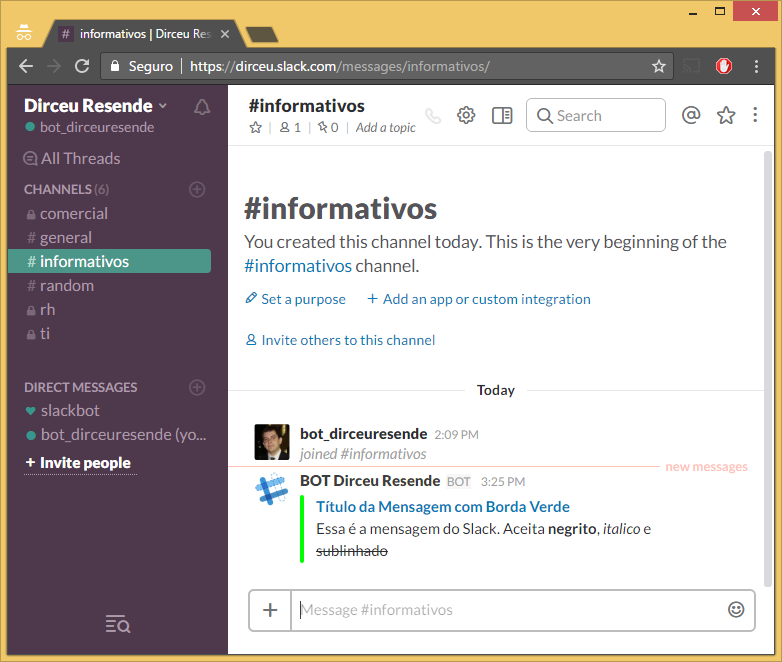
Sending messages with external links
When you click on the message title, you will be directed to the URL https://dirceuresende.com/blog 🙂
EXEC CLR.dbo.stpEnvia_Mensagem_Slack_Completa
    @Ds_Canal = N'informativos', -- nvarchar(max)
    @Ds_Mensagem = N'', -- nvarchar(max)
    @Ds_Cor_Hexa = N'00ff00', -- nvarchar(max)
    @Ds_Titulo = N'Título da Mensagem com Borda Verde', -- nvarchar(max)
    @Ds_Link = N'https://dirceuresende.com/blog', -- nvarchar(max)
    @Ds_Mensagem_Interna = N'Essa é a mensagem do Slack. Aceita *negrito*, _italico_ e ~sublinhado~' -- nvarchar(max)
Sending a message with line breaks
EXEC CLR.dbo.stpEnvia_Mensagem_Slack_Completa
    @Ds_Canal = N'informativos', -- nvarchar(max)
    @Ds_Mensagem = N'', -- nvarchar(max)
    @Ds_Cor_Hexa = N'0000ff', -- nvarchar(max)
    @Ds_Titulo = N'', -- nvarchar(max)
    @Ds_Link = N'', -- nvarchar(max)
    @Ds_Mensagem_Interna = N'Essa é a mensagem do Slack com Borda Azul.\n\nAceita *negrito*\nAceita_italico_\nAceita ~sublinhado~' -- nvarchar(max)

To learn more about formatting in Slack, access this link.
And that's it, folks!
I hope you enjoyed this post and see you next time!
sql server clr .net dotnet framework c# csharp integration how to create database integration database how to send messages how to send messages notifications private group notifications dm Slack
sql server clr .net dotnet framework c# csharp integration how to create database integration database how to send messages how to send messages notifications private group notifications dm Slack

Comments (0)
Loading comments...