
Hey guys,
Goodnight!
In this post, I will demonstrate to you how to use the new JSON handling feature in SQL Server 2016, which is using a CLR procedure (C#) to return information about your favorite TV series. This is a cool and fun way to learn a little more about these two powerful SQL Server tools.
This idea was inspired by the post Consuming JSON with Ole Automation Procedures in SQL Server 2016, alerting you to your favorite episodes (Off-Topic), from Reginaldo Silva's blog and I decided to demonstrate this solution using the CLR.
If you don't know what CLR is, find out more by accessing the post Introduction to SQL CLR (Common Language Runtime) in SQL Server.
Creating the Stored Procedure for Querying the Web API
To query the TVMaze.com Web API (http://www.tvmaze.com/api), Reginaldo used OLE Automation procedures, while in this post I will use the stpWs_Requisicao procedure, written in C# to be used in SQLCLR.
Source code of Procedure stpWs_Requisicao:
using System.Data.SqlTypes;
using System.Net;
using System.IO;
using System.Text;

public partial class StoredProcedures
{
    [Microsoft.SqlServer.Server.SqlProcedure]
    public static void stpWs_Requisicao(SqlString Ds_Url, SqlString Ds_Metodo, SqlString Ds_Parametros, SqlString Ds_Codificacao, out SqlString Ds_Retorno_OUTPUT)
    {

        var parametros = (Ds_Parametros.IsNull) ? "" : Ds_Parametros.Value;
        var metodo = (Ds_Metodo.IsNull) ? "GET" : Ds_Metodo.Value;
        var url = Ds_Url.Value;
        var feedData = string.Empty;
        var encoding = (Ds_Codificacao.IsNull) ? "UTF-8" : Ds_Codificacao.Value;

        if (string.IsNullOrEmpty(encoding))
            encoding = "UTF-8";

        var request = (HttpWebRequest) WebRequest.Create(url);
        request.Method = metodo;

        if (metodo == "POST" && parametros.Length > 0)
        {
            var data = parametros;
            var dataStream = Encoding.UTF8.GetBytes(data);

            request.ContentLength = dataStream.Length;

            using (var newStream = request.GetRequestStream())
            {
                newStream.Write(dataStream, 0, dataStream.Length);
                newStream.Close();
            }
        }


        using (var response = (HttpWebResponse) request.GetResponse())
        {
            using (var stream = response.GetResponseStream())
            {
                if (stream != null)
                {
                    using (var streamReader = new StreamReader(stream, Encoding.GetEncoding(encoding)))
                    {
                        feedData = streamReader.ReadToEnd();
                    }
                }
            }
        }

        Ds_Retorno_OUTPUT = feedData;

    }

};
Understanding the JSON_VALUE function in SQL Server 2016
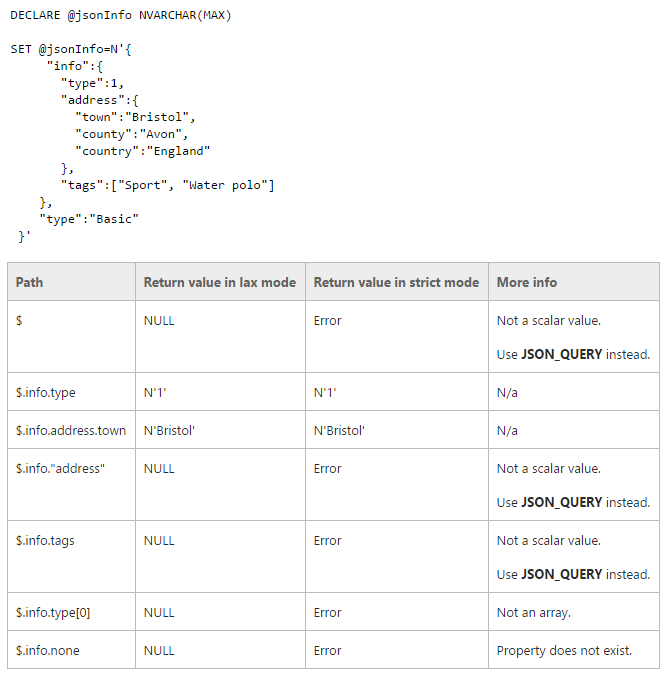
Once the Stored Procedure has been created and published in your database, you can now create your series query procedure, using the code below, which also uses the new JSON_VALUE feature in SQL Server 2016, which allows you to manipulate JSON strings natively in the database.
Examples of using JSON_VALUE:
Creating the Stored Procedure to Search for Series
Once the CLR stpWS_Requisicao has been created and you already understand how the new JSON_VALUE function works, let's create the Stored Procedure that will return your series information.
Stored Procedure source code:
CREATE PROCEDURE dbo.stpInformacoes_Serie (
    @Nome_Serie NVARCHAR(MAX)
)
AS BEGIN

    DECLARE
        @URL NVARCHAR(MAX),
        @Retorno1 NVARCHAR(MAX),
        @Retorno2 NVARCHAR(MAX),
        @Retorno3 NVARCHAR(MAX)

    SET @URL = 'http://api.tvmaze.com/search/shows?q=' + @Nome_Serie

    -- Faz uma consulta ao webservice para consultar as informações da série
    EXEC CLR.dbo.stpWs_Requisicao
        @Ds_Url = @URL, -- nvarchar(max)
        @Ds_Metodo = N'GET', -- nvarchar(max)
        @Ds_Parametros = N'', -- nvarchar(max)
        @Ds_Codificacao = N'UTF-8', -- nvarchar(max)
        @Ds_Retorno_OUTPUT = @Retorno1 OUTPUT -- nvarchar(max)


    -- Remove os caracteres [] do começo e fim da string
    SET @Retorno1 = SUBSTRING(@Retorno1, 2, LEN(@Retorno1) - 2)

    -- Recupera o ID da série
    DECLARE @Id_Serie INT = CAST(JSON_VALUE(@Retorno1,'$.show.id') AS INT)
    DECLARE @Serie NVARCHAR(100) = JSON_VALUE(@Retorno1,'$.show.name')

    -- Recupera informações do episódio anterior
    SET @Url = 'http://api.tvmaze.com/shows/' + CAST(@Id_Serie AS VARCHAR(5)) + '?embed=previousepisode'

    EXEC CLR.dbo.stpWs_Requisicao
        @Ds_Url = @URL, -- nvarchar(max)
        @Ds_Metodo = N'GET', -- nvarchar(max)
        @Ds_Parametros = N'', -- nvarchar(max)
        @Ds_Codificacao = N'UTF-8', -- nvarchar(max)
        @Ds_Retorno_OUTPUT = @Retorno2 OUTPUT -- nvarchar(max)


    -- Recupera informações do próximo episódio
    SET @Url = 'http://api.tvmaze.com/shows/' + CAST(@Id_Serie AS VARCHAR(5)) + '?embed=nextepisode'

    EXEC CLR.dbo.stpWs_Requisicao
        @Ds_Url = @URL, -- nvarchar(max)
        @Ds_Metodo = N'GET', -- nvarchar(max)
        @Ds_Parametros = N'', -- nvarchar(max)
        @Ds_Codificacao = N'UTF-8', -- nvarchar(max)
        @Ds_Retorno_OUTPUT = @Retorno3 OUTPUT -- nvarchar(max)


    -- Extrai as informações dos episódios com JSON_VALUE e guarda numa tabela
    IF (OBJECT_ID('tempdb..#Episodios') IS NOT NULL) DROP TABLE #Episodios
    CREATE TABLE #Episodios (
        Ds_Serie NVARCHAR(100),
        Ds_Tipo VARCHAR(50),
        Nr_Temporada INT,
        Ds_Episodio NVARCHAR(100),
        Nr_Episodio INT,
        Dt_Episodio DATE,
        Hr_Episodio NVARCHAR(5)
    )

    INSERT INTO #Episodios
    SELECT
        @Serie AS Ds_Serie ,
        'Anterior' AS Ds_Tipo,
        JSON_VALUE(@Retorno2, '$._embedded.previousepisode.season') AS Nr_Temporada,
        JSON_VALUE(@Retorno2, '$._embedded.previousepisode.name') AS Ds_Episodio,
        JSON_VALUE(@Retorno2, '$._embedded.previousepisode.number') AS Nr_Episodio,
        JSON_VALUE(@Retorno2, '$._embedded.previousepisode.airdate') AS Dt_Episodio,
        JSON_VALUE(@Retorno2, '$._embedded.previousepisode.airtime') AS Hr_Episodio

    UNION ALL

    SELECT
        @Serie AS Ds_Serie,
        'Próximo' AS Ds_Tipo,
        ISNULL(JSON_VALUE(@Retorno3, '$._embedded.nextepisode.season'), '') AS Nr_Temporada,
        ISNULL(JSON_VALUE(@Retorno3, '$._embedded.nextepisode.name'), '') AS Ds_Episodio,
        ISNULL(JSON_VALUE(@Retorno3, '$._embedded.nextepisode.number'), '') AS Nr_Episodio,
        ISNULL(JSON_VALUE(@Retorno3, '$._embedded.nextepisode.airdate'), '') AS Dt_Episodio,
        ISNULL(JSON_VALUE(@Retorno3, '$._embedded.nextepisode.airtime'), '') AS Hr_Episodio


    SELECT * FROM #Episodios


END
Examples of using the Procedure:

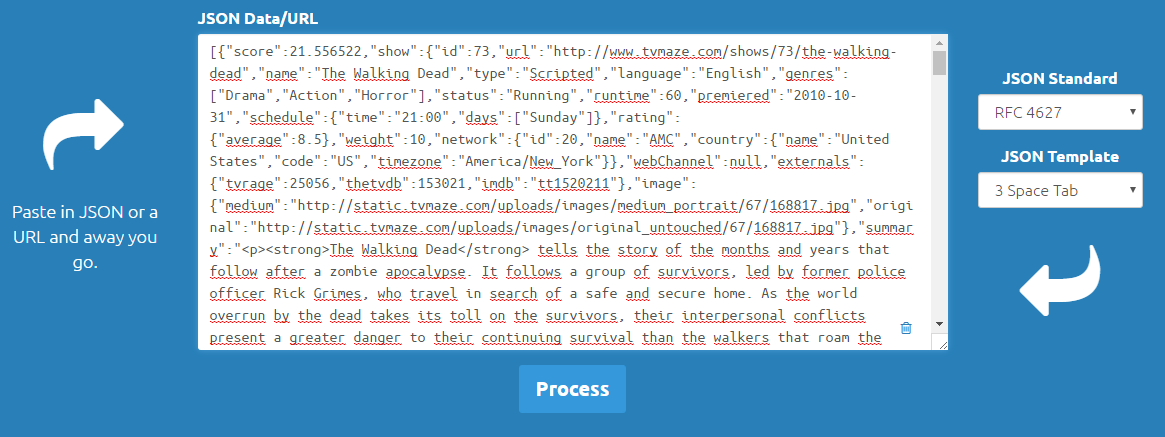
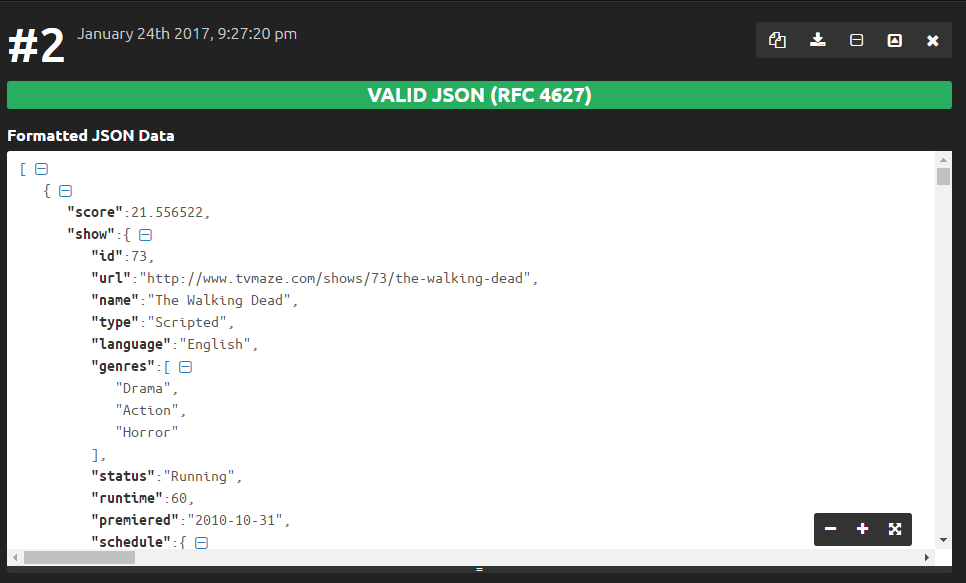
A great tip that Reginaldo gave us is to use the website JSON Formatter & Validator to improve the visualization of the JSON returned by the Webservice query, as shown in the example below.
Original JSON:
Formatted JSON:
That's it, folks!
I hope you liked the post.
If you want to create automated monitoring through a Job in SQL Server Agent, which sends you an email when an episode is close to being released, be sure to check out the post I mentioned from Reginaldo Silva's blog, which has this solution there.
Hug!

Comentários (0)
Carregando comentários…