
Hey guys!
In today's post I would like to demonstrate a feature that has been available since SQL Server 2008 and that I see very few use cases for on a daily basis in the companies I have worked for, which is the use of “tables” as parameters for Stored Procedures.
Introduction
If you're a guy who likes tricks, I'm sure you thought I was referring to passing the table name as a VARCHAR parameter and using dynamic query to read the table's data, right? Yes, but that's not what this post is about... lol
The objective of this article is to show how to use table types to be able to pass complex data types as parameters of Stored Procedures, simulating a table from the database.
Using this type of object has a series of advantages for our programming:
- Do not generate locks
- They are stored in cache, just like temporary tables
- Simplifies programming
- Brings business rules to data modeling
- Provides a strong typing model
- Allows you to provide tables and structured data for Stored Procedures
- Can be created using In-Memory OLTP = WITH(MEMORY_OPTIMIZED=ON)
However, we must also pay attention to the restrictions:
- SQL Server does not maintain statistics on table-valued parameter columns.
- Table-valued parameters must be passed as READONLY input parameters to Transact-SQL routines. You cannot perform DML operations such as UPDATE, DELETE, or INSERT on a table-valued parameter in the body of a routine.
- You cannot use a table-valued parameter as the target of a SELECT INTO or INSERT EXEC statement. A table-valued parameter can be in the FROM clause of SELECT INTO, in a string, or INSERT EXEC of Stored Procedures.
- A table type cannot be changed. If you need to change it, you will need to recreate it. If it is used as parameters in objects, the type will have to be disassociated from these objects, deleted and then created again with the desired structure
- You cannot create indexes directly on the type with table structure (below I will demonstrate how to create indexes)
Creating our first type with table structure
The first step to this is to create our table data type:
CREATE TYPE dbo.tpPessoa AS TABLE (
    Nome varchar(100),
    Idade INT,
    Dt_Nascimento DATE
)
Now, let's create a simple Stored Procedure, which will receive a @variable of type tpPessoa, which we just created and will simply display this data on the screen:
CREATE PROCEDURE dbo.stpExibe_Pessoa (
    @Pessoa tpPessoa READONLY
)
AS
BEGIN

    SELECT *
    FROM @Pessoa

END
GO
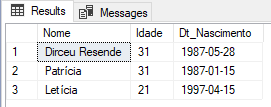
After creating this Stored Procedure, we will declare a @variable using the type tpPessoa, insert some values and then execute the Stored Procedure stpExibe_Pessoa, informing the @variable as a parameter:
DECLARE @Variavel_Pessoa AS tpPessoa

INSERT INTO @Variavel_Pessoa
(
    Nome,
    Idade,
    Dt_Nascimento
)
VALUES
( 'Dirceu Resende', 31, '1987-05-28'),
( 'Patrícia', 31, '1987-01-15'),
( 'Letícia', 21, '1997-04-15')


EXEC dbo.stpExibe_Pessoa
    @Pessoa = @Variavel_Pessoa -- tpPessoa
Result:
And now, viewing the entire code at once:
View source code
It is important to note that, after creating the type and using it in a Stored Procedure, for example, you will only be able to delete the type if it is disassociated from the SP. Otherwise, you will receive this error message when trying to delete it (remembering that it is not possible to change the type with table structure):
Msg 3732, Level 16, State 1, Line 2
Cannot drop type ‘dbo.tpPessoa’ because it is being referenced by object ‘stpExibe_Pessoa’. There may be other objects that reference this type.
Types with more complex table structures
Now, let's try a slightly more complex example with some business rules:
View source codeWhen trying to execute this code above, we will come across the error message below, which proves that the UNIQUE index we created on the type is actually working:
Msg 2627, Level 14, State 1, Line 55
Violation of UNIQUE KEY constraint ‘UQ__#A8CD763__C7F1EF4BE5A1C81E’. Cannot insert duplicate key in object ‘dbo.@Variavel_Pessoa’. The duplicate key value is (1111111).
The statement has been terminated.
After correcting the input data (I replaced the document “1111111” with “4444444”) and running the script again, we see that it returns this set of data:

Comparing with the previous result, we see that this time it is ordering the results by Name, since we declared a clustered index on the Name field. Although the clustered index does not guarantee the ordering of records, we saw that it is being put into practice in the tpPessoa type.
Still not convinced that the index really exists and is being used in the tpPessoa type? OK!
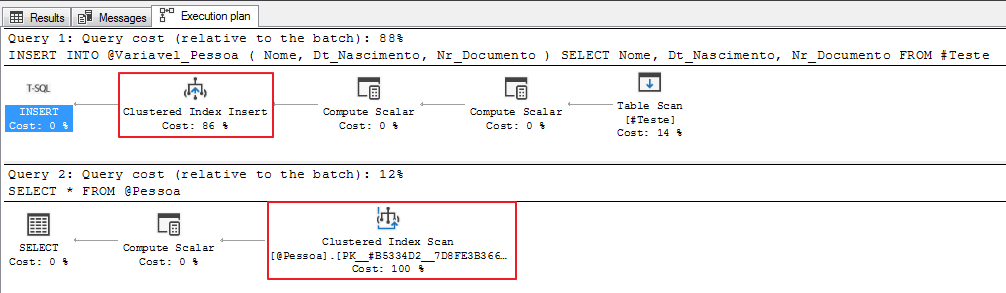
What if we try to create an index after the tpPessoa type has been created?
CREATE NONCLUSTERED INDEX SK01_tpPessoa ON dbo.tpPessoa(Nr_Documento)
Result:
Msg 1088, Level 16, State 12, Line 15
Cannot find the object “dbo.tpPessoa” because it does not exist or you do not have permissions.
What about In-Memory OLTP? Does it work? Yes!!
CREATE TYPE dbo.tpPessoa AS TABLE (
    Nome VARCHAR(100) NOT NULL,
    Nr_Documento VARCHAR(11) NOT NULL,
    Idade AS (DATEDIFF(YEAR, Dt_Nascimento, GETDATE())) -- Coluna calculada
) WITH(MEMORY_OPTIMIZED=ON)
GO
Using table-structured types in functions
Until then, I demonstrated how to use tpPessoa in Stored Procedures. But is it possible to use it in functions?
Let's test:
View code
Result: (it worked!)

What if we try it in table-valued functions?
View code
Result: (it worked!)

That's it, folks!
I hope you enjoyed this post and see you next time!
References:
https://docs.microsoft.com/pt-br/sql/relational-databases/tables/use-table-valued-parameters-database-engine?view=sql-server-2017
https://docs.microsoft.com/pt-br/sql/t-sql/statements/create-type-transact-sql?view=sql-server-2017

Comentários (0)
Carregando comentários…