Warning: preg_match(): Unknown modifier 'b' in /mnt/datadisk/www/src/Controllers/PostController.php on line 206 SQL Server - How to query national, state, municipal, and optional holidays from an API using OLE Automation and CLR (C#) — Dirceu ResendeSkip to content
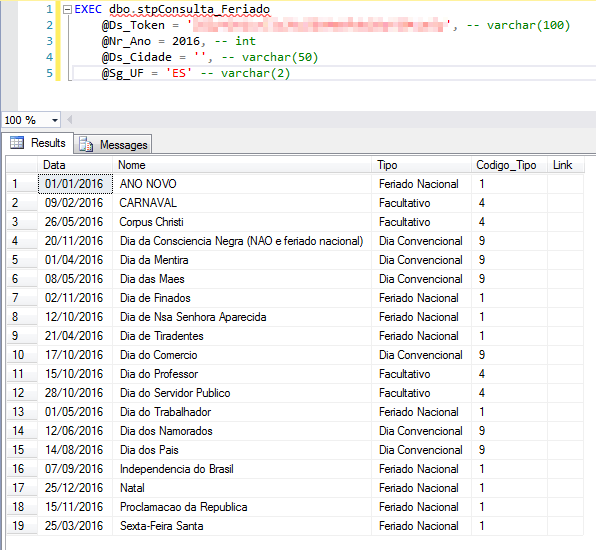
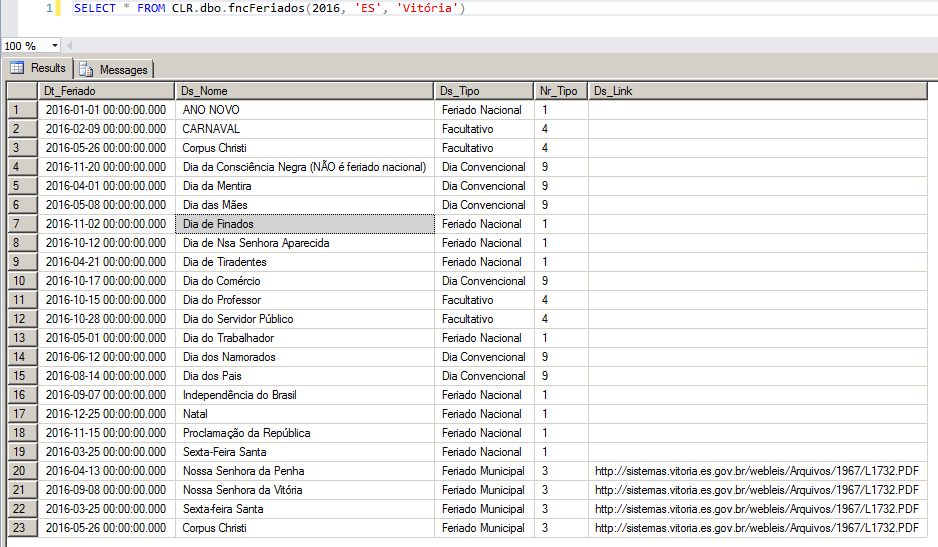
In this post, I'm going to follow a reader's tip and use the site's excellent free API Calendario.com.br to return the list of national, state, municipal and optional holidays in Brazil, allowing you to filter by year, state and/or city. I had already commented on this subject in the post How to create a table with holidays (national, state and mobile) in SQL Server, but I think this post will provide another way to accomplish this task.
I believe that the solution in this post is more complete than that of my previous post on holidays, as it even includes municipal and optional holidays. However, each query generates an HTTP request, which, applied to a large list of cities/years, could take several seconds, while the solution in the other post already calculates and stores all the data in a table, which does not prevent this from also being done with the solution via API.
To learn more about the OLE Automation feature, click this link.
Using OLE Automation
The quickest way to implement this is using the OLE Automation object MSXML2.ServerXMLHTTP, which allows you to make XML requests via the HTTP protocol.
As I have already mentioned in other posts, for security and environmental stability reasons, I DO NOT recommend activating and using the OLE Automation feature, but I wanted to demonstrate here a solution on how to use this powerful, but dangerous, database feature.
View source code
CREATE PROCEDURE dbo.stpConsulta_Feriado (
    @Ds_Token VARCHAR(100),
    @Nr_Ano INT,
    @Ds_Cidade VARCHAR(50),
    @Sg_UF VARCHAR(2) = 'ES'
)
AS BEGIN


    DECLARE
        @obj INT,
        @Url VARCHAR(8000),
        @xml XML,
        @resposta VARCHAR(MAX)


    IF (OBJECT_ID('tempdb..#xml') IS NOT NULL) DROP TABLE #xml
    CREATE TABLE #xml (
        Ds_Dados VARCHAR(MAX)
    )


    SET @Url = 'http://www.calendario.com.br/api/api_feriados.php?token=' + @Ds_Token + '&ano=' + CAST(@Nr_Ano AS VARCHAR(4))

    IF (NULLIF(LTRIM(RTRIM(@Sg_UF)), '') IS NOT NULL)
        SET @Url += '&estado=' + @Sg_UF


    IF (NULLIF(LTRIM(RTRIM(@Ds_Cidade)), '') IS NOT NULL)
        SET @Url += '&cidade=' + @Ds_Cidade


    EXEC sys.sp_OACreate @progid = 'MSXML2.ServerXMLHTTP', @objecttoken = @obj OUT, @context = 1
    EXEC sys.sp_OAMethod @obj, 'open', NULL, 'GET', @Url, false
    EXEC sys.sp_OAMethod @obj, 'setRequestHeader', NULL, 'Content-Type', 'application/x-www-form-urlencoded'
    EXEC sys.sp_OAMethod @obj, 'send'


    INSERT INTO #xml(Ds_Dados)
    EXEC sys.sp_OAGetProperty @obj, 'responseText' --, @resposta OUT


    EXEC sys.sp_OADestroy @obj


    SELECT TOP 1 @resposta = Ds_Dados FROM #xml
    SET @xml = @resposta COLLATE SQL_Latin1_General_CP1251_CS_AS

    SELECT
        eventos.linha.value('date[1]','varchar(100)') AS [Data],
        eventos.linha.value('name[1]','varchar(100)') AS Nome,
        eventos.linha.value('type[1]','varchar(30)') AS Tipo,
        eventos.linha.value('type_code[1]','int') AS Codigo_Tipo,
        eventos.linha.value('link[1]','varchar(100)') AS Link
    FROM
        @xml.nodes('//events/event') eventos(linha)


END
Already known here from blog posts, the CLR allows you to use C# or VB.NET code from the .NET Framework within the SQL Server database, and thus obtain new features and extend the database's capacity.
If you don't know the CLR, or don't know how it works and what it is, access this link.
View source code
using System.Collections;
using System.Data.SqlTypes;
using System.IO;
using System.Net;
using System.Text;
using System.Xml;
using Bibliotecas.Model;
using System;

public partial class UserDefinedFunctions
{

    private class ConsultaFeriado
    {

        public SqlDateTime Date;
        public SqlString Name;
        public SqlString Type;
        public SqlInt32 Type_Code;
        public SqlString Link;

        public ConsultaFeriado(SqlDateTime date, SqlString name, SqlString type, SqlInt32 typeCode, SqlString link)
        {

            Date = date;
            Name = name;
            Type = type;
            Type_Code = typeCode;
            Link = link;

        }

    }

    [Microsoft.SqlServer.Server.SqlFunction(
        FillRowMethodName = "FillRow_ConsultaFeriado",
        TableDefinition = "Dt_Feriado DATETIME, Ds_Nome NVARCHAR(100), Ds_Tipo NVARCHAR(50), Nr_Tipo INT, Ds_Link NVARCHAR(500)"
    )]
    public static IEnumerable fncFeriados(int Ano, string Sg_UF, string Ds_Cidade)
    {

        var consultaFeriadoCollection = new ArrayList();

        if (Ano < 1900 || Ano > 2099)
            return consultaFeriadoCollection;


        // Gere o seu token no endereço: http://www.calendario.com.br/api_feriados_municipais_estaduais_nacionais.php
        var token = "";
        var parametros = "?token=" + token + "&ano=" + Ano;

        if (!string.IsNullOrEmpty(Sg_UF))
            parametros += "&estado=" + Sg_UF;

        if (!string.IsNullOrEmpty(Ds_Cidade))
            parametros += "&cidade=" + Ds_Cidade;


        var request = (HttpWebRequest)WebRequest.Create("http://www.calendario.com.br/api/api_feriados.php" + parametros);
        //request.Proxy = new WebProxy(Servidor.Ds_Proxy_Url, Servidor.Ds_Proxy_Porta) { Credentials = new NetworkCredential(Servidor.Ds_Proxy_Usuario, Servidor.Ds_Proxy_Senha, Servidor.Ds_Proxy_Dominio) };

        request.Method = "GET";
        request.UserAgent = "curl/7.45.0";
        request.ContentType = "application/x-www-form-urlencoded";


        using (var response = (HttpWebResponse)request.GetResponse())
        {
            using (var stream = response.GetResponseStream())
            {

                if (stream == null) return consultaFeriadoCollection;

                using (var streamReader = new StreamReader(stream, Encoding.GetEncoding("UTF-8")))
                {

                    var resposta = streamReader.ReadToEnd();

                    var xml = new XmlDocument();
                    xml.LoadXml(resposta);

                    var root = xml.DocumentElement;
                    var nodes = root?.SelectNodes("/events/event");

                    if (nodes == null) return consultaFeriadoCollection;

                    foreach (XmlNode node in nodes)
                    {

                        if (node != null)
                        {

                            consultaFeriadoCollection.Add(new ConsultaFeriado(
                                (string.IsNullOrEmpty(node["date"]?.InnerText)) ? SqlDateTime.Null : Convert.ToDateTime(node["date"].InnerText),
                                node["name"]?.InnerText,
                                node["type"]?.InnerText,
                                int.Parse(node["type_code"]?.InnerText),
                                node["link"]?.InnerText
                            ));

                        }

                    }
                }
            }
        }


        return consultaFeriadoCollection;

    }

    protected static void FillRow_ConsultaFeriado(object objConsultaFeriado, out SqlDateTime date, out SqlString name, out SqlString type, out SqlInt32 typeCode, out SqlString link)
    {

        var consultaFeriado = (ConsultaFeriado)objConsultaFeriado;

        date = consultaFeriado.Date;
        name = consultaFeriado.Name;
        type = consultaFeriado.Type;
        typeCode = consultaFeriado.Type_Code;
        link = consultaFeriado.Link;

    }

}


Comentários (0)
Carregando comentários…