
Hey guys,
Goodnight!
In this post, I will demonstrate how to encrypt and decrypt passwords with the CLR (C#). To do this, I will use the .NET Framework's MD5CryptoServiceProvider and TripleDESCryptoServiceProvider encryption algorithms, which allow you to use a keyword (Salt) to guarantee that this key will be used to encrypt the data and can only be decrypted using this secret keyword.
If you are new to the CLR and would like to know more about this powerful feature of SQL Server, access this link.
View source codeUsage examples
Encrypting data
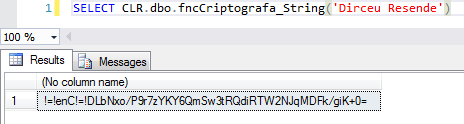
Decrypting data

This implementation is not part of the Windows Platform FIPS validated cryptographic algorithms
If you compiled your CLR assembly on a server running Windows Server, you will probably encounter this error message when trying to execute these two functions in the post.
Msg 6522, Level 16, State 1, Line 6
A .NET Framework error occurred during execution of user-defined routine or aggregate “fncCriptografa_String”:
System.InvalidOperationException: This implementation is not part of the Windows Platform FIPS validated cryptographic algorithms.
System.InvalidOperationException:
at System.Security.Cryptography.MD5CryptoServiceProvider..ctor()
at Bibliotecas.Model.Utils.CreateDES(String key)
at UserDefinedFunctions.fncCriptografa_String(SqlString Ds_Password)
This occurs because the algorithms used (MD5CryptoServiceProvider and TripleDESCryptoServiceProvider) do not comply with Microsoft's FIPS standard.
This problem is similar to the one I reported in the post SQL Server Reporting Services – Error Saving Report: System.InvalidOperationException This implementation is not part of the Windows Platform FIPS validated cryptographic algorithms., but I will use a different solution for this case.
So that you can use these functions on your server, I will present two solutions to solve this problem:
Option 1: Disable FIPS
To disable this setting, simply access the Windows registry, find the setting “HKEY_LOCAL_MACHINE\SYSTEM\CurrentControlSet\Control\Lsa\fipsalgorithmpolicy” and change the value of the “Enabled” key to 0.
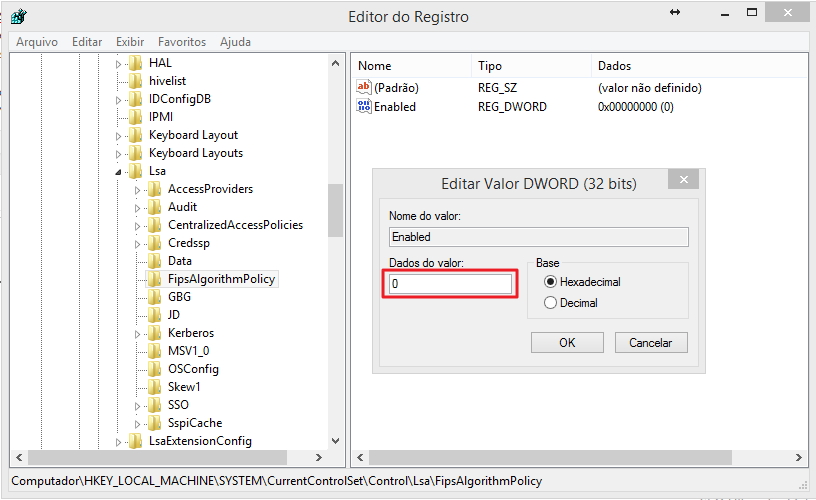
After that, restart the SQL Server service and you will be able to use these functions normally.
Option 2: Change the SQL Server sqlservr.exe.config file
One way to resolve this problem without having to disable this security policy (if it is enabled, your company's security analyst probably thinks it is a good option) is to change the file sqlservr.exe.config, usually located in C:\Program Files\Microsoft SQL Server\MSSQL12.Name_Of_Your_Instance\MSSQL\Binn and add the following configuration to the end of the file, within the
<enforceFIPSPolicy enabled="0" />
Your file should look like this:
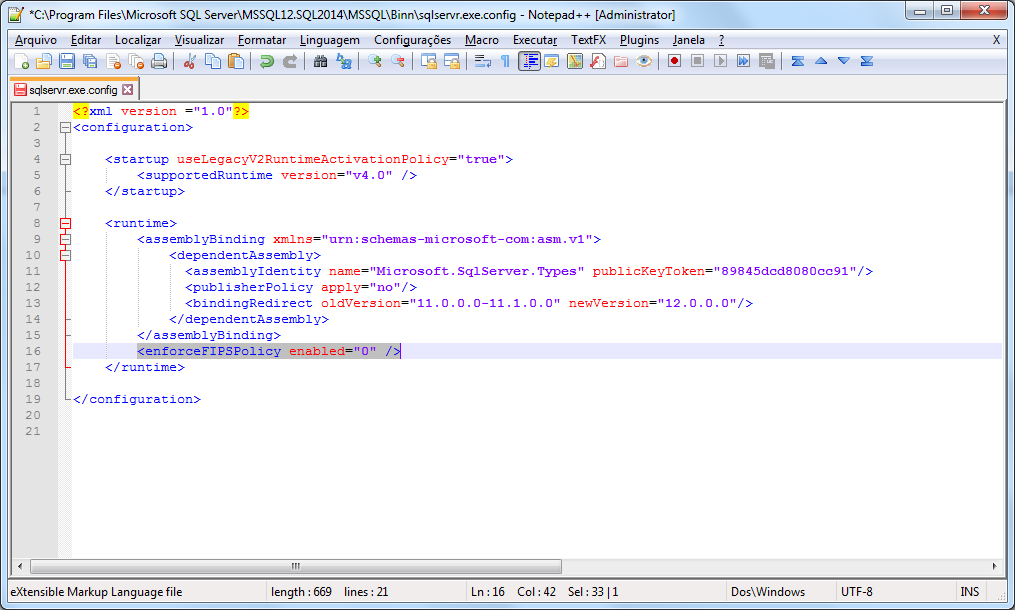
After changing the file, restart the SQL Server service. This change will need to be made in all instances where you will use this function.
Another alternative is to make this change in the machine.config of the machine (Usually located in C:\Windows\Microsoft.NET\Framework64\v4.0.30319\Config), but keep in mind that using this solution, you will disable this option for ALL .NET applications on the server.
Supported and unsupported encryption algorithms
See also the list below to identify which algorithms are supported and which are not supported by the “System.Security.Cryptography” namespace:
Hash Algorithms
– HMACSHA1
– MACTripleDES
– SHA1CryptoServiceProvider
Symmetric Algorithms (Use the same key for encryption and decryption)
– DESCryptoServiceProvider
– TripleDESCryptoServiceProvider
Asymmetric Algorithms (Use a public key for encryption and a private key for decryption)
– DSACryptoServiceProvider
– RSACryptoServiceProvider
Algorithms that do not support FIPS standards (and should not be used)
– HMACMD5
– HMACRIPEMD160
– HMACSHA256
– HMACSHA384
– HMACSHA512
– MD5CryptoServiceProvider
– RC2CryptoServiceProvider
– RijndaelManaged
– RIPEMD160Managed
– SHA1Managed
That's it, folks!
I hope you liked the post.
A hug and see you next time.

Comments (0)
Loading comments...