
Hey guys
All good?
In this post, I would like to show you how to read and write events in the Windows Event Viewer using the CLR (C#). To learn more about the CLR, this powerful resource that allows you to create and execute code written using the C# programming language and the .NET Framework to extend the functionalities of SQL Server, access the post Introduction to SQL CLR (Common Language Runtime) in SQL Server.
In many situations, having this information available for queries in the database can be very useful for creating internal monitoring or for creating web applications that consume this information and help the development team identify problems in applications and services, as well as allowing the ability to record personalized event messages within the Stored Procedures of the SQL Server database, according to certain situations.
Another cool example for this post is here at the company where I work, where there is a service that monitors the Event Viewer of a server, looking for an event where the application is “XPTO” and the type is “Error”. When an event is generated using this application, a monitoring team that works 24x7 calls a certain number to take the necessary actions, especially for highly critical routines that cannot fail or stop. This event is recorded by the CLR when a certain situation occurs in the database.
How to record events in Event Viewer from SQL Server
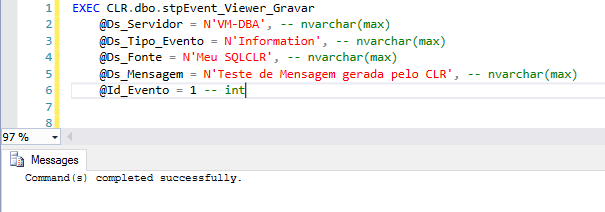
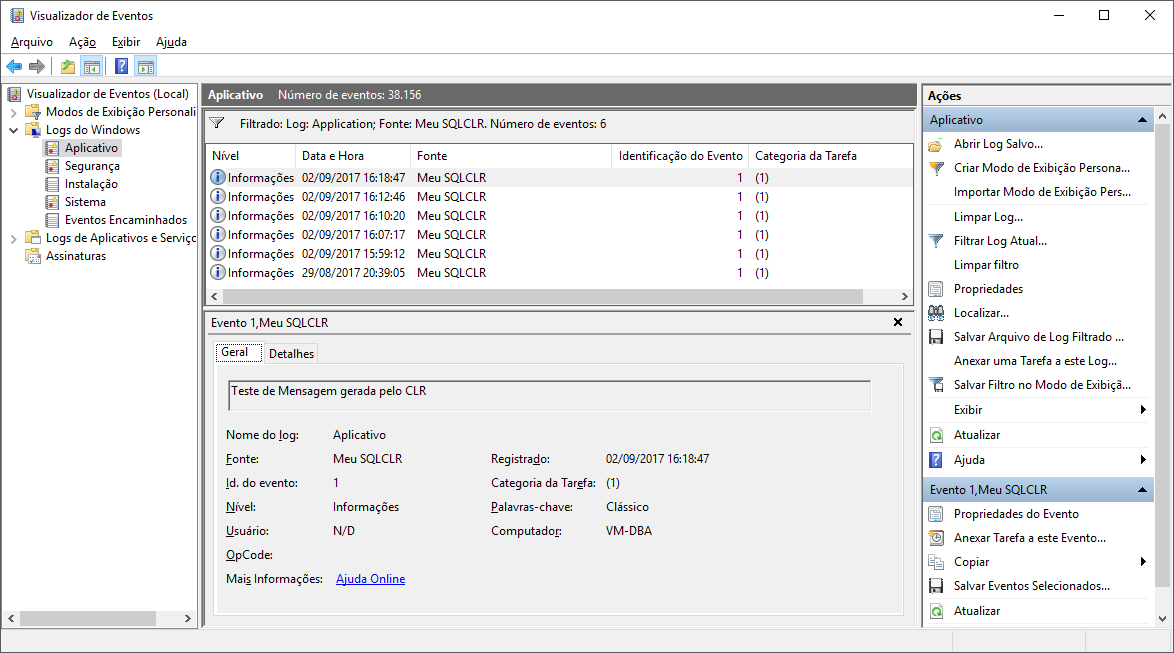
To record events in the Windows Event Viewer via SQL Server, simply execute the Stored Procedure stpEvent_Viewer_Record from your CLR library.
Parameters:
- @Ds_Servidor: Name of the server you want to record the event
- @Ds_Tipo_Evento: Type of event you want to record (Error, FailureAudit, Warning, SuccessAudit, Success or Information)
- @Ds_Fonte: Name you want to define as the event source (Usually, the name of the system or application)
- @Ds_Mensagem: Message you want to record in the event
- @Id_Evento: Error code or message you want to generate for this event (free choice)
View source code
using System.Diagnostics;

public partial class StoredProcedures
{
    [Microsoft.SqlServer.Server.SqlProcedure]
    public static void stpEvent_Viewer_Gravar(string Ds_Servidor, string Ds_Tipo_Evento, string Ds_Fonte, string Ds_Mensagem, int Id_Evento)
    {

        var tipoEvento = Ds_Tipo_Evento;
        var enumTipoEvento = EventLogEntryType.Error;

        switch (tipoEvento)
        {
            case "Error":
                enumTipoEvento = EventLogEntryType.Error;
                break;

            case "FailureAudit":
                enumTipoEvento = EventLogEntryType.FailureAudit;
                break;

            case "Information":
                enumTipoEvento = EventLogEntryType.Information;
                break;

            case "SuccessAudit":
            case "Success":
                enumTipoEvento = EventLogEntryType.SuccessAudit;
                break;

            case "Warning":
                enumTipoEvento = EventLogEntryType.Warning;
                break;

            default:
                return;
        }

        if (!EventLog.SourceExists(Ds_Fonte))
        {
            EventLog.CreateEventSource(Ds_Fonte, "Application");
        }

        using (var ev = new EventLog("Application", Ds_Servidor))
        {
            ev.Source = Ds_Fonte;
            ev.WriteEntry(Ds_Mensagem, enumTipoEvento, Id_Evento, 1);
        }

    }

};
Example of use
How to record events in Event Viewer using SQL Server (Without CLR)
Is it possible to record events in the Event Viewer via SQL Server without using the CLR? Yes, it is, although it is not such an “elegant” way, since it is not possible to specify the source of the event.
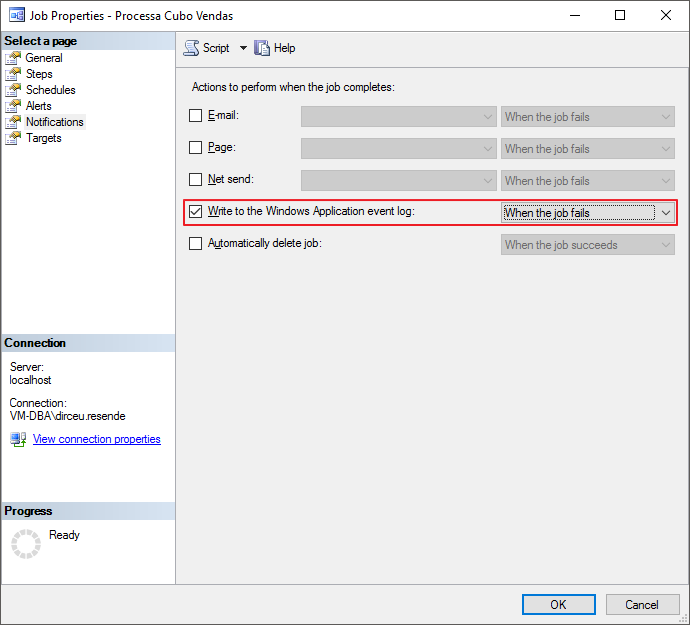
One of the ways to do this is using the SQL Agent “Write to the Windows Application event log” option:
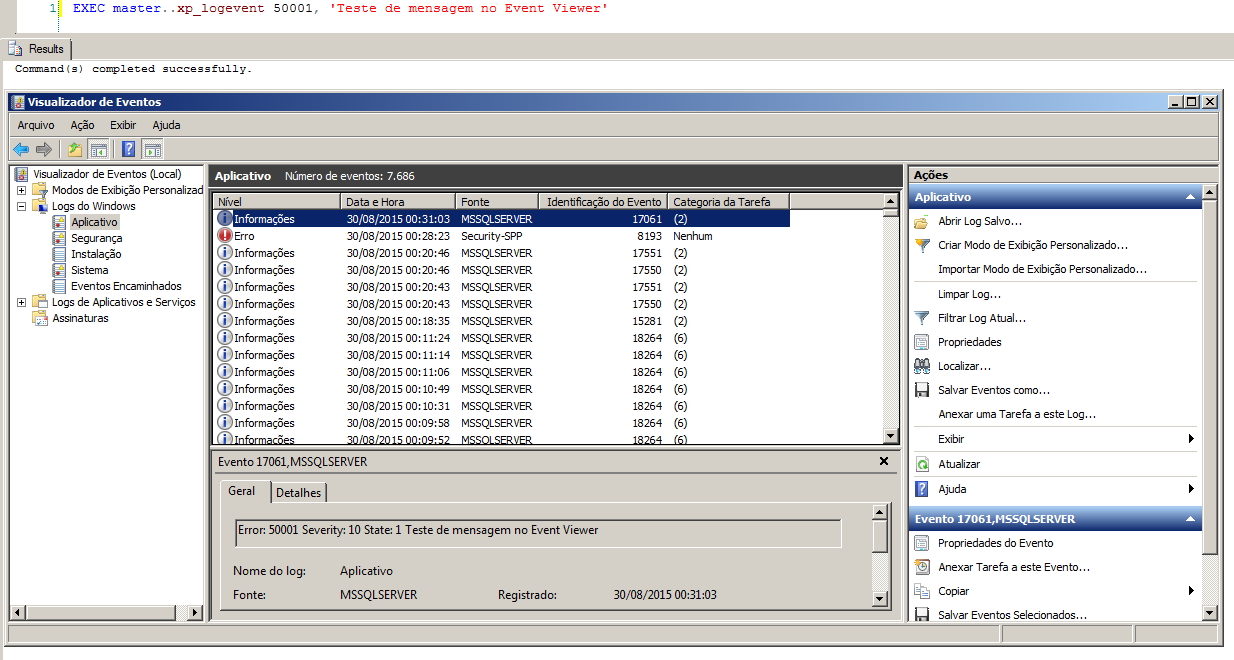
The other way is to use the undocumented procedure xp_logevent, which I had already published about in the post SQL Server undocumented extended procedures:
EXEC master..xp_logevent 50001, 'Teste de mensagem no Event Viewer', 'INFORMATIONAL' -- INFORMATIONAL, WARNING, ERRORUsage example:
How to read events in Event Viewer using SQL Server
To read events in the Windows Event Viewer via SQL Server, I will share two ways to achieve this goal, one using a Stored Procedure and the other using a Table-valued function, which gives us more flexibility to work with the data.
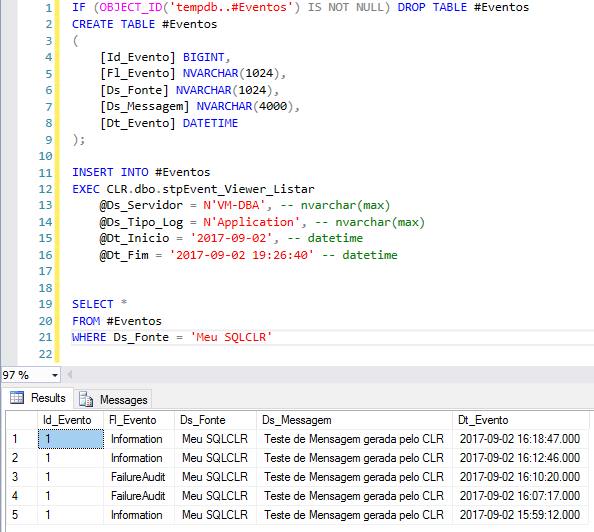
View stpEvent_Viewer_Listar source code
using System;
using System.Data;
using System.Data.SqlTypes;
using Microsoft.SqlServer.Server;
using System.Diagnostics;

public partial class StoredProcedures
{
    [SqlProcedure]
    public static void stpEvent_Viewer_Listar(string Ds_Servidor, string Ds_Tipo_Log, SqlDateTime Dt_Inicio, SqlDateTime Dt_Fim)
    {

        var logType = Ds_Tipo_Log;
        var dtInicio = Dt_Inicio.Value;
        var dtFim = Dt_Fim.Value;

        using (var ev = new EventLog(logType, Ds_Servidor))
        {

            var lastLogToShow = ev.Entries.Count;

            if (lastLogToShow <= 0)
                return;


            var pipe = SqlContext.Pipe;

            var colunas = new SqlMetaData[5];
            colunas[0] = new SqlMetaData("Id_Evento", SqlDbType.BigInt);
            colunas[1] = new SqlMetaData("Fl_Evento", SqlDbType.NVarChar, 1024);
            colunas[2] = new SqlMetaData("Ds_Fonte", SqlDbType.NVarChar, 1024);
            colunas[3] = new SqlMetaData("Ds_Messagem", SqlDbType.NVarChar, 4000);
            colunas[4] = new SqlMetaData("Dt_Evento", SqlDbType.DateTime);

            var linhaSql = new SqlDataRecord(colunas);

            pipe?.SendResultsStart(linhaSql);

            for (var i = ev.Entries.Count - 1; i >= 0; i--)
            {

                try
                {

                    var currentEntry = ev.Entries[i];

                    if ((currentEntry.TimeGenerated >= dtInicio) && (currentEntry.TimeGenerated <= dtFim))
                    {
                        linhaSql.SetSqlInt64(0, new SqlInt64(currentEntry.InstanceId));
                        linhaSql.SetSqlString(1, new SqlString(currentEntry.EntryType.ToString()));
                        linhaSql.SetSqlString(2, new SqlString(currentEntry.Source));
                        linhaSql.SetSqlString(3, new SqlString(currentEntry.Message.Substring(0, (currentEntry.Message.Length) > 4000 ? 3999 : currentEntry.Message.Length)));
                        linhaSql.SetSqlDateTime(4, new SqlDateTime(currentEntry.TimeGenerated));

                        pipe?.SendResultsRow(linhaSql);

                    }
                    else if (currentEntry.TimeGenerated < dtInicio) break;

                }
                catch (Exception e)
                {
                    // ignore
                }

            }

            pipe?.SendResultsEnd();

        }

    }

};
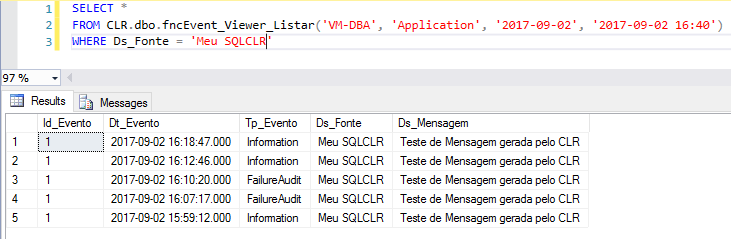
View fncEvent_Viewer_Listar source code
using System;
using System.Collections;
using System.Data.SqlTypes;
using System.Diagnostics;

public partial class UserDefinedFunctions
{

    private class EventViewerListar
    {

        public SqlInt64 Id_Evento;
        public SqlDateTime Dt_Evento;
        public SqlString Tp_Evento;
        public SqlString Ds_Fonte;
        public SqlString Ds_Mensagem;


        public EventViewerListar(SqlInt64 idEvento, SqlDateTime dtEvento, SqlString tpEvento, SqlString dsFonte, SqlString dsMensagem)
        {

            Id_Evento = idEvento;
            Dt_Evento = dtEvento;
            Tp_Evento = tpEvento;
            Ds_Fonte = dsFonte;
            Ds_Mensagem = dsMensagem;

        }
    }

    [Microsoft.SqlServer.Server.SqlFunction(
        FillRowMethodName = "FillRowEventViewer",
        TableDefinition = "Id_Evento BIGINT, Dt_Evento DATETIME, Tp_Evento nvarchar(50), Ds_Fonte nvarchar(50), " +
                          "Ds_Mensagem NVARCHAR(MAX)"
    )]
    public static IEnumerable fncEvent_Viewer_Listar(string Ds_Servidor, string Ds_Tipo_Log, DateTime Dt_Inicio, DateTime Dt_Fim)
    {

        var eventViewerListarCollection = new ArrayList();

        try
        {

            var logType = Ds_Tipo_Log;

            using (var ev = new EventLog(logType, Ds_Servidor))
            {

                var lastLogToShow = ev.Entries.Count;

                if (lastLogToShow > 0)
                {

                    for (var i = lastLogToShow - 1; i >= 0; i--)
                    {

                        var currentEntry = ev.Entries[i];

                        if ((currentEntry.TimeGenerated >= Dt_Inicio) && (currentEntry.TimeGenerated <= Dt_Fim))
                        {

                            eventViewerListarCollection.Add(new EventViewerListar(
                                currentEntry.InstanceId,
                                currentEntry.TimeGenerated,
                                currentEntry.EntryType.ToString(),
                                currentEntry.Source,
                                currentEntry.Message.Substring(0, (currentEntry.Message.Length) > 4000 ? 3999 : currentEntry.Message.Length)
                            ));

                        }
                        else
                            if (currentEntry.TimeGenerated < Dt_Inicio)
                                break;

                    }

                }

            }

        }
        catch (Exception e)
        {
            // ignored
        }


        return eventViewerListarCollection;

    }

    protected static void FillRowEventViewer(object objEventViewerListar, out SqlInt64 idEvento, out SqlDateTime dtEvento, out SqlString tpEvento, out SqlString dsFonte, out SqlString dsMensagem)
    {

        var eventViewerListar = (EventViewerListar)objEventViewerListar;

        idEvento = eventViewerListar.Id_Evento;
        dtEvento = eventViewerListar.Dt_Evento;
        tpEvento = eventViewerListar.Tp_Evento;
        dsFonte = eventViewerListar.Ds_Fonte;
        dsMensagem = eventViewerListar.Ds_Mensagem;

    }

}
Examples of use
Listing events using SP
Listing events using the function
That's it, folks!
I hope you enjoyed this post and please do not confuse Event Viewer events with SQL Server log events.. lol
A hug and see you in the next post.

Comentários (0)
Carregando comentários…