
Hey guys!
In this post, I will demonstrate how to perform operations with files using the xp_cmdshell procedure, such as copying files, deleting, renaming, moving, creating directories, etc.
This post is a complement to others on file operations, using other solutions:
- File operations using OLE Automation in SQL Server
- SQL Server – How to list, read, write, copy, delete and move files with the CLR (C#)
To activate xp_cmdshell, simply run the command below:
sp_configure 'advanced options', 1
RECONFIGURE

sp_configure 'xp_cmdshell', 1
RECONFIGURE
stpFile_Exists
Source code
CREATE PROCEDURE dbo.stpArquivo_Existe (
    @Ds_Arquivo VARCHAR(255),
    @Saida BIT OUTPUT
)
AS BEGIN

    DECLARE @Query VARCHAR(8000) = 'IF EXIST "' + @Ds_Arquivo + '" ( echo 1 ) ELSE ( echo 0 )'

    DECLARE @Retorno TABLE (
        Linha INT IDENTITY(1, 1),
        Resultado VARCHAR(MAX)
    )

    INSERT INTO @Retorno
    EXEC master.dbo.xp_cmdshell
        @command_string = @Query

    SELECT @Saida = Resultado
    FROM @Retorno
    WHERE Linha = 1

END
GO
Examples of use
Checking if a directory exists
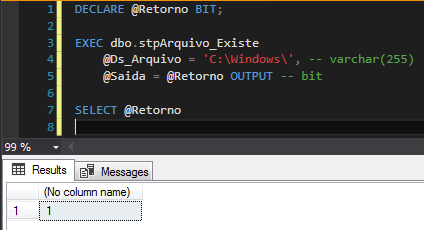
Checking if a file exists

Source code
CREATE PROCEDURE dbo.stpArquivo_Listar (
    @Ds_Diretorio VARCHAR(255)
)
AS BEGIN

    DECLARE @Query VARCHAR(8000) = 'dir/ -C /4 /N "' + @Ds_Diretorio + '"'

    DECLARE @Retorno TABLE (
        Linha INT IDENTITY(1, 1),
        Resultado VARCHAR(MAX)
    )

    DECLARE @Tabela_Final TABLE (
        Linha INT IDENTITY(1, 1),
        Dt_Criacao DATETIME,
        Fl_Tipo BIT,
        Qt_Tamanho INT,
        Ds_Arquivo VARCHAR(255)
    )

    INSERT INTO @Retorno
    EXEC master.dbo.xp_cmdshell
        @command_string = @Query


    INSERT INTO @Tabela_Final(Dt_Criacao, Fl_Tipo, Qt_Tamanho, Ds_Arquivo)
    SELECT
        CONVERT(DATETIME, LEFT(Resultado, 17), 103) AS Dt_Criacao,
        0 AS Fl_Tipo,
        0 AS Qt_Tamanho,
        SUBSTRING(Resultado, 37, LEN(Resultado)) AS Ds_Arquivo
    FROM
        @Retorno
    WHERE
        Resultado IS NOT NULL
        AND Linha >= 6
        AND Linha < (SELECT MAX(Linha) FROM @Retorno) - 2
        AND Resultado LIKE '%<DIR>%'
        AND SUBSTRING(Resultado, 37, LEN(Resultado)) NOT IN ('.', '..')
    ORDER BY
        Ds_Arquivo


    INSERT INTO @Tabela_Final(Dt_Criacao, Fl_Tipo, Qt_Tamanho, Ds_Arquivo)
    SELECT
        CONVERT(DATETIME, LEFT(Resultado, 17), 103) AS Dt_Criacao,
        1 AS Fl_Tipo,
        LTRIM(SUBSTRING(LTRIM(Resultado), 18, 19)) AS Qt_Tamanho,
        SUBSTRING(Resultado, CHARINDEX(LTRIM(SUBSTRING(LTRIM(Resultado), 18, 19)), Resultado, 18) + LEN(LTRIM(SUBSTRING(LTRIM(Resultado), 18, 19))) + 1, LEN(Resultado)) AS Ds_Arquivo
    FROM
        @Retorno
    WHERE
        Resultado IS NOT NULL
        AND Linha >= 6
        AND Linha < (SELECT MAX(Linha) FROM @Retorno) - 2
        AND Resultado NOT LIKE '%<DIR>%'
    ORDER BY
        Ds_Arquivo


    --SELECT * FROM @Retorno
    SELECT * FROM @Tabela_Final


END
GO
Result:

Source code
CREATE PROCEDURE dbo.stpArquivo_Ler (
    @Ds_Arquivo VARCHAR(255)
)
AS BEGIN

    DECLARE @Query VARCHAR(8000) = 'type "' + @Ds_Arquivo + '"'

    DECLARE @Retorno TABLE (
        Linha INT IDENTITY(1, 1),
        Resultado VARCHAR(MAX)
    )

    INSERT INTO @Retorno
    EXEC master.dbo.xp_cmdshell
        @command_string = @Query

    SELECT
        Linha,
        Resultado
    FROM @Retorno

END
GO
Result:

As you may have noticed, importing files with accents doesn't work very well, because the type command in the DOS prompt, even in Windows in Portuguese, doesn't work very well with this. As an alternative, we can use the well-known Power Shell.
Source code in Powershell
CREATE PROCEDURE dbo.stpArquivo_Ler (
    @Ds_Arquivo VARCHAR(255)
)
AS BEGIN

    DECLARE @Query VARCHAR(8000) = 'powershell.exe -ExecutionPolicy Bypass -Command "Get-Content ""' + @Ds_Arquivo + '"""'

    DECLARE @Retorno TABLE (
        Linha INT IDENTITY(1, 1),
        Resultado VARCHAR(MAX)
    )

    INSERT INTO @Retorno
    EXEC master.dbo.xp_cmdshell
        @command_string = @Query

    SELECT * FROM @Retorno

END
Result:

Source code
CREATE PROCEDURE dbo.stpEscreve_Arquivo (
    @Ds_Arquivo VARCHAR(255),
    @Ds_Texto VARCHAR(MAX),
    @Fl_Sobrescrever BIT = 0
)
AS BEGIN

    SET NOCOUNT ON

    DECLARE @Query VARCHAR(8000) = 'ECHO ' + @Ds_Texto + (CASE WHEN @Fl_Sobrescrever = 1 THEN ' > ' ELSE ' >> ' END) + ' ' + @Ds_Arquivo + '"'

    DECLARE @Retorno TABLE ( Resultado VARCHAR(MAX) )

    INSERT INTO @Retorno
    EXEC master.dbo.xp_cmdshell
        @command_string = @Query

END
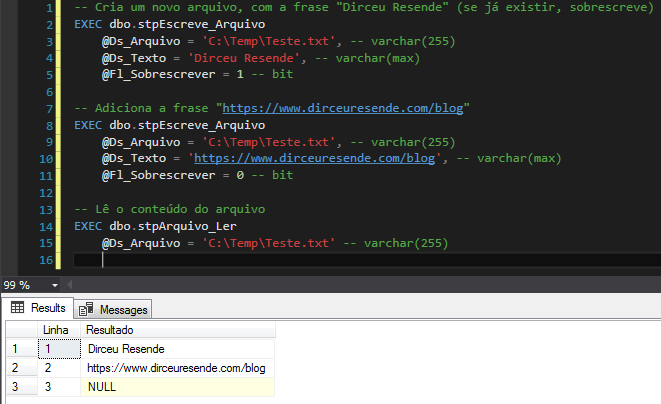
Result:
Source code
CREATE PROCEDURE dbo.stpApaga_Arquivo (
    @Ds_Arquivo VARCHAR(255)
)
AS BEGIN

    SET NOCOUNT ON

    DECLARE @Query VARCHAR(8000) = 'del /F /Q "' + @Ds_Arquivo + '"'

    DECLARE @Retorno TABLE ( Resultado VARCHAR(MAX) )

    INSERT INTO @Retorno
    EXEC master.dbo.xp_cmdshell
        @command_string = @Query

END
Result deleting a file:

Result using wildcard:

Source code
CREATE PROCEDURE dbo.stpCopia_Arquivo (
    @Ds_Arquivo VARCHAR(255),
    @Ds_Diretorio VARCHAR(255),
    @Fl_Sobrescrever BIT = 0
)
AS BEGIN


    SET NOCOUNT ON


    DECLARE
        @Query VARCHAR(8000),
        @Nm_Arquivo_Destino VARCHAR(500) = @Ds_Diretorio + REVERSE(LEFT(REVERSE(@Ds_Arquivo),CHARINDEX('\', REVERSE(@Ds_Arquivo), 1) - 1)),
        @Resultado VARCHAR(MAX)


    IF (@Fl_Sobrescrever = 0)
        SET @Query = 'IF EXIST "' + @Nm_Arquivo_Destino + '" ( ECHO Arquivo já existe ) ELSE ( copy "' + @Ds_Arquivo + '" "' + @Ds_Diretorio + '")'
    ELSE
        SET @Query = 'copy ' + (CASE WHEN @Fl_Sobrescrever = 1 THEN '/Y' ELSE '' END) + ' "' + @Ds_Arquivo + '" "' + @Ds_Diretorio + '"'


    DECLARE @Retorno TABLE (
        Linha INT IDENTITY(1, 1),
        Resultado VARCHAR(MAX)
    )

    INSERT INTO @Retorno
    EXEC master.dbo.xp_cmdshell
        @command_string = @Query


    SELECT @Resultado = LTRIM(RTRIM(Resultado))
    FROM @Retorno
    WHERE Linha = 1

    PRINT @Resultado

END
Result:

Source code
CREATE PROCEDURE dbo.stpMove_Arquivo (
    @Ds_Arquivo VARCHAR(255),
    @Ds_Diretorio VARCHAR(255),
    @Fl_Sobrescrever BIT = 0
)
AS BEGIN


    SET NOCOUNT ON


    DECLARE
        @Query VARCHAR(8000),
        @Nm_Arquivo_Destino VARCHAR(500) = @Ds_Diretorio + REVERSE(LEFT(REVERSE(@Ds_Arquivo),CHARINDEX('\', REVERSE(@Ds_Arquivo), 1) - 1)),
        @Resultado VARCHAR(MAX)


    IF (@Fl_Sobrescrever = 0)
        SET @Query = 'IF EXIST "' + @Nm_Arquivo_Destino + '" ( ECHO Arquivo já existe ) ELSE ( move "' + @Ds_Arquivo + '" "' + @Ds_Diretorio + '")'
    ELSE
        SET @Query = 'move ' + (CASE WHEN @Fl_Sobrescrever = 1 THEN '/Y' ELSE '' END) + ' "' + @Ds_Arquivo + '" "' + @Ds_Diretorio + '"'


    DECLARE @Retorno TABLE (
        Linha INT IDENTITY(1, 1),
        Resultado VARCHAR(MAX)
    )

    INSERT INTO @Retorno
    EXEC master.dbo.xp_cmdshell
        @command_string = @Query


    SELECT @Resultado = LTRIM(RTRIM(Resultado))
    FROM @Retorno
    WHERE Linha = 1

    PRINT @Resultado

END
Result:

Source code
CREATE PROCEDURE dbo.stpCria_Diretorio (
    @Ds_Diretorio VARCHAR(255)
)
AS BEGIN

    SET NOCOUNT ON

    DECLARE @Query VARCHAR(8000) = 'mkdir "' + @Ds_Diretorio + '"'

    DECLARE @Retorno TABLE ( Resultado VARCHAR(MAX) )

    INSERT INTO @Retorno
    EXEC master.dbo.xp_cmdshell
        @command_string = @Query

END
Result:

Source code
CREATE PROCEDURE dbo.stpApaga_Diretorio (
    @Ds_Diretorio VARCHAR(255),
    @Fl_Recursivo BIT = 0
)
AS BEGIN

    SET NOCOUNT ON

    DECLARE @Query VARCHAR(8000) = 'rmdir' + (CASE WHEN @Fl_Recursivo = 1 THEN ' /S' ELSE '' END) + ' "' + @Ds_Diretorio + '"'

    DECLARE @Retorno TABLE ( Resultado VARCHAR(MAX) )

    INSERT INTO @Retorno
    EXEC master.dbo.xp_cmdshell
        @command_string = @Query

END
Result:

As I have already mentioned in some posts here on the blog, I am not a fan of enabling and using xp_cmdshell, since it gives “powers” to any sysadmin user of the instance to execute any command that the user who starts the SQL Server service has privileges, from a dir command, to executing delete, format, etc..
For this reason, I prefer to adopt the use of the CLR, where you program the routines using the C# programming language and the .NET Framework and publish the routines in the instance. Both sysadmin users and normal users can only use the methods implemented in the CLR library, not allowing the execution of malicious code that is not programmed, but I understand that not every DBA wants to go through the trouble of creating libraries in C# and ends up choosing to use a simpler approach, using xp_cmdshell and DOS and/or PowerShell commands.
That's it, folks!
I hope you enjoyed this post and see you next time.

Comments (0)
Loading comments...