
Hey guys,
Goodnight!
In this post I will demonstrate to you how to import, read, process and export data between a SQL Server table and an XML file.
This integration between the database and XML files is an excellent feature and a big differentiator for developers who use SQL Server and can easily read and generate files in this format natively through the database.
Getting to know the example XML files How to import XML files into SQL Server How to treat and read XML attributes in SQL ServerHow to treat and read attribute data from XML in SQL Server
Once the XML is already in a table, let's start processing and reading the XML information. In this case, we will need to store the content in an XML type variable.
To do this, you can do it like this:
DECLARE @XML XML = (SELECT TOP 1 Ds_XML FROM #XML)
Now that we can load our XML into a variable, let's start processing the data.
Simple reading:
DECLARE @XML XML = (SELECT TOP 1 Ds_XML FROM #XML)

SELECT
    @XML.value('(/Root/Cliente[1]/@Nome)[1]','varchar(100)') AS Cliente1_Nome,
    @XML.value('(/Root/Cliente[1]/@Idade)[1]','int') AS Cliente1_Idade,
    @XML.value('(/Root/Cliente[1]/@CPF)[1]','varchar(100)') AS Cliente1_CPF,
    @XML.value('(/Root/Cliente[1]/@Email)[1]','varchar(100)') AS Cliente1_Email,
    @XML.value('(/Root/Cliente[1]/@Celular)[1]','varchar(100)') AS Cliente1_Celular,

    @XML.value('(/Root/Cliente[1]/Endereco[1]/@Cidade)[1]','varchar(100)') AS Cliente1_Endereco1_Cidade,
    @XML.value('(/Root/Cliente[1]/Endereco[2]/@Cidade)[1]','varchar(100)') AS Cliente1_Endereco2_Cidade


SELECT
    @XML.value('(/Root/Cliente[2]/@Nome)[1]','varchar(100)') AS Cliente2_Nome,
    @XML.value('(/Root/Cliente[2]/@Idade)[1]','int') AS Cliente2_Idade,
    @XML.value('(/Root/Cliente[2]/@CPF)[1]','varchar(100)') AS Cliente2_CPF,
    @XML.value('(/Root/Cliente[2]/@Email)[1]','varchar(100)') AS Cliente2_Email,
    @XML.value('(/Root/Cliente[2]/@Celular)[1]','varchar(100)') AS Cliente2_Celular,

    @XML.value('(/Root/Cliente[2]/Endereco[1]/@Cidade)[1]','varchar(100)') AS Cliente1_Endereco1_Cidade,
    @XML.value('(/Root/Cliente[2]/Endereco[2]/@Cidade)[1]','varchar(100)') AS Cliente1_Endereco2_Cidade

As we saw in the example above, we need to manually define the line we want to return information from our XML. But what if the file has 100, 1,000 or more lines? Will we have to use the WHILE statement to traverse all lines of the XML? No. To do this, we can use the NODES function, which applies our SELECT filters to all nodes in our selector and returns them in the form of rows from a table:
Using the NODES function to return all nodes:
DECLARE @XML XML = (SELECT TOP 1 Ds_XML FROM #XML)

SELECT
    Clientes.linha.value('@Nome','varchar(100)') AS Nome,
    Clientes.linha.value('@Idade','int') AS Idade,
    Clientes.linha.value('@CPF','varchar(14)') AS CPF,
    Clientes.linha.value('@Email','varchar(200)') AS Email,
    Clientes.linha.value('@Celular','varchar(20)') AS Celular
FROM
    @XML.nodes('/Root/Cliente') Clientes(linha)

When we use the function nodes, we are informing that for each node in the XML tree that is in the “/Root/Cliente” structure, a record from our table is returned. This record is identified using the nomenclature Customers (parent element, which would be like the table) and line (each record in the parent element).
After breaking the nodes into records, we need to retrieve the information for each attribute. To do this, we use the function value, followed by @NameOfAttribute (must be the same as the name of the XML attribute) and its respective return type.
Using the EXIST function
In certain situations, we need to know if a certain node exists in our XML. To do this, SQL Server provides us with the exist function, which allows us to perform this type of check:
DECLARE @XML XML = (SELECT TOP 1 Ds_XML FROM #XML)

SELECT
    @XML.exist('(/Root/Cliente[1]/@Nome)[1]') AS Cliente1_Existe,
    @XML.exist('(/Root/Cliente[2]/@Nome)[1]') AS Cliente2_Existe,
    @XML.exist('(/Root/Cliente[3]/@Nome)[1]') AS Cliente3_Existe
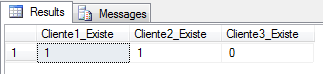
Using exists together with the value:
DECLARE @XML XML = (SELECT TOP 1 Ds_XML FROM #XML)

SELECT

    (CASE WHEN @XML.exist('(/Root/Cliente[1]/@Nome)[1]') = 1
        THEN @XML.value('(/Root/Cliente[1]/@Nome)[1]', 'varchar(100)')
        ELSE 'Não existe'
    END) AS Cliente1_Nome,

    (CASE WHEN @XML.exist('(/Root/Cliente[2]/@Nome)[1]') = 1
        THEN @XML.value('(/Root/Cliente[2]/@Nome)[1]', 'varchar(100)')
        ELSE 'Não existe'
    END) AS Cliente2_Nome,

    (CASE WHEN @XML.exist('(/Root/Cliente[3]/@Nome)[1]') = 1
        THEN @XML.value('(/Root/Cliente[3]/@Nome)[1]', 'varchar(100)')
        ELSE 'Não existe'
    END) AS Cliente3_Nome
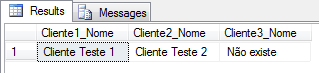
Retrieving child nodes
The first part has been completed: We are now able to perform a simple import into our XML. But we still have a long way to go: Our XML has N child nodes, with 2 more hierarchy levels for us to work with (Address and Telephone).
Importing the 1st level of hierarchy: Address
DECLARE @XML XML = (SELECT TOP 1 Ds_XML FROM #XML)

SELECT
    Clientes.linha.value('@Nome','varchar(100)') AS Nome,
    Clientes.linha.value('@Idade','int') AS Idade,
    Clientes.linha.value('@CPF','varchar(14)') AS CPF,
    Clientes.linha.value('@Email','varchar(200)') AS Email,
    Clientes.linha.value('@Celular','varchar(20)') AS Celular,

    Enderecos.linha.value('@Cidade','varchar(60)') AS Cidade,
    Enderecos.linha.value('@Estado','varchar(2)') AS UF,
    Enderecos.linha.value('@Pais','varchar(50)') AS Pais,
    Enderecos.linha.value('@CEP','varchar(10)') AS CEP
FROM
    @XML.nodes('/Root/Cliente') Clientes(linha)
    CROSS APPLY Clientes.linha.nodes('Endereco') Enderecos(linha)

Note that to get the sublevels of the hierarchy I use a CROSS APPLY of the parent element (Customers) and for each record (line) I cross this data with the child nodes (of the Address type).
Importing the 2nd hierarchy level: Telephone
DECLARE @XML XML = (SELECT TOP 1 Ds_XML FROM #XML)

SELECT
    Clientes.linha.value('@Nome','varchar(100)') AS Nome,
    Clientes.linha.value('@Idade','int') AS Idade,
    Clientes.linha.value('@CPF','varchar(14)') AS CPF,
    Clientes.linha.value('@Email','varchar(200)') AS Email,
    Clientes.linha.value('@Celular','varchar(20)') AS Celular,

    Enderecos.linha.value('@Cidade','varchar(60)') AS Cidade,
    Enderecos.linha.value('@Estado','varchar(2)') AS UF,
    Enderecos.linha.value('@Pais','varchar(50)') AS Pais,
    Enderecos.linha.value('@CEP','varchar(10)') AS CEP,

    Telefones.linha.value('@Fixo','varchar(20)') AS Telefone_Fixo,
    Telefones.linha.value('@Piscina','varchar(20)') AS Tem_Piscina,
    Telefones.linha.value('@Quintal','varchar(20)') AS Tem_Quintal,
    Telefones.linha.value('@Quadra','varchar(20)') AS Tem_Quadra,
    Telefones.linha.value('@NaoExiste','varchar(20)') AS Atributo_Nao_Existe
FROM
    @XML.nodes('/Root/Cliente') Clientes(linha)
    CROSS APPLY Clientes.linha.nodes('Endereco') Enderecos(linha)
    CROSS APPLY Enderecos.linha.nodes('Telefone') Telefones(linha)

And then we were finally able to import the data. But there's an error there...
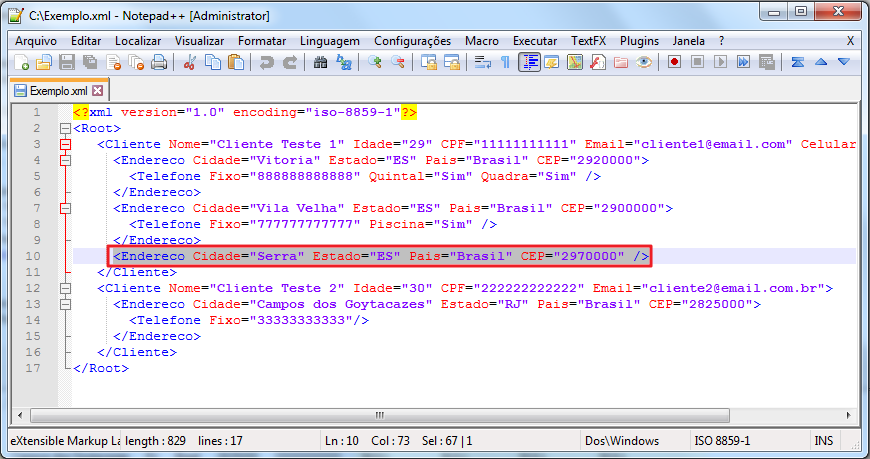
If we analyze our XML further, we will see that one of the addresses was not imported, because it did not have a telephone number and as we did a CROSS APPLY, this record was ignored. We will need to address this:
DECLARE @XML XML = (SELECT TOP 1 Ds_XML FROM #XML)

SELECT
    Clientes.linha.value('@Nome','varchar(100)') AS Nome,
    Clientes.linha.value('@Idade','int') AS Idade,
    Clientes.linha.value('@CPF','varchar(14)') AS CPF,
    Clientes.linha.value('@Email','varchar(200)') AS Email,
    Clientes.linha.value('@Celular','varchar(20)') AS Celular,

    Enderecos.linha.value('@Cidade','varchar(60)') AS Cidade,
    Enderecos.linha.value('@Estado','varchar(2)') AS UF,
    Enderecos.linha.value('@Pais','varchar(50)') AS Pais,
    Enderecos.linha.value('@CEP','varchar(10)') AS CEP,

    Telefones.linha.value('@Fixo','varchar(20)') AS Telefone_Fixo,
    Telefones.linha.value('@Piscina','varchar(20)') AS Tem_Piscina,
    Telefones.linha.value('@Quintal','varchar(20)') AS Tem_Quintal,
    Telefones.linha.value('@Quadra','varchar(20)') AS Tem_Quadra,
    Telefones.linha.value('@NaoExiste','varchar(20)') AS Atributo_Nao_Existe
FROM
    @XML.nodes('/Root/Cliente') Clientes(linha)
    CROSS APPLY Clientes.linha.nodes('Endereco') Enderecos(linha)
    OUTER APPLY Enderecos.linha.nodes('Telefone') Telefones(linha)
To resolve this situation, I replaced the last CROSS APPLY with an OUTER APPLY, which has similar behavior to a LEFT JOIN in this case, where records that do not have a child node continue to appear in our table, and the columns destined for child nodes will be empty. Whenever there is a situation where you are not sure whether the element will have children or not, use OUTER APPLY.

How to treat and read data from XML in SQL Server
Unlike base 1, where the information was all stored in the form of attributes, we will now use base 2 XML, which is predominantly made up of data.
Simple data reading
DECLARE @XML XML = (SELECT TOP 1 Ds_XML FROM #XML2)

SELECT
    @XML.value('(Escola/Turma/Aluno)[1]', 'varchar(60)') AS Aluno1,
    @XML.value('(Escola/Turma/Aluno)[2]', 'varchar(60)') AS Aluno2,
    @XML.value('(Escola/Turma/Aluno)[3]', 'varchar(60)') AS Aluno3,
    @XML.value('(Escola/Turma/Aluno)[4]', 'varchar(60)') AS Aluno4,
    @XML.value('(Escola/Turma/Aluno)[5]', 'varchar(60)') AS Aluno5,
    @XML.value('(Escola/Turma/Aluno)[6]', 'varchar(60)') AS Aluno6,
    @XML.value('(Escola/Turma/Aluno)[14]', 'varchar(60)') AS Aluno14_Nao_Existe

Just as I did with attributes, I wanted to demonstrate how to individually return each node in the file, specifying the index of its position in relation to the root. Now I will demonstrate again how to use the NODES function to return all nodes as records from a table:
DECLARE @XML XML = (SELECT TOP 1 Ds_XML FROM #XML2)

SELECT
    Alunos.linha.value('.','varchar(100)') AS Nome
FROM
    @XML.nodes('/Escola/Turma/Aluno') Alunos(linha)
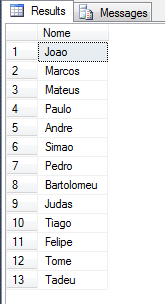
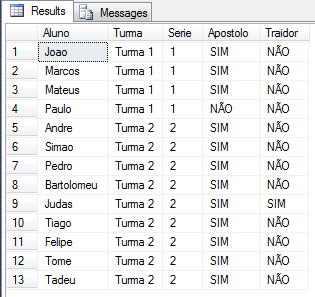
More complete example, mixing data and attributes:
DECLARE @XML XML = (SELECT TOP 1 Ds_XML FROM #XML2)

SELECT
    Alunos.linha.value('.', 'varchar(60)') AS Aluno,

    Turmas.linha.value('@Nome','varchar(100)') AS Turma,
    Turmas.linha.value('@Serie','int') AS Serie,

    (CASE WHEN Alunos.linha.value('@Apostolo','varchar(60)') = '1' THEN 'SIM' ELSE 'NÃO' END) AS Apostolo,
    (CASE WHEN Alunos.linha.value('@Traidor','varchar(2)') = '1' THEN 'SIM' ELSE 'NÃO' END) AS Traidor
FROM
    @XML.nodes('/Escola/Turma') Turmas(linha)
    CROSS APPLY Turmas.linha.nodes('Aluno') Alunos(linha)
Using XQuery (XML.query function)
Many times when handling XML files, we feel the need to perform more advanced queries or filters to return the information we want instead of the entire file. For this need, we have the query function:
DECLARE @XML XML = (SELECT TOP 1 Ds_XML FROM #XML2)

SELECT
    @XML.query('.') AS XML_Completo,
    @XML.query('Escola/Turma[1]/Aluno[1]') AS XML_Turma1_Aluno1,
    @XML.query('Escola/Turma[1]/Aluno[1]/text()') AS XML_Turma1_Aluno1_Nome,
    @XML.query('Escola/Turma[1]/Aluno[1]').value('.', 'varchar(100)') AS Turma1_Aluno1_Nome

Using XQuery to filter results:
DECLARE @XML XML = (SELECT TOP 1 Ds_XML FROM #XML2)

SELECT
    @XML.query('Escola/Turma[@Serie=''2'']') AS XML_Turma_2a_Serie,
    @XML.query('Escola/Turma[@Nome=''Turma 1'']') AS XML_Turma1,
    @XML.query('Escola/Turma/Aluno[@Traidor=''1'']') AS XML_Judas,
    @XML.query('Escola/Turma/Aluno[@Apostolo=''0'']') AS XML_Paulo,
    @XML.query('Escola/Turma/Aluno[.=''Pedro'']') AS XML_Pedro

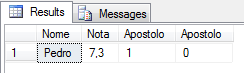
Returning student Pedro’s information:
DECLARE @XML XML = (SELECT TOP 1 Ds_XML FROM #XML2)
DECLARE @XML2 XML = (SELECT @XML.query('Escola/Turma/Aluno[.=''Pedro'']'))

SELECT
    Alunos.linhas.value('.', 'varchar(100)') AS Nome,
    Alunos.linhas.value('@Nota', 'float') AS Nota,
    Alunos.linhas.value('@Apostolo', 'bit') AS Apostolo,
    Alunos.linhas.value('@Traidor', 'bit') AS Apostolo
FROM
    @XML2.nodes('/Aluno') AS Alunos(linhas)
Working with values:
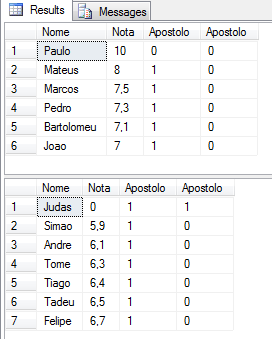
DECLARE @XML XML = (SELECT TOP 1 Ds_XML FROM #XML2)

DECLARE @XML_Aprovados XML = (SELECT @XML.query('//Aluno[@Nota>=7]'))
DECLARE @XML_Reprovados XML = (SELECT @XML.query('//Aluno[@Nota<7]'))

SELECT
    Alunos.linhas.value('.', 'varchar(100)') AS Nome,
    Alunos.linhas.value('@Nota', 'float') AS Nota,
    Alunos.linhas.value('@Apostolo', 'bit') AS Apostolo,
    Alunos.linhas.value('@Traidor', 'bit') AS Apostolo
FROM
    @XML_Aprovados.nodes('/Aluno') AS Alunos(linhas)
ORDER BY
    Nota DESC

SELECT
    Alunos.linhas.value('.', 'varchar(100)') AS Nome,
    Alunos.linhas.value('@Nota', 'float') AS Nota,
    Alunos.linhas.value('@Apostolo', 'bit') AS Apostolo,
    Alunos.linhas.value('@Traidor', 'bit') AS Apostolo
FROM
    @XML_Reprovados.nodes('/Aluno') AS Alunos(linhas)
ORDER BY
    Nota
One thing to note about the query function is that it does not allow you to select attribute data that is at the same level as the current node. Example, if you are using a student selector, you cannot return an attribute of that Student node that you are selecting. If you try to do this, you will encounter one of these error messages:
XQuery [Sqm.data.query()]: Attribute may not appear outside of an element
XQuery [value()]: Top-level attribute nodes are not supported
To get around this, use the function value and apply your filters another way.
Using functions in XML
Another very cool feature of XML is the possibility of using functions to filter or obtain more information through the data in our XML. I will now demonstrate how to apply this to our example XML files.
Using numeric functions:
DECLARE @XML XML = (SELECT TOP 1 Ds_XML FROM #XML2)

SELECT
    @XML.value('max(//Aluno/@Nota)', 'float') AS Maior_Nota,
    @XML.value('min(//Aluno/@Nota)', 'float') AS Menor_Nota,
    @XML.value('avg(//Aluno/@Nota)', 'float') AS Media_Nota,
    @XML.value('sum(//Aluno/@Nota)', 'float') AS Soma_Nota,
    @XML.value('count(//Aluno/@Nota)', 'int') AS Qtde_Nota,
    @XML.value('count(//Aluno[@Nota>=7]/@Nota)', 'int') AS Qtde_Nota_Maior7,
    @XML.value('count(//Aluno[@Nota<7]/@Nota)', 'int') AS Qtde_Nota_Menor7

String Functions:
DECLARE @XML XML = (SELECT TOP 1 Ds_XML FROM #XML2)

SELECT
    @XML.value('(//Aluno[.=''Pedro''])[1]', 'varchar(100)') AS Pedro,
    @XML.value('string-length((//Aluno[.=''Pedro''])[1])', 'varchar(100)') AS Tamanho_Nome_Pedro,
    @XML.value('concat((//Aluno[.=''Pedro''])[1], '' Teste'')', 'varchar(100)') AS [Concat],
    @XML.value('substring((//Aluno[.=''Pedro''])[1], 1, 1)', 'varchar(100)') AS [Primeira_Letra]
or we can use contains:
DECLARE @XML XML = (SELECT TOP 1 Ds_XML FROM #XML2)

SELECT
    Alunos.linha.value('.', 'varchar(100)') AS Pedro,
    Alunos.linha.value('string-length((.))', 'varchar(100)') AS Tamanho_Nome_Pedro,
    Alunos.linha.value('concat((.), '' Teste'')', 'varchar(100)') AS [Concat],
    Alunos.linha.value('substring((.), 1, 1)', 'varchar(100)') AS [Primeira_Letra]
FROM
    @XML.nodes('//Aluno') AS Alunos(linha)
WHERE
    Alunos.linha.value('contains((.), "Pedro")', 'bit') = 1
and even simple Transact-SQL operations:
DECLARE @XML XML = (SELECT TOP 1 Ds_XML FROM #XML2)

SELECT
    Alunos.linha.value('.', 'varchar(100)') AS Pedro,
    Alunos.linha.value('string-length((.))', 'varchar(100)') AS Tamanho_Nome_Pedro,
    Alunos.linha.value('concat((.), '' Teste'')', 'varchar(100)') AS [Concat],
    Alunos.linha.value('substring((.), 1, 1)', 'varchar(100)') AS [Primeira_Letra]
FROM
    @XML.nodes('//Aluno') AS Alunos(linha)
WHERE
    Alunos.linha.value('.', 'varchar(100)') = 'Pedro'

Manipulating XML with the modify function
When we are using the modify function, we have further proof of how advanced XML processing is with SQL Server. This function allows us to modify the data stored in the XML variable at run time, and it allows us to insert data (insert), replace data (replace value of) and delete data (delete).
To use the modify() function, you must perform UPDATE, DELETE or SET @Variavel. Using this function during a SELECT is not permitted.
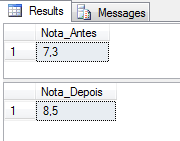
How to replace values using the replace value of function:
DECLARE @XML XML = (SELECT TOP 1 Ds_XML FROM #XML2)

SELECT @XML.value('(//Aluno[.="Pedro"]/@Nota)[1]', 'float') AS Nota_Antes

------------------------------------------------------
-- ALTERA O VALOR DA NOTA DO ALUNO "PEDRO"
------------------------------------------------------

DECLARE @Tabela_XML TABLE ( Dados XML )

INSERT INTO @Tabela_XML
SELECT Ds_Xml FROM #XML2

UPDATE @Tabela_XML
SET Dados.modify('replace value of (//Aluno[.="Pedro"]/@Nota)[1] with("8.5")')

SET @XML = (SELECT TOP 1 Dados FROM @Tabela_XML)

SELECT @XML.value('(//Aluno[.="Pedro"]/@Nota)[1]', 'float') AS Nota_Depois
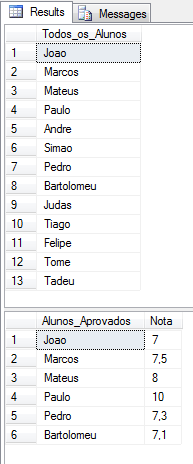
Remove an element from XML using the delete function:
DECLARE @XML XML = (SELECT TOP 1 Ds_XML FROM #XML2)

SELECT Alunos.linha.value('.', 'varchar(100)') AS Todos_os_Alunos
FROM @XML.nodes('//Aluno') Alunos(linha)

------------------------------------------------------
-- REMOVE OS ALUNOS COM NOTA MENOR QUE 7
------------------------------------------------------

DECLARE @Tabela_XML TABLE ( Dados XML )

INSERT INTO @Tabela_XML
SELECT Ds_Xml FROM #XML2

UPDATE @Tabela_XML
SET Dados.modify('delete (//Aluno[@Nota<7])')

SET @XML = (SELECT TOP 1 Dados FROM @Tabela_XML)

SELECT
    Alunos.linha.value('.', 'varchar(100)') AS Alunos_Aprovados,
    Alunos.linha.value('@Nota', 'float') AS Nota
FROM @XML.nodes('//Aluno') Alunos(linha)
Insert nodes into XML using the insert function:
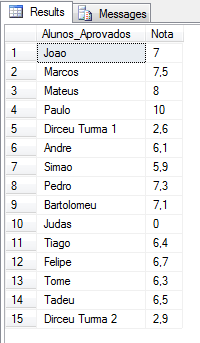
DECLARE @XML XML = (SELECT TOP 1 Ds_XML FROM #XML2)

SET @XML.modify('insert <Aluno Apostolo="0" Traidor="0" Nota="2.6">Dirceu Turma 1</Aluno>
into (//Turma)[1]')

SET @XML.modify('insert <Aluno Apostolo="0" Traidor="0" Nota="2.9">Dirceu Turma 2</Aluno>
into (//Turma)[2]')

SELECT
    Alunos.linha.value('.', 'varchar(100)') AS Alunos_Aprovados,
    Alunos.linha.value('@Nota', 'float') AS Nota
FROM @XML.nodes('//Aluno') Alunos(linha)
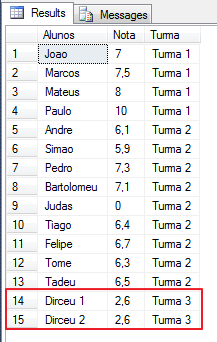
Insert multiple nodes into XML from a SQL variable:
DECLARE @XML XML = (SELECT TOP 1 Ds_XML FROM #XML2)

DECLARE @Inserir XML = '
<Turma Nome="Turma 3" Serie="3">
    <Aluno Apostolo="0" Traidor="0" Nota="2.6">Dirceu 1</Aluno>
    <Aluno Apostolo="0" Traidor="0" Nota="2.6">Dirceu 2</Aluno>
</Turma>'

SET @XML.modify('insert sql:variable("@Inserir")
into (//Escola)[1]')

SELECT
    Alunos.linha.value('.', 'varchar(100)') AS Alunos,
    Alunos.linha.value('@Nota', 'float') AS Nota,
    Alunos.linha.value('../@Nome', 'varchar(100)') AS Turma
FROM
    @XML.nodes('//Aluno') Alunos(linha)
Using XQuery FLOWR expressions in XML
The FLOWR resource (pronounced “flower”) is a powerful tool and extension of the QUERY function, which allows you to iterate through XML files and perform a series of operations. The commands are FOR, LET, ORDER BY, WHERE and RETURN. Let's see below how to use them.
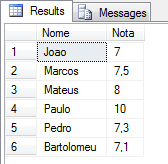
Using FOR iteration:
DECLARE @XML XML = (SELECT TOP 1 Ds_XML FROM #XML2)

DECLARE @XML2 XML = (SELECT @XML.query('for $A in //Aluno[@Nota>=7] return $A'))

SELECT
    Alunos.linha.value('.', 'varchar(100)') AS Nome,
    Alunos.linha.value('@Nota', 'float') AS Nota
FROM
    @XML2.nodes('//Aluno') Alunos(linha)
Using FOR, WHERE and ORDER BY iteration:
DECLARE @XML XML = (SELECT TOP 1 Ds_XML FROM #XML2)

DECLARE @XML2 XML = (SELECT @XML.query('
for $A
in //Aluno
where ($A = "Pedro" or $A = "Marcos" or $A = "Andre" or $A = "Joao")
order by $A descending
return $A'))

SELECT
    Alunos.linha.value('.', 'varchar(100)') AS Nome,
    Alunos.linha.value('@Nota', 'float') AS Nota
FROM
    @XML2.nodes('//Aluno') Alunos(linha)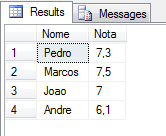
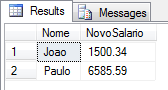
Using the LET command to change the value of information and give a 20% increase to two employees:
In this specific example, I create the XML in real time, as my 2 example XML did not have data values, only attributes, which makes it impossible to use together with the query function.
DECLARE @XML XML = '
<Empresa>
    <Funcionario>
        <Nome>Joao</Nome>
        <Salario>1250.28</Salario>
    </Funcionario>
    <Funcionario>
        <Nome>Pedro</Nome>
        <Salario>1754.54</Salario>
    </Funcionario>
    <Funcionario>
        <Nome>Paulo</Nome>
        <Salario>5487.99</Salario>
    </Funcionario>
</Empresa>'


DECLARE @XML_Modificado XML = (SELECT @XML.query('
for $A
in //Funcionario
let $T := 1.20
where $A/Nome != "Pedro"
return
<Funcionario>
    <Nome>{data($A/Nome)}</Nome>
    <NovoSalario>{data($A/Salario/text())[1] * data($T)}</NovoSalario>
</Funcionario>'))

SELECT
    Funcionarios.linha.value('Nome[1]', 'varchar(100)') AS Nome,
    Funcionarios.linha.value('NovoSalario[1]', 'numeric(18,2)') AS NovoSalario
FROM
    @XML_Modificado.nodes('//Funcionario') Funcionarios(linha)
Exporting database data to XML – FOR XML RAW, AUTO, EXPLICIT, PATH
After much talk about importing and processing XML files, the time has finally come to do the opposite. How to transform data from a SQL Server table to an XML string.
To facilitate this task, SQL Server provides 4 ways to do this with FOR XML: RAW, AUTO, EXPLICI and PATH. Let's find out now what they are for and how to use them.
Creation of the test table:
IF (OBJECT_ID('dbo.Teste_XML') IS NOT NULL) DROP TABLE dbo.Teste_XML
CREATE TABLE dbo.Teste_XML (
    Categoria VARCHAR(100),
    Descricao VARCHAR(100)
)

INSERT INTO dbo.Teste_XML ( Categoria, Descricao )
VALUES ('Brinquedo', 'Bola'),
('Brinquedo', 'Carrinho'),
('Brinquedo', 'Boneco'),
('Brinquedo', 'Jogo'),
('Cama e Mesa', 'Toalha'),
('Cama e Mesa', 'Edredom'),
('Informatica', 'Teclado'),
('Informatica', 'Mouse'),
('Informatica', 'HD'),
('Informatica', 'CPU'),
('Informatica', 'Memoria'),
('Informatica', 'Placa-Mae'),
(NULL, 'TV')
FOR XML RAW
The RAW method of FOR XML generates an XML from our table where each column becomes an attribute of the generated XML and each line will represent a node (element).
SELECT *
FROM dbo.Teste_XML
FOR XML RAW
Generated XML:
<row Categoria="Brinquedo" Descricao="Bola" />
<row Categoria="Brinquedo" Descricao="Carrinho" />
<row Categoria="Brinquedo" Descricao="Boneco" />
<row Categoria="Brinquedo" Descricao="Jogo" />
<row Categoria="Cama e Mesa" Descricao="Toalha" />
<row Categoria="Cama e Mesa" Descricao="Edredom" />
<row Categoria="Informatica" Descricao="Teclado" />
<row Categoria="Informatica" Descricao="Mouse" />
<row Categoria="Informatica" Descricao="HD" />
<row Categoria="Informatica" Descricao="CPU" />
<row Categoria="Informatica" Descricao="Memoria" />
<row Categoria="Informatica" Descricao="Placa-Mae" />
<row Descricao="TV" />
In the example below, I will add the ROOT option after RAW(), to add a root element that will be the parent node of the created nodes. This is optional, if you don't use it, the only difference is that the
SELECT *
FROM dbo.Teste_XML
FOR XML RAW('Produto'), ROOT('Produtos')
Generated XML:
<Produtos>
  <Produto Categoria="Brinquedo" Descricao="Bola" />
  <Produto Categoria="Brinquedo" Descricao="Carrinho" />
  <Produto Categoria="Brinquedo" Descricao="Boneco" />
  <Produto Categoria="Brinquedo" Descricao="Jogo" />
  <Produto Categoria="Cama e Mesa" Descricao="Toalha" />
  <Produto Categoria="Cama e Mesa" Descricao="Edredom" />
  <Produto Categoria="Informatica" Descricao="Teclado" />
  <Produto Categoria="Informatica" Descricao="Mouse" />
  <Produto Categoria="Informatica" Descricao="HD" />
  <Produto Categoria="Informatica" Descricao="CPU" />
  <Produto Categoria="Informatica" Descricao="Memoria" />
  <Produto Categoria="Informatica" Descricao="Placa-Mae" />
  <Produto Descricao="TV" />
</Produtos>
Even in RAW XML we can have the columns returned as XML elements. To do this, simply include the ELEMENTS option:
SELECT *
FROM dbo.Teste_XML
FOR XML RAW('Produto'), ROOT('Produtos'), ELEMENTS
Generated XML (just a snippet so it doesn't get too long):
<Produtos>
  <Produto>
    <Categoria>Brinquedo</Categoria>
    <Descricao>Bola</Descricao>
  </Produto>
  <Produto>
    <Categoria>Brinquedo</Categoria>
    <Descricao>Carrinho</Descricao>
  </Produto>
  <Produto>
    <Categoria>Brinquedo</Categoria>
    <Descricao>Boneco</Descricao>
  </Produto>
</Produtos>
Another interesting option of FOR XML is when dealing with empty data (NULL). When we do not perform any treatment, they are simply ignored and are not generated, as is the case with the “TV” product category. To handle this, we can use the XSINIL option after the ELEMENTS option, which will add the empty element and create an attribute informing this (xsi:nil=”true”):
SELECT *
FROM dbo.Teste_XML
FOR XML RAW('Produto'), ROOT('Produtos'), ELEMENTS XSINIL
And then the XML with the product is generated like this:
<Produto>
    <Categoria xsi:nil="true" />
    <Descricao>TV</Descricao>
</Produto>
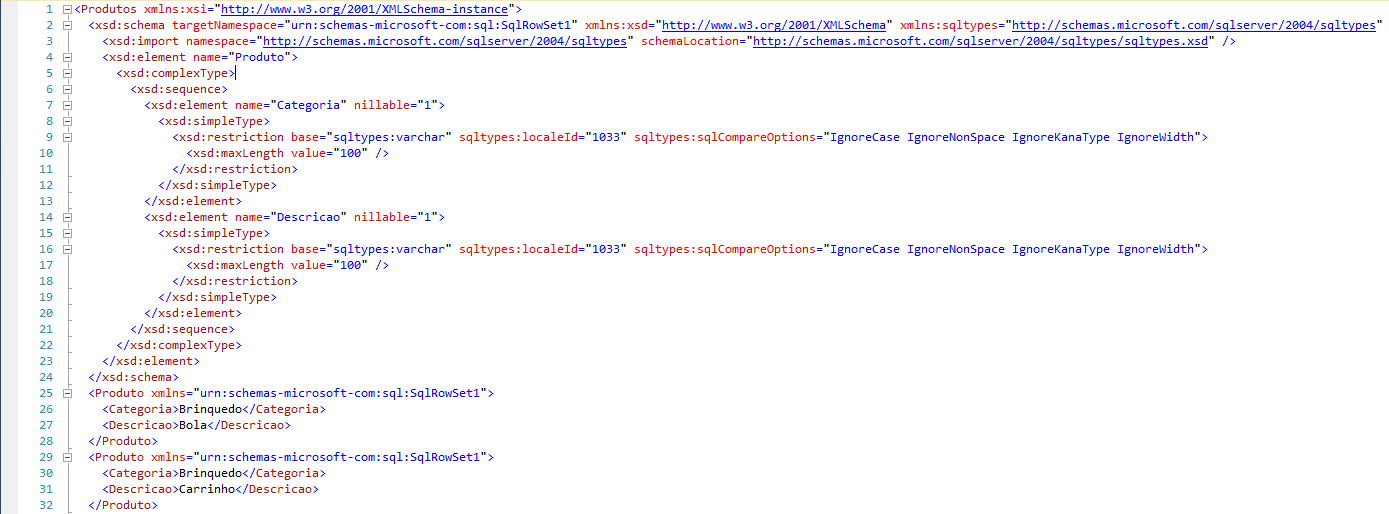
Additionally, we can use the XMLSCHEMA option to transform our XML into a complete XSD:
SELECT *
FROM dbo.Teste_XML
FOR XML RAW('Produto'), ROOT('Produtos'), ELEMENTS XSINIL, XMLSCHEMA
FOR XML AUTO
FOR XML's AUTO mode is very similar to RAW, but with the difference that in its standard use, the table name is the default name of each element.
SELECT *
FROM dbo.Teste_XML
FOR XML AUTO
Generated XML:
<dbo.Teste_XML Categoria="Brinquedo" Descricao="Bola" />
<dbo.Teste_XML Categoria="Brinquedo" Descricao="Carrinho" />
<dbo.Teste_XML Categoria="Brinquedo" Descricao="Boneco" />
<dbo.Teste_XML Categoria="Brinquedo" Descricao="Jogo" />
<dbo.Teste_XML Categoria="Cama e Mesa" Descricao="Toalha" />
<dbo.Teste_XML Categoria="Cama e Mesa" Descricao="Edredom" />
<dbo.Teste_XML Categoria="Informatica" Descricao="Teclado" />
<dbo.Teste_XML Categoria="Informatica" Descricao="Mouse" />
<dbo.Teste_XML Categoria="Informatica" Descricao="HD" />
<dbo.Teste_XML Categoria="Informatica" Descricao="CPU" />
<dbo.Teste_XML Categoria="Informatica" Descricao="Memoria" />
<dbo.Teste_XML Categoria="Informatica" Descricao="Placa-Mae" />
<dbo.Teste_XML Descricao="TV" />
FOR XML PATH
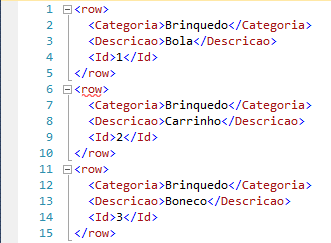
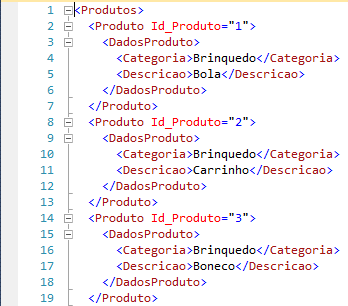
The XML PATH is a little different from the other two examples in that column names and aliases are treated as XPATH elements. When you generate a common XML, without customizing, it includes a root element (row), where each line is a child element, one level of hierarchy below and each column is also an element of the XML, plus another level below:
Just like XML AUTO and XML RAW, we can use ROOT(‘NomeDaRaiz’) to create the root element, we can also use the ELEMENTS option with XSINIL as well (to return even null elements).
Note: As XML PATH always returns columns as elements, using only the ELEMENTS option will not have any effect, only if used in conjunction with XSINIL.
Creating hierarchies with XML PATH:
SELECT
    Id AS '@Id_Produto', -- Atributo
    Categoria AS 'DadosProduto/Categoria', -- Elemento
    Descricao AS 'DadosProduto/Descricao'-- Elemento
FROM
    dbo.Teste_XML
FOR XML PATH('Produto'), ROOT('Produtos'), ELEMENTS
Generated XML:
FOR XML EXPLICIT
FOR XML's EXPLICIT mode tends to be very different from other modes. This is because it requires a header in a specific format, defining hierarchy and structures. This header must have joined the data using UNION ALL.
The SELECT header must have the following structure:
- First column: It is a number that defines the level of the hierarchy. The column name must be Tag.
- Second column: It is a number that defines the hierarchy level of the parent element (or NULL, if it does not have one and is the root). The column name must be Parent.
- Third column onwards: This is the data that will be part of the XML and will be returned by your XML.
Note that from the beginning we need to define all the columns that will be part of the XML in the header.
The default format for field definition is defined as follows:
<NomeDoElemento>!<NúmeroDaTag>!<NomeDoAtributo>[!<InformacoesAdicionais>]
Where:
- ElementName: It is the name of the parent element that we are generating (In the case of the example, Products)
- TagNumber: It is the number of the hierarchy level of the child elements
- AttributeName: It is the name of each attribute/column of the data that we are exporting to XML (in the case of the example, Category and Description)
- Additional Information: Additional data that can be used in building the XML
Let's see now how this works in practice:
-- Cabeçalho
SELECT
    1 AS Tag,
   NULL AS Parent,
   NULL AS [Produtos!1!Id],
   NULL AS [Produto!2!Categoria!ELEMENT],
   NULL AS [Produto!2!Descricao!ELEMENT]

UNION ALL

-- Conteúdo
SELECT
    2 AS Tag,
    1 AS Parent,
    NULL,
    Categoria,
    Descricao
FROM
    dbo.Teste_XML
FOR
    XML EXPLICIT
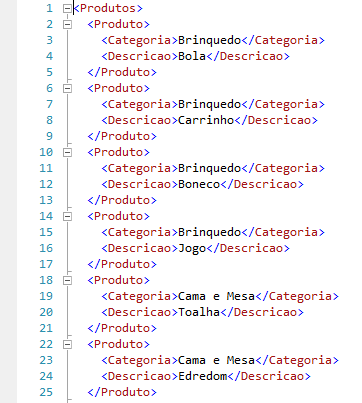
Excerpt from the returned XML:
To make the example cooler, I'll add a new column to our table:
ALTER TABLE dbo.Teste_XML ADD Id INT IDENTITY(1,1)
Generating the XML again:
-- Cabeçalho
SELECT
    1 AS Tag,
    NULL AS Parent,
    Id AS [Produtos!1!Id_Produto],
    NULL AS [Produto!2!Categoria!ELEMENT],
    NULL AS [Produto!2!Descricao!ELEMENT]
FROM
    dbo.Teste_XML

UNION ALL

-- Conteúdo
SELECT
    2 AS Tag,
    1 AS Parent,
    Id AS Id_Produto,
    ISNULL(Categoria, ''),
    Descricao
FROM
    dbo.Teste_XML
ORDER BY
    [Produtos!1!Id_Produto],
    [Produto!2!Categoria!ELEMENT]
FOR
    XML EXPLICIT
Our result will be this:
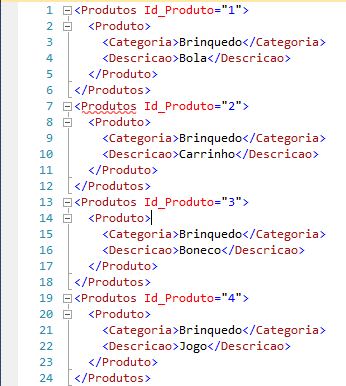
It is worth mentioning that this ORDER BY used is necessary for the results to be displayed in the correct way. Otherwise, the elements will be generated in the wrong order and the XML will not have the same result.
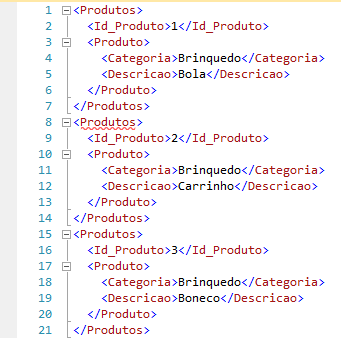
As we can see, the new added field (ID) is an XML attribute. If you want to turn it into an attribute, just add !ELEMENT to your header:
-- Cabeçalho
SELECT
    1 AS Tag,
    NULL AS Parent,
    Id AS [Produtos!1!Id_Produto!ELEMENT],
    NULL AS [Produto!2!Categoria!ELEMENT],
    NULL AS [Produto!2!Descricao!ELEMENT]
FROM
    dbo.Teste_XML

UNION ALL

-- Conteúdo
SELECT
    2 AS Tag,
    1 AS Parent,
    Id AS Id_Produto,
    ISNULL(Categoria, ''),
    Descricao
FROM
    dbo.Teste_XML
ORDER BY
    [Produtos!1!Id_Produto!ELEMENT],
    [Produto!2!Categoria!ELEMENT]
FOR
    XML EXPLICIT
Staying like this:
In the two examples above, I added an ISNULL() clause to the category, since the “TV” product has no defined category. When this occurs in EXPLICIT mode, and the category is used to sort the results, the elements end up getting lost and those without a category end up together with elements from other categories.
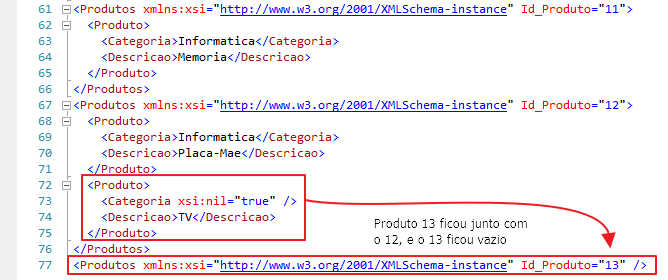
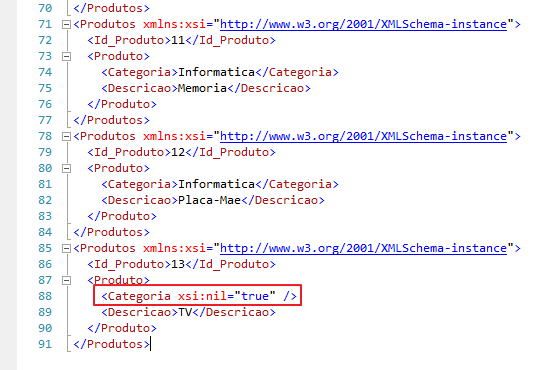
Another way to solve this problem, in addition to adding ISNULL(), is by defining the ELEMENTXSINIL attribute type in the header of our SELECT structure and not using this column that has possible NULL values in the ORDER BY:
-- Cabeçalho
SELECT
    1 AS Tag,
    NULL AS Parent,
    Id AS [Produtos!1!Id_Produto!ELEMENT],
    NULL AS [Produto!2!Categoria!ELEMENTXSINIL],
    NULL AS [Produto!2!Descricao!ELEMENT]
FROM
    dbo.Teste_XML

UNION ALL

-- Conteúdo
SELECT
    2 AS Tag,
    1 AS Parent,
    Id AS Id_Produto,
    Categoria,
    Descricao
FROM
    dbo.Teste_XML
ORDER BY
    [Produtos!1!Id_Produto!ELEMENT],
    [Produto!2!Descricao!ELEMENT]
FOR
    XML EXPLICIT
Generated XML:
If you have any questions or suggestions, leave them here in the comments.
Thanks for visiting and see you next time!
sql server how to learn work use read import treat xml string file learning
sql server how to learn work use read import treat xml string file learning

Comentários (0)
Carregando comentários…