
Hey guys!
Excited for another post???
In this article I would like to demonstrate to you how we can use regular expressions (RegExp) in your database through queries, whether to create monitoring or even create BI reports and indicators or some system.
Regular expression (or the foreign terms regex or regexp, short for regular expression) provides a concise and flexible way of identifying strings of interest, such as particular characters, words or character patterns. In other words, the regular expression is a way of allowing you to perform, in a simple way, operations with extremely complex strings, which would require several conditions to process this data.
As you may know, the Regexp dialect is not something that is common sense among programming languages. There are several different implementations and the regular expression rules are similar, but they can change between one language and another. Ex: A regexp expression that works in .NET may not work in PHP or Java and vice versa.
In SQL Server, we can use 2 dialects to use our regular expressions:
- .NET: Dialect available using SQLCLR (available starting with SQL Server 2005) and the .NET Framework system.text.regularexpression library
- ECMA: Dialect available using OLE Automation (available starting with SQL Server 2000) and the VBScript.RegExp module. This dialect is the same one used by Javascript
For terms of comparison:
- SQL Server native regexp (using LIKE or PATINDEX): Limited (when compared to the most common dialects) and has the best performance among the 3
- .NET: As complete as the ECMA dialect is (that is, it has MUCH more resources than the native SQL Server one), it has performance a little below the native SQL Server one, but MUCH (really) above ECMA (due to OLE Automation, not the dialect itself).
- ECMA: As complete as the .NET dialect (that is, it has MUCH more resources than the native SQL Server) but has very poor performance when compared to the other 2. Its advantage over .NET is that it does not require the creation of SQLCLR objects and is available in SQL Server 2000.
The purpose of this post is to demonstrate how to use regular expressions in SQL Server and show some simple examples about this. The focus here is not to become an expert in regular expression. Regexp was not created to be easily understood. It requires a lot of effort and study to master this language. For this, I suggest the excellent website Regular-Expressions.info and also the Brazilian website of Aurelio Jargas.
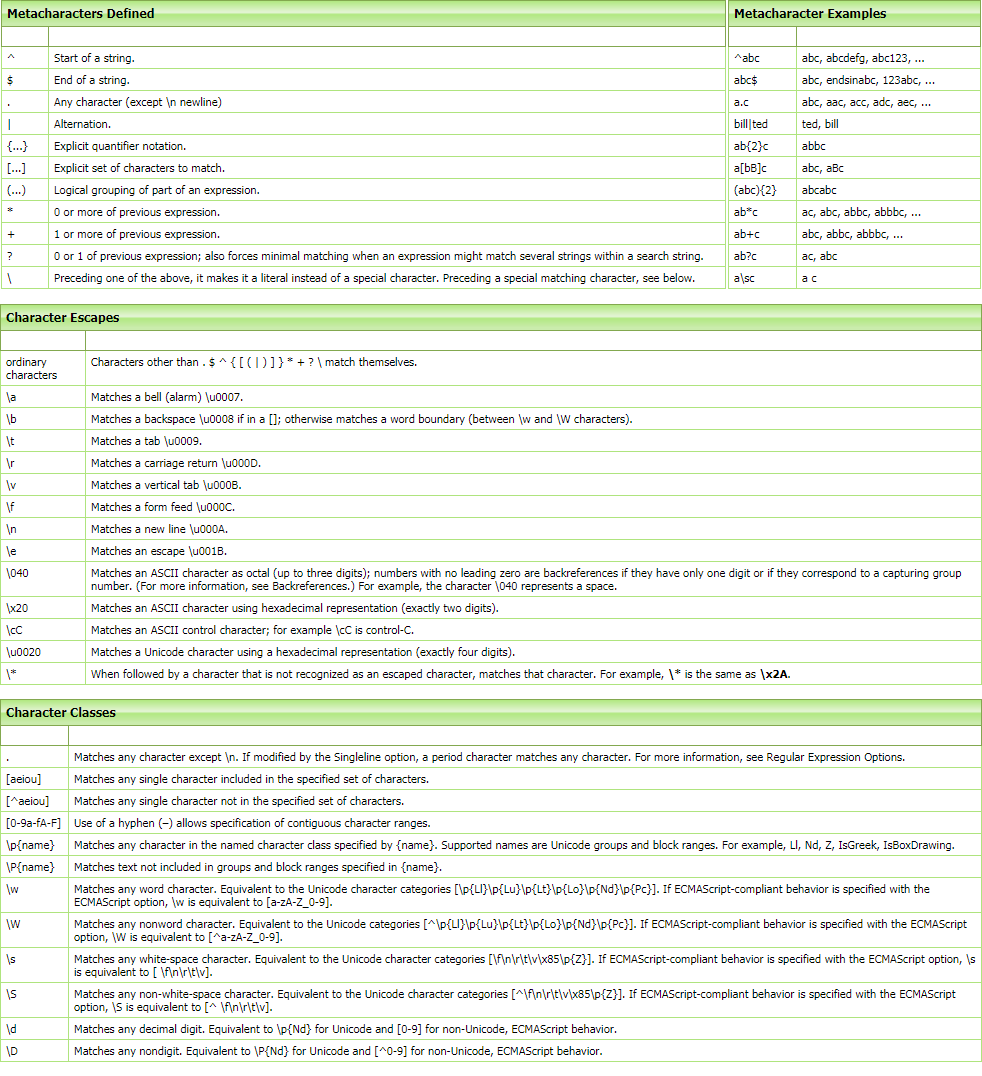
To help understand the use of regular expressions (.NET and ECMA dialects), see the image below, which I extracted from the website RegExLib:
Alternative #1: LIKE and PATINDEX
Using this native SQL Server solution, you will be able to use simple regular expressions, but very useful in your daily life, and with good execution performance. The advantage of this method is that it does not require any additional permissions on the database, nor the need to enable any advanced features or create new objects in the database.
View contentCase sensitive

Filtering the first letter
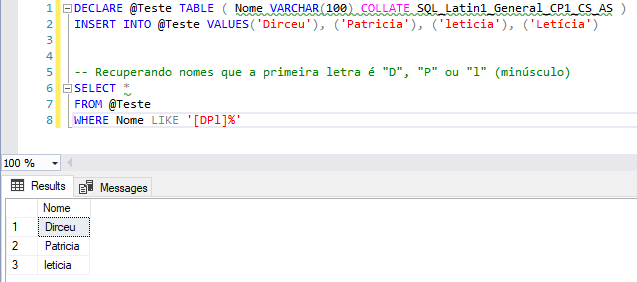
Filtering the first letters + Case sensitive

Applying a specific, custom filter
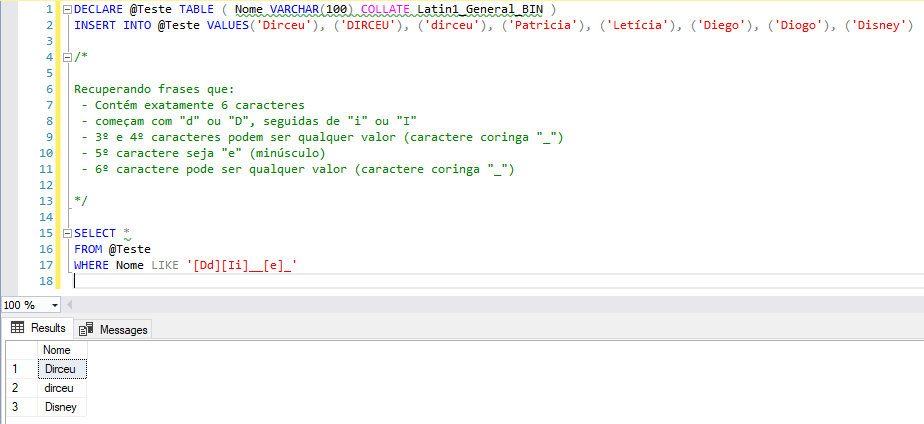
Using the negation operator (^)

Using the escape operator
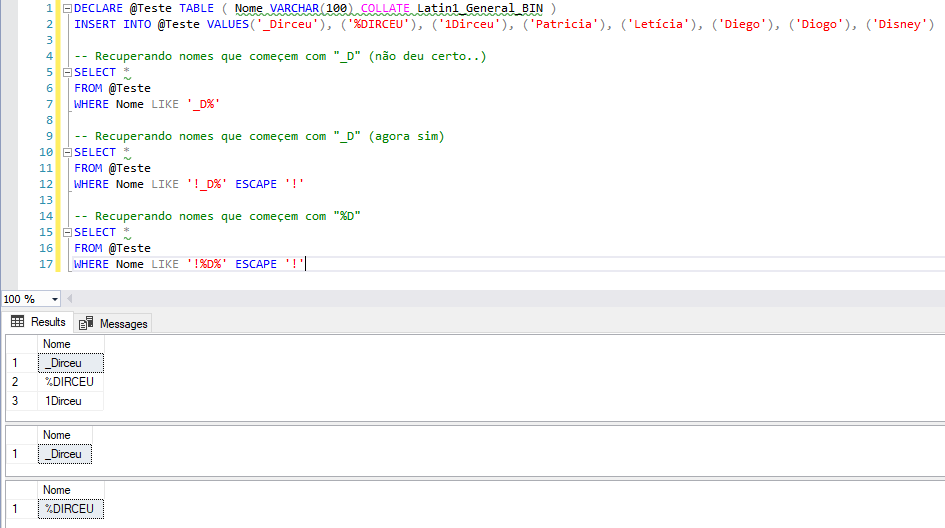
Identifying special characters
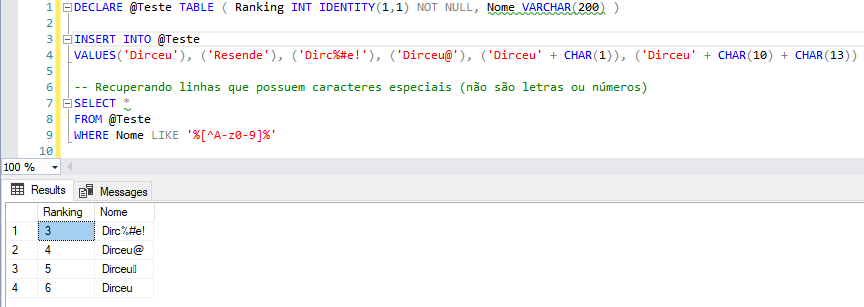
Need to remove special characters? Find out more by accessing the post How to remove accentuation and special characters from a string in SQL Server.
Using numbers
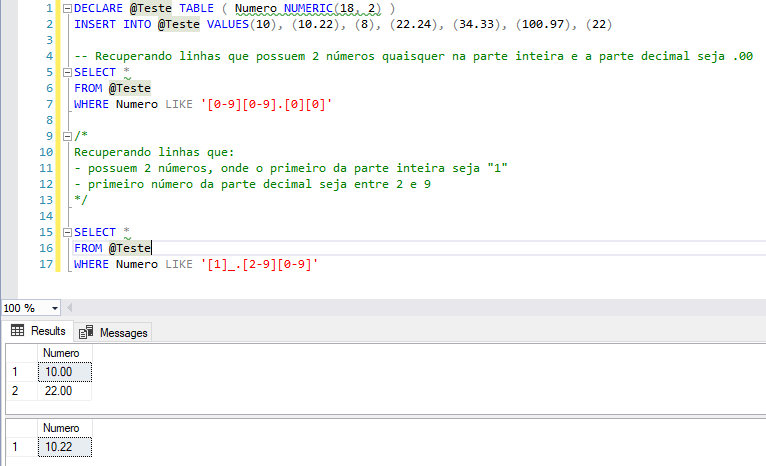
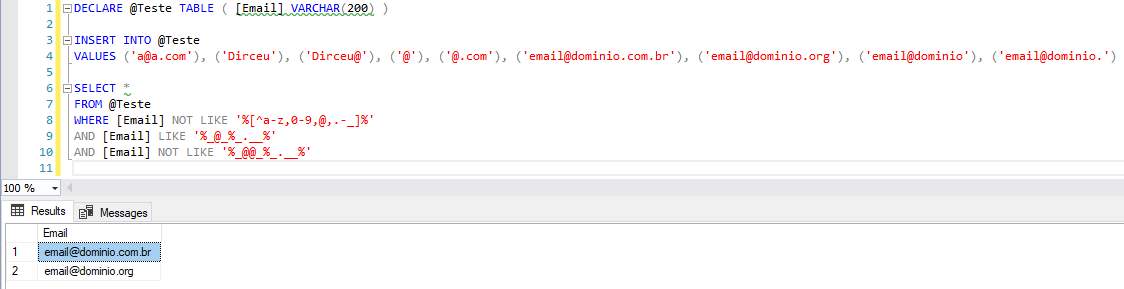
Validating emails
DECLARE @Teste TABLE ( [Email] VARCHAR(200) )

INSERT INTO @Teste
VALUES ('a@a.com'), ('Dirceu'), ('Dirceu@'), ('@'), ('@.com'), ('email@dominio.com.br'), ('email@dominio.org'), ('email@dominio'), ('email@dominio.')

SELECT *
FROM @Teste
WHERE [Email] NOT LIKE '%[^a-z,0-9,@,.-_]%'
AND [Email] LIKE '%_@_%_.__%'
AND [Email] NOT LIKE '%_@@_%_.__%'
Result:
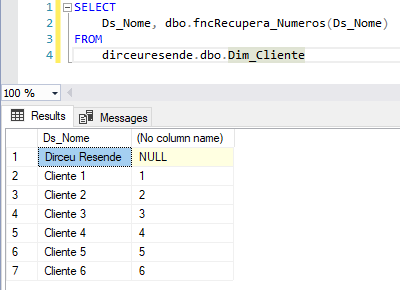
Retrieving only the numeric part of a string
CREATE FUNCTION [dbo].[fncRecupera_Numeros] ( @str VARCHAR(MAX) )
RETURNS VARCHAR(500)
BEGIN

    DECLARE @startingIndex INT
    SET @startingIndex = 0

    WHILE (1 = 1)
    BEGIN

        -- Vamos identificar todos os caracteres não-numéricos (não estão no intervalo 0-9) e substituir por ''
        SET @startingIndex = PATINDEX('%[^0-9]%', @str)
        IF @startingIndex <> 0
            SET @str = REPLACE(@str, SUBSTRING(@str, @startingIndex, 1), '')
        ELSE
            BREAK

    END


    RETURN @str


END
Example:
Want to know more about data validation? Access the posts below:
– Validating CPF, CNPJ, E-mail, Telephone and CEP in SQL Server
– How to validate state registration for all states using C# (CSharp) and SQL Server CLR
– How to validate state registration using T-SQL function in SQL Server
Alternative #2: .NET Dialect with SQLCLR
With this method, you will have access to using regular expressions from the .NET Framework, which has high performance and all the dialect's available resources, using SQLCLR and C#. It has been available since SQL Server 2005.
If you want to know more about SQLCLR, be sure to read the articles below:
– Introduction to SQL CLR (Common Language Runtime) in SQL Server
– SQL Server – Performance comparison between Scalar Function and CLR Scalar Function
– Other posts about SQLCLR
fncRegex_Match Examples
Identifying repeated words
SELECT
    CLR.dbo.fncRegex_Match('Essa frase frase contém palavras repetidas', '\b(\w+)\s+\1\b'),
    CLR.dbo.fncRegex_Match('Essa frase NÃO contém palavras repetidas', '\b(\w+)\s+\1\b')

Validating a specific numeric mask (CEP)
SELECT
    -- Retorna 1 se a string atende o formato "99999-999"
    CLR.dbo.fncRegex_Match('29090-270', '[0-9]{5}-[0-9]{3}'),
    CLR.dbo.fncRegex_Match('29.090-270', '[0-9]{5}-[0-9]{3}'),
    CLR.dbo.fncRegex_Match('29090270', '[0-9]{5}-[0-9]{3}')

SELECT
    -- Retorna 1 se a string atende o formato "99.999-999"
    CLR.dbo.fncRegex_Match('29090-270', '[0-9]{2}.[0-9]{3}-[0-9]{3}'),
    CLR.dbo.fncRegex_Match('29.090-270', '[0-9]{2}.[0-9]{3}-[0-9]{3}'),
    CLR.dbo.fncRegex_Match('29090270', '[0-9]{2}.[0-9]{3}-[0-9]{3}')

SELECT
    -- Retorna 1 se a string atende o formato "99999999"
    CLR.dbo.fncRegex_Match('29090-270', '[0-9]{8}'),
    CLR.dbo.fncRegex_Match('29.090-270', '[0-9]{8}'),
    CLR.dbo.fncRegex_Match('29090270', '[0-9]{8}')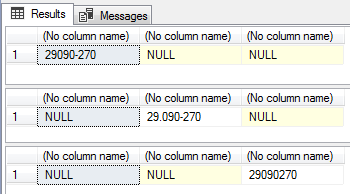
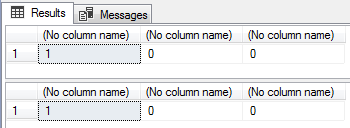
Validating CPF and CNPJ (format only, no DV)
SELECT
    -- Valida se o CPF informado atende a máscara "999.999.999-99"
    CLR.dbo.fncRegex_Match('123.456.789-09', '^\d{3}\.\d{3}\.\d{3}\-\d{2}$'),
    CLR.dbo.fncRegex_Match('12X.456.789-09', '^\d{3}\.\d{3}\.\d{3}\-\d{2}$'),
    CLR.dbo.fncRegex_Match('12345678909', '^\d{3}\.\d{3}\.\d{3}\-\d{2}$')

SELECT
    -- Valida se o CNPJ informado atende a máscara "99.999.999/9999-99"
    CLR.dbo.fncRegex_Match('12.345.678/1234-09', '^\d{2}\.\d{3}\.\d{3}\/\d{4}\-\d{2}$'),
    CLR.dbo.fncRegex_Match('12.3X5.678/1234-09', '^\d{2}\.\d{3}\.\d{3}\/\d{4}\-\d{2}$'),
    CLR.dbo.fncRegex_Match('12345678123409', '^\d{2}\.\d{3}\.\d{3}\/\d{4}\-\d{2}$')
fncRegex_Find Examples
Recover passages where the word “Dirceu” appears in the text
DECLARE @exemplo VARCHAR(2000) = 'Olá pessoal! Meu nome é Dirceu Resende e quero demonstrar como o Regexp é útil nesse artigo do Dirceu blog Resende do Wordpress'

SELECT
    '...' + Ds_Texto + '...'
FROM
    CLR.dbo.fncRegexp_Find(@exemplo, '\bDirceu(?:\W+\w+){0,3}')
Finding repeated words
DECLARE @exemplo VARCHAR(2000) = 'nesse exemplo exemplo eu gostaria de eu demonstrar como identificar palavras palavras repetidas repetidas eu'

SELECT [Ds_Texto]
FROM CLR.dbo.fncRegexp_Find(@exemplo, '\b(\w+)\s+\1\b')

Returning a resultset with line breaks (split)
DECLARE @exemplo VARCHAR(MAX) = '
Segunda linha
Terceira linha
Quarta linha'

SELECT Ds_Texto
FROM CLR.dbo.fncRegexp_Find(@exemplo, '[^\r\n]*(?:[\r\n]*)')
WHERE LEN(Ds_Texto) > 0

Retrieve only valid dates
DECLARE @exemplo VARCHAR(MAX) = '
12/2/2006 12:30 <> 13/2/2007
32/3/2007
2-4-2007
25.8.2007
1/1/2005
34/2/2104
2/5/2006'

SELECT
    DISTINCT CONVERT(DATETIME, Ds_Texto, 103)
FROM
    CLR.dbo.fncRegexp_Find(@exemplo, '\b(0?[1-9]|[12][0-9]|3[01])[- /.](0?[1-9]|1[012])[- /.](19|20?[0-9]{2})\b')

Identifying license plates in a string
DECLARE
    @exemplo VARCHAR(2000) = 'Olá pessoal! Meu nome é Dirceu Resende meu carro é placa AAA-9999 e BBB9999 ou ccc2222',
    @mascara VARCHAR(MAX) = '[a-zA-Z]{3}-?\d{4}'

SELECT
    *
FROM
    CLR.dbo.fncRegexp_Find(@exemplo, @mascara)

fncRegex_Replace Examples
Removing special characters
DECLARE @examplo VARCHAR(MAX) = 'Re@move%ndo car$act¨eres ()_+especi*%#!ais no meu texto:^{}<>|\'

SELECT
    CLR.dbo.fncRegex_Replace(@examplo, '[^a-zA-Z0-9 ]', '')

Removing HTML tags
DECLARE @exemplo VARCHAR(MAX)
SET @exemplo = '<span class="Teste">Utilizando</span> <strong>RegExp</strong> para <u>remover</u> códigos HTML <!-- (até comentários) -->. Veja mais no <a href="https://dirceuresende.com/blog">meu blog</a>'

SELECT
    CLR.dbo.fncRegex_Replace(@exemplo, '<(?:[^>''"]*|([''"]).*?\1)*>', '')
Convert tabular data to INSERT command in the database
DECLARE @exemplo VARCHAR(MAX) = '1|Dirceu|154
2|Resende|467
3|Blog|1348
4|SQL Server|139
'

PRINT
    CLR.dbo.fncRegex_Replace(
        @exemplo,
        '([^\|\r\n]+)[|\r\n]+([^\|\r\n]+)[|\r\n]+([^\|\r\n]+)[|\r\n]+',
        'INSERT INTO Tabela (Coluna1, Coluna2, Coluna3) VALUES ($1, ''$2'', $3);
');
Remove duplicate words
DECLARE @examplo VARCHAR(MAX) = 'RegExp para remover remover palavras duplicadas duplicadas duplicadas'

SELECT
    CLR.dbo.fncRegex_Replace(@examplo, '\b(\w+)(?:\s+\1\b)+', '$1')
C# source code of functions
If you want to use these functions in your own SQLCLR project, you can use the source codes provided below:
fncRegex_Replace
using System;
using System.Data.SqlTypes;
using System.Text.RegularExpressions;

public partial class UserDefinedFunctions
{
    [Microsoft.SqlServer.Server.SqlFunction]
    public static SqlString fncRegex_Replace(SqlString Ds_Texto, SqlString Ds_Mascara, SqlString Ds_Substituir)
    {

        if (Ds_Texto.IsNull || Ds_Mascara.IsNull || Ds_Substituir.IsNull)
            return SqlString.Null;

        try
        {
            return Regex.Replace(Ds_Texto.Value, Ds_Mascara.Value, Ds_Substituir.Value);
        }
        catch (Exception e)
        {
            return SqlString.Null;
        }

    }
}
fncRegexp_Match
using System;
using System.Data.SqlTypes;
using System.Text.RegularExpressions;

public partial class UserDefinedFunctions
{
    [Microsoft.SqlServer.Server.SqlFunction]
    public static SqlString fncRegex_Match(SqlString Ds_Texto, SqlString Ds_Mascara)
    {

        if (Ds_Texto.IsNull || Ds_Mascara.IsNull)
            return SqlString.Null;

        try
        {
            var resultado = Regex.Match(Ds_Texto.Value, Ds_Mascara.Value);
            return resultado.Success ? resultado.Groups[0].Value : SqlString.Null;
        }
        catch (Exception e)
        {
            return SqlString.Null;
        }

    }
}
fncRegexp_Find
using System.Collections;
using System.Data.SqlTypes;
using System.Text.RegularExpressions;
using Microsoft.SqlServer.Server;

public partial class UserDefinedFunctions
{

    private class RegexpFind
    {

        public SqlInt32 Nr_Linha;
        public SqlString Ds_Texto;

        public RegexpFind(SqlInt32 nrLinha, SqlString dsTexto)
        {

            Nr_Linha = nrLinha;
            Ds_Texto = dsTexto;

        }

    }

    [Microsoft.SqlServer.Server.SqlFunction(
        FillRowMethodName = "FillRow_Regexp_Find",
        TableDefinition = "Nr_Linha INT, Ds_Texto NVARCHAR(MAX)",
        DataAccess = DataAccessKind.Read,
        SystemDataAccess = SystemDataAccessKind.Read
    )]
    public static IEnumerable fncRegexp_Find(string Ds_Texto, string Ds_Mascara)
    {


        var regexpFindCollection = new ArrayList();

        if (string.IsNullOrEmpty(Ds_Texto) || string.IsNullOrEmpty(Ds_Mascara))
            return regexpFindCollection;

        var contador = 1;
        var retorno = Regex.Matches(Ds_Texto, Ds_Mascara, RegexOptions.None);

        foreach (var linha in retorno)
        {

            regexpFindCollection.Add(new RegexpFind(
                contador,
                linha.ToString()
            ));

            contador++;
        }


        return regexpFindCollection;

    }

    protected static void FillRow_Regexp_Find(object objRegexpFind, out SqlInt32 nrLinha, out SqlString dsTexto)
    {

        var regexpFind = (RegexpFind) objRegexpFind;

        nrLinha = regexpFind.Nr_Linha;
        dsTexto = regexpFind.Ds_Texto;

    }

}
T-SQL source code of functions
If you are not very familiar with C# or projects in Visual Studio, but still want to use regular expressions in SQL Server, I will provide the T-SQL code below, which will allow you to create the assembly and functions in your database, without much effort, just by pressing “F5” in this script:
CREATE ASSEMBLY [Regexp]
FROM 0x4D5A90000300000004000000FFFF0000B800000000000000400000000000000000000000000000000000000000000000000000000000000000000000800000000E1FBA0E00B409CD21B8014CCD21546869732070726F6772616D2063616E6E6F742062652072756E20696E20444F53206D6F64652E0D0D0A2400000000000000504500004C0103008C57115B0000000000000000E00022200B013000000E00000006000000000000BE2C00000020000000400000000000100020000000020000040000000000000006000000000000000080000000020000000000000300608500001000001000000000100000100000000000001000000000000000000000006C2C00004F00000000400000A002000000000000000000000000000000000000006000000C000000342B00001C0000000000000000000000000000000000000000000000000000000000000000000000000000000000000000200000080000000000000000000000082000004800000000000000000000002E74657874000000C40C000000200000000E000000020000000000000000000000000000200000602E72737263000000A0020000004000000004000000100000000000000000000000000000400000402E72656C6F6300000C0000000060000000020000001400000000000000000000000000004000004200000000000000000000000000000000A02C00000000000048000000020005004C220000E808000001000000000000000000000000000000000000000000000000000000000000000000000000000000000000000000000000000000000000001B3002006A00000001000011000F00280500000A2D090F01280500000A2B01170A062C087E0600000A0B2B4800000F00280700000A0F01280700000A280800000A0C086F0900000A2D077E0600000A2B16086F0A00000A166F0B00000A6F0C00000A280D00000A0BDE0A0D007E0600000A0BDE00072A000001100000000021003D5E000A090000011B3003005900000002000011000F00280500000A2D120F01280500000A2D090F02280500000A2B01170A062C087E0600000A0B2B2E00000F00280700000A0F01280700000A0F02280700000A280E00000A280D00000A0BDE0A0C007E0600000A0BDE00072A0000000110000000002A00234D000A090000011B3003008D0000000300001100730F00000A0A02281000000A2D0803281000000A2B01170D092C050613042B69170B020316281100000A0C00086F1200000A13052B2D11056F1300000A1306000607281400000A11066F1500000A280D00000A73060000066F1600000A260717580B0011056F1700000A2DCADE1611057510000001130711072C0811076F1800000A00DC0613042B0011042A00000001100000020035003A6F001600000000133002002100000004000011000274030000020A03067B01000004811100000104067B0200000481070000012A2202281900000A002A5E02281900000A000002037D0100000402047D020000042A000042534A4201000100000000000C00000076342E302E33303331390000000005006C000000C8020000237E0000340300002403000023537472696E6773000000005806000004000000235553005C0600001000000023475549440000006C0600007C02000023426C6F620000000000000002000001571502000902000000FA01330016000001000000170000000300000002000000060000000C00000019000000060000000400000001000000030000000100000000005A010100000000000600F00024020600100124020600C70011020F00440200000600DB0279010A00DB00C8010A0038015B020E00540170020600A00179010A007F00C8010A007900C80106009F008F020600FA028F020E00800170020600F1018F020600AB0079010A0001005B020E000D0370020E00BB0170020E00900170020E00B70070020600440179010E00B7027002000000000A00000000000100010001001000A2020000150001000100030010006E000000150001000600060013008D000600AA011E0050200000000096004B0191000100D8200000000096008E009A00030050210000000096005C00A5000600FC210000000094004800AC00080029220000000086180B0206000B0032220000000086180B02B7000B0000000100AA0100000200240000000100AA0100000200240000000300E30100000100AA01000002002400000001006B00020002001C0002000300B301000001001C0000000200B30109000B02010011000B02060019000B020A0031000B020600390065011A0039006B011E0039002E0122009100540126009900CF021A004100C4022D00A10070013200A9002E0122003900E202380091009700460069000B020600B10013035D009100530262007100FD016B007900EE0270008900E2027400290042012200690044007A00790004031A008100BF00060029000B02060020002300F0002E000B00BF002E001300C8002E001B00E70040002300F00060002300F50010003E004D007F00048000000000000000000000000000000000C101000004000000000000000000000084003B000000000004000000000000000000000084002F000000000004000000000000000000000084007901000000000300020000000053716C496E743332003C4D6F64756C653E004E725F4C696E6861006E724C696E68610044735F4D6173636172610053797374656D2E44617461006D73636F726C6962004164640046696C6C526F775F5265676578705F46696E6400666E635265676578705F46696E64006F626A52656765787046696E640053797374656D446174614163636573734B696E6400666E6352656765785F5265706C6163650049456E756D657261626C650049446973706F7361626C65004361707475726500446973706F73650044656275676761626C654174747269627574650053716C46756E6374696F6E41747472696275746500436F6D70696C6174696F6E52656C61786174696F6E734174747269627574650052756E74696D65436F6D7061746962696C697479417474726962757465006765745F56616C75650053716C537472696E6700546F537472696E6700666E6352656765785F4D61746368005265676578702E646C6C006765745F49734E756C6C006765745F4974656D0053797374656D004D61746368436F6C6C656374696F6E0047726F7570436F6C6C656374696F6E00457863657074696F6E0044735F546578746F006473546578746F0047726F757000526567657870004D6963726F736F66742E53716C5365727665722E5365727665720044735F537562737469747569720049456E756D657261746F7200476574456E756D657261746F72002E63746F720053797374656D2E446961676E6F73746963730053797374656D2E52756E74696D652E436F6D70696C6572536572766963657300446562756767696E674D6F646573004D6174636865730053797374656D2E446174612E53716C54797065730053797374656D2E546578742E526567756C617245787072657373696F6E730053797374656D2E436F6C6C656374696F6E730055736572446566696E656446756E6374696F6E730052656765784F7074696F6E73006765745F47726F757073006765745F53756363657373004F626A656374006F705F496D706C69636974006765745F43757272656E740041727261794C697374004D6F76654E6578740052656765780049734E756C6C4F72456D70747900000000000000000C14EAF7F46A2245B903BE327055CEBE0004200101080320000105200101111109070402111D12211225032000020306111D0320000E06000212210E0E0420001251052001124D08050001111D0E07070302111D12250600030E0E0E0E0F07081235081239021231123D1C1241040001020E08000312390E0E115D042000123D0320001C050001114508042001081C040701120C08B77A5C561934E08903061145080002111D111D111D0A0003111D111D111D111D06000212310E0E0A0003011C10114510111D072002011145111D0801000800000000001E01000100540216577261704E6F6E457863657074696F6E5468726F7773010801000701000000000401000000818501000400540E1146696C6C526F774D6574686F644E616D651346696C6C526F775F5265676578705F46696E64540E0F5461626C65446566696E6974696F6E244E725F4C696E686120494E542C2044735F546578746F204E56415243484152284D4158295455794D6963726F736F66742E53716C5365727665722E5365727665722E446174614163636573734B696E642C2053797374656D2E446174612C2056657273696F6E3D342E302E302E302C2043756C747572653D6E65757472616C2C205075626C69634B6579546F6B656E3D623737613563353631393334653038390A446174614163636573730100000054557F4D6963726F736F66742E53716C5365727665722E5365727665722E53797374656D446174614163636573734B696E642C2053797374656D2E446174612C2056657273696F6E3D342E302E302E302C2043756C747572653D6E65757472616C2C205075626C69634B6579546F6B656E3D623737613563353631393334653038391053797374656D4461746141636365737301000000000000008C57115B00000000020000001C010000502B0000500D000052534453A6F053CD17E4E94A923D821619E3D25F01000000433A5C55736572735C646966696C5C446F63756D656E74735C56697375616C2053747564696F20323031375C50726F6A656374735C5265676578705C5265676578705C6F626A5C44656275675C5265676578702E7064620000000000000000000000000000000000000000000000000000000000000000000000000000000000000000000000000000000000000000000000000000000000000000000000000000000000000000000000000000000000000000000000000000000000000000000000000000000000000000000000000000000000000000000000000000000000000000000000000000000000000000000000000000000000000000000000000000000000942C00000000000000000000AE2C0000002000000000000000000000000000000000000000000000A02C0000000000000000000000005F436F72446C6C4D61696E006D73636F7265652E646C6C0000000000FF25002000100000000000000000000000000000000000000000000000000000000000000000000000000000000000000000000000000000000000000000000000000000000000000000000000000000000000000000000000000000000000000000000000000000000000000000000000000000000000000000000000000000000000000000000000000000000000000000000000000000000000000000000000000000000000000000000000000000000000000000000000000000000000000000000000000000000000000000000000000000000000000000000000000000000000000000000000000000000000000000000000000000000000000000000000000000000000000000000000000000000000000000000000000000000000000000000000000000000000000000000000000000000000000000000000000000000000000000000000000000000000000100100000001800008000000000000000000000000000000100010000003000008000000000000000000000000000000100000000004800000058400000440200000000000000000000440234000000560053005F00560045005200530049004F004E005F0049004E0046004F0000000000BD04EFFE00000100000000000000000000000000000000003F000000000000000400000002000000000000000000000000000000440000000100560061007200460069006C00650049006E0066006F00000000002400040000005400720061006E0073006C006100740069006F006E00000000000000B004A4010000010053007400720069006E006700460069006C00650049006E0066006F0000008001000001003000300030003000300034006200300000002C0002000100460069006C0065004400650073006300720069007000740069006F006E000000000020000000300008000100460069006C006500560065007200730069006F006E000000000030002E0030002E0030002E003000000036000B00010049006E007400650072006E0061006C004E0061006D00650000005200650067006500780070002E0064006C006C00000000002800020001004C006500670061006C0043006F0070007900720069006700680074000000200000003E000B0001004F0072006900670069006E0061006C00460069006C0065006E0061006D00650000005200650067006500780070002E0064006C006C0000000000340008000100500072006F006400750063007400560065007200730069006F006E00000030002E0030002E0030002E003000000038000800010041007300730065006D0062006C0079002000560065007200730069006F006E00000030002E0030002E0030002E00300000000000000000000000000000000000000000000000000000000000000000000000000000000000000000000000000000000000000000000000000000000000000000000000000000000000000000000000000000000000000000000000000000000000000000000000000000000000000000000000000000000000000000000000000000000000000000000000000000000000000000000000000000000000000000000000000000000000000000000000000000000000000000000000000000000000000000000000000000000000000000000000000000000000000000000000000000000000000000000000000000000000000000000000000000000000000000000000000000000000000000000000000000000000000000000000000000000000000000000000000000000000000000000000000000000000000000000000000000000000000000000000000000000000000000000000000000000000000000000000002000000C000000C03C00000000000000000000000000000000000000000000000000000000000000000000000000000000000000000000000000000000000000000000000000000000000000000000000000000000000000000000000000000000000000000000000000000000000000000000000000000000000000000000000000000000000000000000000000000000000000000000000000000000000000000000000000000000000000000000000000000000000000000000000000000000000000000000000000000000000000000000000000000000000000000000000000000000000000000000000000000000000000000000000000000000000000000000000000000000000000000000000000000000000000000000000000000000000000000000000000000000000000000000000000000000000000000000000000000000000000000000000000000000000000000000000000000000000000000000000000000000000000000000000000000000000000000000000000000000000000000000000000000000000000000000000000000000000000000000000000000000000000000000000000000000000000000000000000000000000000000000000000000000000000000000000000000000000000000000000000000000000000000000000000000000000000000000000000000000000000000000
WITH PERMISSION_SET = SAFE
GO

CREATE FUNCTION [dbo].[fncRegex_Match] (@Ds_Texto [nvarchar](MAX), @Ds_Mascara [nvarchar](MAX))
RETURNS [nvarchar](MAX)
AS EXTERNAL NAME [Regexp].[UserDefinedFunctions].[fncRegex_Match];
GO

CREATE FUNCTION [dbo].[fncRegex_Replace] (@Ds_Texto [nvarchar](MAX), @Ds_Mascara [nvarchar](MAX), @Ds_Substituir [nvarchar](MAX))
RETURNS [nvarchar](MAX)
AS EXTERNAL NAME [Regexp].[UserDefinedFunctions].[fncRegex_Replace];
GO

CREATE FUNCTION [dbo].[fncRegexp_Find](@Ds_Texto [nvarchar](max), @Ds_Mascara [nvarchar](max))
RETURNS  TABLE (
    [Nr_Linha] [int] NULL,
    [Ds_Texto] [nvarchar](max) NULL
) WITH EXECUTE AS CALLER
AS
EXTERNAL NAME [Regexp].[UserDefinedFunctions].[fncRegexp_Find]
GO
Alternative #3: ECMA Dialect with OLE Automation and VBScript
Using the OLE Automation method, you will have access to all the features of the ECMA dialect in your SQL Server, and you will be able to create very complex regular expressions. The cost of this is that using OLE Automation can make your code run slower than other options, but its implementation is simpler than the alternative using SQLCLR.
Available since version 2000, OLE Automation can cause some instabilities in your instance due to known memory management problems by SQL Server, one of the reasons that led to the recommendation to replace this feature with SQLCLR. The message is: Use in moderation.
Want to know more about OLE Automation? Be sure to read these articles below:
– Enabling OLE Automation via T-SQL on SQL Server
– File operations using OLE Automation in SQL Server
– Other posts about OLE Automation
How to enable OLE Automation
To activate OLE Automation on your instance, simply run the command below:
sp_configure 'show advanced options', 1;
GO
RECONFIGURE;
GO
sp_configure 'Ole Automation Procedures', 1;
GO
RECONFIGURE;
GO
sp_configure 'Agent XPs', 1;
GO
RECONFIGURE;
GO
sp_configure 'show advanced options', 1;
GO
RECONFIGURE;
GO
To see my other articles about OLE Automation, access this link here.
For this topic, I will use the excellent functions of Phil Factor RegexReplace, RegexMatch and RegexFind (source code after examples).
Examples of using RegexMatch
Identify repeated words
SELECT
    dbo.RegexMatch('\b(\w+)\s+\1\b','Essa frase frase contém palavras repetidas'),
    dbo.RegexMatch('\b(\w+)\s+\1\b','Essa frase NÃO contém palavras repetidas')

Identify nearby words
-- Verifica se na frase, a palavra "Resende" está de 1 até 6 palavras após a palavra "Dirceu"
SELECT
    dbo.RegexMatch('\bDirceu(?:\W+\w+){1,6}?\W+Resende\b', 'Meu nome é Dirceu e meu sobrenome é Resende. Trabalho com BI e SQL Server')

-- Verifica se na frase, a palavra "Resende" está de 1 até 2 palavras após a palavra "Dirceu"
SELECT
    dbo.RegexMatch('\bDirceu(?:\W+\w+){1,2}?\W+Resende\b', 'Meu nome é Dirceu e meu sobrenome é Resende. Trabalho com BI e SQL Server')

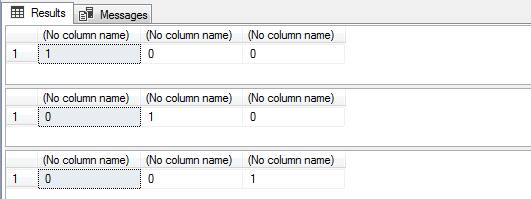
Validating a specific numeric mask (CEP)
SELECT
    -- Retorna 1 se a string atende o formato "99999-999"
    dbo.RegexMatch('[0-9]{5}-[0-9]{3}', '29090-270'),
    dbo.RegexMatch('[0-9]{5}-[0-9]{3}', '29.090-270'),
    dbo.RegexMatch('[0-9]{5}-[0-9]{3}', '29090270')

SELECT
    -- Retorna 1 se a string atende o formato "99.999-999"
    dbo.RegexMatch('[0-9]{2}.[0-9]{3}-[0-9]{3}', '29090-270'),
    dbo.RegexMatch('[0-9]{2}.[0-9]{3}-[0-9]{3}', '29.090-270'),
    dbo.RegexMatch('[0-9]{2}.[0-9]{3}-[0-9]{3}', '29090270')

SELECT
    -- Retorna 1 se a string atende o formato "99999999"
    dbo.RegexMatch('[0-9]{8}', '29090-270'),
    dbo.RegexMatch('[0-9]{8}', '29.090-270'),
    dbo.RegexMatch('[0-9]{8}', '29090270')
Validating CPF and CNPJ (format only, no DV)
SELECT
    -- Valida se o CPF informado atende a máscara "999.999.999-99"
    dbo.RegexMatch('^\d{3}\.\d{3}\.\d{3}\-\d{2}$','123.456.789-09'),
    dbo.RegexMatch('^\d{3}\.\d{3}\.\d{3}\-\d{2}$','12X.456.789-09'),
    dbo.RegexMatch('^\d{3}\.\d{3}\.\d{3}\-\d{2}$','12345678909')

SELECT
    -- Valida se o CNPJ informado atende a máscara "99.999.999/9999-99"
    dbo.RegexMatch('^\d{2}\.\d{3}\.\d{3}\/\d{4}\-\d{2}$','12.345.678/1234-09'),
    dbo.RegexMatch('^\d{2}\.\d{3}\.\d{3}\/\d{4}\-\d{2}$','12.3X5.678/1234-09'),
    dbo.RegexMatch('^\d{2}\.\d{3}\.\d{3}\/\d{4}\-\d{2}$','12345678123409')
Examples of using RegexFind
Recover passages where the word “Dirceu” appears in the text
DECLARE @exemplo VARCHAR(2000) = 'Olá pessoal! Meu nome é Dirceu Resende e quero demonstrar como o Regexp é útil nesse artigo do Dirceu Resende blog do Wordpress'

SELECT
    '...' + SUBSTRING(@exemplo, FirstIndex - 8, Length + 16) + '...'
FROM
    dbo.RegexFind('\bDirceu(?:\W+\w+){0,3}', @exemplo, 1, 1)

Finding repeated words
-- encontrando palavras repetidas seguidamente
DECLARE @exemplo VARCHAR(2000) = 'nesse exemplo exemplo eu gostaria de eu demonstrar como identificar palavras palavras repetidas repetidas eu'

SELECT [Value] FROM dbo.RegexFind ('\b(\w+)\s+\1\b', @exemplo, 1, 1)
Returning a resultset with line breaks (split)
DECLARE @exemplo VARCHAR(MAX) = '
Segunda linha
Terceira linha
Quarta linha'

SELECT Value
FROM dbo.RegexFind('[^\r\n]*(?:[\r\n]*)', @exemplo,1,1)
WHERE [Length] > 0
Break lines for each word in the sentence (split)
DECLARE @exemplo VARCHAR(MAX) = 'Com essa função, cada palavra vai ficar em uma linha do resultado'

SELECT Value
FROM dbo.RegexFind ('\b[\w]+\b', @exemplo,1,1)
Retrieve only valid dates
DECLARE @exemplo VARCHAR(MAX) = '
12/2/2006 12:30 <> 13/2/2007
32/3/2007
2-4-2007
25.8.2007
1/1/2005
34/2/2104
2/5/2006'

SELECT
    DISTINCT CONVERT(DATETIME, Value, 103)
FROM
    dbo.RegexFind ('\b(0?[1-9]|[12][0-9]|3[01])[- /.](0?[1-9]|1[012])[- /.](19|20?[0-9]{2})\b', @exemplo, 1, 1)
Identifying license plates in a string
DECLARE
    @exemplo VARCHAR(2000) = 'Olá pessoal! Meu nome é Dirceu Resende meu carro é placa AAA-9999 e BBB9999 ou ccc2222',
    @mascara VARCHAR(MAX) = '[a-zA-Z]{3}-?\d{4}'

SELECT
    [Value]
FROM
    dirceuresende.dbo.RegexFind(@mascara, @exemplo, 1, 1)
Examples of using RegexReplace
Identifies URL and encapsulates as html link – A tag
SELECT
    dbo.RegexReplace(
        '\b(https?|ftp|file)://([-A-Z0-9+&@#/%?=~_|!:,.;]*[-A-Z0-9+&@#/%=~_|])',
        '<a href="$2">$2</a>',
        'Testando Regexp com o site do https://www.google.com.br', 1, 1
    )
Remove HTML strings from text
DECLARE @exemplo VARCHAR(MAX)
SET @exemplo = '<span class="Teste">Utilizando</span> <strong>RegExp</strong> para <u>remover</u> códigos HTML <!-- (até comentários) -->. Veja mais no <a href="https://dirceuresende.com/blog">meu blog</a>'

SELECT
    dbo.RegexReplace('<(?:[^>''"]*|([''"]).*?\1)*>', '', @exemplo, 1, 1)

Convert tabular data to INSERT command in the database
DECLARE @exemplo VARCHAR(MAX) = '1|Dirceu|154
2|Resende|467
3|Blog|1348
4|SQL Server|139
'

PRINT
    dbo.RegexReplace(
        '([^\|\r\n]+)[|\r\n]+([^\|\r\n]+)[|\r\n]+([^\|\r\n]+)[|\r\n]+',
        'INSERT INTO Tabela (Coluna1, Coluna2, Coluna3) VALUES ($1, ''$2'', $3);
',
        @exemplo, 1, 1
    );
Remove duplicate words
DECLARE @examplo VARCHAR(MAX) = 'RegExp para remover remover palavras duplicadas duplicadas duplicadas'

SELECT
    dbo.RegexReplace('\b(\w+)(?:\s+\1\b)+', '$1', @examplo, 1, 1)

Removing special characters
DECLARE @examplo VARCHAR(MAX) = 'Re@move%ndo car$act¨eres ()_+especi*%#!ais no meu texto:^{}<>|\'

SELECT
    dbo.RegexReplace('[^a-zA-Z0-9 ]', '', @examplo, 1, 1)

RegexFind function code
CREATE FUNCTION RegexFind (
    @pattern VARCHAR(255),
    @matchstring VARCHAR(MAX),
    @global BIT = 1,
    @Multiline bit = 1
)
RETURNS @result TABLE (
    Match_ID INT,
    FirstIndex INT ,
    [Length] INT ,
    [Value] VARCHAR(2000),
    Submatch_ID INT,
    SubmatchValue VARCHAR(2000),
    Error VARCHAR(255)
)
AS
BEGIN

    DECLARE
        @objRegexExp INT,
        @objErrorObject INT,
        @objMatch INT,
        @objSubMatches INT,
        @strErrorMessage VARCHAR(255),
        @error VARCHAR(255),
        @Substituted VARCHAR(8000),
        @hr INT,
        @matchcount INT,
        @SubmatchCount INT,
        @ii INT,
        @jj INT,
        @FirstIndex INT,
        @length INT,
        @Value VARCHAR(2000),
        @SubmatchValue VARCHAR(2000),
        @objSubmatchValue INT,
        @command VARCHAR(8000),
        @Match_ID INT

    DECLARE @match TABLE (
        Match_ID INT IDENTITY(1, 1) NOT NULL,
        FirstIndex INT NOT NULL,
        [length] INT NOT NULL,
        [Value] VARCHAR(2000)
    )

    DECLARE @Submatch TABLE (
        Submatch_ID INT IDENTITY(1, 1),
        match_ID INT NOT NULL,
        SubmatchNo INT NOT NULL,
        SubmatchValue VARCHAR(2000)
    )

    SELECT  @strErrorMessage = 'creating a regex object',@error=''
    EXEC @hr= sp_OACreate 'VBScript.RegExp', @objRegexExp OUT

    IF @hr = 0
        SELECT  @strErrorMessage = 'Setting the Regex pattern',
                @objErrorObject = @objRegexExp

    IF @hr = 0
        EXEC @hr= sp_OASetProperty @objRegexExp, 'Pattern', @pattern

    IF @hr = 0
        SELECT  @strErrorMessage = 'Specifying a case-insensitive match'

    IF @hr = 0
        EXEC @hr= sp_OASetProperty @objRegexExp, 'IgnoreCase', 1

    IF @hr = 0
        EXEC @hr= sp_OASetProperty @objRegexExp, 'MultiLine', @Multiline

    IF @hr = 0
        EXEC @hr= sp_OASetProperty @objRegexExp, 'Global', @global

    IF @hr = 0
        SELECT  @strErrorMessage = 'Doing a match'

    IF @hr = 0
        EXEC @hr= sp_OAMethod @objRegexExp, 'execute', @objMatch OUT,
            @matchstring
    IF @hr = 0
        SELECT  @strErrorMessage = 'Getting the number of matches'

    IF @hr = 0
        EXEC @hr= sp_OAGetProperty @objmatch, 'count', @matchcount OUT


    SET @ii = 0


/*

The Match object has four read-only properties.
The FirstIndex property indicates the number of characters in the string to the left of the match.
The Length property of the Match object indicates the number of characters in the match.
The Value property returns the text that was matched.

*/

    WHILE (@hr = 0 AND @ii < @Matchcount)
    BEGIN

        SELECT
            @strErrorMessage = 'Getting the FirstIndex property',
            @command = 'item(' + CAST(@ii AS VARCHAR) + ').FirstIndex'

        IF @hr = 0
            EXEC @hr= sp_OAGetProperty @objmatch, @command, @Firstindex OUT

        IF @hr = 0
            SELECT
                @strErrorMessage = 'Getting the length property',
                @command = 'item(' + CAST(@ii AS VARCHAR) + ').Length'

        IF @hr = 0
            EXEC @hr= sp_OAGetProperty @objmatch, @command, @Length OUT

        IF @hr = 0
            SELECT
                @strErrorMessage = 'Getting the value property',
                @command = 'item(' + CAST(@ii AS VARCHAR) + ').Value'

        IF @hr = 0
            EXEC @hr= sp_OAGetProperty @objmatch, @command, @Value OUT

        INSERT INTO @match (
            Firstindex,
            [Length],
            [Value]
        )
        SELECT
            @firstindex + 1,
            @Length,
            @Value

        SELECT  @Match_ID = @@Identity

        -- The SubMatches property of the Match object is a collection of strings. It will only hold values if your regular expression has capturing groups. The collection will hold one string for each capturing group. The Count property (returned as SubmatchCount) indicates the number of string in the collection. The Item property takes an index parameter, and returns the text matched by the capturing group.
        IF @hr = 0
            SELECT
                @strErrorMessage = 'Getting the SubMatches collection',
                @command = 'item(' + CAST(@ii AS VARCHAR) + ').SubMatches'

        IF @hr = 0
            SELECT  @strErrorMessage = 'Getting the number of submatches'

        IF @hr = 0
            EXEC @hr= sp_OAGetProperty @objSubmatches, 'count', @submatchCount OUT

        SET @jj = 0
        WHILE (@hr = 0 AND @jj < @submatchCount)
        BEGIN

            IF @hr = 0
                SELECT
                    @strErrorMessage = 'Getting the submatch value property',
                    @command = 'item(' + CAST(@jj AS VARCHAR) + ')' ,@submatchValue=NULL

            IF @hr = 0
                EXEC @hr= sp_OAGetProperty @objSubmatches, @command, @SubmatchValue OUT

            INSERT INTO @Submatch (
                Match_ID,
                SubmatchNo,
                SubmatchValue
            )
            SELECT
                @Match_ID,
                @jj+1,
                @SubmatchValue

            SET @jj += 1

        END

        EXEC @hr= sp_OAGetProperty @objmatch, @command, @objSubmatches OUT

        SET @ii += 1

    END


    IF (@hr <> 0)
    BEGIN

        DECLARE
            @Source VARCHAR(255),
            @Description VARCHAR(255),
            @Helpfile VARCHAR(255),
            @HelpID INT

        EXECUTE sp_OAGetErrorInfo @objErrorObject, @source OUTPUT, @Description OUTPUT, @Helpfile OUTPUT, @HelpID OUTPUT

        SET @Error = 'Error whilst ' + COALESCE(@strErrorMessage, 'doing something') + ', ' + COALESCE(@Description, '')

    END


    EXEC sp_OADestroy @objRegexExp
    EXEC sp_OADestroy @objMatch
    EXEC sp_OADestroy @objSubMatches


    INSERT INTO @result (
        Match_ID,
        FirstIndex,
        [Length],
        [Value],
        Submatch_ID,
        SubmatchValue,
        Error
    )
    SELECT
        m.[Match_ID],
        [FirstIndex],
        [Length],
        [Value],
        [SubmatchNo],
        [SubmatchValue],
        @error
    FROM
        @match m
        LEFT OUTER JOIN @submatch s ON m.match_ID = s.match_ID

    IF (@@ROWCOUNT = 0 AND LEN(@error) > 0)
        INSERT INTO @result(Error)
        SELECT @error

    RETURN

END
GO
RegexMatch function code
CREATE FUNCTION dbo.RegexMatch (
    @pattern VARCHAR(2000),
    @matchstring VARCHAR(MAX)--Varchar(8000) got SQL Server 2000
)
RETURNS INT
AS
BEGIN

    DECLARE @objRegexExp INT,
        @objErrorObject INT,
        @strErrorMessage VARCHAR(255),
        @hr INT,
        @match BIT

    SELECT  @strErrorMessage = 'creating a regex object'
    EXEC @hr= sp_OACreate 'VBScript.RegExp', @objRegexExp OUT

    IF @hr = 0
        EXEC @hr= sp_OASetProperty @objRegexExp, 'Pattern', @pattern
        --Specifying a case-insensitive match

    IF @hr = 0
        EXEC @hr= sp_OASetProperty @objRegexExp, 'IgnoreCase', 1
        --Doing a Test'

    IF @hr = 0
        EXEC @hr= sp_OAMethod @objRegexExp, 'Test', @match OUT, @matchstring

    IF @hr <> 0
    BEGIN
        RETURN NULL
    END

    EXEC sp_OADestroy @objRegexExp

    RETURN @match

END
GO
RegexReplace function code
CREATE FUNCTION dbo.RegexReplace (
    @pattern VARCHAR(255),
    @replacement VARCHAR(255),
    @Subject VARCHAR(MAX),
    @global BIT = 1,
    @Multiline bit =1
)
RETURNS VARCHAR(MAX)
AS
BEGIN


    DECLARE @objRegexExp INT,
        @objErrorObject INT,
        @strErrorMessage VARCHAR(255),
        @Substituted VARCHAR(8000),
        @hr INT,
        @Replace BIT

    SELECT  @strErrorMessage = 'creating a regex object'
    EXEC @hr= sp_OACreate 'VBScript.RegExp', @objRegexExp OUT

    IF @hr = 0
        SELECT  @strErrorMessage = 'Setting the Regex pattern',
                @objErrorObject = @objRegexExp

    IF @hr = 0
        EXEC @hr= sp_OASetProperty @objRegexExp, 'Pattern', @pattern

    IF @hr = 0 /*By default, the regular expression is case sensitive. Set the IgnoreCase property to True to make it case insensitive.*/
        SELECT  @strErrorMessage = 'Specifying the type of match'

    IF @hr = 0
        EXEC @hr= sp_OASetProperty @objRegexExp, 'IgnoreCase', 1

    IF @hr = 0
        EXEC @hr= sp_OASetProperty @objRegexExp, 'MultiLine', @Multiline

    IF @hr = 0
        EXEC @hr= sp_OASetProperty @objRegexExp, 'Global', @global

    IF @hr = 0
        SELECT  @strErrorMessage = 'Doing a Replacement'

    IF @hr = 0
        EXEC @hr= sp_OAMethod @objRegexExp, 'Replace', @Substituted OUT,
            @subject, @Replacement

     /*If the RegExp.Global property is False (the default), Replace will return the @subject string with the first regex match (if any) substituted with the replacement text. If RegExp.Global is true, the @Subject string will be returned with all matches replaced.*/
    IF @hr <> 0
    BEGIN
        DECLARE @Source VARCHAR(255),
            @Description VARCHAR(255),
            @Helpfile VARCHAR(255),
            @HelpID INT

        EXECUTE sp_OAGetErrorInfo @objErrorObject, @source OUTPUT,
            @Description OUTPUT, @Helpfile OUTPUT, @HelpID OUTPUT

        SELECT  @strErrorMessage = 'Error whilst '
                + COALESCE(@strErrorMessage, 'doing something') + ', '
                + COALESCE(@Description, '')

        RETURN @strErrorMessage

    END

    EXEC sp_OADestroy @objRegexExp

    RETURN @Substituted

END
GO
In this post, we were able to see how useful regular expressions (Regexp or Regex) can be in our daily lives, whether you are a DBA, BI analyst or developer. I also demonstrated how easy it is to use this powerful feature in SQL Server, whether using LIKE or PATINDEX (native DBMS functions) or using other features, such as OLE Automation and SQLCLR.
I hope this post clarified some doubts about Regexp and showed an incredible new feature for those who didn't know it yet.
A hug and see you in the next post!

Comentários (0)
Carregando comentários…