
Hey guys!
In this post, I would like to demonstrate to you how to use the MERGE command, available since SQL Server 2008, to perform INSERT and UPDATE commands between two tables in a single statement.
For the examples in this post, I will use a base that I will create using the script below:
IF (OBJECT_ID('dbo.Venda') IS NOT NULL) DROP TABLE dbo.Venda
CREATE TABLE dbo.Venda (
    Id_Venda INT IDENTITY(1,1) NOT NULL,
    Dt_Venda DATE NOT NULL,
    Id_Produto INT NOT NULL,
    Quantidade INT NOT NULL,
    Valor NUMERIC(9, 2) NOT NULL
)

INSERT INTO dbo.Venda
(
    Dt_Venda,
    Id_Produto,
    Quantidade,
    Valor
)
VALUES ( '2018-09-21', 1, 2, 25.99 ), ( '2018-09-21', 2, 3, 29.99 ), ( '2018-09-21', 1, 1, 15.99 ),
( '2018-09-22', 1, 2, 25.99 ), ( '2018-09-22', 2, 1, 10.00 ), ( '2018-09-22', 9, 1, 35.99 ), ( '2018-09-22', 5, 3, 20.00 ),
( '2018-09-22', 3, 2, 25.87 ), ( '2018-09-22', 2, 1, 11.25 ), ( '2018-09-22', 1, 1, 21.90 ), ( '2018-09-22', 4, 3, 29.99 )


IF (OBJECT_ID('dbo.Dim_Venda') IS NOT NULL) DROP TABLE dbo.Dim_Venda
CREATE TABLE dbo.Dim_Venda (
    Id_Venda INT NOT NULL,
    Dt_Venda DATE NOT NULL,
    Id_Produto INT NOT NULL,
    Quantidade INT NOT NULL,
    Valor NUMERIC(9, 2) NOT NULL
)

INSERT INTO dbo.Dim_Venda
(
    Id_Venda,
    Dt_Venda,
    Id_Produto,
    Quantidade,
    Valor
)
SELECT
    Id_Venda,
    Dt_Venda,
    Id_Produto,
    Quantidade,
    Valor
FROM
    dbo.Venda
WHERE
    Dt_Venda = '2018-09-21'
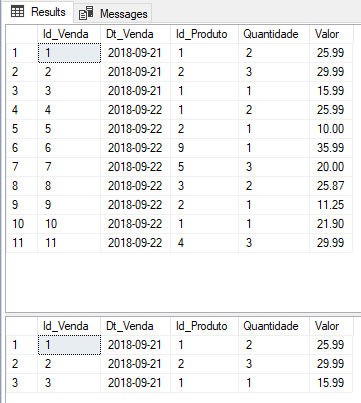
And our source and destination tables look like this:
Introduction
A very common activity in the daily lives of professionals who work with data, especially those who work with ETL, the task of updating a table based on data from another table, usually ends up generating 2 distinct operations to update the data:
Method 1: Insert/Update
- Activity 1: Update the records that exist in both tables
- Activity 2: Insert records that only exist in the source table
Let's see how we would do this:
-- Atividade 1: Atualizar os registros que existem nas duas tabelas
UPDATE A
SET
    A.Dt_Venda = B.Dt_Venda,
    A.Id_Produto = B.Id_Produto,
    A.Quantidade = B.Quantidade,
    A.Valor = B.Valor
FROM
    dbo.Dim_Venda A
    JOIN dbo.Venda B ON A.Id_Produto = B.Id_Venda


-- Atividade 2: Inserir os registros que só existem na tabela de origem
INSERT INTO dbo.Dim_Venda
(
    Id_Venda,
    Dt_Venda,
    Id_Produto,
    Quantidade,
    Valor
)
SELECT
    A.Id_Venda,
    A.Dt_Venda,
    A.Id_Produto,
    A.Quantidade,
    A.Valor
FROM
    dbo.Venda A
    LEFT JOIN dbo.Dim_Venda B ON A.Id_Venda = B.Id_Venda
WHERE
    B.Id_Venda IS NULL


SELECT * FROM dbo.Dim_Venda
SELECT * FROM dbo.Venda
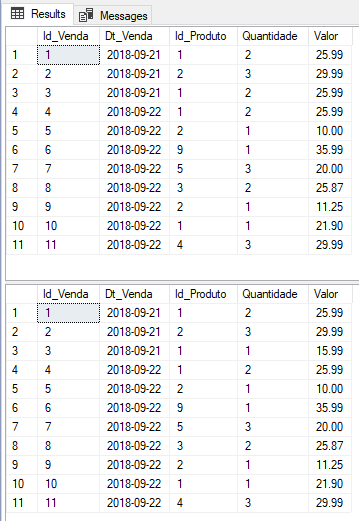
And how did the data in the table look?
Method 2: Delete/Insert
- Activity 1: Deletes the records that exist in both tables
- Activity 2: Insert records from the source table
Which we can understand how it works through the script below:
-- Atividade 1: Apaga os registros que existem nas duas tabelas
DELETE A
FROM
    dbo.Dim_Venda A
    JOIN dbo.Venda B ON A.Id_Produto = B.Id_Venda


-- Atividade 2: Inserir os registros que só existem na tabela de origem
INSERT INTO dbo.Dim_Venda
(
    Id_Venda,
    Dt_Venda,
    Id_Produto,
    Quantidade,
    Valor
)
SELECT
    A.Id_Venda,
    A.Dt_Venda,
    A.Id_Produto,
    A.Quantidade,
    A.Valor
FROM
    dbo.Venda A
    LEFT JOIN dbo.Dim_Venda B ON A.Id_Venda = B.Id_Venda
WHERE
    B.Id_Venda IS NULL


SELECT * FROM dbo.Dim_Venda
SELECT * FROM dbo.Venda
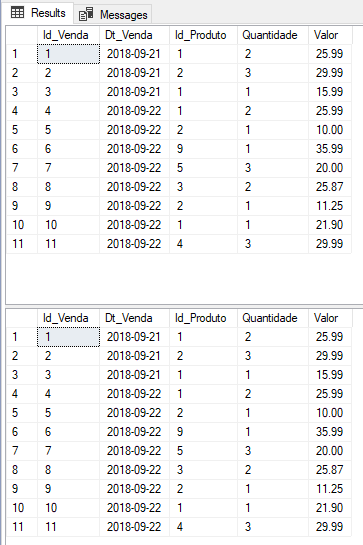
Result:
Using the MERGE command to INSERT + UPDATE + DELETE
So far, I haven't presented anything new, right? DELETE/INSERT and UPDATE/INSERT commands are very common in the daily lives of data professionals.
However, to solve this problem, starting with SQL Server 2008 we can use the MERGE command, which allows us to perform this same activity in just 1 statement. Its operation is simple: One or more columns of the tables involved are considered keys (identifiers) so if the key value exists in the destination table, the values will be updated according to the source table. If this identifier does not exist, this record will be inserted into the destination table.
Its syntax works like this:
MERGE
    dbo.Dim_Venda AS Destino
USING
    dbo.Venda AS Origem ON (Origem.Id_Venda = Destino.Id_Venda)

-- Registro existe nas 2 tabelas
WHEN MATCHED THEN
    UPDATE SET
        Destino.Dt_Venda = Origem.Dt_Venda,
        Destino.Id_Produto = Origem.Id_Produto,
        Destino.Quantidade = Origem.Quantidade,
        Destino.Valor = Origem.Valor

-- Registro não existe no destino. Vamos inserir.
WHEN NOT MATCHED THEN
    INSERT
    VALUES(Origem.Id_Venda, Origem.Dt_Venda, Origem.Id_Produto, Origem.Quantidade, Origem.Valor);
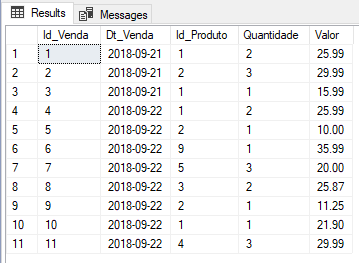
Result:
Controlling the NOT MATCHED clause in the Source and Destination
We can also control when a record does not exist at the destination or at the source, and make different decisions for these 2 situations:
MERGE
    dbo.Dim_Venda AS Destino
USING
    dbo.Venda AS Origem ON (Origem.Id_Venda = Destino.Id_Venda)

-- Registro existe nas 2 tabelas
WHEN MATCHED THEN
    UPDATE SET
        Destino.Dt_Venda = Origem.Dt_Venda,
        Destino.Id_Produto = Origem.Id_Produto,
        Destino.Quantidade = Origem.Quantidade,
        Destino.Valor = Origem.Valor

-- Registro não existe na origem, apenas no destino. Vamos apagar o dado da origem.
WHEN NOT MATCHED BY SOURCE THEN
    DELETE

-- Registro não existe no destino. Vamos inserir.
WHEN NOT MATCHED BY TARGET THEN
    INSERT
    VALUES(Origem.Id_Venda, Origem.Dt_Venda, Origem.Id_Produto, Origem.Quantidade, Origem.Valor);
Updating specific values, through specific filters
It may be necessary to update only the quantity and value, and in cases where these are different:
MERGE
    dbo.Dim_Venda AS Destino
USING
    dbo.Venda AS Origem ON (Origem.Id_Venda = Destino.Id_Venda)

-- Registro existe nas 2 tabelas
WHEN MATCHED AND (Origem.Quantidade <> Destino.Quantidade OR Origem.Valor <> Destino.Valor) THEN
    UPDATE SET
        Destino.Quantidade = Origem.Quantidade,
        Destino.Valor = Origem.Valor

-- Registro não existe no destino. Vamos inserir.
WHEN NOT MATCHED THEN
    INSERT
    VALUES(Origem.Id_Venda, Origem.Dt_Venda, Origem.Id_Produto, Origem.Quantidade, Origem.Valor);
Displaying an output with all changes made by MERGE
What if we want to collect the MERGE results and display the operations performed on the screen? Just use OUTPUT!
MERGE
    dbo.Dim_Venda AS Destino
USING
    dbo.Venda AS Origem ON (Origem.Id_Venda = Destino.Id_Venda)

-- Registro existe nas 2 tabelas
WHEN MATCHED THEN
    UPDATE SET
        Destino.Dt_Venda = Origem.Dt_Venda,
        Destino.Id_Produto = Origem.Id_Produto,
        Destino.Quantidade = Origem.Quantidade,
        Destino.Valor = Origem.Valor

-- Registro não existe na origem, apenas no destino. Vamos apagar o dado da origem.
WHEN NOT MATCHED BY SOURCE THEN
    DELETE

-- Registro não existe no destino. Vamos inserir.
WHEN NOT MATCHED BY TARGET THEN
    INSERT
    VALUES(Origem.Id_Venda, Origem.Dt_Venda, Origem.Id_Produto, Origem.Quantidade, Origem.Valor)

OUTPUT $action,
    Deleted.Id_Venda,
    Deleted.Dt_Venda,
    Deleted.Id_Produto,
    Deleted.Quantidade,
    Deleted.Valor,
    Inserted.Id_Venda,
    Inserted.Dt_Venda,
    Inserted.Id_Produto,
    Inserted.Quantidade,
    Inserted.Valor;
Result:

Storing MERGE output in a table
Would you like to save the log records in a table to query the data?
CREATE TABLE dbo.Dim_Venda_Log
(
    [Id_Log] BIGINT IDENTITY(1,1) NOT NULL PRIMARY KEY CLUSTERED,
    [Acao] NVARCHAR(10),
    [Inserted_Id_Venda] INT,
    [Inserted_Dt_Venda] DATE,
    [Inserted_Id_Produto] INT,
    [Inserted_Quantidade] INT,
    [Inserted_Valor] DECIMAL(9, 2),
    [Deleted_Id_Venda] INT,
    [Deleted_Dt_Venda] DATE,
    [Deleted_Id_Produto] INT,
    [Deleted_Quantidade] INT,
    [Deleted_Valor] DECIMAL(9, 2)
) WITH(DATA_COMPRESSION=PAGE)


MERGE
    dbo.Dim_Venda AS Destino
USING
    dbo.Venda AS Origem ON (Origem.Id_Venda = Destino.Id_Venda)

-- Registro existe nas 2 tabelas
WHEN MATCHED THEN
    UPDATE SET
        Destino.Dt_Venda = Origem.Dt_Venda,
        Destino.Id_Produto = Origem.Id_Produto,
        Destino.Quantidade = Origem.Quantidade,
        Destino.Valor = Origem.Valor

-- Registro não existe na origem, apenas no destino. Vamos apagar o dado da origem.
WHEN NOT MATCHED BY SOURCE THEN
    DELETE

-- Registro não existe no destino. Vamos inserir.
WHEN NOT MATCHED BY TARGET THEN
    INSERT
    VALUES(Origem.Id_Venda, Origem.Dt_Venda, Origem.Id_Produto, Origem.Quantidade, Origem.Valor)

OUTPUT
    $action,
    Inserted.*,
    Deleted.*
    INTO dbo.Dim_Venda_Log;


SELECT * FROM dbo.Dim_Venda_Log
Using queries as source data
MERGE also allows us to join data from queries instead of fixed tables, and use JOINS, if necessary.
MERGE
    dbo.Dim_Venda AS Destino
USING
    (SELECT Id_Venda, Dt_Venda, Id_Produto, Quantidade, Valor FROM dbo.Venda WHERE Dt_Venda = '2018-09-22') AS Origem ON (Origem.Id_Venda = Destino.Id_Venda)

-- Registro existe nas 2 tabelas
WHEN MATCHED THEN
    UPDATE SET
        Destino.Dt_Venda = Origem.Dt_Venda,
        Destino.Id_Produto = Origem.Id_Produto,
        Destino.Quantidade = Origem.Quantidade,
        Destino.Valor = Origem.Valor

-- Registro não existe na origem, apenas no destino. Vamos apagar o dado da origem.
WHEN NOT MATCHED BY SOURCE THEN
    DELETE

-- Registro não existe no destino. Vamos inserir.
WHEN NOT MATCHED BY TARGET THEN
    INSERT
    VALUES(Origem.Id_Venda, Origem.Dt_Venda, Origem.Id_Produto, Origem.Quantidade, Origem.Valor)

OUTPUT
    $action,
    Inserted.*,
    Deleted.*;
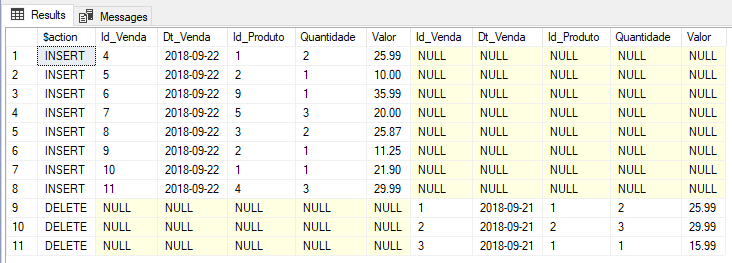
Result - see that, as I only brought the data from 09/22 into MERGE, the data from 09/21 that was manually loaded before MERGE was deleted from the destination table, as it did not exist in the source
Using CTE with JOIN to generate data from the source
Merge also allows you to use CTE to generate the data source resultset and use JOINS, if necessary.
;WITH cteVenda AS (
    SELECT
        A.Id_Venda,
        A.Dt_Venda,
        A.Id_Produto,
        A.Quantidade,
        A.Valor,
        B.Id_Erro,
        B.Dt_Erro,
        B.Ds_Erro
    FROM
        dbo.Venda A
        LEFT JOIN Consultoria.dbo.Log_Erro B ON A.Id_Produto = B.Id_Erro
    WHERE
        A.Dt_Venda = '2018-09-21'
)
MERGE
    dbo.Dim_Venda AS Destino
USING
    cteVenda AS Origem ON (Origem.Id_Venda = Destino.Id_Venda)

-- Registro existe nas 2 tabelas
WHEN MATCHED THEN
    UPDATE SET
        Destino.Dt_Venda = Origem.Dt_Venda,
        Destino.Id_Produto = Origem.Id_Produto,
        Destino.Quantidade = Origem.Quantidade,
        Destino.Valor = Origem.Valor

-- Registro não existe na origem, apenas no destino. Vamos apagar o dado da origem.
WHEN NOT MATCHED BY SOURCE THEN
    DELETE

-- Registro não existe no destino. Vamos inserir.
WHEN NOT MATCHED BY TARGET THEN
    INSERT
    VALUES(Origem.Id_Venda, Origem.Dt_Venda, Origem.Id_Produto, Origem.Quantidade, Origem.Valor)

OUTPUT
    $action,
    Inserted.*,
    Deleted.*;
Result:

Cautions when using MERGE
Now that I have demonstrated several ways to use MERGE in SQL Server, I would like to warn you about the existence of some bugs when using MERGE in SQL Server 2008, which range from incorrect outputs when using OUTPUT to severe errors like the one shown below:
Msg 0, Level 11, State 0, Line 0
A severe error occurred on the current command. The results, if any, should be discarded.
Msg 0, Level 20, State 0, Line 0
A severe error occurred on the current command. The results, if any, should be discarded.
If you are using version 2008 (STILL), update your SQL with the latest version of SP and Cumulative Update available and carefully read the articles that I will make available below, as they have several scenarios that can cause headaches when using MERGE in SQL Server 2008 (in versions 2012+ these bugs no longer exist):
- http://sqlblog.com/blogs/paul_white/archive/2010/08/04/another-interesting-merge-bug.aspx
- http://andreyzavadskiy.com/2015/07/23/sql-server-2008r2-causes-severe-error-in-merge-output/
- https://www.mssqltips.com/sqlservertip/3074/use-caution-with-sql-servers-merge-statement/
Using the Stored Procedure stpETL_Upsert
To facilitate the use of MERGE, especially in tables with many columns, I will share with you the Stored Procedure stpETL_Upsert, originally created by Murilo Mielke and adapted by me, which aims to facilitate the use of MERGE in everyday situations.
SP parameters:
- @Nm_Source: Parameter of type VARCHAR(MAX), it contains the name of the data source table (source). The table name must be specific in full form (database.schema.table)
- @Nm_Target: Parameter of type VARCHAR(MAX), it contains the name of the data destination table (target), that is, where the data will be inserted/updated. The table name must be specific in full form (database.schema.table)
- @Cd_Join: Parameter of type VARCHAR(MAX), the column or columns of the JOIN must be informed to link the data from the source and target tables. For simplified use, you can specify only the column names, if they are the same between the source and destination, separating with a comma “,” if there is more than one column to perform the JOIN. If the name of the columns between source and destination are different, you must use the format source_column_name:destination_column_name, also using the comma separator “,” in case of multiple columns
- @Cd_Chave: Parameter type VARCHAR(MAX), the name of the sequential column (IDENTITY) of the target table must be informed, to prevent the SP from trying to perform an UPDATE or INSERT using that column. If there is no IDENTITY column in the target, you can ignore this parameter, since its default value is already empty.
- @Fl_Update: BIT type parameter, with default value = 1, this column informs the SP whether the records in the destination table (target) should be updated if they exist in the source and destination (@Fl_Update = 1) or not.
- @Fl_Debug: BIT type parameter that causes the SP to display the MERGE command generated at the end of its execution in the output window
Example 1 – Simple use
Using the same scenario as the examples in this article, we will use stpETL_Upset to perform our MERGE:
SELECT * FROM dbo.Dim_Venda

EXEC dbo.stpETL_Upsert
    @Nm_Source = 'dirceuresende.dbo.Venda', -- varchar(max)
    @Nm_Target = 'dirceuresende.dbo.Dim_Venda', -- varchar(max)
    @Cd_Join = 'Id_Venda', -- varchar(max)
    @Cd_Chave = '', -- varchar(max)
    @Fl_Update = 1, -- bit
    @Fl_Debug = 1 -- bit

SELECT * FROM dbo.Dim_Venda
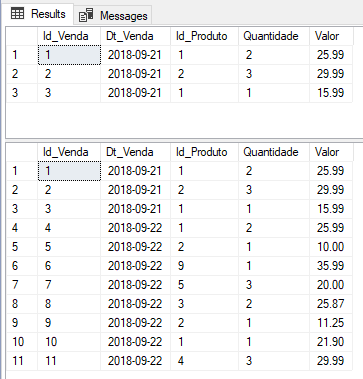
Result:
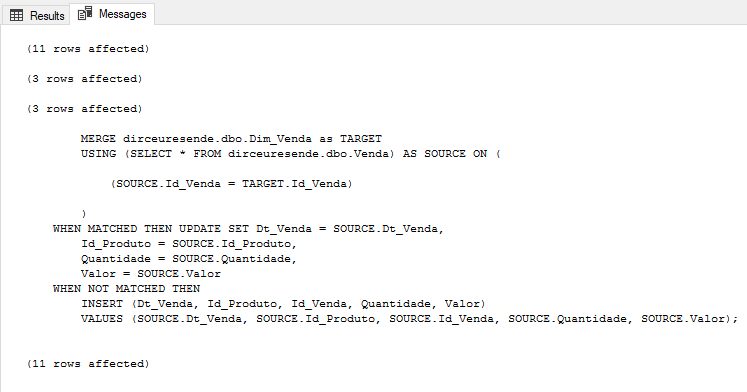
Generated MERGE code:
Example 2 – Using multiple columns for JOIN
If you need to use several columns to JOIN the data, simply separate them with a comma “,” in the SP call:
EXEC dbo.stpETL_Upsert
    @Nm_Source = 'dirceuresende.dbo.Venda', -- varchar(max)
    @Nm_Target = 'dirceuresende.dbo.Dim_Venda', -- varchar(max)
    @Cd_Join = 'Id_Venda, Id_Produto, Dt_Venda', -- varchar(max)
    @Cd_Chave = '', -- varchar(max)
    @Fl_Update = 1, -- bit
    @Fl_Debug = 1 -- bit
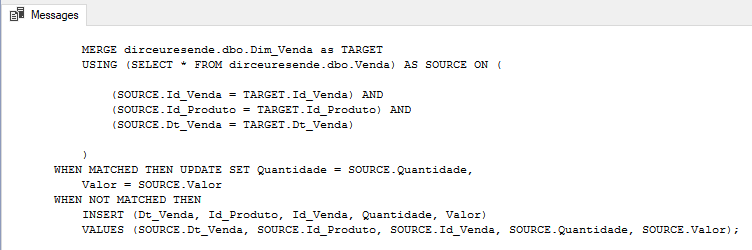
Generated code:
Example 3 – Using JOINS with different columns
If the JOIN columns do not have exactly the same name or you want to use more than one JOIN clause, you can use SP as shown below, using the syntax name_coluna_table_origin:name_coluna_table_destination, and you can also use the comma character “,” to use multiple mappings.
In the example below, the source table “Venda” has a field called Id_Venda, which will perform the JOIN with the Cod_Venda column in the destination table “Dim_Venda”.
EXEC dbo.stpETL_Upsert
    @Nm_Source = 'dirceuresende.dbo.Venda', -- varchar(max)
    @Nm_Target = 'dirceuresende.dbo.Dim_Venda', -- varchar(max)
    @Cd_Join = 'Id_Venda:Cod_Venda', -- varchar(max)
    @Cd_Chave = '', -- varchar(max)
    @Fl_Update = 1, -- bit
    @Fl_Debug = 1 -- bit
Generated code:

Source code
Did you like stpETL_Upset? Pretty practical, right? I will make the source code of this Stored Procedure available below so that you can start using it in your daily life. Don't forget to create the fncSplit and fncSplitTexto objects that are in the requirements, huh?, otherwise it will error and you will complain to me in the comments.. lol
View stpETL_Upsert source code
Requirements:
References
- https://docs.microsoft.com/pt-br/sql/t-sql/statements/merge-transact-sql?view=sql-server-2017
- https://www.mssqltips.com/sqlservertip/1704/using-merge-in-sql-server-to-insert-update-and-delete-at-the-same-time/
Well, guys!
I hope you enjoyed this post and see you next time.
Big hug!

Comentários (0)
Carregando comentários…