
Hey guys!
Everything great with you?
In this post, I would like to share with you how to view the entire Job execution return message when the job output has more than 4,000 characters.
Understanding the scenario and the problem
If we analyze the structure of the msdb.dbo.sysjobhistory table, which is where job log messages are recorded, we can observe that its type is nvarchar(8000) (and was varchar(1024) until version 2008) and that due to the character overhead using UTF-8, it only supports 4,000 characters:
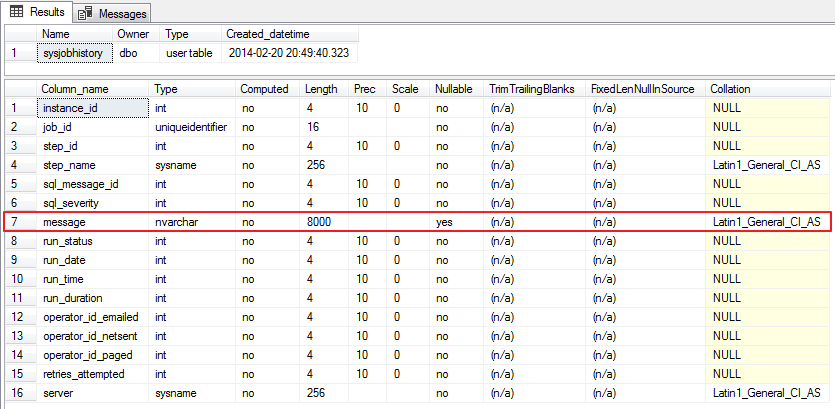
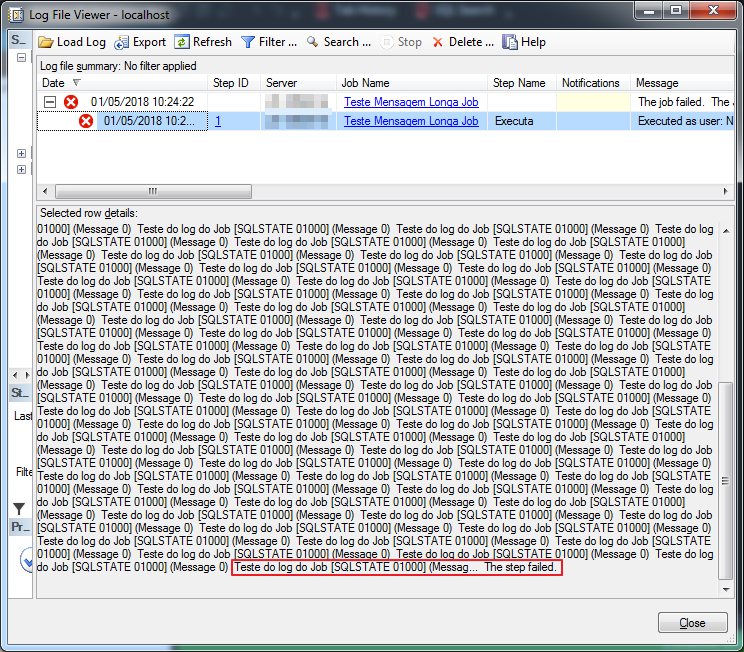
In other words, when the job message exceeds 4000 characters, it appears cut off (truncated) when you try to view the job execution history. For anyone who has ever encountered this situation, you know how frustrating it is when you can see that the job failed, but you cannot see the error message that caused the error.
This means that, even when performing direct queries on the SQL Agent tables, it is not possible to return the entire message, as this limitation is in the table structure itself:
SELECT A.message
FROM msdb.dbo.sysjobhistory A
JOIN msdb.dbo.sysjobs B ON B.job_id = A.job_id
WHERE B.[name] = 'Teste Mensagem Longa Job'
Query result:

Example of this scenario:
Simulating this scenario in your environment
To simulate this scenario, I created a job, with just 1 step, that executed this command:
DECLARE @Contador INT = 1, @Total INT = 1000

WHILE(@Contador <= @Total)
BEGIN

    PRINT 'Teste do log do Job'

    SET @Contador += 1

END

-- Forçando um erro
SELECT 1/0
The solution to this post's problem
Well, now that I've explained how and why this problem occurs, and demonstrated how you can simulate this scenario in your environment (in case you're not facing this problem right now... lol), I'll show you how to solve this problem.
First, let's activate the option to log the step result in a table:
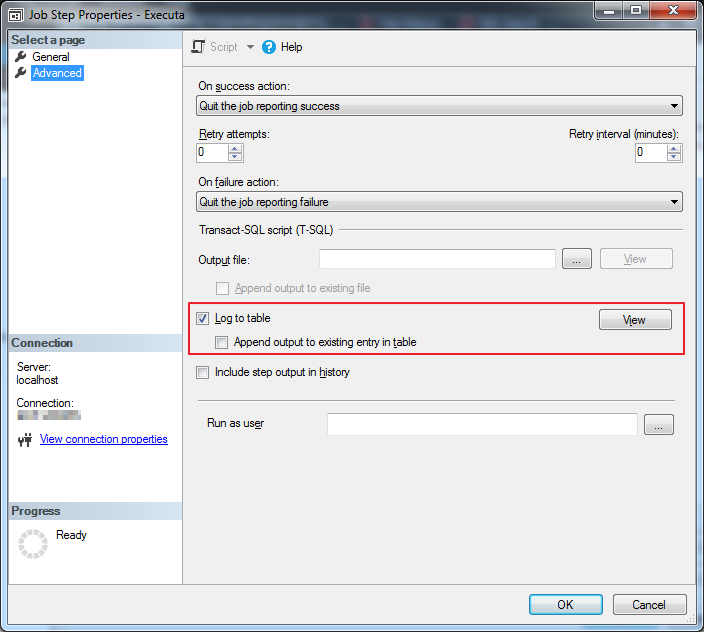
From now on, messages from this step will be written to the database (msdb.dbo.sysjobstepslogs).
Note 1: It is worth remembering that this step must be done for each step you want to activate the feature.
Note 2: Only the last execution is recorded in this log. If you want to store the entire message history, you must check the “Append output to existing entry in table” checkbox.
To view the log message, I will demonstrate some alternatives to do this:
Alternative #1: Using the SSMS interface
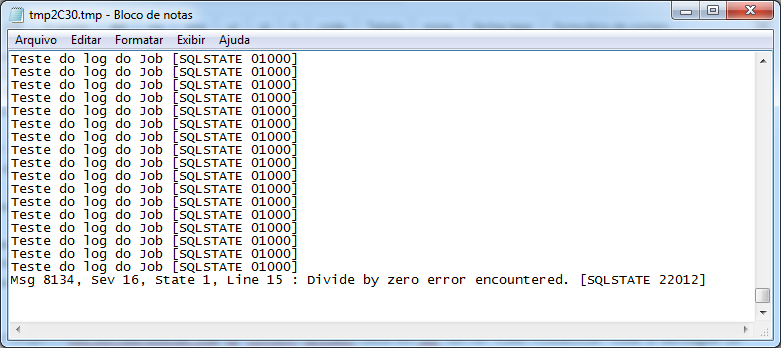
To view the complete message through the SSMS interface, simply click on the “View” button on the Step details screen:
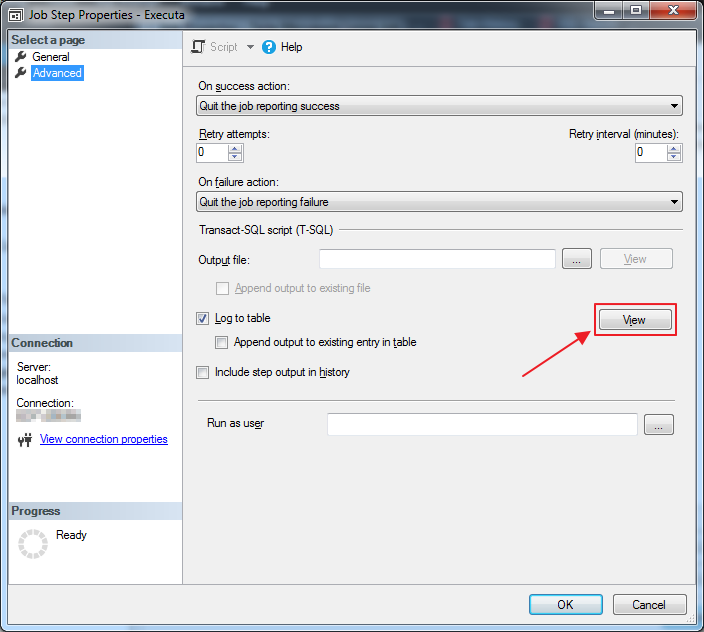
With this, an instance of the notebook will be opened with the result of the job execution:
Alternative #2: Using the sp_help_jobsteplog system SP
Another way to obtain the complete message from the execution of the job in question is by using the sp_help_jobsteplog system SP:
DECLARE @Retorno TABLE (
    [job_id] UNIQUEIDENTIFIER,
    [job_name] NVARCHAR(128),
    [step_id] INT,
    [step_name] NVARCHAR(128),
    [step_uid] UNIQUEIDENTIFIER,
    [date_created] DATETIME,
    [date_modified] DATETIME,
    [log_size] BIGINT,
    [log] NVARCHAR(MAX)
);

INSERT INTO @Retorno
EXEC msdb.dbo.sp_help_jobsteplog
    @job_name = N'Teste Mensagem Longa Job'

SELECT SUBSTRING([log], CHARINDEX('Msg ', [log]), LEN([log]))
FROM @Retorno
Result:

Alternative #3: Using SQL Agent tables
You can also directly query the SQL Agent tables in the msdb database to retrieve job return information.
SELECT
    B.job_id,
    C.[name],
    A.[log],
    SUBSTRING(A.[log], CHARINDEX('Msg ', A.[log]), LEN(A.[log])) AS Msg_Erro,
    LEN(A.[log])
FROM
    msdb.dbo.sysjobstepslogs  AS A
    JOIN msdb.dbo.sysjobsteps AS B ON B.step_uid = A.step_uid
    JOIN msdb.dbo.sysjobs     AS C ON C.job_id = B.job_id
WHERE
    C.[name] = 'Teste Mensagem Longa Job'
Result:

Well folks, that's it!
Do you know of other ways to get this information? Post here in the comments and I will update your post and reference it.
I hope you liked this post and that it was useful to you 🙂
A hug and see you in the next post.
sql server sql agent log return message truncate truncated limit limited size 4000 characters characters
sql server sql agent log return message truncate truncated limit limited size 4000 characters characters

Comentários (0)
Carregando comentários…