
Hey guys,
Good afternoon!
In this post, I will share with you something I learned this week. At the company where I work, the version of RedGate SQL Monitor was recently updated and, as a result, several alerts were created for monitoring instances.
One of these monitoring is long running queries, which identifies sessions that have been executing an instruction for more than X minutes. We set this time to 3 minutes, so any session that executes a command that exceeds this execution time in production will be alerted to the DBA team to analyze.
The problem is that we identified that there was a session that was always alerted and ended up triggering this alert several times, every day, generating SPAM in our email and making this alert lose its importance.
Analyzing the alert, we can see that this session was from Database Mail, a utility from SQL Server itself, which executed the sp_readrequest command, as the alert shows us below:
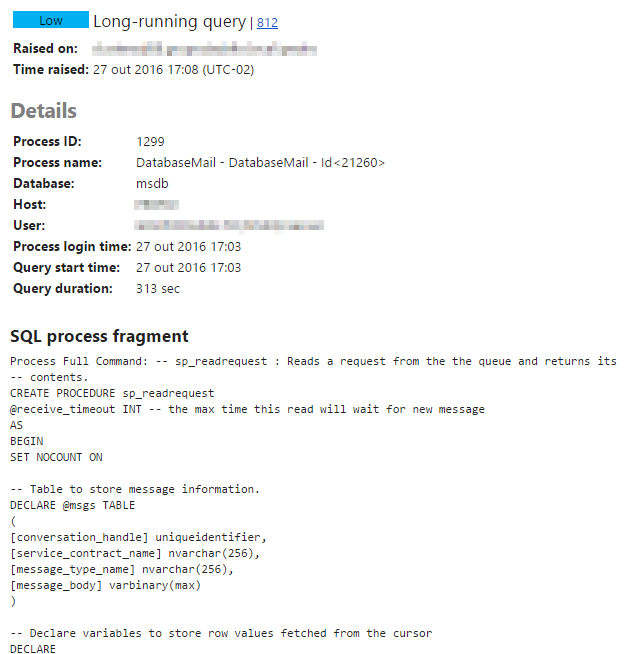
The sp_readrequest stored procedure is a system procedure, which basically reads message requests from the queue and returns its contents. This process is active on the instance for a minimum time, determined by the “DatabaseMailExeMinimumLifeTime” parameter, whose default time is 600 seconds. In other words, whenever this process starts (and it starts constantly), it will run for at least 600 seconds, and therefore, the alert was always triggered.
To resolve this issue so that I don't need to change or disable my alert, I simply change this default minimum time:
Using the SQL Server Management Studio interface
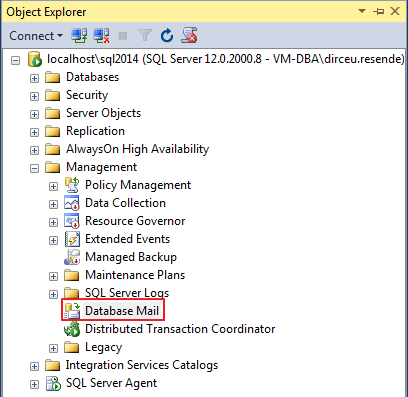
To change this parameter through SQL Server Management Studio, simply access the “Management” > “Database Mail” section
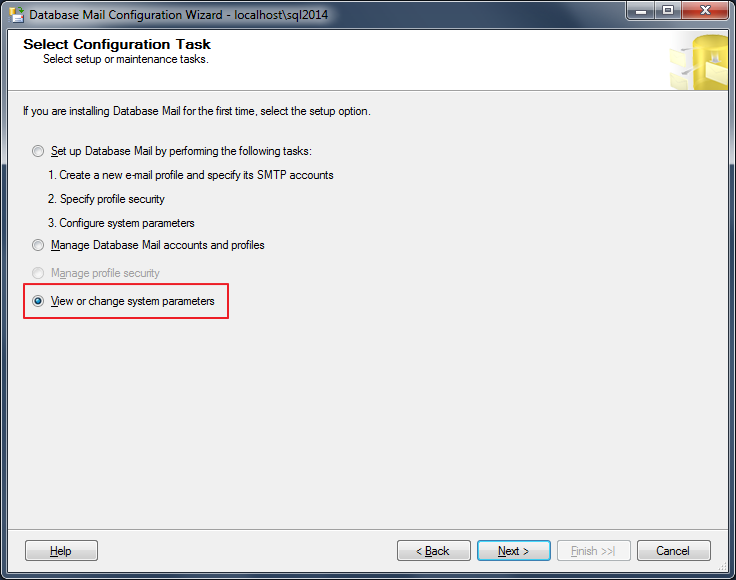
Now, check the option “View or change system parameters” and click “Next”
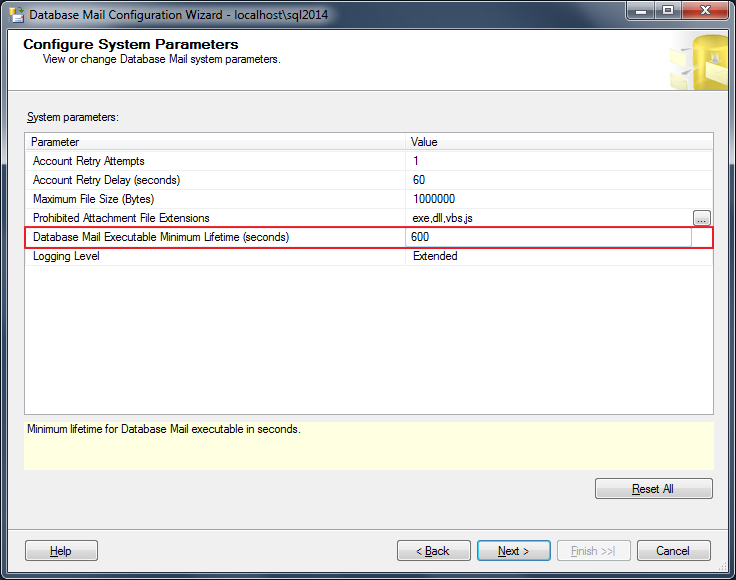
On this screen it is possible to view the current value and define a new value for the “Database Mail Executable Minimium Lifetime (seconds)” parameter.
Using Transact-SQL
To view the default value of the “” parameter using Transact-SQL (TSQL) commands, simply use the query below:
select *
from msdb.dbo.sysmail_configuration
WHERE paramname = 'DatabaseMailExeMinimumLifeTime'
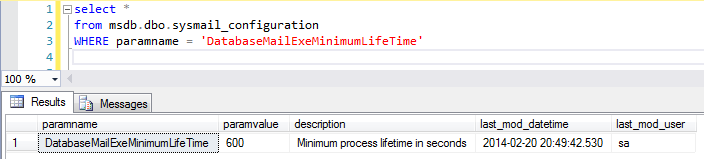
And if you want to change the parameter value, just perform an UPDATE on the msdb.dbo.sysmail_configuration table:
UPDATE msdb.dbo.sysmail_configuration
SET paramvalue = 60 -- 60 segundos
WHERE paramname = 'DatabaseMailExeMinimumLifeTime'
or execute the sysmail_configure_sp stored procedure:
EXECUTE msdb.dbo.sysmail_configure_sp 'DatabaseMailExeMinimumLifeTime', '60'
An important point that must be taken into consideration is that this parameter serves to limit the minimum time that the DatabaseMail process will execute for each connection.
With a very high minimum time, the process will remain active on the instance, even if it has no message to deliver.
If you set a very low minimum time, the process will remain active on the instance for less time, but it will also generate more connections and disconnections on the instance to process this activity, causing a small overhead as a result. If your instance always has lots and lots of Database Mail messages to deliver, consider increasing this minimum time to reduce this connection overhead.
I hope you enjoyed the post and see you next time!
Hug.
SQL Server Session running long-running with command sp_readrequest (DatabaseMail) Why a Session With sp_readrequest Takes so Long to Execute Red Gate SQL Monitor alert long-running query
SQL Server Session running long-running with command sp_readrequest (DatabaseMail) Why a Session With sp_readrequest Takes so Long to Execute Red Gate SQL Monitor alert long-running query

Comentários (0)
Carregando comentários…