
Hey guys,
Good afternoon!
In this post, I will talk again about the CLR (C#), demonstrating another use of this powerful SQL Server feature, which is the integration between the database and FTP servers, whether to download (download) or upload (upload) files between a local folder or on your network and the FTP server.
This feature is especially useful when you need integrations with other companies, where you need to export data and make it available on another company's external FTP or import files from an FTP and import them to your network or database.
To return warning messages and error messages from the CLR to the database, I use the Return class, which is available in the post SQL Server – How to send warnings and error messages to the database using the CLR (C#) and is a dependency on this FTP class.
In all routines, I placed a “retry” of up to 10 attempts in cases of connection failure or timeout, so that your routine does not fail due to any network instability (this has already helped me A LOT).
If you don't know CLR or don't know where to start, see more by accessing the post Introduction to SQL CLR (Common Language Runtime) in SQL Server.
Base Class – FTPControle.cs
View more details, usage examples, and source codeHow to list files from an FTP using SQL Server
View more details, usage examples, and source codeThe filter parameter allows you to enter the name of the file you want to filter or use a Wildcard to return only the files that meet the specified criteria (Ex: “*” returns all files, “*.txt” returns all files ending with .txt, etc..)
Usage example:
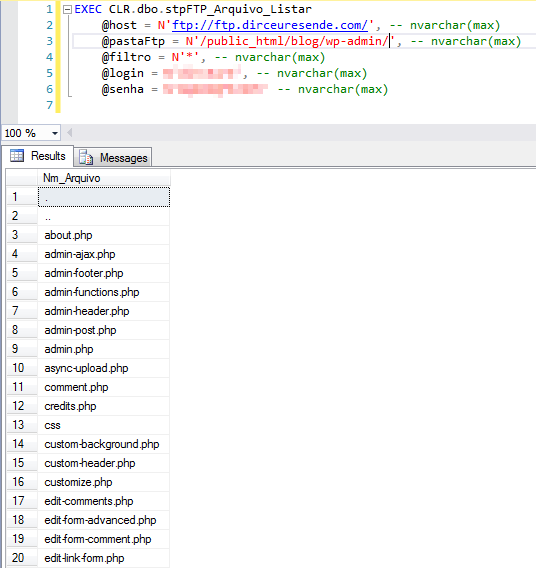
Source code:
using System.Data;
using System.Data.SqlTypes;
using System.Net;
using System.Threading;
using Microsoft.SqlServer.Server;
using Bibliotecas.Model;

public partial class StoredProcedures
{
    [Microsoft.SqlServer.Server.SqlProcedure]
    public static void stpFTP_Arquivo_Listar(SqlString host, SqlString pastaFtp, SqlString filtro, SqlString login, SqlString senha)
    {

        const int tentativas = 10;
        var sucesso = false;

        for (var i = 1; i <= tentativas; i++)
        {

            try
            {

                var ftp = new FTPControle(host.Value, login.Value, senha.Value);
                var arquivos = ftp.ListarArquivos(pastaFtp.Value, filtro.Value);

                var pipe = SqlContext.Pipe;
                var cols = new SqlMetaData[1];
                cols[0] = new SqlMetaData("Nm_Arquivo", SqlDbType.NVarChar, 1024);

                var rec = new SqlDataRecord(cols);
                if (pipe == null) return;

                pipe.SendResultsStart(rec);

                foreach (var file in arquivos)
                {
                    rec.SetSqlString(0, new SqlString(file));
                    pipe.SendResultsRow(rec);
                }

                pipe.SendResultsEnd();
                sucesso = true;
            }
            catch (WebException e)
            {
                if (e.Status == WebExceptionStatus.Timeout || e.Status == WebExceptionStatus.ConnectFailure || e.Status == WebExceptionStatus.SendFailure || e.Status == WebExceptionStatus.ReceiveFailure || e.Status == WebExceptionStatus.PipelineFailure || e.Status == WebExceptionStatus.ConnectionClosed)
                {
                    if (i < tentativas)
                        Retorno.Mensagem($"Erro na tentativa {i}: {e.Message}");
                    else
                        Retorno.Erro($"Erro : {e.Message}\n\nInner Exception: {e.InnerException}");
                }
                else
                    Retorno.Erro($"Erro : {e.Message}\n\nInner Exception: {e.InnerException}");
            }


            if (sucesso)
                break;


            Thread.Sleep(10000);


        }

    }

};
Function to list files from an FTP using SQL Server
View more details, usage examples, and source codeFurthermore, it can be easily used to filter with WHERE, use JOINS, ORDER BY, SELECT * INTO #Table, etc., giving much more flexibility in its use compared to the previous Stored Procedure.
Usage example:
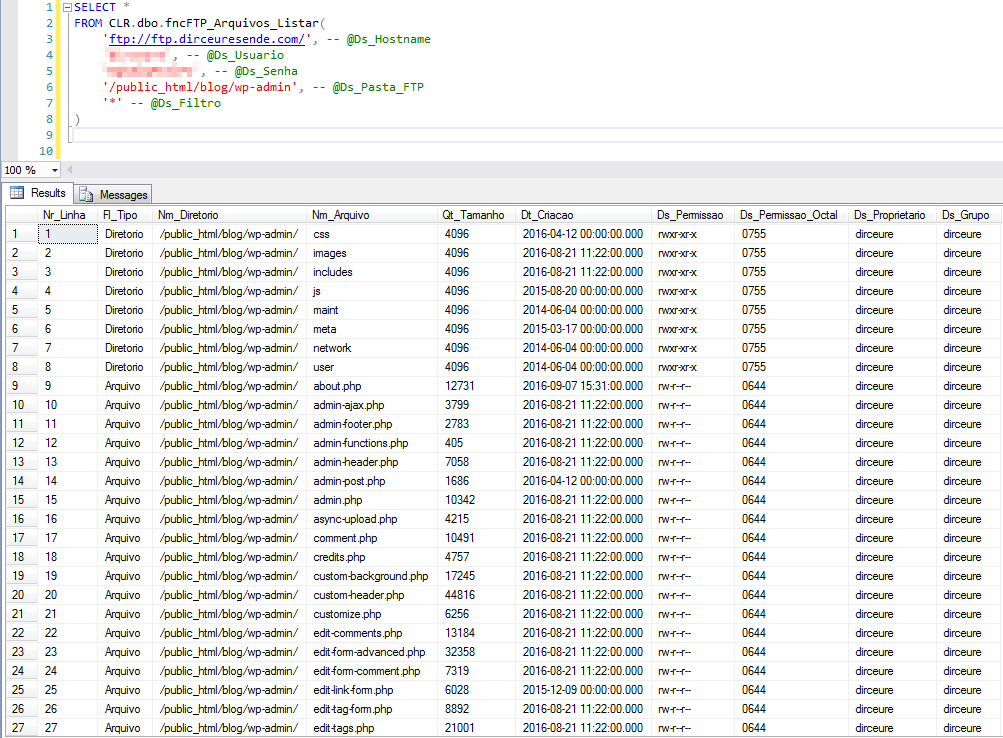
Source code:
using System.Collections;
using System.Collections.Generic;
using System.Data.SqlTypes;
using System.Net;
using System.Threading;
using Bibliotecas.Model;

public partial class UserDefinedFunctions
{

    [Microsoft.SqlServer.Server.SqlFunction(
        FillRowMethodName = "FillRow_FTP_Arquivos_Listar",
        TableDefinition = "Nr_Linha INT, Fl_Tipo NVARCHAR(20), Nm_Diretorio NVARCHAR(500), Nm_Arquivo NVARCHAR(500), " +
                            "Qt_Tamanho BIGINT, Dt_Criacao DATETIME, Ds_Permissao NVARCHAR(20), Ds_Permissao_Octal NVARCHAR(4), " +
                            "Ds_Proprietario NVARCHAR(20), Ds_Grupo NVARCHAR(20)"
    )]
    public static IEnumerable fncFTP_Arquivos_Listar(string Ds_Hostname, string Ds_Usuario, string DsSenha, string Ds_Pasta_FTP, string Ds_Filtro)
    {

        var ftpArquivoListarCollection = new ArrayList();

        if (string.IsNullOrEmpty(Ds_Hostname))
            return ftpArquivoListarCollection;


        var ftp = new FTPControle(Ds_Hostname, Ds_Usuario, DsSenha);
        var arquivos = new List<string>();


        const int tentativas = 10;
        var sucesso = false;

        for (var i = 1; i <= tentativas; i++)
        {

            try
            {
                arquivos = ftp.ListarArquivosCompleto(Ds_Pasta_FTP, Ds_Filtro);
                sucesso = true;
            }
            catch (WebException e)
            {
                if (e.Status == WebExceptionStatus.Timeout || e.Status == WebExceptionStatus.ConnectFailure || e.Status == WebExceptionStatus.SendFailure || e.Status == WebExceptionStatus.ReceiveFailure || e.Status == WebExceptionStatus.PipelineFailure || e.Status == WebExceptionStatus.ConnectionClosed)
                {
                    if (i < tentativas)
                        Retorno.Mensagem($"Erro na tentativa {i}: {e.Message}");
                    else
                        Retorno.Erro($"Erro : {e.Message}\n\nInner Exception: {e.InnerException}");
                }
                else
                    Retorno.Erro($"Erro : {e.Message}\n\nInner Exception: {e.InnerException}");
            }

            if (sucesso)
                break;

            Thread.Sleep(10000);

        }


        var contador = 1;

        foreach (var arquivo in arquivos)
        {

            if (arquivo.Substring(0, 1) != "d") continue;

            var retorno = ftp.ListarArquivosCompleto_Parse(arquivo, Ds_Pasta_FTP, contador);
            if (retorno.Nr_Linha.Value == 0) continue;

            ftpArquivoListarCollection.Add(retorno);

            contador++;
        }


        foreach (var arquivo in arquivos)
        {

            if (arquivo.Substring(0, 1) == "d") continue;

            var retorno = ftp.ListarArquivosCompleto_Parse(arquivo, Ds_Pasta_FTP, contador);

            ftpArquivoListarCollection.Add(retorno);

            contador++;
        }


        return ftpArquivoListarCollection;

    }

    protected static void FillRow_FTP_Arquivos_Listar(object objFTPArquivoListar, out SqlInt32 nrLinha, out SqlString nmArquivo, out SqlString nmDiretorio, out SqlString flTipo, out SqlInt64 qtTamanho, out SqlDateTime dtCriacao, out SqlString dsPermissao, out SqlString dsPermissaoOctal, out SqlString dsProprietario, out SqlString dsGrupo)
    {

        var ftpArquivoListar = (FTPArquivoListar) objFTPArquivoListar;

        nrLinha = ftpArquivoListar.Nr_Linha;
        nmArquivo = ftpArquivoListar.Nm_Arquivo;
        nmDiretorio = ftpArquivoListar.Nm_Diretorio;
        flTipo = ftpArquivoListar.Fl_Tipo;
        qtTamanho = ftpArquivoListar.Qt_Tamanho;
        dtCriacao = ftpArquivoListar.Dt_Criacao;
        dsPermissao = ftpArquivoListar.Ds_Permissao;
        dsPermissaoOctal = ftpArquivoListar.Ds_Permissao_Octal;
        dsProprietario = ftpArquivoListar.Ds_Proprietario;
        dsGrupo = ftpArquivoListar.Ds_Grupo;

    }

}
How to download a file from an FTP server using SQL Server
View more details, usage examples, and source codeAn especially useful parameter is @apagarRemoto, which when the value “1” is entered, downloads the files that meet the filter criteria entered and then deletes these files from the FTP server.
Usage examples:
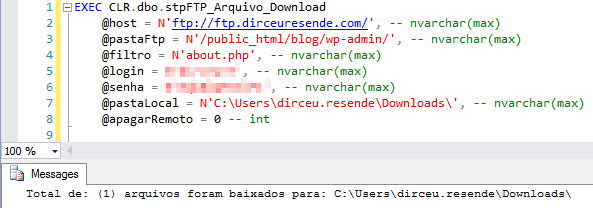
Downloading the “about.php” file

Downloading multiple files using Wildcard filters
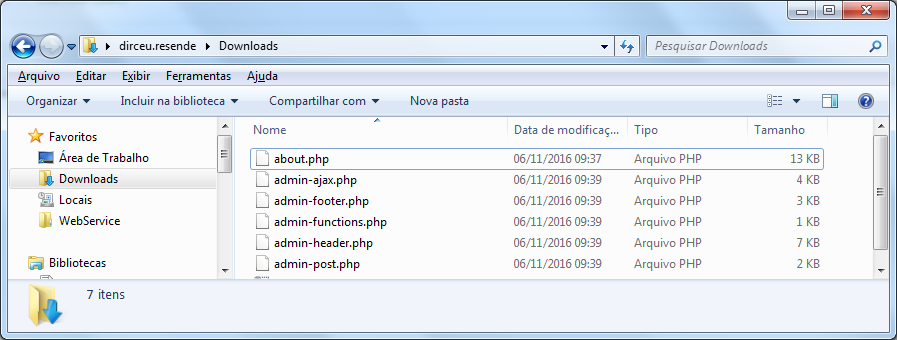
Final result with files downloaded from FTP
Source code:
using System.Data.SqlTypes;
using System.IO;
using System.Net;
using System.Threading;
using Bibliotecas.Model;

public partial class StoredProcedures
{
    [Microsoft.SqlServer.Server.SqlProcedure]
    public static void stpFTP_Arquivo_Download(SqlString host, SqlString pastaFtp, SqlString filtro, SqlString login, SqlString senha, SqlString pastaLocal, SqlBoolean apagarRemoto)
    {

        #region tratamento de entradas

        try
        {
            if (!Directory.Exists(pastaLocal.Value))
            {
                Retorno.Erro("Pasta local especificada não existe ou inacessivel.");
                return;
            }
        }
        catch
        {
            Retorno.Erro("Erro ao converter pasta local especificada.");
            return;
        }

        #endregion


        const int tentativas = 10;
        var sucesso = false;

        for (var i = 1; i <= tentativas; i++)
        {

            try
            {

                var ftp = new FTPControle(host.Value, login.Value, senha.Value);
                var arquivos = ftp.ListarArquivos(pastaFtp.Value, filtro.Value);
                var qntArquivos = ftp.BaixarArquivos(pastaFtp.Value, arquivos, pastaLocal.Value);

                if (apagarRemoto.Value)
                {
                    ftp.ApagarArquivos(pastaFtp.Value, arquivos);
                }

                Retorno.Mensagem("Total de: (" + qntArquivos + ") arquivos foram baixados para: " + pastaLocal.Value);
                sucesso = true;
            }
            catch (WebException e)
            {
                if (e.Status == WebExceptionStatus.Timeout || e.Status == WebExceptionStatus.ConnectFailure || e.Status == WebExceptionStatus.SendFailure || e.Status == WebExceptionStatus.ReceiveFailure || e.Status == WebExceptionStatus.PipelineFailure || e.Status == WebExceptionStatus.ConnectionClosed)
                {
                    if (i < tentativas)
                        Retorno.Mensagem($"Erro na tentativa {i}: {e.Message}");
                    else
                        Retorno.Erro($"Erro : {e.Message}\n\nInner Exception: {e.InnerException}");
                }
                else
                    Retorno.Erro($"Erro : {e.Message}\n\nInner Exception: {e.InnerException}");
            }


            if (sucesso)
                break;


            Thread.Sleep(10000);


        }

    }

};
How to send a file to an FTP server using SQL Server
View more details, usage examples, and source codeAgain, SP allows you to specify the file name in the @filtro parameter to send a specific file, or use wildcards to perform filters on file names and send multiple files in a single execution of the Stored Procedure.
Usage example:
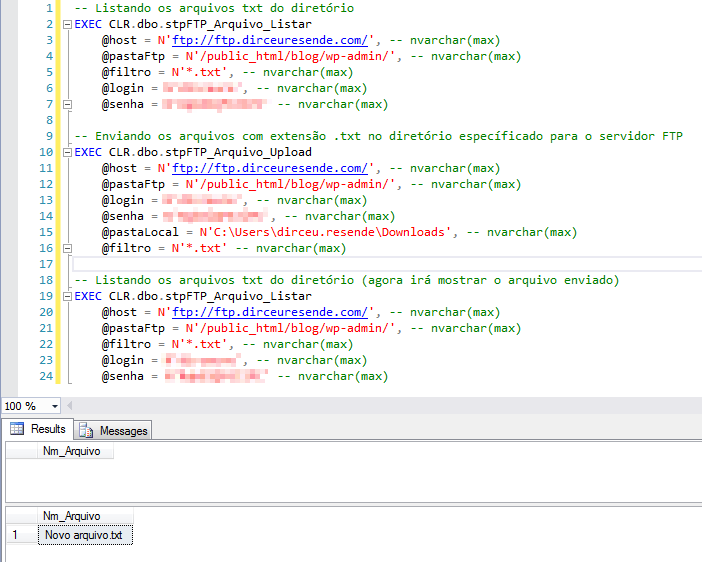
Uploading all files with “.txt” extension to FTP server
Source code:
using System.Collections.Generic;
using System.Data.SqlTypes;
using System.IO;
using System.Net;
using System.Threading;
using Bibliotecas.Model;

public partial class StoredProcedures
{
    [Microsoft.SqlServer.Server.SqlProcedure]
    public static void stpFTP_Arquivo_Upload(SqlString host, SqlString pastaFtp, SqlString login, SqlString senha, SqlString pastaLocal, SqlString filtro)
    {

        #region tratamento de entradas
        try
        {
            if (!Directory.Exists(pastaLocal.Value))
            {
                Retorno.Erro("Pasta local especificada não existe ou inacessivel.");
                return;
            }
        }
        catch
        {
            Retorno.Erro("Erro ao converter pasta local especificada.");
            return;
        }

        List<string> listaArquivos;
        try
        {
            var arquivos = Directory.GetFiles(pastaLocal.Value, filtro.Value);
            listaArquivos = new List<string>(arquivos);
            if (listaArquivos.Count == 0)
            {
                Retorno.Mensagem("(0) arquivos atendem o requisito de filtragem na pasta especificada.");
                return;
            }
        }
        catch
        {
            Retorno.Erro("Erro ao listar arquivos da pasta especificada.");
            return;
        }

        #endregion


        const int tentativas = 10;
        var sucesso = false;

        for (var i = 1; i <= tentativas; i++)
        {

            try
            {

                var ftp = new FTPControle(host.Value, login.Value, senha.Value);
                var qntArquivos = ftp.SubirArquivos(listaArquivos, pastaFtp.Value);

                if (qntArquivos != -1)
                {
                    Retorno.Mensagem("Total de: (" + qntArquivos + ") arquivos foram enviados para: " + pastaFtp.Value);
                    sucesso = true;
                }
                else
                    Retorno.Erro("Erro : Diretório do arquivo local inválido!");

            }
            catch (WebException e)
            {
                if (e.Status == WebExceptionStatus.Timeout || e.Status == WebExceptionStatus.ConnectFailure || e.Status == WebExceptionStatus.SendFailure || e.Status == WebExceptionStatus.ReceiveFailure || e.Status == WebExceptionStatus.PipelineFailure || e.Status == WebExceptionStatus.ConnectionClosed)
                {
                    if (i < tentativas)
                        Retorno.Mensagem($"Erro na tentativa {i}: {e.Message}");
                    else
                        Retorno.Erro($"Erro : {e.Message}\n\nInner Exception: {e.InnerException}");
                }
                else
                    Retorno.Erro($"Erro : {e.Message}\n\nInner Exception: {e.InnerException}");
            }


            if (sucesso)
                break;


            Thread.Sleep(10000);

        }

    }

}
How to create a directory on an FTP server using SQL Server
View more details, usage examples, and source codeUsing the functions to list files and directories, it is possible to identify whether the desired directory exists or not, and if it does not, create it using this SP.
Usage example:
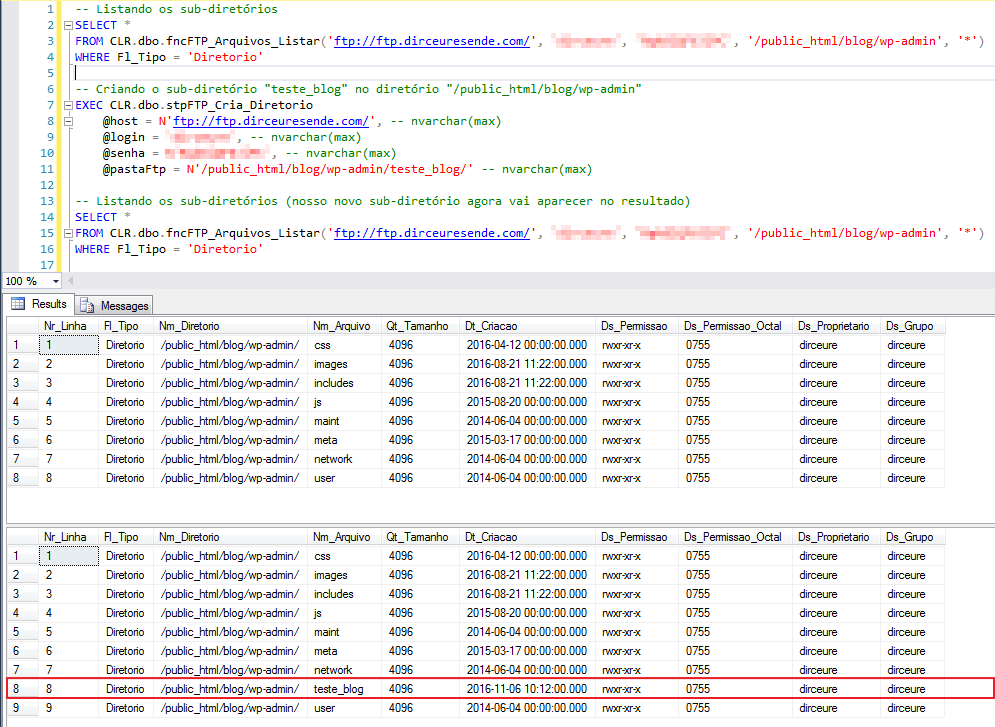
Source code:
using System.Data.SqlTypes;
using Bibliotecas.Model;
using System.Net;
using System.Threading;

public partial class StoredProcedures
{
    [Microsoft.SqlServer.Server.SqlProcedure]
    public static void stpFTP_Cria_Diretorio(SqlString host, SqlString login, SqlString senha, SqlString pastaFtp)
    {

        const int tentativas = 10;
        var sucesso = false;

        for (var i = 1; i <= tentativas; i++)
        {

            try
            {

                var ftp = new FTPControle(host.Value, login.Value, senha.Value);
                using (var response = ftp.CriaDiretorio(pastaFtp.Value))
                {

                    if (response.StatusCode == FtpStatusCode.PathnameCreated)
                    {
                        Retorno.Mensagem("Diretório " + pastaFtp.Value + " criado com sucesso");
                        sucesso = true;
                    }
                    else
                    {
                        Retorno.Erro(response.StatusDescription);
                    }
                }

            }
            catch (WebException e)
            {
                if (e.Status == WebExceptionStatus.Timeout || e.Status == WebExceptionStatus.ConnectFailure || e.Status == WebExceptionStatus.SendFailure || e.Status == WebExceptionStatus.ReceiveFailure || e.Status == WebExceptionStatus.PipelineFailure || e.Status == WebExceptionStatus.ConnectionClosed)
                {
                    if (i < tentativas)
                        Retorno.Mensagem($"Erro na tentativa {i}: {e.Message}");
                    else
                        Retorno.Erro($"Erro : {e.Message}\n\nInner Exception: {e.InnerException}");
                }
                else
                    Retorno.Erro($"Erro : {e.Message}\n\nInner Exception: {e.InnerException}");
            }


            if (sucesso)
                break;


            Thread.Sleep(10000);

        }

    }

};
How to delete a file from an FTP server using SQL Server
View more details, usage examples, and source codeThis is not due to technical impossibility, I just found it more “safe” not to allow deleting multiple files using a filter, but nothing that prevents you from changing this Procedure to allow this or using the Stored Procedure stpFTP_Apaga_Diretorio, which is just below.
Usage example:
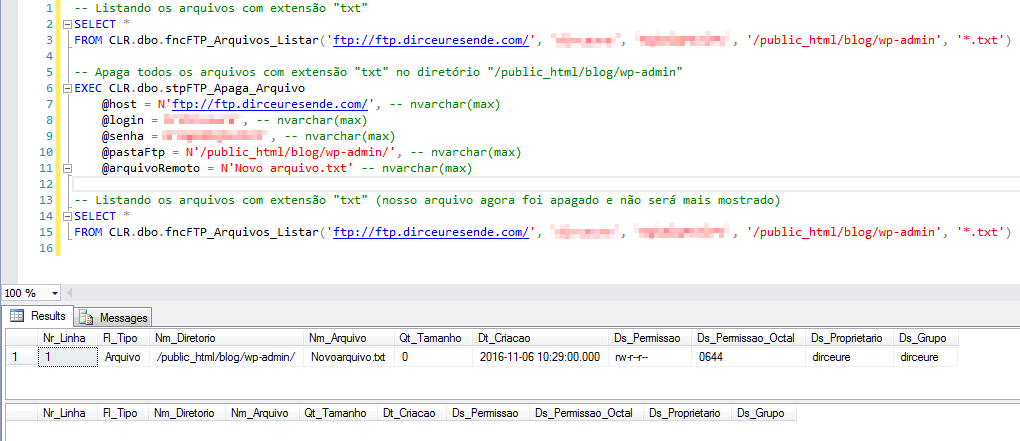
Source code:
using System.Data.SqlTypes;
using Bibliotecas.Model;
using System.Net;
using System.Threading;

public partial class StoredProcedures
{
    [Microsoft.SqlServer.Server.SqlProcedure]
    public static void stpFTP_Apaga_Arquivo(SqlString host, SqlString login, SqlString senha, SqlString pastaFtp, SqlString arquivoRemoto)
    {

        const int tentativas = 10;
        var sucesso = false;

        for (var i = 1; i <= tentativas; i++)
        {

            try
            {

                var ftp = new FTPControle(host.Value, login.Value, senha.Value);
                using (var response = ftp.ApagaArquivo(pastaFtp.Value, arquivoRemoto.Value))
                {

                    if (response.StatusCode == FtpStatusCode.CommandOK || response.StatusCode == FtpStatusCode.FileActionOK)
                    {
                        Retorno.Mensagem("Arquivo " + pastaFtp.Value + "/" + arquivoRemoto.Value + " apagado com sucesso");
                        sucesso = true;
                    }
                    else
                    {
                        Retorno.Erro(response.StatusDescription);
                    }
                }

            }
            catch (WebException e)
            {
                if (e.Status == WebExceptionStatus.Timeout || e.Status == WebExceptionStatus.ConnectFailure || e.Status == WebExceptionStatus.SendFailure || e.Status == WebExceptionStatus.ReceiveFailure || e.Status == WebExceptionStatus.PipelineFailure || e.Status == WebExceptionStatus.ConnectionClosed)
                {
                    if (i < tentativas)
                        Retorno.Mensagem($"Erro na tentativa {i}: {e.Message}");
                    else
                        Retorno.Erro($"Erro : {e.Message}\n\nInner Exception: {e.InnerException}");
                }
                else
                    Retorno.Erro($"Erro : {e.Message}\n\nInner Exception: {e.InnerException}");
            }


            if (sucesso)
                break;


            Thread.Sleep(10000);

        }
    }
};
How to delete a directory from an FTP server using SQL Server
View more details, usage examples, and source codeKeep in mind that if you enter the value of the @apagarArquivos parameter = 0 and there are files in the directory you are trying to delete, SP will return an error message informing you that there are files in the directory.
Usage example:
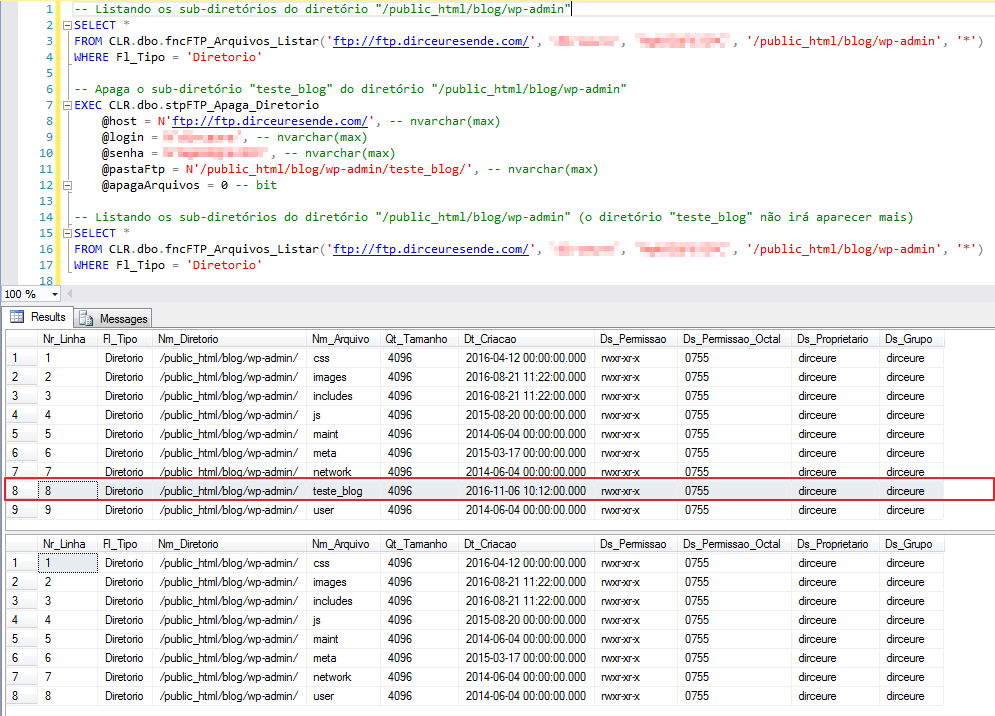
Source code:
using System.Data.SqlTypes;
using Bibliotecas.Model;
using System.Net;
using System.Threading;

public partial class StoredProcedures
{
    [Microsoft.SqlServer.Server.SqlProcedure]
    public static void stpFTP_Apaga_Diretorio(SqlString host, SqlString login, SqlString senha, SqlString pastaFtp, SqlBoolean apagaArquivos)
    {

        const int tentativas = 10;
        var sucesso = false;

        for (var i = 1; i <= tentativas; i++)
        {

            try
            {

                var ftp = new FTPControle(host.Value, login.Value, senha.Value);
                using (var response = ftp.ApagaDiretorio(pastaFtp.Value, apagaArquivos.Value))
                {

                    if (response.StatusCode == FtpStatusCode.FileActionOK)
                    {
                        Retorno.Mensagem("Diretório " + pastaFtp.Value + " apagado com sucesso");
                        sucesso = true;
                    }
                    else
                    {
                        Retorno.Erro(response.StatusDescription);
                    }
                }

            }
            catch (WebException e)
            {
                if (e.Status == WebExceptionStatus.Timeout || e.Status == WebExceptionStatus.ConnectFailure || e.Status == WebExceptionStatus.SendFailure || e.Status == WebExceptionStatus.ReceiveFailure || e.Status == WebExceptionStatus.PipelineFailure || e.Status == WebExceptionStatus.ConnectionClosed)
                {
                    if (i < tentativas)
                        Retorno.Mensagem($"Erro na tentativa {i}: {e.Message}");
                    else
                        Retorno.Erro($"Erro : {e.Message}\n\nInner Exception: {e.InnerException}");
                }
                else
                    Retorno.Erro($"Erro : {e.Message}\n\nInner Exception: {e.InnerException}");
            }


            if (sucesso)
                break;


            Thread.Sleep(10000);

        }
    }
};
That's it, folks!
I hope you enjoyed this post and see you later!
sql server clr c# csharp download download read read send upload upload files files list list integrate integrate integration integration server ftp server
sql server clr c# csharp download download read read send upload upload files files list list integrate integrate integration integration server ftp server

Comments (0)
Loading comments...