
Hey guys!
In this post, I would like to share an error that was reported in a Whatsapp group and that I personally had never seen before, which was the error message below and the report that users who used SQL authentication were only able to connect to the instance if they had sysadmin privileges.
Right away, I asked him to check if the instance was allowing connections coming from SQL Server authentication, since the default is to be enabled to only accept connections with Windows authentication (AD):
DECLARE @AuthenticationMode INT

EXEC master.dbo.xp_instance_regread
    N'HKEY_LOCAL_MACHINE',
    N'Software\Microsoft\MSSQLServer\MSSQLServer',
    N'LoginMode',
    @AuthenticationMode OUTPUT

SELECT
    CASE @AuthenticationMode
        WHEN 1 THEN 'Windows Authentication'
        WHEN 2 THEN 'Windows and SQL Server Authentication'
        ELSE 'Unknown'
    END AS [Authentication Mode]
Result:
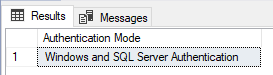
First validation was carried out successfully. Another point that can cause this type of error is the Logon Triggers. I asked him to check if there were logon triggers on the instance and, if so, to disable the triggers to test if that was what was blocking it:
SELECT *
FROM sys.server_triggers
WHERE is_ms_shipped = 0
AND is_disabled = 0
Result:

I disabled the trigger and there was nothing preventing login. Let's look at the SQL Server log to see if we have any clues to the problem:

The error message is very clear. My next suspect now is the permissions on the instance endpoints. I will analyze the Endpoint permissions:
SELECT
    sp2.[permission_name],
    e.state_desc,
    e.[name] AS endpoint_name,
    e.principal_id,
    sp.[sid],
    e.is_admin_endpoint,
    sp.is_disabled,
    sp.[name] AS granted_name,
    e.protocol_desc
FROM
    sys.server_permissions AS sp2
    JOIN sys.server_principals AS sp ON sp2.grantee_principal_id = sp.principal_id
    LEFT OUTER JOIN sys.endpoints AS e ON sp2.major_id = e.endpoint_id
WHERE
    sp2.class_desc = 'ENDPOINT'
    AND e.is_admin_endpoint = 0
Result:

Problem found! The public role does not have permission to access the endpoints. Someone probably made some modification to the default permission and users with SQL authentication do not have access to the endpoints. To resolve this, let's grant these permissions:
SELECT
    'USE [master]; GRANT CONNECT ON ENDPOINT::[' + [name] COLLATE SQL_Latin1_General_CP1_CI_AI + '] TO [public];' AS GrantCmd
FROM
    sys.endpoints
WHERE
    is_admin_endpoint = 0
Result:
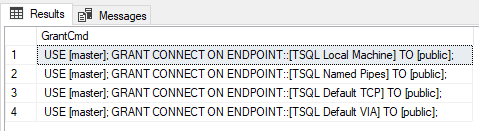
Now copy these Grant commands and apply them to your instance to release CONNECT permission for the public role on all endpoints.
After that, users with SQL Server authentication were able to connect normally to the instance 🙂
Note 2: This type of problem can happen to both Windows authentication and SQL authentication users.
I hope you enjoyed this error case resolved from a Whatsapp group, and if one day this happens to you too, I hope this article helps 🙂
A big hug and see you next time!

Comentários (0)
Carregando comentários…