
Hey guys!!
In this article I would like to bring up a scenario that I am occasionally asked about how to solve, which is transforming strings from a line to columns, often used for accounting accounts or cost centers, for example, which was exactly the situation I was asked for help with about 10 days ago and I decided to take some time to write this article.
Table example:
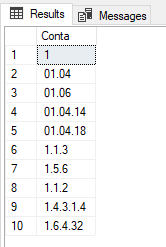
And then the person needed to break the cost center numbers (separated by “.”) into different columns, to be able to create a hierarchy of cost centers and carry out some analyses/put together reports based on this data.
Solution #1 – STRING_SPLIT
If you are using the 2016+ version of SQL Server, you can use the function STRING_SPLIT to achieve the desired objective:
DECLARE @Tabela TABLE ( Conta VARCHAR(100) )

INSERT INTO @Tabela
VALUES
    ('1'), ('01.04'), ('01.06'), ('01.04.14'), ('01.04.18'),
    ('1.1.3'), ('1.5.6'), ('1.1.2'), ('1.4.3.1.4'), ('1.6.4.32')


SELECT *, ROW_NUMBER() OVER(PARTITION BY A.Conta ORDER BY A.Conta) AS Nivel
FROM @Tabela A
CROSS APPLY STRING_SPLIT(A.Conta, '.')
Result:
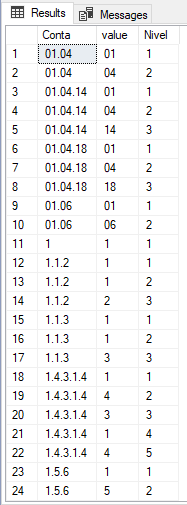
To convert these multiple rows into columns, we can use aggregation functions with CASE’s, assuming that the maximum level would be 10 levels:
DECLARE @Tabela TABLE ( Conta VARCHAR(100) )

INSERT INTO @Tabela
VALUES
    ('1'), ('01.04'), ('01.06'), ('01.04.14'), ('01.04.18'),
    ('1.1.3'), ('1.5.6'), ('1.1.2'), ('1.4.3.1.4'), ('1.6.4.32')


IF (OBJECT_ID('tempdb..#Tabela') IS NOT NULL) DROP TABLE #Tabela
;WITH dados AS (
    SELECT A.Conta, [value] AS Palavra, ROW_NUMBER() OVER(PARTITION BY A.Conta ORDER BY A.Conta) AS Nivel
    FROM @Tabela A
    CROSS APPLY STRING_SPLIT(A.Conta, '.')
)
SELECT
    A.Conta,
    MAX(CASE WHEN A.Nivel = 1 THEN CONVERT(INT, A.Palavra) END) AS Parte1,
    MAX(CASE WHEN A.Nivel = 2 THEN CONVERT(INT, A.Palavra) END) AS Parte2,
    MAX(CASE WHEN A.Nivel = 3 THEN CONVERT(INT, A.Palavra) END) AS Parte3,
    MAX(CASE WHEN A.Nivel = 4 THEN CONVERT(INT, A.Palavra) END) AS Parte4,
    MAX(CASE WHEN A.Nivel = 5 THEN CONVERT(INT, A.Palavra) END) AS Parte5,
    MAX(CASE WHEN A.Nivel = 6 THEN CONVERT(INT, A.Palavra) END) AS Parte6,
    MAX(CASE WHEN A.Nivel = 7 THEN CONVERT(INT, A.Palavra) END) AS Parte7,
    MAX(CASE WHEN A.Nivel = 8 THEN CONVERT(INT, A.Palavra) END) AS Parte8,
    MAX(CASE WHEN A.Nivel = 9 THEN CONVERT(INT, A.Palavra) END) AS Parte9,
    MAX(CASE WHEN A.Nivel = 10 THEN CONVERT(INT, A.Palavra) END) AS Parte10
FROM
    dados A
GROUP BY
    A.Conta
Result:
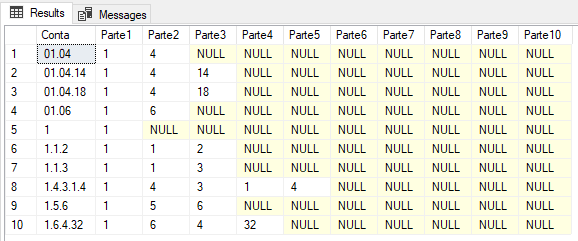
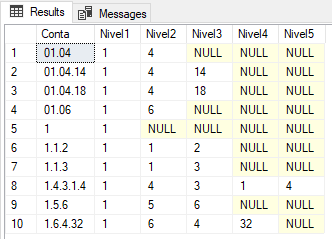
And if you want to use a more dynamic solution, where the number of levels in the table is defined by the number of levels in the real data, you can also use the code below:
------------------------------------------------------
-- GERA OS DADOS
------------------------------------------------------

DECLARE @Tabela TABLE ( Conta VARCHAR(100) )

INSERT INTO @Tabela
VALUES
    ('1'), ('01.04'), ('01.06'), ('01.04.14'), ('01.04.18'),
    ('1.1.3'), ('1.5.6'), ('1.1.2'), ('1.4.3.1.4'), ('1.6.4.32')


------------------------------------------------------
-- QUEBRA AS CONTAS EM PARTES
------------------------------------------------------

IF (OBJECT_ID('tempdb..#Partes') IS NOT NULL) DROP TABLE #Partes
SELECT
    A.Conta,
    CONVERT(INT, [value]) AS Parte,
    ROW_NUMBER() OVER(PARTITION BY A.Conta ORDER BY A.Conta) AS Nivel
INTO
    #Partes
FROM
    @Tabela A
    CROSS APPLY STRING_SPLIT(A.Conta, '.')


------------------------------------------------------
-- GERA OS SCRIPTS PRA CRIAÇÃO E ATUALIZAÇÃO DINÂMICA
------------------------------------------------------

DECLARE
    @Contador INT = 1,
    @Total INT = (SELECT MAX(Nivel) FROM #Partes),
    @QueryCreate VARCHAR(MAX) = 'CREATE TABLE ##Tabela ( Conta VARCHAR(100)',
    @QueryUpdate VARCHAR(MAX) = ''


WHILE(@Contador <= @Total)
BEGIN
    SET @QueryCreate += ', Nivel' + CONVERT(VARCHAR(10), @Contador) + ' INT'
    SET @QueryUpdate += 'UPDATE A SET A.Nivel' + CONVERT(VARCHAR(10), @Contador) + ' = B.Parte FROM ##Tabela A JOIN #Partes B ON A.Conta = B.Conta WHERE B.Nivel = ' + CONVERT(VARCHAR(10), @Contador) + '; '
    SET @Contador += 1
END

SET @QueryCreate += ' )'


------------------------------------------------------
-- CRIA A TABELA DINAMICAMENTE
------------------------------------------------------

IF (OBJECT_ID('tempdb..##Tabela') IS NOT NULL) DROP TABLE ##Tabela
EXEC(@QueryCreate)

INSERT INTO ##Tabela ( Conta )
SELECT DISTINCT Conta
FROM #Partes


------------------------------------------------------
-- ATUALIZA OS DADOS DINAMICAMENTE
------------------------------------------------------

EXEC(@QueryUpdate)


------------------------------------------------------
-- RESULTADO FINAL
------------------------------------------------------

SELECT * FROM ##Tabela
Result:
Solution #2 – fncSplitTexto
If you are using a version of SQL Server prior to 2016, the function STRING_SPLIT cannot be used. However, you can very well use the fncSplitTexto function, which I made available in the article How to break a string into a substring table using a delimiter in SQL Server.
The advantage of using this function, in addition to backwards compatibility, is that it already has the indexer by default.
Once created, its use is almost identical to the use of STRING_SPLIT:
DECLARE @Tabela TABLE ( Conta VARCHAR(100) )

INSERT INTO @Tabela
VALUES
    ('1'), ('01.04'), ('01.06'), ('01.04.14'), ('01.04.18'),
    ('1.1.3'), ('1.5.6'), ('1.1.2'), ('1.4.3.1.4'), ('1.6.4.32')


IF (OBJECT_ID('tempdb..#Tabela') IS NOT NULL) DROP TABLE #Tabela
SELECT
    Conta,
    MAX(CASE WHEN B.Id = 1 THEN CONVERT(INT, B.Palavra) END) AS Parte1,
    MAX(CASE WHEN B.Id = 2 THEN CONVERT(INT, B.Palavra) END) AS Parte2,
    MAX(CASE WHEN B.Id = 3 THEN CONVERT(INT, B.Palavra) END) AS Parte3,
    MAX(CASE WHEN B.Id = 4 THEN CONVERT(INT, B.Palavra) END) AS Parte4,
    MAX(CASE WHEN B.Id = 5 THEN CONVERT(INT, B.Palavra) END) AS Parte5,
    MAX(CASE WHEN B.Id = 6 THEN CONVERT(INT, B.Palavra) END) AS Parte6,
    MAX(CASE WHEN B.Id = 7 THEN CONVERT(INT, B.Palavra) END) AS Parte7,
    MAX(CASE WHEN B.Id = 8 THEN CONVERT(INT, B.Palavra) END) AS Parte8,
    MAX(CASE WHEN B.Id = 9 THEN CONVERT(INT, B.Palavra) END) AS Parte9,
    MAX(CASE WHEN B.Id = 10 THEN CONVERT(INT, B.Palavra) END) AS Parte10
FROM
    @Tabela
    CROSS APPLY dbo.fncSplitTexto(Conta, '.') AS B
GROUP BY
    Conta
Result:
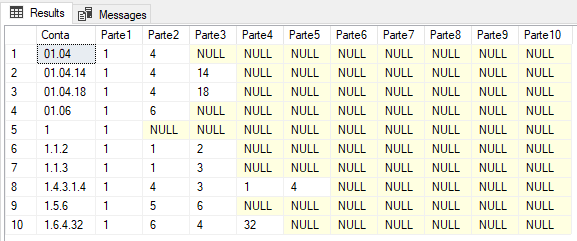
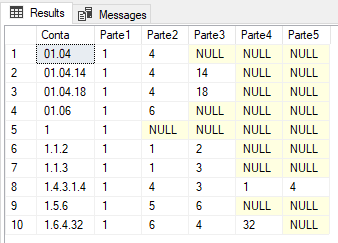
And to read the data dynamically, according to the existing columns in the data, you can use the code below:
------------------------------------------------------
-- GERA OS DADOS
------------------------------------------------------

DECLARE @Tabela TABLE ( Conta VARCHAR(100) )

INSERT INTO @Tabela
VALUES
    ('1'), ('01.04'), ('01.06'), ('01.04.14'), ('01.04.18'),
    ('1.1.3'), ('1.5.6'), ('1.1.2'), ('1.4.3.1.4'), ('1.6.4.32')


------------------------------------------------------
-- QUEBRA AS CONTAS EM PARTES
------------------------------------------------------

IF (OBJECT_ID('tempdb..#Partes') IS NOT NULL) DROP TABLE #Partes
SELECT
    Conta,
    B.Id,
    CONVERT(INT, B.Palavra) AS Parte
INTO
    #Partes
FROM
    @Tabela
    CROSS APPLY dbo.fncSplitTexto(Conta, '.') AS B


------------------------------------------------------
-- GERA OS SCRIPTS PRA CRIAÇÃO E ATUALIZAÇÃO DINÂMICA
------------------------------------------------------

DECLARE
    @Contador INT = 1,
    @Total INT = (SELECT MAX(Id) FROM #Partes),
    @QueryCreate VARCHAR(MAX) = 'CREATE TABLE ##Tabela ( Conta VARCHAR(100)',
    @QueryUpdate VARCHAR(MAX) = ''


WHILE(@Contador <= @Total)
BEGIN
    SET @QueryCreate += ', Parte' + CONVERT(VARCHAR(10), @Contador) + ' INT'
    SET @QueryUpdate += 'UPDATE A SET A.Parte' + CONVERT(VARCHAR(10), @Contador) + ' = B.Parte FROM ##Tabela A JOIN #Partes B ON A.Conta = B.Conta WHERE B.Id = ' + CONVERT(VARCHAR(10), @Contador) + '; '
    SET @Contador += 1
END

SET @QueryCreate += ' )'


------------------------------------------------------
-- CRIA A TABELA DINAMICAMENTE
------------------------------------------------------

IF (OBJECT_ID('tempdb..##Tabela') IS NOT NULL) DROP TABLE ##Tabela
EXEC(@QueryCreate)

INSERT INTO ##Tabela ( Conta )
SELECT DISTINCT Conta
FROM #Partes


------------------------------------------------------
-- ATUALIZA OS DADOS DINAMICAMENTE
------------------------------------------------------

EXEC(@QueryUpdate)


------------------------------------------------------
-- RESULTADO FINAL
------------------------------------------------------

SELECT * FROM ##Tabela
Result:
The performance of the two functions
If you have already studied Performance Tuning a little or have read my article SQL Server – Performance comparison between Scalar Function and CLR Scalar Function, I'm sure you already know that using STRING_SPLIT is much faster than using a UDF (User Defined Function), even a TVF (Table-valued Function).
Even so, I will show the difference in performance between the native function (I will test with and without ROW_NUMBER) with a UDF function, on a data volume of approximately 20 thousand records:

As you can see, the difference in performance is huge between a UDF and a native function, and the more data in the table, the greater the difference. For this reason, I recommend always using the native STRING_SPLIT function, when possible.
Well guys, I hope you liked this article.
A big hug and see you next time!

Comments (0)
Loading comments...