
Hey guys!
In this quick post here, I would like to share with you some use cases of the TRANSLATE function, available since SQL Server 2017, which can help replace several REPLACE commands with just one TRANSLATE command, greatly reducing the complexity and size of the codes.
Spoiler: Are you using a version before 2017? Calm down.. There is a way for everything 🙂
To understand how the TRANSLATE command works and its differences from REPLACE, I prepared some cool examples for you.
TRANSLATE Simple
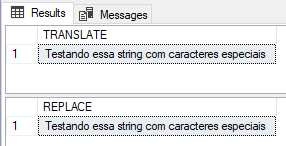
In this first example, we will demonstrate how TRANSLATE works in practice and how to have the same behavior using REPLACE:
DECLARE @Texto VARCHAR(100) = 'Testando essa string com c4r4ct3r3$ 3$p3c141$'

-- O QUE EU QUERO?
-- SUBSTITUIR "4" por "a" | "3" por "e" | "$" por "s" | "1" por "i"

-- TRANSLATE
SELECT TRANSLATE(@Texto, '43$1', 'aesi') AS [TRANSLATE]

-- REPLACE
SELECT REPLACE(REPLACE(REPLACE(REPLACE(@Texto, '4', 'a'), '3', 'e'), '$', 's'), '1', 'i') AS [REPLACE]
Result:
TRANSLATE with variables
In this other example, I want to show that it is possible to use TRANSLATE with variables. I will also show a difference in the behavior of TRANSLATE compared to REPLACE.
DECLARE
    @Texto VARCHAR(100) = 'Testando essa string com ca$r@a@c%t&e(r)e+s e!s~p^e`c´i<a>i:s;?ª{}',
    @Encontrar VARCHAR(100) = '$@%&()+!~^`´<>:;?ª{}',
    @Substituir VARCHAR(100) = ''

SET @Substituir = REPLICATE(' ', LEN(@Encontrar))


-- TRANSLATE
SELECT TRANSLATE(@Texto, @Encontrar, @Substituir)

-- REPLACE
SELECT
    REPLACE( REPLACE( REPLACE( REPLACE(
        REPLACE( REPLACE( REPLACE( REPLACE(
            REPLACE( REPLACE( REPLACE( REPLACE(
                REPLACE( REPLACE( REPLACE( REPLACE(
                    REPLACE( REPLACE( REPLACE( REPLACE( @Texto, '$', ' ' ),
                '@', ' ' ), '%', ' ' ), '&', ' ' ), '(', ' ' ),
            ')', ' ' ), '+', ' ' ), '!', ' ' ), '~', ' ' ), '^', ' ' ),
        '`', ' ' ), '´', ' ' ), '<', ' ' ), '>', ' ' ), ':', ' ' ),
    ';', ' ' ), '?', ' ' ), 'ª', ' ' ), '{', ' ' ), '}', ' ' );
Result:
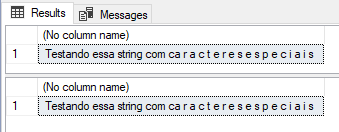
In the example above, it was very clear how TRANSLATE makes writing and reading code easier, avoiding typing errors, reducing complexity and making maintenance and reading easier. But both presented the same result. And I wish there wasn't this spacing between characters, like in the print above.
Let's try to remove this.
In REPLACE it was very easy. All you had to do was replace the space character “” with an empty string “”:
DECLARE
    @Texto VARCHAR(100) = 'Testando essa string com ca$r@a@c%t&e(r)e+s e!s~p^e`c´i<a>i:s;?ª{}',
    @Encontrar VARCHAR(100) = '$@%&()+!~^`´<>:;?ª{}'

-- REPLACE
SELECT
    REPLACE( REPLACE( REPLACE( REPLACE(
        REPLACE( REPLACE( REPLACE( REPLACE(
            REPLACE( REPLACE( REPLACE( REPLACE(
                REPLACE( REPLACE( REPLACE( REPLACE(
                    REPLACE( REPLACE( REPLACE( REPLACE( @Texto, '$', '' ),
                '@', '' ), '%', '' ), '&', '' ), '(', '' ),
            ')', '' ), '+', '' ), '!', '' ), '~', '' ), '^', '' ),
        '`', '' ), '´', '' ), '<', '' ), '>', '' ), ':', '' ),
    ';', '' ), '?', '' ), 'ª', '' ), '{', '' ), '}', '' );
Result:

Now I'm going to try using TRANSLATE:
DECLARE
    @Texto VARCHAR(100) = 'Testando essa string com ca$r@a@c%t&e(r)e+s e!s~p^e`c´i<a>i:s;?ª{}',
    @Encontrar VARCHAR(100) = '$@%&()+!~^`´<>:;?ª{}',
    @Substituir VARCHAR(100) = ''

-- TRANSLATE
SELECT TRANSLATE(@Texto, @Encontrar, REPLICATE(@Substituir, LEN(@Encontrar)))
Result:
The second and third arguments of the TRANSLATE built-in function must contain an equal number of characters.
In other words, I can't do the same thing with TRANSLATE in this case, because the size of the string to be located and the string to be replaced must be the same size. Even though I am using REPLICATE to force the size to be the same, as the string is empty (“”), the number of characters does not increase.
This example then justifies the use of REPLACE in certain scenarios when you want to replace a character with an empty string, correct?
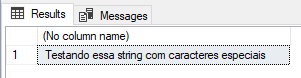
Calm down.. We can try a “workaround” to solve this, merging a TRANSLATE with a single REPLACE, where I will replace all special characters with the null character (character 0) using TRANSLATE and then I replace all nulls with an empty string with a single REPLACE:
DECLARE
    @Texto VARCHAR(100) = 'Testando essa string com ca$r@a@c%t&e(r)e+s e!s~p^e`c´i<a>i:s;?ª{}',
    @Encontrar VARCHAR(100) = '$@%&()+!~^`´<>:;?ª{}',
    @Substituir VARCHAR(100) = CHAR(0)

-- TRANSLATE + REPLACE
SELECT
    REPLACE(
        TRANSLATE(@Texto, @Encontrar, REPLICATE(@Substituir, LEN(@Encontrar))),
    @Substituir, '')
Result:
TRANSLATE + SELECT in tables
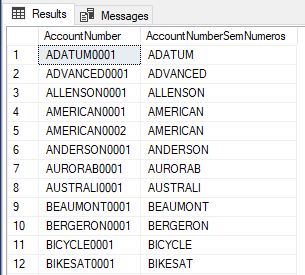
The TRANSLATE command also works normally when applied to data sets, such as tables and views:
SELECT
    [V].[AccountNumber],
    REPLACE( TRANSLATE( [V].[AccountNumber], '0123456789', REPLICATE( CHAR( 0 ), 10)), CHAR( 0 ), '' ) AS AccountNumberSemNumeros
FROM
    [Purchasing].[Vendor] AS [V]
Result:
TRANSLATE in versions prior to 2017
As I mentioned at the beginning of the post, the TRANSLATE function is only available from SQL Server 2017 onwards, that is, if you need to use it in previous versions, you will have to settle for several nested REPLACE commands, right? NO!!
I will share with you this function that I found in this post here from StackOverflow and made some small modifications so I didn't need to create external tables.
CREATE FUNCTION dbo.fncTranslate (
    @ReplaceTarget NVARCHAR(MAX),
    @from_chars    NVARCHAR(MAX),
    @to_chars      NVARCHAR(MAX)
)
RETURNS NVARCHAR(MAX)
AS
BEGIN

    DECLARE @numbers TABLE ( id INT );
    INSERT INTO @numbers VALUES (0), (1), (2), (3), (4), (5), (6), (7), (8), (9);

    DECLARE @steps INT = LEN( '_' + @from_chars + '_' ) - 2;

    WITH dictionary ( id, string_from, string_interim, string_to )
    AS
    (
        SELECT
            id,
            string_from,
            N'<' + string_from + N'>',
            string_to
        FROM
        (
            SELECT
                id,
                ROW_NUMBER() OVER ( PARTITION BY string_from ORDER BY id ) AS occurence,
                string_from,
                string_to
            FROM
                @numbers AS A
                CROSS APPLY
            (
                SELECT
                    CAST(SUBSTRING( @from_chars, A.id, 1 ) AS NVARCHAR(5)) AS string_from,
                    CAST(SUBSTRING( @to_chars, A.id, 1 ) AS NVARCHAR(5))   AS string_to
            ) chars
            WHERE
                A.id > 0
                AND A.id <= @steps
        ) sorted_dictionary
        WHERE
            occurence = 1
    ),
    mapping_sequence ( id, string_from, string_to )
    AS
    (
        SELECT 1, N'<', N'<<>' WHERE @from_chars LIKE N'%<%'
        UNION ALL
        SELECT 2, N'>', N'<>>' WHERE @from_chars LIKE N'%>%'
        UNION ALL
        SELECT 3, N'<<<>>', N'<<>' WHERE @from_chars LIKE N'%<%' AND @from_chars LIKE N'%>%'
        UNION ALL
        SELECT 3 + id, string_from, string_interim FROM dictionary WHERE string_from NOT IN ( N'<', N'>' )
        UNION ALL
        SELECT 3 + @steps + id, string_interim, string_to FROM dictionary
    )
    SELECT
        @ReplaceTarget = REPLACE( @ReplaceTarget, string_from, string_to )
    FROM
        mapping_sequence
    ORDER BY
        id;


    RETURN @ReplaceTarget;

END;
The usage is the same as the original function:
DECLARE @Texto VARCHAR(100) = 'Testando essa string com c4r4ct3r3$ 3$p3c141$'

-- O QUE EU QUERO?
-- SUBSTITUIR "4" por "a" | "3" por "e" | "$" por "s" | "1" por "i"

-- TRANSLATE
SELECT TRANSLATE(@Texto, '43$1', 'aesi') AS [TRANSLATE]

-- TRANSLATE UDF - SQL ANTIGO
SELECT dbo.fncTranslate(@Texto, '43$1', 'aesi') AS [TRANSLATE_UDF]
Result:

Another tip: Generally speaking, user functions (UDF) are slow to execute on large tables. Another alternative to greatly improve the performance of functions is to use SQLCLR functions, as I demonstrate the gains in the article SQL Server – Performance comparison between Scalar Function and CLR Scalar Function.
Video by Fabiano Amorim about TRANSLATE
The video that inspired me to write this article was one by the master Fabiano Amorim, the biggest national SQL Server myth (and one of the biggest references in the world)
And that's it, folks!
A big hug and see you next time.
References

Comentários (0)
Carregando comentários…