
Hey guys!
Is everything ok?
In this post I would like to write about a SQL Server feature that we still see being implemented in instances of several companies today and that causes all resources (CPU, Disk, Memory...) to be released after the last user deducts from the databases. I'm talking about the Auto-Close property, which is considered by many to be one of the WORST practices in managing SQL Server instances.
Explaining the Auto Close feature
According to Microsoft documentation, when the Auto Close feature is enabled on a database, all resources related to that database are released and the database is closed after the last active user disconnects from that database. If a user tries to access this database again, the server resources are reallocated again, the database is reopened and becomes available.
In theory, this feature seems to be advantageous, as it saves server resources and only uses them when necessary. However, in practice the opposite happens: There is a cost for dropping idle connections, file handling and buffer allocations to “shut down” the database when it is automatically closed. This cost is even greater when having to “reconnect” the database when new access is requested to that database when it is “off”.
As no cache is made, if the database is closed by Auto-close and after 1 ms it is requested again, the database will have to deallocate all resources and reallocate everything again within an interval of 1 ms. Imagine an instance in which this occurs frequently. The overhead of this operation, repeated over and over again, requires a much greater effort than leaving the resources allocated indefinitely, not justifying the use of this property.
Furthermore, this feature is in line with the benefits obtained by the SQL Server Connection Pool, widely used by .NET applications, whose purpose is to reduce the high cost of having to open and close connections with each command sent to the database.
Another negative point when using this property is that you will start to see several events in the SQL Server log with the message “Starting up database seu_database”, as shown below:
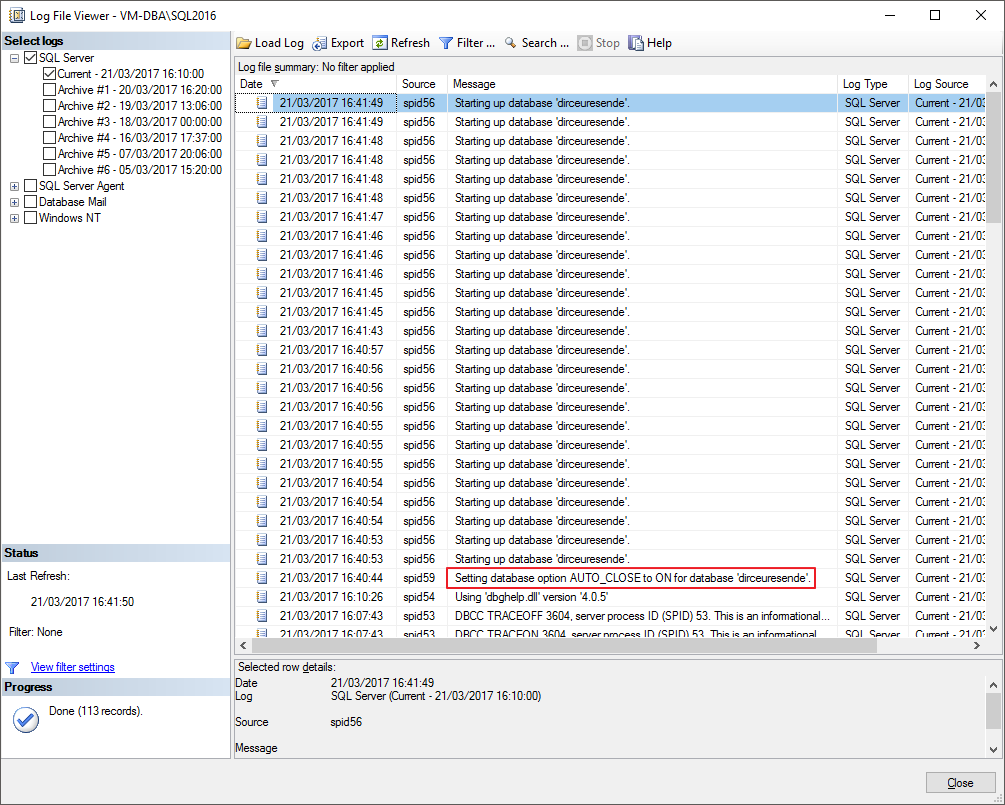
This is very bad for instance administration, as it ends up generating a very large volume of information in the instance log and diverting attention from alerts that could actually indicate an alert or problem with the instance.
To make life even worse for the DBA who usually activates this property, some SQL Server DMVs, which you use for performance tuning, validations and information extraction, end up having their values reset every time the database goes offline, meaning you do not have reliable information to perform this type of analysis.
Another negative point of Auto Close is that I have seen some cases in which it ends up generating “confusion” in the undocumented procedure master.dbo.sp_MSforeachdb, causing it, in its loop of iterations between databases, to end up not listing a database that has Auto Close activated, and thus not executing the command that should be executed. This occurs because this procedure only executes commands in databases whose status is “ONLINE”. With Auto Close activated, it is common for it to be in the “In Recovery” state when leaving the idle state when a user accesses it.
If you are still not satisfied with all the arguments presented, this property is marked as deprecated (Referral link), that is, it will be removed in some future version of SQL Server and should no longer be used in new environments and newly created instances.
In fact, you shouldn't even be using Auto Close.
In what scenarios should Auto Close be used?
As it is considered a bad practice among SQL Server DBA's, it is very unlikely that you will encounter a scenario where Auto Close should be used.
One scenario in which I think it would be justified is when you have a database on a server with few CPU and memory resources, and which is accessed once a day, by a SQL Agent job or a specific query. This query would execute a processing routine reading the data from this database and after this processing, no job, user or application would read, write or otherwise access this database.
As you may know, in the real world this scenario is very unlikely to happen and it is difficult to guarantee that no one else will use the database, meaning that even if this scenario exists, in the future you may run the risk of this scenario changing and your instance suffering this overhead generated by Auto Close.
How to identify if a database has Auto Close activated?
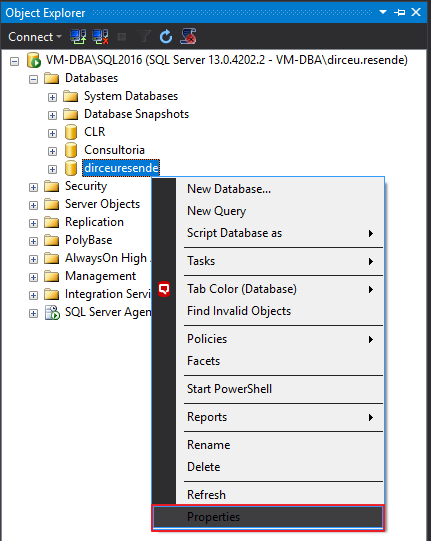
To identify instances that have the Auto Close property activated, simply right-click on a database, select the “Properties” option
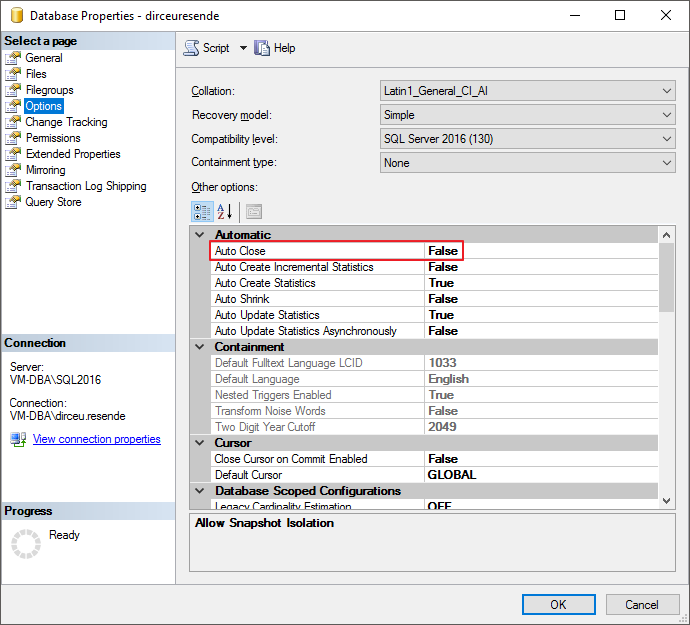
On this screen, select the “Options” category and look for the “Auto Close” property in the Grid.
How to identify databases with Auto Close activated on the instance using T-SQL?
To identify databases with Auto Close activated on the instance using T-SQL, you can run the query below:
SELECT database_id, [name], user_access_desc, state_desc
FROM sys.databases
WHERE is_auto_close_on = 1
Result:

How to disable Auto Close using T-SQL?
To disable the Auto Close property of a database in your instance, use the command below:
USE [master]
GO

ALTER DATABASE [dirceuresende] SET AUTO_CLOSE OFF
GO
If you want to apply this command to all databases in your instance, you can use this command:
USE [master]
GO

DECLARE @Comando VARCHAR(MAX) = ''

SELECT @Comando += 'ALTER DATABASE [' + [name] + '] SET AUTO_CLOSE OFF; '
FROM sys.databases
WHERE is_auto_close_on = 1

EXEC(@Comando)
That's it!
I hope you liked this tip.
A hug and see you in the next post.
sql server database how to identify disable how to identify disable what is auto close property property option option all databases
sql server database how to identify disable how to identify disable what is auto close property property option option all databases

Comentários (0)
Carregando comentários…