
Hey guys,
All very well ?
In this post I'm going to talk a little about a problem that I've seen a lot in the databases where I've been providing consultancy, which is orphan users in the database.
A little about permissions in SQL Server
In SQL Server, there is the concept of Login, which is the user at the database instance level and is also the object that is associated with the password, password expiration and security policies, server-level permissions, etc.
In addition, there is also the concept of user, which is created for each database in the instance and holds the privileges of the database in question. Therefore, a person has a Login on the instance and one or more users created, because for each database, he must have his own user (it does not need to be the same name) to receive specific permissions on each database (unless the person's Login is in a role that gives him privileges in all databases, such as the administrator role sysadmin).
SQL Server still has the concept of an AD group, where if you are part of an AD group, and this group is created in SQL Server in the form of a login, it will not be necessary to create a login for each member of the AD group, only for the group itself. In this case, all members of this group will have the same instance-level permissions and will be able to connect to the bank using their AD username and password. (If the group has privileges to do so)
What are orphan users?
In theory, all users, from all databases, must reference a login so that it is possible to use that login to authenticate to the database. When there is a user who does not have this reference, we call this user an orphan.
One thing that should be very clear when we find a SQL Server user without a login is that there is a difference between an orphan user and a user without a login:
- Orphaned user: This SQL user was created and mapped to a login. For some reason (possibly a bank restore) this user lost the association with the login and remained in this user state without a login. This user type can be remapped to login if this association is lost, and can be used to log into SQL Server.
- User without login: This SQL Server user was created using the “SQL User without login” option and was not associated with any login during creation. In this scenario, cannot map this user to a login (unless you delete the user, create it again by associating it with a login and reapply the permissions it had), and as a result, it is not possible to log into SQL Server using that user.
This scenario is widely used for security reasons, where a user is needed to be the owner of the objects, but you do not want to be able to use it to log into the database or make changes to data or structures, as we can read in Pinal Dave's article at this link here.
How does this happen?
SQL Server tries to prevent you from creating a user without specifying their login:
CREATE USER [Teste]
GO
Msg 15007, Level 16, State 1, Line 1
‘Teste’ is not a valid login or you do not have permission.
Now let's create it right:
USE [master]
CREATE LOGIN [Usuario_Teste] WITH PASSWORD=N'123', DEFAULT_DATABASE=[master], CHECK_EXPIRATION=OFF, CHECK_POLICY=OFF
GO

USE [Testes]
CREATE USER [Usuario_Orfao] FOR LOGIN [Usuario_Teste] WITH DEFAULT_SCHEMA=[dbo]
GO
Ready. We create our login and our user:
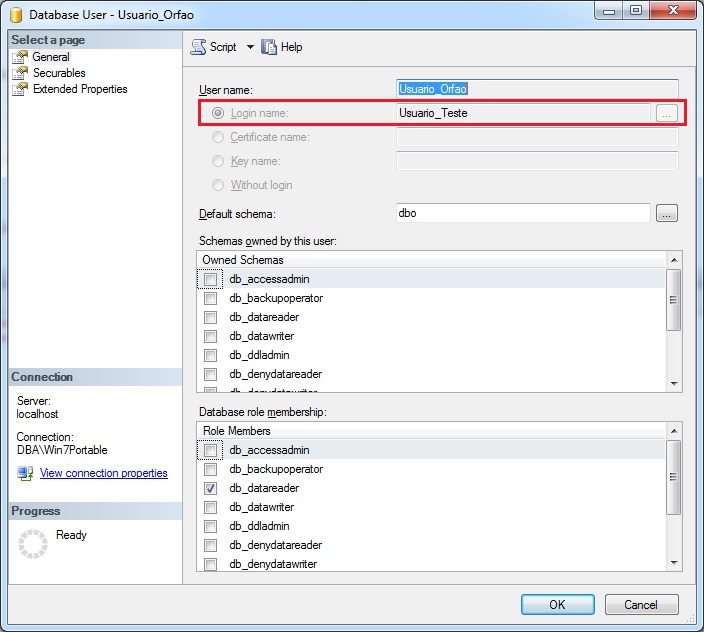
Now, what happens to the user if we delete their login?
USE [master]
DROP LOGIN [Usuario_Teste]
GO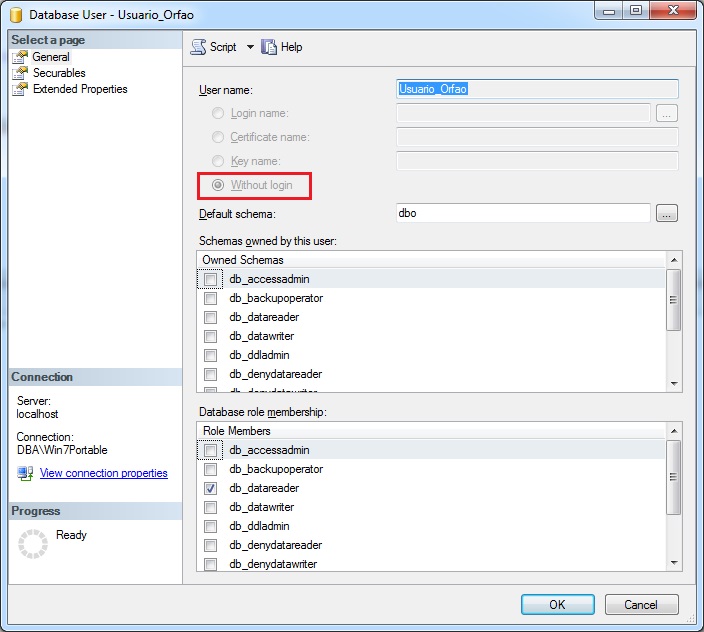
In other words, this way, even if we have our user created, we will not be able to log in to the bank, as our login no longer exists. We then have an orphan user in the base. And this is a problem, as it is a “useless” user at the bank, as without a login, it is not possible to connect to the bank.
How to identify orphan users in a database?
USE [Testes]
EXEC sp_change_users_login 'Report'
Or using sys.syslogins (SQL Server 2000 onwards):
SELECT
    A.name AS UserName,
    A.[sid] AS UserSID
FROM
    sys.sysusers A WITH(NOLOCK)
    LEFT JOIN sys.syslogins B WITH(NOLOCK) ON A.[sid] = B.[sid]
WHERE
    A.issqluser = 1
    AND SUSER_NAME(A.[sid]) IS NULL
    AND IS_MEMBER('db_owner') = 1
    AND A.[sid] != 0x00
    AND A.[sid] IS NOT NULL
    AND ( LEN(A.[sid]) <= 16 )
    AND B.[sid] IS NULL
ORDER BY
    A.name
Or using sys.database_principals (SQL Server 2008 onwards):
SELECT
    A.name AS UserName,
    A.[sid] AS UserSID
FROM
    sys.database_principals A WITH(NOLOCK)
    LEFT JOIN sys.sql_logins B WITH(NOLOCK) ON A.[sid] = B.[sid]
    JOIN sys.server_principals C WITH(NOLOCK) ON A.[name] COLLATE SQL_Latin1_General_CP1_CI_AI = C.[name] COLLATE SQL_Latin1_General_CP1_CI_AI
WHERE
    A.principal_id > 4
    AND B.[sid] IS NULL
    AND A.is_fixed_role = 0
    AND C.is_fixed_role = 0
    AND A.name NOT LIKE '##MS_%'
    AND A.[type_desc] = 'SQL_USER'
    AND C.[type_desc] = 'SQL_LOGIN'
    AND A.name NOT IN ('sa')
    AND A.authentication_type <> 0 -- NONE
ORDER BY
    A.name
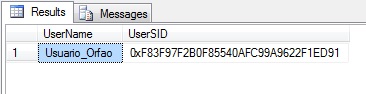
I have already recreated the login. How do I recreate the Login x User association?
USE [Testes]
EXEC sp_change_users_login 'Auto_Fix', 'Usuario_Orfao' -- Isso irá associar o Login 'Usuario_Orfao' ao usuário 'Usuario_Orfao'
GO
If successful, SQL Server will return the messages below and by executing the EXEC sp_change_users_login 'Report' command again, this user will no longer appear in the returned lines:
The row for user ‘Usuario_Orfao’ will be fixed by updating its login link to a login already in existence.
The number of orphaned users fixed by updating users was 1.
The number of orphaned users fixed by adding new logins and then updating users was 0.
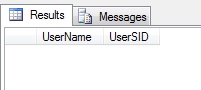
Recreating the login of all users, of all databases, of your instance
-- Identificando todos os usuários órfãos da instância
IF (OBJECT_ID('tempdb..#Usuarios_Orfaos') IS NOT NULL) DROP TABLE #Usuarios_Orfaos
CREATE TABLE #Usuarios_Orfaos (
    [Ranking] INT IDENTITY(1,1),
    [Database] sysname,
    [Username] sysname,
    [SID] UNIQUEIDENTIFIER,
    [Command] VARCHAR(MAX)
)

INSERT INTO #Usuarios_Orfaos
EXEC master.dbo.sp_MSforeachdb '
SELECT
    ''?'' AS [database],
    A.name,
    A.[sid],
    ''EXEC [?].[sys].[sp_change_users_login] ''''Auto_Fix'''', '''''' + A.name + '''''''' AS command
FROM
    [?].sys.database_principals A WITH(NOLOCK)
    LEFT JOIN [?].sys.sql_logins B WITH(NOLOCK) ON A.[sid] = B.[sid]
    JOIN sys.server_principals C WITH(NOLOCK) ON A.[name] COLLATE SQL_Latin1_General_CP1_CI_AI = C.[name] COLLATE SQL_Latin1_General_CP1_CI_AI
WHERE
    A.principal_id > 4
    AND B.[sid] IS NULL
    AND A.is_fixed_role = 0
    AND C.is_fixed_role = 0
    AND A.name NOT LIKE ''##MS_%''
    AND A.[type_desc] = ''SQL_USER''
    AND C.[type_desc] = ''SQL_LOGIN''
    AND A.name NOT IN (''sa'')
    AND A.authentication_type <> 0 -- NONE
ORDER BY
    A.name'


-- Exibindo os usuários órfãos da instância
SELECT * FROM #Usuarios_Orfaos


-- Executando os comandos no banco
DECLARE @Comando VARCHAR(MAX) = ''

SELECT @Comando += Command + '; '
FROM #Usuarios_Orfaos

EXEC(@Comando)
I have already recreated the login, but it does not have the same username. How do I recreate the Login x User association?
USE [Testes]
EXEC sp_change_users_login
    'Update_One',
    'Usuario_Orfao',  -- Usuário
    'Usuario_Teste'   -- Login
GO
There is already a user created. I want to associate it with a new login that I will create at runtime.
USE [Testes]
EXEC sp_change_users_login
    'Auto_Fix',
    'Usuario_Orfao',  -- Usuário
    NULL,             -- Login. Deixar NULL para criar um novo com o mesmo nome do usuário
    '123'             -- Senha do Login que será criado
GO
Return from SQL Server:
Barring a conflict, the row for user ‘Usuario_Orfao’ will be fixed by updating its link to a new login.
The number of orphaned users fixed by updating users was 0.
The number of orphaned users fixed by adding new logins and then updating users was 1.
An invalid parameter or option was specified for procedure ‘sys.sp_change_users_login’
Common error that occurs in SQL Server when you try to AUTO_FIX an orphaned user and this user has already been created with the WITHOUT LOGIN option. In this case, Auto_Fix will not fix the problem and will return this error message:
Msg 15600, Level 15, State 1, Procedure sp_change_users_login, Line 214
An invalid parameter or option was specified for procedure ‘sys.sp_change_users_login’.
In this case, the solution is to fix the problem manually, using the solutions presented above.
The user cannot be remapped to a login. Remapping can only be done for users that were mapped to Windows or SQL logins.
One thing that should be very clear when we find a SQL Server user without a login is that there is a difference between an orphan user and a user without a login:
- Orphaned user: This SQL user was created and mapped to a login. For some reason (possibly a bank restore) this user lost the association with the login and remained in this user state without a login. This user type can be remapped to login if this association is lost, and can be used to log into SQL Server.
- User without login: This SQL Server user was created using the “SQL User without login” option and was not associated with any login during creation. In this scenario, cannot map this user to a login, and therefore, it is not possible to log into SQL Server using this user. This scenario is widely used for security reasons, where a user is needed to be the owner of the objects, but you do not want to be able to use it to log into the database or make changes to data or structures. If you try to map this type of user to a login, you will encounter the error message above.
ALTER USER… WITH LOGIN
Another way to fix orphaned users is to use the ALTER USER command:
ALTER USER [Usuario] WITH LOGIN = [Login]To identify and correct orphaned users of the instance, in all databases, with the ALTER USER command, use the script below:
-- Identificando todos os usuários órfãos da instância
IF (OBJECT_ID('tempdb..#Usuarios_Orfaos') IS NOT NULL) DROP TABLE #Usuarios_Orfaos
CREATE TABLE #Usuarios_Orfaos (
    [Ranking] INT IDENTITY(1,1),
    [Database] sysname,
    [Username] sysname,
    [SID] UNIQUEIDENTIFIER,
    [Command] VARCHAR(MAX)
)

INSERT INTO #Usuarios_Orfaos
EXEC master.dbo.sp_MSforeachdb '
SELECT
    ''?'' AS [database],
    A.name,
    A.[sid],
    ''USE [?]; ALTER USER ['' + A.[name] + ''] WITH LOGIN = ['' + A.[name] + '']'' AS command
FROM
    [?].sys.database_principals A WITH(NOLOCK)
    LEFT JOIN [?].sys.sql_logins B WITH(NOLOCK) ON A.[sid] = B.[sid]
    JOIN sys.server_principals C WITH(NOLOCK) ON A.[name] COLLATE SQL_Latin1_General_CP1_CI_AI = C.[name] COLLATE SQL_Latin1_General_CP1_CI_AI
WHERE
    A.principal_id > 4
    AND B.[sid] IS NULL
    AND A.is_fixed_role = 0
    AND C.is_fixed_role = 0
    AND A.[type_desc] = ''SQL_USER''
    AND C.[type_desc] = ''SQL_LOGIN''
    AND A.authentication_type <> 0 -- NONE
ORDER BY
    A.name'

SELECT * FROM #Usuarios_Orfaos
Result:

Note: I prefer this method as sp_change_users_login is marked as deprecated and may be removed in future editions of SQL Server.
Conclusion
Remember that SQL Server has the concept of Access Groups coming from AD. If there is a Login for an AD group in your instance and you need to grant individual access to the databases for certain users, these users will probably not be associated with the Login, and are therefore orphaned users.
In this case, these orphaned users have no negative effect on your database, as they normally access the database through the AD group, and have individual permissions on certain databases.
Therefore, be very careful when identifying and removing/fixing orphaned users, as the commands seen above may return false positives for orphaned users in this situation.
That's it,
Until next time!

Comments (0)
Loading comments...