
Hey guys,
Goodnight!
In today's post I will demonstrate how to convert time stored as an integer to a time column. I had the idea of writing this post when a fellow DBA told me that he is managing a system that uses the MySQL database and has a table where the programmer decides to store the time in an integer field, so that 09:30 is stored as 930 and 21:20 is stored as 2120, for example.
Unfortunately, this was nothing new to me and this motivated me to write this post, as it can help other people, whether the DBA, to be able to work with this data or the Developer, so that he can use the datetime or time field to store this type of information.
Simulating the test base
So that you can simulate this problem at home, I decided to make this simple script available:
-- Cria a tabela de teste
DROP TABLE IF EXISTS `teste`;

CREATE TABLE `teste` (
  `descricao` VARCHAR(60) COLLATE utf8_unicode_ci NOT NULL,
  `hora_int` INT(11) NOT NULL,
  `hora` TIME DEFAULT NULL
) ENGINE=INNODB DEFAULT CHARSET=utf8 COLLATE=utf8_unicode_ci;

-- Insere os dados
INSERT INTO `teste`(descricao, hora_int) VALUES('Teste 09:30', 930), ('Teste 13:42', 1342), ('Teste 21:53', 2153);

-- Exibe os dados
SELECT * FROM `teste`;
Result:
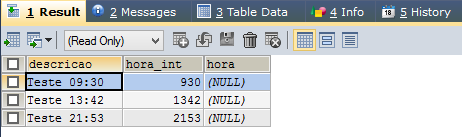
Converting time stored as an INT column to TIME
After making this introduction and posting the test script, I will now demonstrate how to perform this conversion from integer to time.
Using CONVERT
A quick way to do this is to use MySQL's CONVERT function to convert the number to TIME. If we try to perform the conversion directly, MySQL will transform the data, but it will understand that the data is represented in the form mm:ss, as shown in the print below:
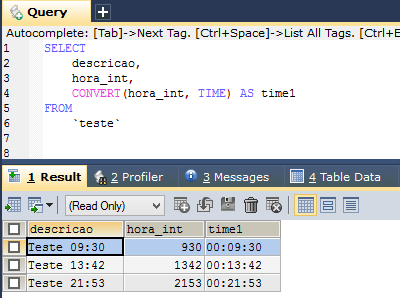
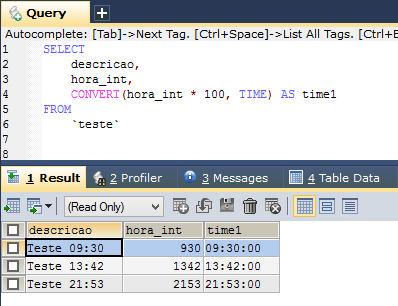
So that he understands that our time format is HH:mm:ss, I will multiply the number by 100, so that the “minute” becomes an hour, the “second” becomes a minute and the seconds will be reset to zero.
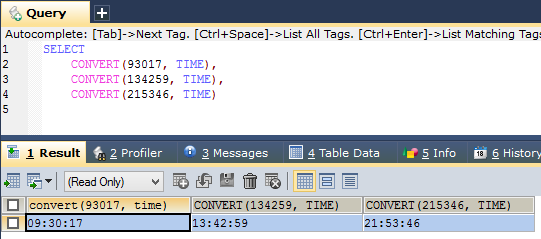
If you also store seconds in the entire field, you don't need to multiply by 100:
Converting to seconds and then using the SEC_TO_TIME() function
Another way to do this is:
- Manually separate the value of the time field (LEFT(int_hour, CHAR_LENGTH(int_hour) – 2)
- Once the hour value is obtained, the obtained hour is multiplied by 3600 (60 x 60), to calculate the number of seconds that make up the hour
- Manually separate the value from the minute field (RIGHT(int_hour, 2))
- Once the value of the minute is obtained, the obtained minute is multiplied by 60, to calculate the number of seconds that make up the minutes
- Add the number of seconds in the hour to the number of seconds in the minutes to calculate the total number of seconds
- Once converted to seconds, we can use MySQL's SEC_TO_TIME() function to obtain the corresponding time from the calculated number of seconds
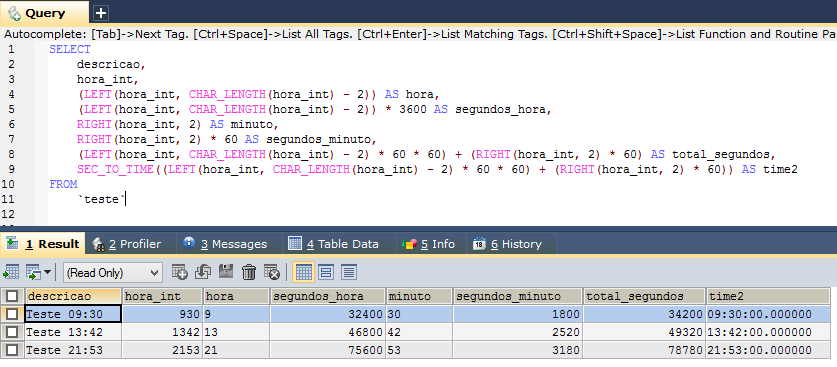
And now we can check the summarized solution:
SELECT
    descricao,
    hora_int,
    CONVERT(hora_int * 100, TIME) AS time1,
    SEC_TO_TIME((LEFT(hora_int, CHAR_LENGTH(hora_int) - 2) * 3600) + (RIGHT(hora_int, 2) * 60)) AS time2
FROM
    `teste`
Final Result:
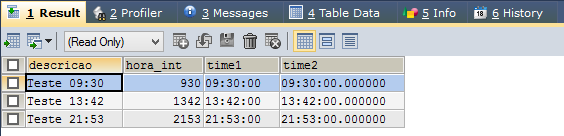
I used the SELECT statement to display the final result, but you can easily use it with UPDATE, converting from INT to TIME. In this case, I recommend creating a new column of type TIME, performing the UPDATE, and if everything is ok, deleting the INT column.
I hope you liked the post!
If you have any questions, just leave them in the comments.

Comments (0)
Loading comments...