
Speak up, my dear readers!
In this article, I would like to extend the topic of security a little and share with you how to disable the “sa” login while minimizing impacts. As I already mentioned in the article SQL Server – How to activate/enable the sa user, it is a good security practice to keep the user “sa” deactivated and renamed, since this user is in the sysadmin role (cannot be removed), cannot be deleted from the instance and is a standard user, that is, it is present in any instance of SQL Server, which makes this user the preferred target of potential attackers. In fact, this is one of the security features of the FREE SQL Server Checkup that the Fabrício Lima is offering to get to know the company.
For a few days I made an instance of SQL Server and Power BI Report Server public to the Web to perform some tests. After a few days, I saw in the SQL Server error log that they were already trying to invade my base. Imagine which user most tried to use to access my bank?

Do you want to check how these statistics are in your instance? Just run the script below:
DECLARE @ArquivosLog TABLE ( LogNumber INT, StartDate DATETIME, SizeInBytes INT )
DECLARE @Dados TABLE ( [LogDate] datetime, [ProcessInfo] nvarchar(12), [Text] nvarchar(3999) )

INSERT INTO @ArquivosLog
EXEC sys.xp_enumerrorlogs 1


DECLARE
    @Contador INT = 0,
    @Total INT = (SELECT COUNT(*) FROM @ArquivosLog)

WHILE(@Contador < @Total)
BEGIN

    INSERT INTO @Dados
    EXEC sys.sp_readerrorlog @Contador, 1, 'login failed'

    SET @Contador += 1

END


SELECT
   MIN(LogDate) AS Dt_Menor_Ocorrencia,
   MAX(LogDate) AS Dt_Maior_Ocorrencia,
   SUBSTRING([Text], 1, IIF(CHARINDEX('[', [Text]) = 0, LEN([Text]), CHARINDEX('[', [Text]) - 1))  AS Texto,
   COUNT(DISTINCT [Text]) AS Quantidade
FROM
   @Dados
GROUP BY
   SUBSTRING([Text], 1, IIF(CHARINDEX('[', [Text]) = 0, LEN([Text]), CHARINDEX('[', [Text]) - 1))
ORDER BY
   4 DESC
Now that I've made a brief summary of why this user should be deactivated and renamed, I'll explain how we can do this in your database. In theory, it's something extremely simple:
USE [master]
GO

ALTER LOGIN [sa] DISABLE
GO

ALTER LOGIN [sa] WITH NAME = [sa_DESATIVADO]
GO
Or even, through the Management Studio (SSMS) interface:
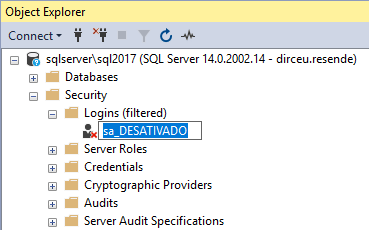
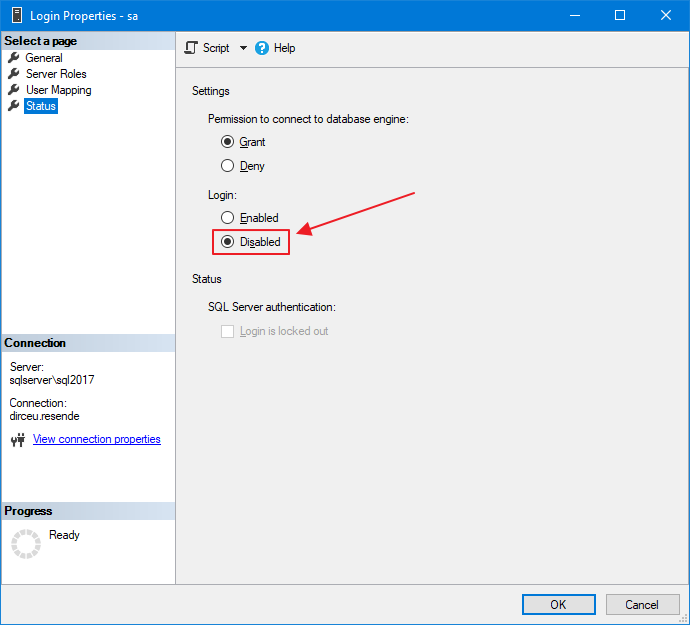
The problem is that many people are unsure about carrying out this operation on their database and ending up having impacts on the environment. My idea in this post is to help you identify and minimize these possible impacts so that you can apply these security settings to all your environments.
Application using SA
The first item that must be checked is whether there is any application that uses the user “sa” to connect to the database (believe me, it exists). The easiest way to identify this is to question the application supplier or the development team.
One way that can help you validate this information and even be able to identify whether this scenario is occurring in your environment is by consulting the DMV sys.dm_exec_sessions:
SELECT
    session_id,
    login_time,
    login_name,
    [program_name],
    [host_name],
    client_interface_name,
    [status],
    nt_domain,
    nt_user_name,
    original_login_name
FROM
    sys.dm_exec_sessions
WHERE
    session_id > 50
    AND security_id = 0x01
Result:

Databases where the SA user is owner
This is a very common concern among DBA's that if they deactivate the SA user and rename it, a problem may occur in the databases where the SA user is the owner. However, you can rest assured that there will be no problem when doing this. I have already done several tests in various environments, both testing and production, and disabling the SA user does not have any impact on this.
To prove what I'm saying, here's a demonstration:
SELECT
    A.database_id,
    A.[name],
    B.[name] AS [owner],
    A.create_date,
    A.state_desc,
    A.[compatibility_level],
    A.collation_name
FROM
    sys.databases A
    JOIN sys.server_principals B ON A.owner_sid = B.[sid]


SELECT
    [name],
    is_disabled
FROM
    sys.server_principals
WHERE
    principal_id = 1 -- sa
Result:

Jobs where the SA user is owner
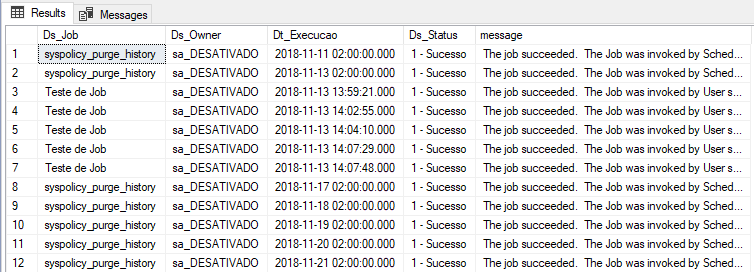
Just as when the SA user is the owner of a database, there is no impact on the execution of SQL Agent Jobs when renaming and deactivating the “sa” login. They can be carefree and don't need to change the owner of all jobs to rename/deactivate sa.
Query used for demonstration:
SELECT
    A.[name] AS Ds_Job,
    B.[name] AS Ds_Owner,
    msdb.dbo.agent_datetime(C.run_date, C.run_time) AS Dt_Execucao,
    (CASE C.run_status
        WHEN 0 THEN '0 - Falha'
        WHEN 1 THEN '1 - Sucesso'
        WHEN 2 THEN '2 - Retry'
        WHEN 3 THEN '3 - Cancelado'
        WHEN 4 THEN '4 - Executando'
    END) AS Ds_Status,
    C.[message]
FROM
    msdb.dbo.sysjobs A
    JOIN sys.server_principals B ON A.owner_sid = B.[sid]
    JOIN msdb.dbo.sysjobhistory C ON C.job_id = A.job_id
WHERE
    C.step_id = 0 -- Geral
Result:
LinkedServer
This is probably the most difficult validation to do in the environment, although it is also quite uncommon. If there is a Linked Server that points to your instance, where the connection to the bank is made using the user “sa”, fixed in the LS, you may have problems deactivating and renaming this user.
It's difficult to validate this, because you have to go into all instances in your environment that may have a linked server pointed to this specific instance and validate if this scenario is occurring:
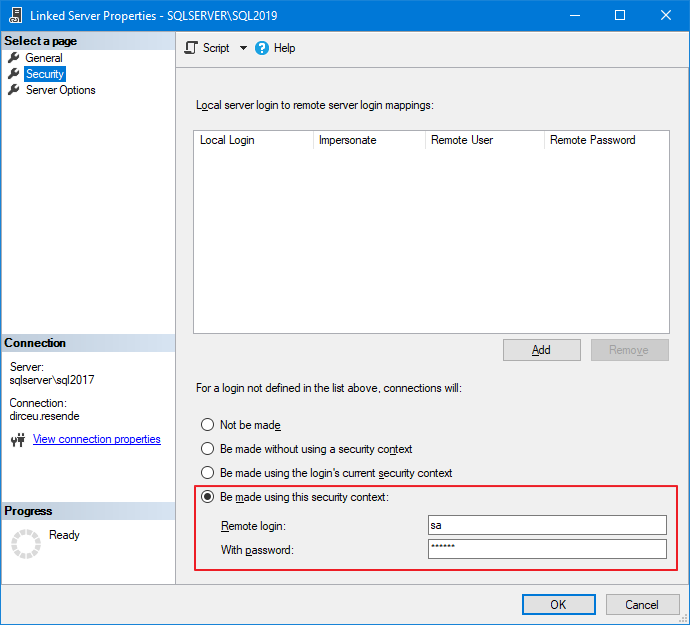
It is not very common to use a Linked Server with a fixed user on the connection, since any user on the remote instance could execute ANY COMMAND on the target instance, since the connection is arriving as “sa”, which is sysadmin, but it is a validation that must be done to ensure that the change will not generate impacts.
You can use this query to facilitate this check:
SELECT
    B.[name],
    B.product,
    B.[provider],
    B.[data_source],
    A.remote_name
FROM
    sys.linked_logins A
    JOIN sys.servers B ON B.server_id = A.server_id
WHERE
    A.server_id > 0
    AND A.local_principal_id = 0 -- SA
Objects with IMPERSONATE using SA
It is quite common to see procedures and objects that use the EXECUTE AS command to execute tasks as if they were another user, especially to allow a user with few privileges to execute routines and commands that would require more privileges than he has, thus creating an elevation of privilege. If you want to delve deeper into IMPERSONATE and elevation of privileges, I recommend reading my article SQL Server – How to use EXECUTE AS to execute commands as another user (Impersonate login and user).
To reassure you, know that it is not possible to use EXECUTE AS USER and impersonate the user “sa”, as he is a “special” user, that is, one less concern for you.
Other services
And finally, so that you can make your change with complete peace of mind, I recommend that you validate whether there is any Windows service, Reporting Services report, any Power Shell routine, monitoring tool or any process external to SQL Server that may be using the sa user in your environment.
As they are external processes and can be specific to your company, there is not much of a “recipe” to deal with these situations, but it is not at all common for a DBA to allow a service to use the “sa” user for such operations, so it must be very difficult to find this scenario.
Be calm and confident when deactivating and renaming the “sa” user, as this is a good security practice for your environment. Remember to monitor the SQL Server log after this change to see if login failure messages using “sa” are occurring. I provided a query that you can even automate this at the beginning of this post 😉
If you identify a problem, you may have discovered an intrusion attempt or a non-standard process in your company, which must be changed urgently to use another user to connect to the database.
Well folks, that's it!
I hope you liked this tip, rename and deactivate the “sa” user in your environments and see you next time!

Comments (0)
Loading comments...