
Hey guys!
In today's post, I would like to share a solution I created to answer a question in one of the Telegram groups I participate in, which was the question of how to know how long a database has been online in SQL Server. This is not how long the instance has been online and yes, how long a database has been online.
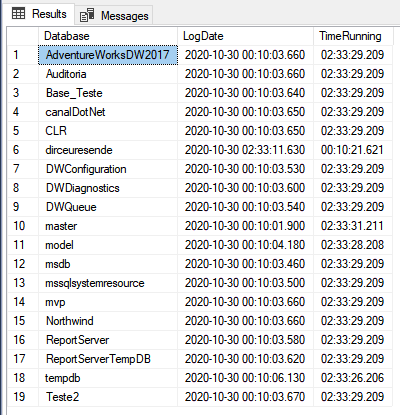
To resolve this question, I thought about using the SQL Server log itself to identify when each database was started and return it to the user. The query below will return all the databases that are in the last log file, along with the date the database was last initialized and the time elapsed since then until the current time.
IF (OBJECT_ID('tempdb..#StartupDB') IS NOT NULL) DROP TABLE #StartupDB
CREATE TABLE #StartupDB (
    [LogNumber] TINYINT,
    [LogDate] DATETIME,
    [ProcessInfo] NVARCHAR(50) COLLATE SQL_Latin1_General_CP1_CI_AI,
    [Text] NVARCHAR(MAX) COLLATE SQL_Latin1_General_CP1_CI_AI,
    [Database] AS (REPLACE(REPLACE(SUBSTRING([Text], CHARINDEX('''', [Text]), 128), '''', ''), '.', ''))
)

INSERT INTO #StartupDB (LogDate, ProcessInfo, [Text])
EXEC master.dbo.sp_readerrorlog 0, 1, N'Starting up database ', NULL

SELECT
    [Database],
    MAX(LogDate) AS LogDate,
    (CASE WHEN DATEDIFF(SECOND, MAX(LogDate), GETDATE()) > 86400 THEN CAST(DATEDIFF(SECOND, MAX(LogDate), GETDATE()) / 86400 AS VARCHAR) + 'd ' ELSE '' END) +
    RIGHT('00' + CAST((DATEDIFF(SECOND, MAX(LogDate), GETDATE()) / 3600) % 24 AS VARCHAR), 2) + ':' +
    RIGHT('00' + CAST((DATEDIFF(SECOND, MAX(LogDate), GETDATE()) / 60) % 60 AS VARCHAR), 2) + ':' +
    RIGHT('00' + CAST(DATEDIFF(SECOND, MAX(LogDate), GETDATE()) % 60 AS VARCHAR), 2) + '.' +
    RIGHT('000' + CAST(DATEDIFF(SECOND, MAX(LogDate), GETDATE()) AS VARCHAR), 3)
    AS TimeRunning
FROM
    #StartupDB
GROUP BY
    [Database]
ORDER BY 1
Result:
If you want to analyze the entire database startup history, scanning through all log files (not just the last one):
IF (OBJECT_ID('tempdb..#Arquivos_Log') IS NOT NULL) DROP TABLE #Arquivos_Log
CREATE TABLE #Arquivos_Log (
    [idLog] INT,
    [dtLog] NVARCHAR(30) COLLATE SQL_Latin1_General_CP1_CI_AI,
    [tamanhoLog] INT
)

IF (OBJECT_ID('tempdb..#StartupDB') IS NOT NULL) DROP TABLE #StartupDB
CREATE TABLE #StartupDB (
    [LogNumber] TINYINT,
    [LogDate] DATETIME,
    [ProcessInfo] NVARCHAR(50) COLLATE SQL_Latin1_General_CP1_CI_AI,
    [Text] NVARCHAR(MAX) COLLATE SQL_Latin1_General_CP1_CI_AI,
    [Database] AS (REPLACE(REPLACE(SUBSTRING([Text], CHARINDEX('''', [Text]), 128), '''', ''), '.', ''))
)


INSERT INTO #Arquivos_Log
EXEC sys.sp_enumerrorlogs

DECLARE
    @Contador INT = 0,
    @Total INT = (SELECT COUNT(*) FROM #Arquivos_Log)


WHILE(@Contador < @Total)
BEGIN

    INSERT INTO #StartupDB (LogDate, ProcessInfo, [Text])
    EXEC master.dbo.xp_readerrorlog @Contador, 1, N'Starting up database ', NULL, NULL, NULL

    -- Atualiza o número do arquivo de log
    UPDATE #StartupDB
    SET LogNumber = @Contador
    WHERE LogNumber IS NULL

    SET @Contador += 1

END


SELECT *
FROM #StartupDB
ORDER BY LogDate DESC
Result:
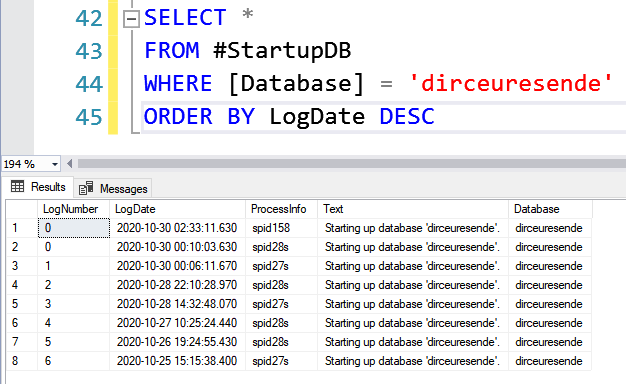
In the two solutions presented, you can use the “Database” column to filter the selected banks and I believe that the original question was answered by these 2 scripts.
That's it, folks! I hope you liked this tip. Do you know of any other solution to answer this question? Leave it here in the comments 🙂
A big hug and see you next time!

Comments (0)
Loading comments...