
Hey guys,
Are you all right?
I was watching the latest video Fabricio Lima, where he wrote about the blogs he usually follows through Feedly, an RSS reader. I thought the idea was cool and decided to create a small RSS reader running on SQL Server, using the CLR or cURL running with xp_cmdshell.
In this case, as the return of requests is greater than 4,000 characters in most cases, it is not possible to do so using OLE Automation, which has this limitation.
As the RSS feed return is basically XML, you will need to have a basic understanding of treating and manipulating strings and XML files. To do this, visit my post SQL Server – How to read, import and export data from XML files.
One thing worth mentioning is that the number of records returned by each site is configurable, that is, one site returns the last 50 posts and another site returns only the last 10 posts (WordPress standard). However, even if the RSS feed is limited to 10 records, it is possible to navigate between pages in the feed (see below).
How to query WordPress RSS feeds using CLR
To perform this query using the CLR (C#), simply use the Stored Procedure stpWs_Requisicao, where the source code is available in the post Performing POST and GET requests using CLR (C#) in SQL Server.
If you don't know or want to know more about SQLCLR (C#) in SQL Server, see these 2 links:
How to enable the use of the CLR on your instance:
sp_configure 'show advanced options', 1
GO

RECONFIGURE
GO

sp_configure 'clr enabled', 1
GO

RECONFIGURE
GO
View source code:
CREATE PROCEDURE dbo.stpConsulta_Rss (
    @Ds_URL VARCHAR(255)
)
AS BEGIN


    DECLARE
        @Ds_Retorno_OUTPUT NVARCHAR(MAX),
        @Retorno_XML XML


    EXEC CLR.dbo.stpWs_Requisicao
        @Ds_Url = @Ds_URL, -- nvarchar(max)
        @Ds_Metodo = N'GET', -- nvarchar(max)
        @Ds_Parametros = N'', -- nvarchar(max)
        @Ds_Codificacao = N'UTF-8', -- nvarchar(max)
        @Ds_Retorno_OUTPUT = @Ds_Retorno_OUTPUT OUTPUT -- nvarchar(max)


    SET @Retorno_XML = REPLACE(@Ds_Retorno_OUTPUT, '<?xml version="1.0" encoding="UTF-8"?>', '')

    SELECT
        Dados.linhas.value('title[1]', 'varchar(max)') AS Ds_Titulo,
        Dados.linhas.value('link[1]', 'varchar(max)') AS Ds_Link,
        CONVERT(DATETIME, SUBSTRING(Dados.linhas.value('pubDate[1]', 'varchar(max)'), 6, 20)) AS Dt_Publicacao,
        Dados.linhas.query('for $i in category return concat($i/text()[1], ";")').value('.', 'varchar(max)') AS Ds_Categoria,
        Dados.linhas.value('description[1]', 'varchar(max)') AS Ds_Descricao
    FROM
        @Retorno_XML.nodes('/rss/channel/item') AS Dados(linhas)


END
How to query WordPress RSS feeds using xp_cmdshell
To perform this query using xp_cmdshell, we will need the cURL binary, available in this link.
To be able to use the curl.exe binary without having to specify the path, you must copy it to the C:\Windows\System32 directory or enter the full path of curl.exe on your machine.
How to enable the use of xp_cmdshell on your instance:
sp_configure 'show advanced options', 1
GO

RECONFIGURE
GO

sp_configure 'xp_cmdshell', 1
GO

RECONFIGURE
GO
View source code:
CREATE PROCEDURE dbo.stpConsulta_Rss (
    @Ds_URL VARCHAR(255)
)
AS BEGIN


    DECLARE
        @Comando VARCHAR(4000) = 'curl.exe --fail --silent --show-error --output "C:\Teste\output.xml" ' + @Ds_URL + ' | type "C:\Teste\output.xml"',
        @Conteudo VARCHAR(MAX) = '',
        @Retorno_XML XML,
        @Linha_Inicio INT,
        @Linha_Fim INT

    IF (OBJECT_ID('tempdb..#Retorno') IS NOT NULL) DROP TABLE #Retorno
    CREATE TABLE #Retorno (
        Linha INT IDENTITY(1, 1),
        Ds_Saida VARCHAR(MAX) COLLATE SQL_Latin1_General_CP1_CS_AS
    )

    INSERT INTO #Retorno
    EXEC master.dbo.xp_cmdshell @Comando

    SELECT @Linha_Inicio = Linha
    FROM #Retorno
    WHERE Ds_Saida LIKE '<rss version%'

    SELECT @Linha_Fim = Linha
    FROM #Retorno
    WHERE Ds_Saida LIKE '</rss>%'

    DELETE FROM #Retorno
    WHERE Linha < @Linha_Inicio OR Linha > @Linha_Fim


    -- Tratamento de acentuação
    UPDATE #Retorno
    SET
        Ds_Saida =
            REPLACE(REPLACE(REPLACE(REPLACE(REPLACE(REPLACE(REPLACE(REPLACE(REPLACE(REPLACE(REPLACE(REPLACE(REPLACE(REPLACE(REPLACE(REPLACE(REPLACE(REPLACE(REPLACE(REPLACE(REPLACE(REPLACE(REPLACE(REPLACE(REPLACE(REPLACE(REPLACE(REPLACE(REPLACE(REPLACE(REPLACE(REPLACE(REPLACE(REPLACE(REPLACE(REPLACE(REPLACE(
                Ds_Saida,
                'ÔÇÿ', '"'),
                'ÔÇÖ', '"'),
                'ÔÇô', '-'),
                '+ü', 'Á'),
                '+â', 'Ã'),
                '+é', 'Â'),
                '+Ç', 'À'),
                '+ë', 'É'),
                '+ê', 'È'),
                '+è', 'Ê'),
                '+ì', 'Í'),
                '+Ä', 'Î'),
                '+î', 'Ì'),
                '+ô', 'Ó'),
                '+ò', 'Õ'),
                '+Æ', 'Ò'),
                '+ö', 'Ô'),
                '+Ü', 'Ú'),
                '+Ö', 'Ù'),
                '+ø', 'Û'),
                '+ç', 'Ç'),
                '+í', 'á'),
                '+ú', 'ã'),
                '+ó', 'â'),
                '+á', 'à'),
                '+ó', 'â'),
                '+®', 'é'),
                '+¿', 'è'),
                '+¬', 'ê'),
                '+¡', 'í'),
                '+«', 'î'),
                '+¼', 'ì'),
                '+¦', 'ó'),
                '+Á', 'õ'),
                '+¦', 'ú'),
                '++', 'û'),
                '+º', 'ç') COLLATE SQL_Latin1_General_CP1_CS_AS


    SELECT @Conteudo += ISNULL(Ds_Saida, '')
    FROM #Retorno


    SET @Retorno_XML = REPLACE(@Conteudo, '<?xml version="1.0" encoding="UTF-8"?>', '')


    SELECT
        Dados.linhas.value('title[1]', 'varchar(max)') AS Ds_Titulo,
        Dados.linhas.value('link[1]', 'varchar(max)') AS Ds_Link,
        CONVERT(DATETIME, SUBSTRING(Dados.linhas.value('pubDate[1]', 'varchar(max)'), 6, 20)) AS Dt_Publicacao,
        Dados.linhas.query('for $i in category return concat($i/text()[1], ";")').value('.', 'varchar(max)') AS Ds_Categoria,
        Dados.linhas.value('description[1]', 'varchar(max)') AS Ds_Descricao
    FROM
        @Retorno_XML.nodes('/rss/channel/item') AS Dados(linhas)


END
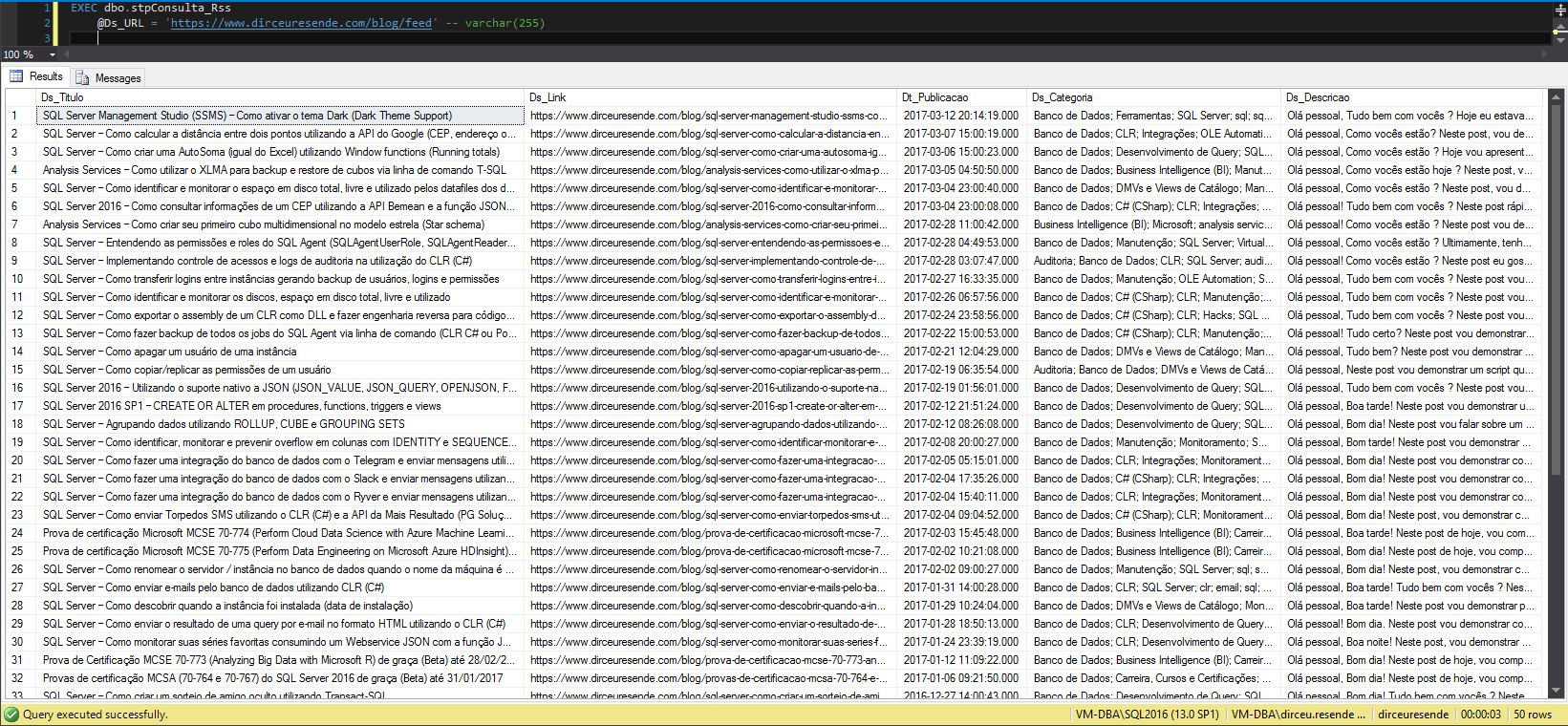
Usage example (It is the same for both SP’s – CLR and xp_cmdshell):
Querying for SQL Server updates
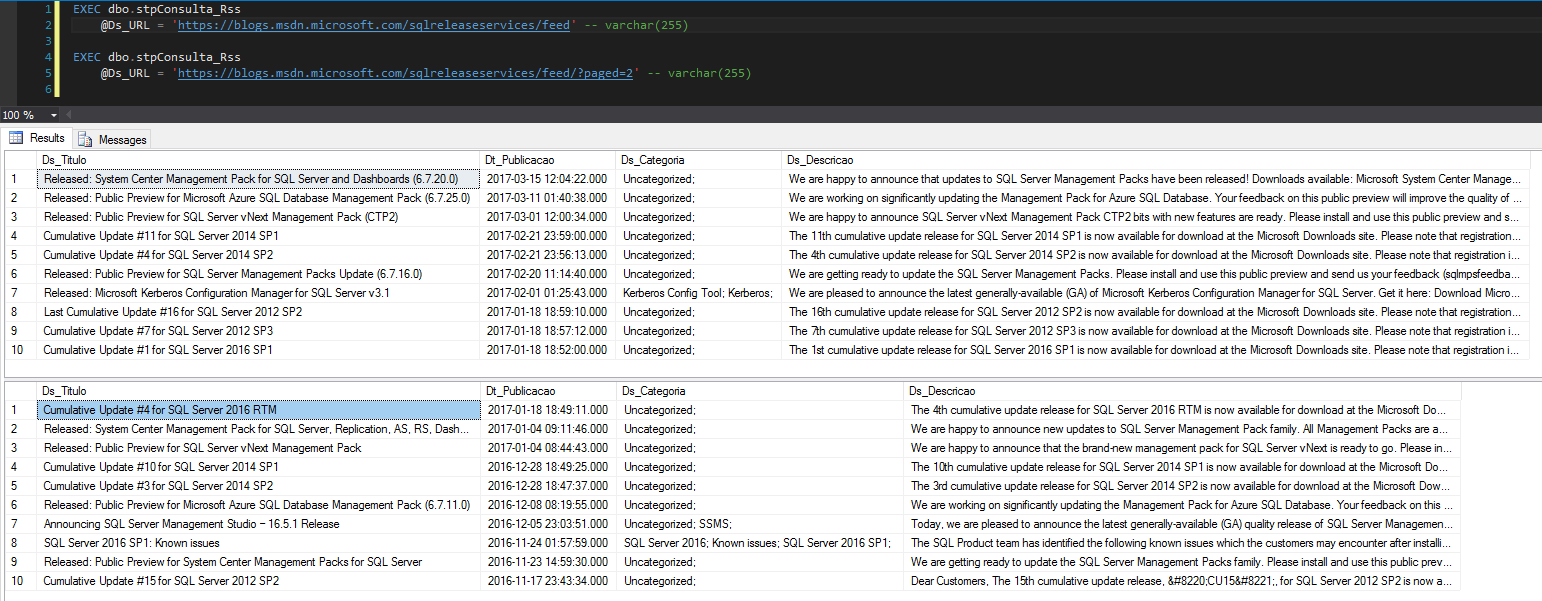
Do you want to stay up to date with SQL Server updates and know when a Service Pack, Cumulative Update or new version was released?
Discover the blog https://blogs.msdn.microsoft.com/sqlreleaseservices and follow your feed.
How to create an RSS feed reader in SQL Server
Now I will demonstrate how to create an RSS feed reader, so that it consults all the posts from the sites you want to follow and sends you weekly updates with new posts. You can customize this reader as you wish, you can change the frequency of alerts, creating a category option when sending the email, separating posts by categories, etc. Be creative.
To be able to create the RSS feed reader below, you will need 2 prerequisites:
- Procedure stpExporta_Table_HTML_Output, available in the post How to export data from a SQL Server table to HTML.
- Database Mail configured. If not, see how to do it in the post SQL Server – How to activate and configure Database mail to send and monitor emails through the database (sp_send_dbmail).
Table creation and configuration
IF (OBJECT_ID('dbo.Sites_RSS') IS NOT NULL) DROP TABLE dbo.Sites_RSS
CREATE TABLE dbo.Sites_RSS (
    Id INT IDENTITY(1, 1) NOT NULL,
    Ds_Url VARCHAR(255)
)

INSERT INTO dbo.Sites_RSS ( Ds_Url )
VALUES
    ( 'https://dirceuresende.com/blog/feed' ),
    ( 'https://pessoalex.wordpress.com/feed/' ),
    ( 'https://demetriosilva.wordpress.com/feed' ),
    ( 'https://caiosamante.wordpress.com/feed' ),
    ( 'http://edvaldocastro.com/feed' ),
    ( 'https://blogs.msdn.microsoft.com/fcatae/feed' ),
    ( 'http://www.fabriciolima.net/feed' ),
    ( 'https://gustavomaiaaguiar.wordpress.com/feed' ),
    ( 'https://pedrogalvaojunior.wordpress.com/feed' ),
    ( 'https://leka.com.br/feed' ),
    ( 'https://blogdojamal.wordpress.com/feed' ),
    ( 'http://crespidb.com/feed' ),
    ( 'http://blog.sqlauthority.com/feed' ),
    ( 'https://sqlfromhell.wordpress.com/feed' ),
    ( 'https://sqlgo.wordpress.com/feed' ),
    ( 'http://www.tiagoneves.net/blog/feed' ),
    ( 'http://www.vssti.com.br/blog/feed' )


IF (OBJECT_ID('dbo.Conteudo_RSS') IS NOT NULL) DROP TABLE dbo.Conteudo_RSS
CREATE TABLE dbo.Conteudo_RSS (
    Id INT IDENTITY(1, 1) NOT NULL,
    Ds_Url VARCHAR(500),
    Ds_Titulo VARCHAR(500),
    Ds_Link VARCHAR(500),
    Dt_Publicacao DATETIME,
    Ds_Categorias VARCHAR(MAX),
    Ds_Conteudo VARCHAR(MAX),
    Fl_Enviado BIT
)


-- Executa a SP para buscar os posts,
-- atualizar no banco
--  e enviar as novidades por e-mail
EXEC dbo.stpLeitor_Feeds_RSS
RSS reader source code
CREATE PROCEDURE dbo.stpLeitor_Feeds_RSS
AS BEGIN

    ---------------------------------------------------------------------------------
    -- ATUALIZA O CONTEÚDO
    ---------------------------------------------------------------------------------

    DECLARE
        @Contador INT = 1,
        @TotalSites INT = (SELECT COUNT(*) FROM dbo.Sites_RSS),
        @Url VARCHAR(500),
        @Ultima_Data DATETIME


    IF (OBJECT_ID('tempdb..#Sites') IS NOT NULL) DROP TABLE #Sites
    SELECT
        ROW_NUMBER() OVER(ORDER BY Ds_Url) AS Ranking,
        Ds_Url
    INTO
        #Sites
    FROM
        dbo.Sites_RSS WITH(NOLOCK)


    IF (OBJECT_ID('tempdb..#Conteudo') IS NOT NULL) DROP TABLE #Conteudo
    CREATE TABLE #Conteudo (
        Id INT IDENTITY(1, 1) NOT NULL,
        Ds_Titulo VARCHAR(500),
        Ds_Link VARCHAR(500),
        Dt_Publicacao DATETIME,
        Ds_Categorias VARCHAR(MAX),
        Ds_Conteudo VARCHAR(MAX)
    )


    WHILE(@Contador <= @TotalSites)
    BEGIN


        SELECT @Url = Ds_Url
        FROM #Sites
        WHERE Ranking = @Contador


        TRUNCATE TABLE #Conteudo

        INSERT INTO #Conteudo
        EXEC dbo.stpConsulta_Rss
            @Ds_URL = @Url -- varchar(255)


        SELECT @Ultima_Data = MAX(Dt_Publicacao)
        FROM dbo.Conteudo_RSS WITH(NOLOCK)
        WHERE Ds_Url = @Url


        INSERT INTO dbo.Conteudo_RSS (
            Ds_Url,
            Ds_Titulo,
            Ds_Link,
            Dt_Publicacao,
            Ds_Categorias,
            Ds_Conteudo,
            Fl_Enviado
        )
        SELECT
            @Url,
            Ds_Titulo,
            Ds_Link,
            Dt_Publicacao,
            Ds_Categorias,
            Ds_Conteudo,
            0 AS Fl_Enviado
        FROM
            #Conteudo
        WHERE
            Dt_Publicacao > ISNULL(@Ultima_Data, '1900-01-01')


        SET @Contador += 1


    END


    ---------------------------------------------------------------------------------
    -- ENVIA OS NOVOS POSTS
    ---------------------------------------------------------------------------------

    -- Não envia posts com mais de 7 dias
    UPDATE
        dbo.Conteudo_RSS
    SET
        Fl_Enviado = 1
    WHERE
        Dt_Publicacao < DATEADD(DAY, -7, CONVERT(DATE, GETDATE()))
        AND Fl_Enviado = 0


    IF (OBJECT_ID('tempdb..##Leitor_RSS') IS NOT NULL) DROP TABLE ##Leitor_RSS
    SELECT
        Ds_Url AS [Fonte],
        Ds_Titulo AS [Titulo],
        Dt_Publicacao AS [Publicação],
        Ds_Link AS [URL]
    INTO
        ##Leitor_RSS
    FROM
        dbo.Conteudo_RSS
    WHERE
        Fl_Enviado = 0


   CREATE CLUSTERED INDEX SK01_Leitir_RSS ON ##Leitor_RSS([Publicação] DESC)


    IF ((SELECT COUNT(*) FROM ##Leitor_RSS) > 0)
    BEGIN


        DECLARE
            @Ds_Saida VARCHAR(MAX);

        EXEC dbo.stpExporta_Tabela_HTML_Output
            @Ds_Tabela = '##Leitor_RSS' , -- varchar(max)
            @Fl_Aplica_Estilo_Padrao = 1 , -- bit
            @Ds_Saida = @Ds_Saida OUTPUT -- varchar(max)


        EXEC msdb.dbo.sp_send_dbmail
            @profile_name = 'ProfileEnvioEmail' , -- sysname
            @recipients = '[email protected]' , -- varchar(max)
            @subject = N'Leitor RSS - Atualização Semanal' , -- nvarchar(255)
            @body = @Ds_Saida , -- nvarchar(max)
            @body_format = 'HTML'


        UPDATE
            dbo.Conteudo_RSS
        SET
            Fl_Enviado = 1
        WHERE
            Fl_Enviado = 0


        SELECT * FROM ##Leitor_RSS


    END


END
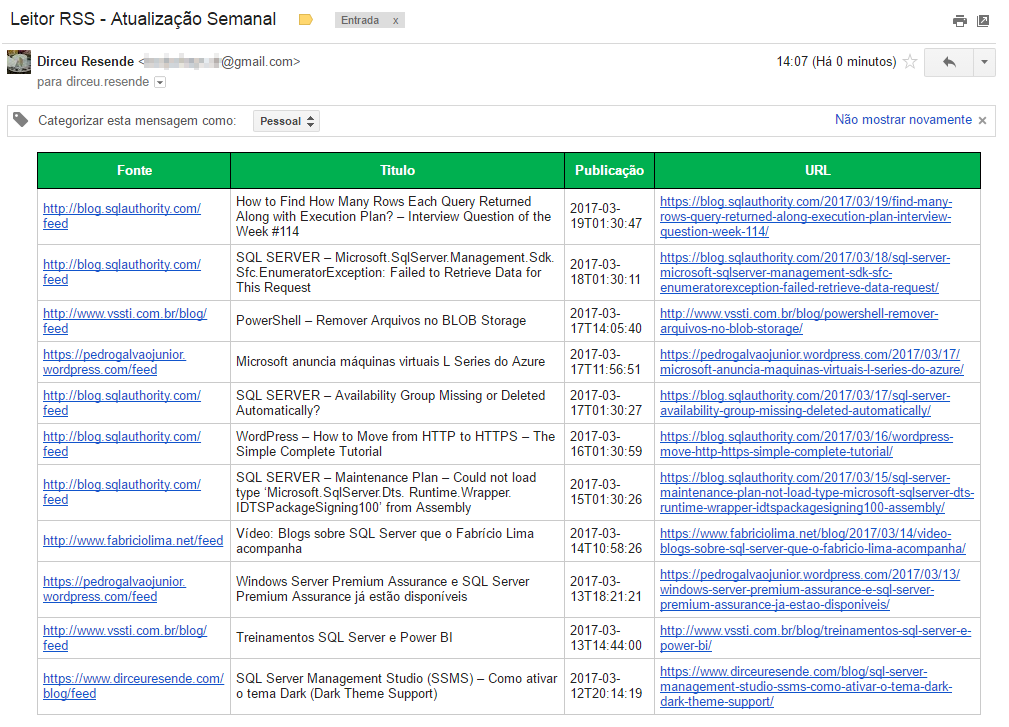
Example of the email sent
That's it, folks!
I hope you liked it.
A hug and see you in the next post.

Comments (0)
Loading comments...