
Hey guys!
In this article I would like to demonstrate in practice the use of 2 query hints widely used by developers to avoid locks when reading data, which are NOLOCK and READPAST, and effectively demonstrate the effect of these hints on a query.
The idea of writing this article came from a question sent to the group “SQL Server – DBA”, from Telegram, and also an old desire to write about this whenever I see environments where almost all queries have NOLOCK.
After reading this post, you will be able to understand exactly how these 2 hints work and will use them wisely and only when convenient. No need to put NOLOCK/READPAST in all your queries, huh!
If your environment has a lot of competition and locks, blocks and deadlocks are frequent and a problem for you, I suggest thinking about a more complete approach than using these hints, which would be to use the Read Committed Snapshot (RCSI) isolation mode, which allows you to use the Read Committed mode without blocking reads when open transactions occur. As not everything is rosy, there are some side effects when using this mode, such as a possible drop in performance. If you want to know more about him, I suggest reading the article Read Committed Snapshot Isolation: Writers Block Writers (RCSI), by the great master Brent Ozar.
To demonstrate how NOLOCK and READPAST work, let's create a table with some records:
IF (OBJECT_ID('dbo.Teste_Nolock') IS NOT NULL) DROP TABLE dbo.Teste_Nolock
CREATE TABLE dbo.Teste_Nolock (
    Id INT IDENTITY(1,1) NOT NULL PRIMARY KEY CLUSTERED,
    Nome VARCHAR(100)
)

INSERT INTO dbo.Teste_Nolock
VALUES ('Dirceu'), ('Resende'), ('Consultor'), ('SQL Server'), ('Power BI'), ('SSRS'), ('SSIS'), ('SSAS'), ('Blog')
Current table:

[Video] – NOLOCK vs READPAST
NOLOCK or READ UNCOMMITTED
Isolation mode well known by DEVs, which allows returning the current data from the table without having to wait for the end of ongoing transactions, doing a “dirty read” of the data, that is, if there are transactions changing the data in the tables being consulted, these records will be returned as they are, even if the transactions are still open (no commit or rollback has been done) and this data is not definitive yet.
This type of reading can be very useful in cases of high competition and the occurrence of locks and deadlocks in the environment, but keep in mind the side effects of using the NOLOCK hint (equivalent to the SET TRANSACTION ISOLATION LEVEL READ UNCOMMITTED or WITH(READUNCOMMITTED) command).
Practical example of NOLOCK
In a SQL Server Management Studio (SSMS) session, run the command below:
BEGIN TRANSACTION

UPDATE dbo.Teste_Nolock
SET Nome = 'Teste Nolock'
WHERE Nome = 'Dirceu'
Open another session in SSMS and run the command below:
BEGIN TRANSACTION

INSERT INTO dbo.Teste_Nolock
VALUES('Teste Nolock2')
Note that these 2 sessions opened a transaction, made changes to the data, but neither commit nor rollback has been done yet, that is, this modified data can still be considered as “temporary” data, since it is not committed and confirmed data. If there is a problem in the flow or the user simply wants to undo these changes, they can roll back these transactions and this inserted/changed data never “officially” existed.
Even so, if still in this scenario, you open a new session and try to query the data, you will see that your session will wait indefinitely, until the transactions are completed with COMMIT or ROLLBACK. This occurs because SQL Server's default reading mode is READ COMMITED, that is, it only returns data that has already been committed to the database.
Using the NOLOCK hint, you can return data without having to wait for these transactions to complete, but data that has not yet been committed will be returned as if it were already definitive data:
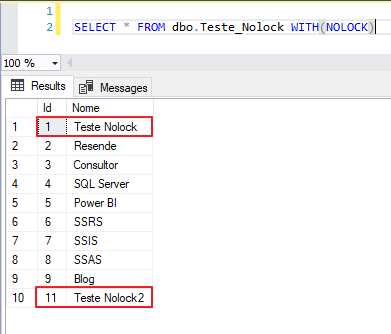
If these sessions perform a ROLLBACK of the data, you ended up querying data that never actually existed. This in a report could end up producing incorrect results.
READPAST
Another way to read data from tables that are being changed by open transactions without having to wait for these transactions to finish is to use the READPAST hint. Unlike NOLOCK, READPAST does not allow dirty reads (save exceptions), but understand how it works: READPAST will only return data that is not being affected by open transactions.
Practical example of NOLOCK
In a SQL Server Management Studio (SSMS) session, run the command below:
BEGIN TRANSACTION

UPDATE dbo.Teste_Nolock
SET Nome = 'Teste Nolock'
WHERE Nome = 'Dirceu'
Open another session in SSMS and run the command below:
BEGIN TRANSACTION

INSERT INTO dbo.Teste_Nolock
VALUES('Teste Nolock2')
And now, let's try to read the data using the READPAST hint and see how uncommitted records will be returned:
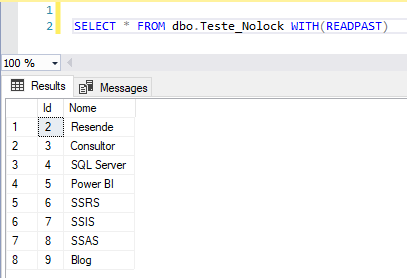
Using the READPAST hint, you can return data without having to wait for these transactions to complete, but data that has not yet been committed will not be returned by SELECT, that is, records can be ignored in this reading mode. When you are using aggregation functions, such as SUM, MAX, MIN, in this reading mode, the final values can be very different from the actual values, as records can be ignored.
NOLOCK or READPAST?
To conclude and summarize this article, both NOLOCK and READPAST have as their main justification for use, the possibility of reading data in tables without having to wait for active transactions to be completed, minimizing the occurrence of locks and blocks, even if these records are being changed by these transactions.
When using NOLOCK (or READ UNCOMMITED), if the table has 10 rows and 3 are being changed by UPDATE/DELETE, the SELECT command will return all 10 rows, with the data “updated”. New inserted rows that have not yet been committed will also be returned by SELECT.
When using READPAST, if the table has 10 rows and 3 are being changed by UPDATE/DELETE, the SELECT command will only return the 7 rows that are not being changed. New inserted rows that have not yet been committed will NOT be returned by SELECT.
References:
– https://docs.microsoft.com/pt-br/sql/t-sql/language-elements/transaction-isolation-levels?view=sql-server-2017
– https://www.tiagoneves.net/blog/isolation-level-no-sql-server/
– http://www.diegonogare.net/2013/01/transaction-isolation-level-voc-est-usando-certo/
– https://imasters.com.br/data/entendê-transaction-isolation-level-no-sql-server

Comments (0)
Loading comments...