
Hey guys! How are you?
Today we are going to dive into one of the topics that generates the most doubt in the minds of those who are starting the journey of data modernization in Microsoft Azure: choosing the purchasing model for Azure SQL Database.
If you've already opened the Azure portal, you may have come across alphabet soup: DTU, vCore, Basic, Standard, General Purpose, Single Database, Elastic Pool, Hyperscale, Serverless, Elastic Pool…
The list is long and choosing the wrong model can mean paying much more for an unnecessary resource and/or suffering from performance problems because the IOPS or CPU bottleneck is hitting the ceiling of a service layer that was not well planned for that workload.
When Azure SQL Database emerged, Microsoft needed to reach two completely different audiences at the same time: developers who just wanted a working database and DBAs who were used to thinking about CPU, memory, disk and latency and wanted the flexibility to choose the database's hardware components.
In this post, we will analyze the technical differences, understand the architecture behind each tier and, of course, provide a script so you know exactly what the vCore equivalent is for your bank that currently runs on DTU.
What is the DTU Model (Database Transaction Unit)?
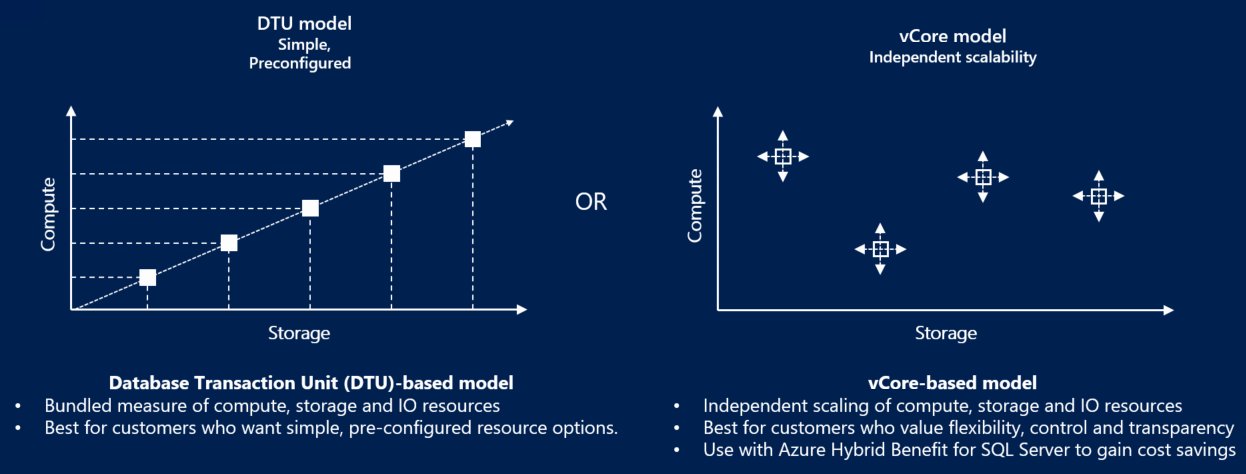
The model based on DTU it was the first to be released on Azure SQL Database, and is of the Single Database type. Microsoft's idea was to simplify the lives of DBAs and Developers: instead of worrying about how many processor cores, how many IOPS the disk will have or how much RAM the bank needs, you buy a “unit of measurement” that represents computational power.
One DTU is a balanced mixture of CPU, Memory and Data Reading/Writing (I/O) based on an internal Microsoft benchmark that simulates a generic OLTP workload, with reading, writing, CPU usage and transaction log generation.
When you buy DTUs, you are not buying CPU, nor memory, nor IOPS individually. You are buying a slice of this closed package.
In practice, this means that if your application is CPU-bound, you will hit the CPU limit before anything else. If it is I/O-bound, it will hit IOPS. If it is log-heavy, the bottleneck appears as WRITELOG. And what's worse: you can't reallocate resources within the package. If you have plenty of memory but a lack of CPU, you will have to increase the bank tier, which will increase CPU, memory and disk, even if you don't need to increase memory and disk, for example.
Service Levels in the DTU Model
- Basic: It is the simplest tier possible, which costs USD 4.90 monthly, where the database size limit is just 2 GB and the processing power is minimal. It was designed for extremely lightweight scenarios, proofs of concept, demos and very small applications. IOPS are very low, latency is high and any load spike quickly becomes a bottleneck. It's not a tier for serious production.
- Standard: This is where most businesses start, where the monthly cost starts at USD 17.81 with up to 250 GB of storage (tier S0) and can scale up to a monthly cost of USD 5606.43 with 1 TB of storage (tier S12). In this tier, if you allocate 1 GB or 250 GB, you will pay exactly the same amount. From 250 GB onwards, anything beyond this size will incur a charge. Provides predictable performance for small to medium applications and small data projects. Storage continues to be remote, logging can easily become a bottleneck and more aggressive workloads begin to suffer from I/O and WRITELOG latency.
- Premium: Focused on mission-critical applications, where the monthly cost starts at USD 552.12 with up to 500 GB of storage already included (tier P1), reaching up to USD 19081.25 and 4 TB of storage (tier P15). At Business Critical, you have IOPS significantly higher, low latency (local SSD) and support Read Scale-Out (a free read replica) for heavy queries and reports without impacting the primary node where the application runs. Premium DTU and Business Critical vCore use very similar architectures.
In the DTU service layer, the bank uses local hardware redundancy (LRS), with a typical SLA of 99.99%, where your bank has replicas in the same datacenter, but if there is any unavailability in that datacenter, your bank will be unavailable.
What is the vCore (Virtual Core) Model?
The model vCore, which is also of the Single Database type, was created to provide transparency. It is much closer to what we are used to in the environment On-Premises. In it, you specifically choose the hardware generation, the number of virtual cores (vCores) and the amount of memory is linked to this choice (generally a fixed ratio per core).
With vCore, you can understand exactly whether the bank is CPU-bound, memory-bound or I/O-bound. You can plan growth, estimate costs, compare with on-premises and, most importantly, technically justify every penny spent. In return, you lose the simplicity of DTU and take on the responsibility of architecting correctly.
The big advantage here, in addition to transparency, is the possibility of using the Azure Hybrid Benefit (AHB), which allows you to use your SQL Server licenses that you already have (with Software Assurance) to pay much less on PaaS.
Service Levels in the vCore Model
- General Purpose: Entry layer for vCore and ideal for common enterprise applications, as long as they are not very sensitive to I/O latency. The initial monthly cost starts from USD 568.48 with 2 vCores 1 GB of storage, expandable up to 1 TB and can reach USD 37483.51 with 128 vCores and 4 TB of storage. Storage and compute are separate. The transaction log and data are in Azure Premium Storage, which may result in slightly higher IO latency compared to Business Critical.
- General Purpose (Serverless): General Purpose variant where computation automatically scales according to usage, allowing auto-pause from the bank when idle and billing per vCore per second. Ideal for intermittent workloads, development environments, QA and applications with sporadic use, drastically reducing the cost when the database is not being used. It has cold start upon resumption and is not suitable for critical OLTP systems or 24×7 workloads.
- Business Critical: High performance and high availability, with monthly costs starting at USD 1392.62 for 1 GB of storage, reaching up to USD 91520.22 per month, with 128 vCores and 4 TB of storage. As with Premium (DTU), the data is stored on local SSDs (NVMe), guaranteeing very low latency and replicating the data internally via Always On in 3 replicas, in addition to support for Read Scale-Out, where 1 of the 3 local replicas allows reads to execute heavy queries and reports without impacting the primary node where the application runs. Ideal for banks with a high volume of WRITELOG and is the right tier for critical systems, heavy OLTP and banks that suffer from WRITELOG and PAGEIOLATCH.
- Hyperscale: The most modern architecture, with monthly costs starting at USD 506.70 for 1 high availability replica, reaching up to USD 101339.77 per month, with 80 vCores and 4 high availability replicas. Allows banks of up to 128 TB in Single Database (and 100 TB in Elastic Pool). It separates the query engine from the storage engine, enabling near-instant scaling regardless of data size, enabling virtually unlimited data growth. It is not automatically faster than Business Critical. It's best when the problem is size and growth, not pure latency.
- Hyperscale (Serverless): Hyperscale variant (availability depends on region) where computing scales automatically and the bank can auto-pause when idle, charging per vCore per second. It maintains the entire Hyperscale distributed architecture (Page Servers + Log Service), allowing banks of up to 128 TB at an extremely reduced cost in intermittent workloads or with long periods of inactivity. It has a cold start upon resumption and is not suitable for 24×7 critical workloads that require constant minimum latency.
Graphic comparison:
Local Redundancy (LRS) and Zone Redundancy (ZRS)
Just like in the DTU service layer, in vCore models, the default option is to use local hardware redundancy (LRS), with a typical SLA of 99.99%, your bank has replicas in the same datacenter, but if there is any unavailability in that datacenter, your bank will be unavailable.
Unlike DTU, in vCore it is also possible to choose zone redundancy (ZRS), spread across 3 different datacenters (3 availability zones), with an SLA of 99.995%. This means your data is stored simultaneously in 3 separate physical zones, each with independent power, networking and cooling. If an entire data center goes down, Azure promotes another replica and your application keeps running.
ZRS offers higher SLA and datacenter fault tolerance, but at an additional cost of 10~20%, slightly slower writes and slightly higher latency.
Reserved Capacity (vCores Reservation)
In the vCore model it is possible to contract a 1 or 3 year reserve, drastically reducing the monthly cost, which does not happen in the DTU model.
With vCore you don't “rent by the hour forever”: You can purchase CPU capacity (vCores) in advance for 1 or 3 years, and in return, Microsoft gives you aggressive discounts on the value of the compute, reaching up to 33% off with a 1-year reservation, 55% off on a 3-year reservation and 70~80% off on a 3-year reservation + Azure Hybrid Benefit (AHB).
In practice, you don't reserve a bank, you reserve as many vCores as you want in a region. These vCores remain as credit and any Azure SQL vCore you have in that region automatically consumes these credits. In other words, you don't lose flexibility and can move the bank, change tier, scale and the credit follows.
Direct Comparison: DTU vs vCore
To make your decision making easier, I prepared this comparative table that shows where each model shines:
| Feature | DTU model | vCore model |
|---|---|---|
| Best use for | Simplicity and predictability of low costs. | Granular control, scalability and license savings. |
| Hardware Configuration | Abstract (you don't choose the processor). | Specifiable (Gen5, Fsv2, M-Series, etc). |
| Storage Scalability | Linked to the DTU tier. | Independent (you can increase the disk without increasing the CPU). |
| Azure Hybrid Benefit | Not available. | Available (up to 55% savings). |
| Read Replication | Available only on Premium. | Available in Business Critical and Hyperscale. |
Azure SQL Database Serverless (vCore Serverless)
THE Serverless is not a new type of database, but rather a special mode of the vCore model, available in the General Purpose and Hyperscale tiers, where Microsoft automatically manages the amount of active CPU, scaling up and down dynamically depending on the workload.
Unlike provisioned vCore, where you pay for fixed vCores 24x7, in Serverless you pay for CPU used per second and storage, which can drastically reduce the cost of intermittent workloads.
Main Features
- CPU auto-scale: Azure automatically increases and reduces the number of vCores based on actual bank usage.
- Auto-pause: If the database is inactive for a configurable period (min. 1 hour), it can be paused automatically, and you stop paying for computation and only pay for data storage.
- Cold Start: When receiving a new connection after being paused, the bank is automatically reactivated (30–90s on average).
- No downtime when scaling: The scale up/down occurs online, without downtime.
Costs
- You pay per second of active vCore, not per provisioned vCore.
- During auto-pause, you only pay for storage and backups.
- Ideal for workloads that are idle most of the time, such as loads in D-1 environments that do not have readings during the day.
When is it worth using Serverless
- Development, approval and QA environments.
- Applications with sporadic use (intranet, backoffice, SaaS with few accesses).
- APIs with intermittent traffic.
- Loads that are inactive for long periods.
- Projects with a strong concern about cost.
- Large Hyperscale banks that are inactive most of the time.
When NOT to use Serverless
- Critical and 24×7 OLTP systems.
- Workloads sensitive to connection latency (cold start).
- Frequent continuous or batch ETLs.
- Banks that need total performance predictability.
Change service tier between DTU and vCore
Important: There are few limitations when switching between tiers, even different models (DTU and vCore), that is, you can migrate from DTU Basic to a vCore Business Critical and then back to a vCore General Purpose or DTU Standard, for example.
However, you need to be careful.
The Size Barrier (Max Storage Size)
The first point of attention is the physical storage limit. Each service tier has a maximum supported GB ceiling. If your database has grown beyond the target tier limit, Azure simply won't allow you to downgrade or switch models until you reduce your data volume or choose a compatible tier.
A classic example: The DTU Basic tier is limited to 2 GB. If your bank has 5 GB in a Standard S0 tier and you try to move it to Basic to save, the operation will fail.
Limitation of Engine Resources (Features)
Although the SQL Server engine is the same, Microsoft disables some features depending on the tier contracted in the DTU service layer.
Lower tiers, specifically DTU Basic and Standard at levels S0, S1 and S2, have restrictions on features such as Columnstore Indexes and In-Memory OLTP (XTP), which are not available at these levels.
Hyperscale has different rules
Hyperscale is not just a higher tier, it completely changes the physical architecture of the bank, where the bank no longer exists as a traditional MDF: Data goes to distributed storage, data is replicated internally using Log Service + Page Servers instead of an AlwaysOn and the bank becomes a set of distributed fragments.
When migrating a bank to Hyperscale, you have a window of approximately 45 days to return to General Purpose or Business Critical while maintaining the same bank. After this period, direct downgrade is no longer allowed and return requires a data copy migration strategy.
This happens because Microsoft temporarily maintains a compatible image of the bank in the old format. For ~45 days, Azure is still able to remount its database back to GP/BC. After that, the bank is definitively converted to the distributed format and from that moment on, the traditional MDF no longer exists.
After these 45 days, you can no longer move from Hyperscale to another tier or layer of services, the portal simply blocks this change. If you really want to migrate to another service layer or tier, you will have to create a new database and migrate the data, using BACPAC, Replication, SQLPackage or another tool.
Resource Availability Table (DTU Model)
To make things easier, I put together this quick table so you don't make mistakes when planning your tier:
| Feature | Basic / S0 – S2 | Standard S3 – S12 | Premium (All) |
|---|---|---|---|
| Columnstore Indexes | Not supported | Supported | Supported |
| In-Memory OLTP | Not supported | Not supported | Supported |
| Maximum Size | 250GB (S2) | 4TB (S3+) | 4TB |
Impeditive Items Check Script
To avoid being caught by surprise, I prepared a script that you should run on your bank BEFORE attempting any downgrade to lower tiers. It checks if there are objects that prevent going to the input DTU Basic/Standard world.
-- VERIFICA RECURSOS E TAMANHO PARA DOWNGRADE (DTU BASIC / S0-S2)
IF ( OBJECT_ID( 'tempdb..#Tmp_Validacao_Downgrade' ) IS NOT NULL )
    DROP TABLE [#Tmp_Validacao_Downgrade];


CREATE TABLE [#Tmp_Validacao_Downgrade] (
    [Ds_Tipo_Validacao] VARCHAR(100) COLLATE SQL_Latin1_General_CP1_CI_AS,
    [Nm_Referencia]     VARCHAR(255) COLLATE SQL_Latin1_General_CP1_CI_AS,
    [Ds_Mensagem]       VARCHAR(500) COLLATE SQL_Latin1_General_CP1_CI_AS,
    [Fl_Impeditivo]     BIT
)
WITH ( DATA_COMPRESSION = PAGE );


-- 1. VALIDACAO DE TAMANHO (STORAGE)
DECLARE @Nr_Tamanho_Atual_Gb DECIMAL(10, 2);


SELECT
    @Nr_Tamanho_Atual_Gb = CAST(SUM( [size] ) * 8. / 1024 / 1024 AS DECIMAL(10, 2))
FROM
    [sys].[database_files]
WHERE
    [type] = 0; -- SOMENTE DADOS (DATA)


-- VERIFICA LIMITE PARA BASIC (2 GB)
IF ( @Nr_Tamanho_Atual_Gb > 2.0 )
BEGIN
    INSERT INTO [#Tmp_Validacao_Downgrade] ( [Ds_Tipo_Validacao], [Nm_Referencia], [Ds_Mensagem], [Fl_Impeditivo] )
    VALUES
    (
        'Storage', 'Tier Basic', 'O banco possui ' + CAST(@Nr_Tamanho_Atual_Gb AS VARCHAR(10)) + ' GB. O limite do Basic e 2 GB.', 1
    );
END;


-- VERIFICA LIMITE PARA S0-S2
IF ( @Nr_Tamanho_Atual_Gb > 250.0 )
BEGIN
    INSERT INTO [#Tmp_Validacao_Downgrade] ( [Ds_Tipo_Validacao], [Nm_Referencia], [Ds_Mensagem], [Fl_Impeditivo] )
    VALUES
    (
        'Storage', 'Tier S0-S2', 'O banco possui ' + CAST(@Nr_Tamanho_Atual_Gb AS VARCHAR(10)) + ' GB. Se tentar migrar para o tier DTU Standard S0-S2, vai dar erro.', 1
    );
END;


-- 2. VALIDACAO DE INDICES COLUMNSTORE
INSERT INTO [#Tmp_Validacao_Downgrade] ( [Ds_Tipo_Validacao], [Nm_Referencia], [Ds_Mensagem], [Fl_Impeditivo] )
SELECT
    'Feature'                                                 AS [Ds_Tipo_Validacao],
    [A].[name] + '.' + [B].[name]                             AS [Nm_Referencia],
    'Indices Columnstore requerem no minimo tier Standard S3' AS [Ds_Mensagem],
    1                                                         AS [Fl_Impeditivo]
FROM
    [sys].[indexes]            AS [A]
    INNER JOIN [sys].[objects] AS [B] ON [A].[object_id] = [B].[object_id]
WHERE
    [A].[type] IN ( 5, 6 );


-- 3. VALIDACAO DE IN-MEMORY OLTP
INSERT INTO [#Tmp_Validacao_Downgrade] ( [Ds_Tipo_Validacao], [Nm_Referencia], [Ds_Mensagem], [Fl_Impeditivo] )
SELECT
    'Feature'                                                       AS [Ds_Tipo_Validacao],
    [name]                                                          AS [Nm_Referencia],
    'Tabelas em memoria requerem tier Premium ou Business Critical' AS [Ds_Mensagem],
    1                                                               AS [Fl_Impeditivo]
FROM
    [sys].[tables]
WHERE
    [is_memory_optimized] = 1;


-- EXIBE O RESULTADO FINAL
SELECT
    [Ds_Tipo_Validacao],
    [Nm_Referencia],
    [Ds_Mensagem],
    ( CASE WHEN [Fl_Impeditivo] = 1 THEN 'SIM' ELSE 'NAO' END ) AS [Fl_Erro_Critico]
FROM
    [#Tmp_Validacao_Downgrade];
When DTU makes sense
DTU makes sense when simplicity is more important than control. Small environments, simple applications, teams without a dedicated DBA or scenarios where the bank is not critical tend to benefit from the DTU model. It reduces decisions, reduces human error, and delivers something good enough without requiring in-depth architectural knowledge.
In practical terms, when you are starting a new project, starting at DTU makes a lot of sense, as you can start with a very low value and scale up to the next tiers as needed. From tier S6 onwards, the cost reaches USD 712.44 and migrating to the vCore model now makes more sense than maintaining DTU.
When to migrate from DTU to vCore?
The million dollar question! In my experience, the signs that you should move away from DTU and go to vCore are:
- Memory Pressure (Memory-bound): If you suffer from waits like RESOURCE_SEMAPHORE, operator spills (Hash/Sort) or cache degradation and the DTU is already high. In vCore you can control the memory ratio per core, something impossible in DTU.
- Storage Latency (IO-bound): If you notice recurring waits like PAGEIOLATCH_SH, WRITELOG or LOG_RATE_GOVERNOR. In vCore Business Critical or DTU Premium, the data and log are on a local NVMe SSD, drastically reducing read and write latency, but vCore BC may have a better cost-benefit ratio.
- Licensing Cost: If your company already has SQL Server licenses with Software Assurance, vCore allows you to use Azure Hybrid Benefit and reduce monthly cost by up to 55% (or up to ~80% by combining with reservations).
- Throughput and ETL Predictability: If you need to guarantee log rate (MB/s), IOPS or stable throughput for ETL loads, integrations or batch processes that today suffer from internal DTU governance.
- Bank Size and Growth: If your bank starts approaching 300–500GB, or heading towards the 1 TB limit of the Standard tiers, vCore becomes the natural choice as it allows independent storage growth and access to Hyperscale.
- True High Availability (ZRS): If the bank is critical and needs to survive the fall of an entire data center, only vCore allows Zone Redundant Storage (ZRS) with an SLA of 99.995%.
- Massive data scale (Hyperscale): Only vCore allows banks above 4 TB, reaching up to 128 TB with read scale-out and almost instantaneous restores.
- True parallelism and CPU control: vCore provides true CPU and maxDOP while avoiding the hard and unpredictable limits of DTU.
T-SQL script to compare DTU vs vCore tier of current Azure bank
Many DBAs get lost when converting “X DTUs” to “Y vCores”. To resolve this, I prepared a script that analyzes your current database's DMVs and suggests vCore and DTU configuration based on the hardware you are running on Azure.
Because DTU hides CPU, memory, and I/O inside a closed package, Azure doesn't clearly tell you how much hardware you actually have behind it. This script opens the DTU black box and translates your current database into real infrastructure numbers.
This script estimates how many “logical cores” your bank has today, how much total memory the bank actually has available, and which generation of hardware (Gen4 or Gen5) the bank is running on. From this, it generates From x To which shows how many vCores would be needed to reach something equivalent in the vCore model, and not just on one hardware, but on several different families: Gen4, Gen5, Fsv2 (CPU-bound) and M-Series (memory-bound). For each of them, the script also estimates how much memory that environment would have, making it easier to choose the correct family.
Finally, the script also suggests which vCore tier makes the most sense architecturally for your bank (General Purpose, Business Critical or Hyperscale), based on the current DTU tier, serving as an initial migration guide.
-- https://docs.microsoft.com/en-us/azure/azure-sql/database/migrate-dtu-to-vcore

WITH dtu_vcore_map
AS (
        SELECT
            rg.server_name,
            rg.[database_name],
            rg.slo_name,
            rg.dtu_limit,
            rg.volume_local_iops,
            rg.pool_max_io,
            rg.max_dop,
            rg.max_sessions,
            DATABASEPROPERTYEX( DB_NAME(), 'Edition' )                                      AS dtu_service_tier,
            DATABASEPROPERTYEX( DB_NAME(), 'ServiceObjective' )                             AS [service_objective],
            DATABASEPROPERTYEX( DB_NAME(), 'Updateability' )                                AS updateability,
            (CASE
                WHEN rg.slo_name LIKE '%SQLG4%' OR rg.slo_name LIKE '%GPGen4%' THEN 'Gen4'
                WHEN rg.slo_name LIKE '%SQLGZ%' OR rg.slo_name LIKE '%GPGenZ%' THEN 'Gen4'
                WHEN rg.slo_name LIKE '%SQLG5%' OR rg.slo_name LIKE '%GPGen5%' THEN 'Gen5'
                WHEN rg.slo_name LIKE '%SQLG6%' OR rg.slo_name LIKE '%GPGen6%' THEN 'Gen5'
                WHEN rg.slo_name LIKE '%SQLG7%' OR rg.slo_name LIKE '%GPGen7%' THEN 'Gen5'
                WHEN rg.slo_name LIKE '%SQLG8%' OR rg.slo_name LIKE '%GPGen8%' THEN 'Gen5'
            END
            )                                                                               AS dtu_hardware_gen,
            CAST(rg.dtu_limit / 100. AS DECIMAL(6, 2))                                      AS dtu_logical_cpus,
            CAST((jo.process_memory_limit_mb / s.scheduler_count) / 1024. AS DECIMAL(6, 2)) AS dtu_memory_per_core_gb
       FROM
           sys.dm_user_db_resource_governance                                                                 AS rg
           CROSS JOIN (SELECT COUNT( 1 ) AS scheduler_count FROM sys.dm_os_schedulers WHERE [status] = 'VISIBLE ONLINE') AS s
           CROSS JOIN sys.dm_os_job_object AS jo
       WHERE
           rg.dtu_limit > 0
           AND DB_NAME() <> 'master'
           AND rg.database_id = DB_ID()
   )
SELECT
    server_name                                                                                                                                       AS ServerName,
    [database_name]                                                                                                                                   AS DatabaseName,
    dtu_service_tier                                                                                                                                  AS ServiceTier,
    [service_objective]                                                                                                                               AS ServiceObjetive,
    dtu_limit                                                                                                                                         AS DTUs,
    volume_local_iops                                                                                                                                 AS IOPS,
    pool_max_io                                                                                                                                       AS ElasticPoolMaxIO,
    max_dop                                                                                                                                           AS [MaxDOP],
    max_sessions                                                                                                                                      AS MaxSessions,
    dtu_hardware_gen                                                                                                                                  AS HardwareGeneration,
    (CASE
         WHEN dtu_service_tier = 'Basic' THEN 'General Purpose'
         WHEN dtu_service_tier = 'Standard' THEN 'General Purpose or Hyperscale'
         WHEN dtu_service_tier = 'Premium' THEN 'Business Critical or Hyperscale'
     END
    )                                                                                                                                                 AS vCoreRecommendedTier,
    dtu_logical_cpus                                                                                                                                  AS CPUs,
    CEILING( dtu_memory_per_core_gb * dtu_logical_cpus )                                                                                              AS MemoryInGB,
    (CASE WHEN dtu_hardware_gen = 'Gen4' THEN dtu_logical_cpus WHEN dtu_hardware_gen = 'Gen5' THEN dtu_logical_cpus * 0.7 END)                        AS vCoresNeededForGen4,
    CEILING((CASE WHEN dtu_hardware_gen = 'Gen4' THEN dtu_logical_cpus WHEN dtu_hardware_gen = 'Gen5' THEN dtu_logical_cpus * 0.7 END) * 7 )          AS MemoryNeededForGen4,
    (CASE WHEN dtu_hardware_gen = 'Gen4' THEN dtu_logical_cpus * 1.7 WHEN dtu_hardware_gen = 'Gen5' THEN dtu_logical_cpus END)                        AS vCoresNeededForGen5,
    CEILING((CASE WHEN dtu_hardware_gen = 'Gen4' THEN dtu_logical_cpus * 1.7 WHEN dtu_hardware_gen = 'Gen5' THEN dtu_logical_cpus END) * 5.05 )       AS MemoryNeededForGen5,
    (CASE WHEN dtu_hardware_gen = 'Gen4' THEN dtu_logical_cpus WHEN dtu_hardware_gen = 'Gen5' THEN dtu_logical_cpus * 0.8 END)                        AS vCoresNeededForFsv2,
    CEILING((CASE WHEN dtu_hardware_gen = 'Gen4' THEN dtu_logical_cpus WHEN dtu_hardware_gen = 'Gen5' THEN dtu_logical_cpus * 0.8 END) * 1.89 )       AS MemoryNeededForFsv2,
    (CASE WHEN dtu_hardware_gen = 'Gen4' THEN dtu_logical_cpus * 1.4 WHEN dtu_hardware_gen = 'Gen5' THEN dtu_logical_cpus * 0.9 END)                  AS vCoresNeededForM,
    CEILING((CASE WHEN dtu_hardware_gen = 'Gen4' THEN dtu_logical_cpus * 1.4 WHEN dtu_hardware_gen = 'Gen5' THEN dtu_logical_cpus * 0.9 END) * 29.4 ) AS MemoryNeededForM
FROM
    dtu_vcore_map;
Performance Analysis and Wait Types
When monitoring performance in Azure SQL Database, regardless of model, you should be aware of Wait Types. They are the DBA's compass.
- INSTANCE_AND_RESOURCES_GOVERNOR: If you see this wait type, Azure is throttling your database because of the contracted tier. It's a clear sign that you need an upgrade (more DTUs or more vCores).
- LOG_RATE_GOVERNOR: Indicates that you have reached the transaction log throughput limit. In vCore, each tier has a log MB/s limit. If your process INSERT/UPDATE bulk is slow, the bottleneck could be here.
- WRITELOG: Common in Standard or General Purpose tiers, where storage is not local. If this wait time is high, consider moving to Premium or Business Critical.
Azure SQL Database does not offer unlimited resources. Each tier has internal limits on CPU, IO, log rate, sessions and workers. Upon reaching these limits, the engine starts to apply governance, causing waits such as LOG_RATE_GOVERNOR and INSTANCE_AND_RESOURCES_GOVERNOR.
Read Scale-out (Native Read Replica)
The tiers DTU Premium and vCore Business Critical offer the resource Read Scale-out, which provides a native, synchronous and automatic read replica, created by Azure SQL Database itself, at no additional cost (already included in the price, in fact).
This replica uses the Always On architecture, maintaining strong consistency (without noticeable lag) and allowing you to offload BI queries, reports, dashboards and reading APIs from the primary replica, without impacting writing performance.
Accessing the read replica is done by simply adding the below parameter to the connection string:
ApplicationIntent=ReadOnly
Unlike traditional replications, Read Scale-out requires no configuration, has no operational complexity, automatically participates in failover mechanisms and ensures that read queries always see data updated in real time.
When a failover occurs, Read Scale-out behaves completely differently than a traditional replica. In architectures with classic replication (Transactional Replication, manually configured Always On, Azure SQL Replica), the application needs to change the connection string to point to the new primary. In Read Scale-out, Azure automatically promotes one of the replicas to primary and recreates the read replica transparently, maintaining the same logical endpoint. This means that no connection string changes are required, and both write and read connections continue to function normally after failover.
Backups and Retention (PITR/LTR)
Azure SQL Database maintains automatic backups of all databases, including full, differential and transaction log, allowing restoration to any point in time (PITR – Point in Time Restore) within the configured retention period.
By default, all banks have 7 days of PITR retention, which can be extended up to 35 days. These backups are stored on storage managed by Azure and are part of the standard cost of the service only up to the standard retention limit.
PITR retention (short term)
- Standard retention (7 days) is included in the bank's cost.
- Any retention beyond this (8–35 days) incurs additional storage charges.
- The value is calculated based on the total bank size and the volume of logs generated.
In banks above a few hundred GB, extending PITR retention from 7 to 35 days can easily add hundreds or thousands of dollars per month in invisible storage costs.
Long Term Retention (LTR)
The LTR is used for legal requirements and audits, allowing you to keep complete copies of the bank for weeks, months or years.
- You can set up weekly, monthly, and annual holds.
- LTR backups are charged in full as backup storage.
- The cost grows linearly with the size of the bank and the number of copies maintained.
Cost difference by tier and architecture
- DTU and vCore General Purpose: Backups are stored on remote Azure Premium Storage, with a cost proportional to the total size of the database.
- vCore Business Critical: Although the data is stored on a local SSD, backups continue to be stored on remote storage and follow the same billing model.
- Hyperscale: It has the greatest potential impact, as the bank can reach tens of TB and backups (including PITR and LTR) follow this growth, and can easily overcome the computing cost.
Real example of financial impact
A 2TB bank with PITR retention extended to 35 days and LTR configured to maintain 12 monthly backups can easily generate an additional estimated backup cost of USD 600 ~ 1000/month on LRS/ZRS and USD 1200 ~ 2100/month on GRS/GZRS, and can be even higher on Hyperscale banks above 10 TB.
Elastic Pool
Elastic Pool is an Azure SQL Database resource sharing model where multiple databases consume a common pool of CPU and I/O, maintaining individual memory governance per bank (separate buffer pool), instead of each bank having fully dedicated resources.
In the DTU model, Elastic Pool uses eDTUs (Elastic DTUs). Although the nomenclature is equivalent, the pool governance model means that, in practice, more eDTUs are needed to deliver the same performance as a Single Database in DTU.
How it works
- The pool has a total of shared vCores or eDTUs.
- Each bank has configurable minimum and maximum limits.
- Azure dynamically distributes CPU and I/O across banks.
- Idle banks give resources to banks that are being used.
Limitations and Particularities of Elastic Pool
- Elastic Pool has a global storage limit shared among all banks.
- Cross-database queries only work between databases that are in the same pool and logical server (Single database does not have this feature).
- Columnstore is only supported from the tier onwards S3/300 eDTU.
- Features such as In-Memory OLTP and Memory-Optimized Tables are not supported in Elastic Pools.
- Log-intensive workloads (WRITELOG) suffer more governance than in Single Database databases.
When Elastic Pool makes sense
- Multi-tenant environments with hundreds or thousands of banks (creating multiple pools, as each pool supports up to 500 banks).
- SaaS applications with unpredictable use per customer.
- Small banks that are idle most of the time.
- Scenarios where the individual cost per bank becomes prohibitive.
When NOT to use Elastic Pool
- Banks with constant simultaneous peaks.
- Predictable latency-sensitive workloads and WRITELOG.
- Critical banks that need minimum performance guaranteed by bank.
Elastic Pool and vCore
- It exists in DTU and vCore, but vCore is where it makes the most sense as it enables Azure Hybrid Benefit, reservations, and modern architecture.
- In vCore, pools exist in General Purpose and Business Critical.
- Hyperscale Pools exist, but the most common and efficient model for massive SaaS is the General Purpose Pool.
Conclusion
The choice between DTU and vCore is not just a question of price, but of architectural strategy, governance and platform evolution. The DTU model is fantastic for its simplicity and low operational friction, while vCore delivers the robustness, predictability and transparency necessary for environments that already behave as critical infrastructure, in addition to facilitating capacity analysis and financial planning for migrations from on-premises environments to Azure SQL Database.
If you are starting a new, small project or with unpredictable use, DTU Standard works very well and allows you to grow in a simple way. If you need minimal disk latency, high log rate and performance consistency, the right path is vCore Business Critical. If your bank grows quickly or needs to exceed traditional size limits, Hyperscale becomes an architectural decision, not just a tier choice.
For environments with intermittent use, development, approval and workloads that are inactive most of the time, vCore Serverless delivers the lowest possible cost without giving up platform resources. For companies that have Software Assurance, vCore with Azure Hybrid Benefit and reservations represents structural savings that the DTU model simply cannot offer.
For SaaS applications and multi-tenant scenarios with dozens or hundreds of banks, with varying and non-competing usage peaks, Elastic Pool is the most efficient way to consolidate cost and capacity, allowing you to scale dozens of banks over the same set of shared resources.
In summary: DTU is an excellent gateway. vCore is the natural path to maturity.
I hope you liked this tip, a big hug and see you next time!

Comentários (0)
Carregando comentários…