Warning: preg_match(): Unknown modifier 'b' in /mnt/datadisk/www/src/Controllers/PostController.php on line 206 CSharp (C#) - How to sort files returned by DirectoryInfo.GetFiles using Natural Sort — Dirceu ResendeSkip to content
In this post I'm going to take a very simple approach to something that many .NET developers look for on the internet, as I looked for this solution myself, but it's a little complicated to find, as most of the solutions posted don't work.
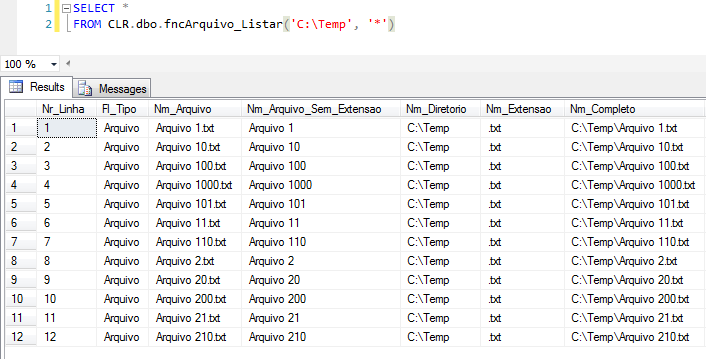
Example of current usage: CSharp sort sorting DirectoryInfo.GetFiles by name natural sort 1
Even if you use an ORDER BY clause to try to sort, this will not work, because SQL Server will sort strings using alphanumeric sorting.
How the alphanumeric string sorting algorithm works
This type of algorithm uses the ASCII code to order the data, comparing character by character until the string ends or the ASCII code of one string is smaller than that of the other. Therefore, in a comparison between File 100 and File 20, the comparison will be made as follows:
Each character of the word “File” will be compared between the 2 strings. As they are the same, the algorithm will proceed to the rest of the string
The character “1” will be compared with the character “2”. As it is smaller, the sorting ends there, placing “File 100” before “File 20”
How the Natural Sort string sorting algorithm works
Just as I am uncomfortable with this ordering, which is the standard for the vast majority of programming languages, many people also do not like “100” coming before “2000” and to give a more “humanized” view, the Natural Sort algorithm was created, which separates numeric characters from letters, and orders them separately. Numbers are compared numerically (where 100 is greater than 20), and strings continue using ASCII code.
To implement the Natural Sort algorithm, I found code on James McCormack's blog to create an ICompare class in C# and thus sort my files in my function (and any other list of files you need to sort).
View ICompare Class Source Code
public class NaturalSortComparer<T> : IComparer<string>, IDisposable
{
    private readonly bool _isAscending;

    public NaturalSortComparer(bool inAscendingOrder = true)
    {
        this._isAscending = inAscendingOrder;
    }

    public int Compare(string x, string y)
    {
        throw new NotImplementedException();
    }

    int IComparer<string>.Compare(string x, string y)
    {
        if (x == y)
            return 0;

        string[] x1, y1;

        if (!table.TryGetValue(x, out x1))
        {
            x1 = Regex.Split(x.Replace(" ", ""), "([0-9]+)");
            table.Add(x, x1);
        }

        if (!table.TryGetValue(y, out y1))
        {
            y1 = Regex.Split(y.Replace(" ", ""), "([0-9]+)");
            table.Add(y, y1);
        }

        int returnVal;

        for (var i = 0; i < x1.Length && i < y1.Length; i++)
        {

            if (x1[i] == y1[i]) continue;

            returnVal = PartCompare(x1[i], y1[i]);
            return _isAscending ? returnVal : -returnVal;
        }

        if (y1.Length > x1.Length)
        {
            returnVal = 1;
        }
        else if (x1.Length > y1.Length)
        {
            returnVal = -1;
        }
        else
        {
            returnVal = 0;
        }

        return _isAscending ? returnVal : -returnVal;
    }

    private static int PartCompare(string left, string right)
    {
        int x, y;
        if (!int.TryParse(left, out x))
            return string.Compare(left, right, StringComparison.InvariantCulture);

        return !int.TryParse(right, out y) ? string.Compare(left, right, StringComparison.InvariantCulture) : x.CompareTo(y);
    }

    private Dictionary<string, string[]> table = new Dictionary<string, string[]>();

    public void Dispose()
    {
        table.Clear();
        table = null;
    }
}
Now I need to change my file listing function (I also included a boolean flag to list files within subdirectories or not) and include an OrderBy function through the LINQ library.
In this excerpt:
foreach (var fileInfo in directories)
I changed it to this excerpt:
foreach (var fileInfo in directories.OrderBy(fileInfo => fileInfo.Name, new NaturalSortComparer<string>()))
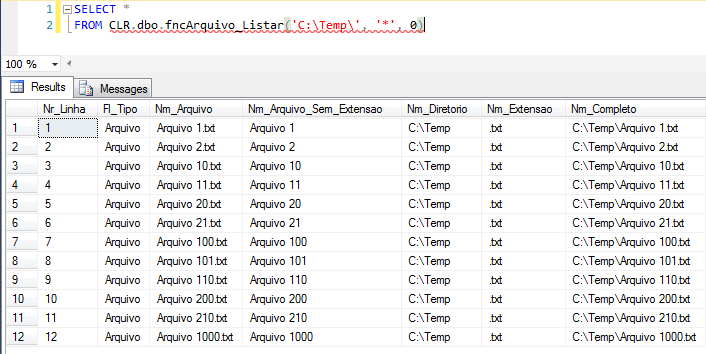
And with that, our problem was solved, where we have the following result: CSharp sort sorting DirectoryInfo.GetFiles by name natural sort solved
View full source code for this function
using System.IO;
using System.Collections;
using System.Data.SqlTypes;
using System.Linq;

public partial class UserDefinedFunctions
{

    private class FileProperties
    {

        public SqlInt32 NrLinha;
        public SqlString Tipo;
        public SqlString FileName;
        public SqlString FileNameWithoutExtension;
        public SqlString DirectoryName;
        public SqlString Extension;
        public SqlString FullName;
        public SqlInt64 FileSize;
        public SqlBoolean IsReadOnly;
        public SqlDateTime CreationTime;
        public SqlDateTime LastAccessTime;
        public SqlDateTime LastWriteTime;


        public FileProperties(SqlInt32 nrLinha, SqlString tipo, SqlString fileName, SqlString fileNameWithoutExtension, SqlString directoryName, SqlString extension, SqlString fullName, SqlInt64 fileSize, SqlBoolean isReadOnly, SqlDateTime creationTime, SqlDateTime lastAccessTime, SqlDateTime lastWriteTime)
        {

            NrLinha = nrLinha;
            Tipo = tipo;
            FileNameWithoutExtension = fileNameWithoutExtension;
            FileName = fileName;
            DirectoryName = directoryName;
            Extension = extension;
            FullName = fullName;
            FileSize = fileSize;
            IsReadOnly = isReadOnly;
            CreationTime = creationTime;
            LastAccessTime = lastAccessTime;
            LastWriteTime = lastWriteTime;

        }
    }

    [Microsoft.SqlServer.Server.SqlFunction(
        FillRowMethodName = "listarArquivos",
        TableDefinition = "Nr_Linha int, Fl_Tipo nvarchar(50), Nm_Arquivo nvarchar(500), Nm_Arquivo_Sem_Extensao nvarchar(500), Nm_Diretorio nvarchar(500), " +
                          "Nm_Extensao nvarchar(20), Nm_Completo nvarchar(500), Qt_Tamanho bigint, Fl_Somente_Leitura bit, Dt_Criacao datetime, " +
                          "Dt_Ultimo_Acesso datetime, Dt_Modificacao datetime"
    )]
    public static IEnumerable fncArquivo_Listar(string Ds_Diretorio, string Ds_Filtro, bool Fl_Recursivo)
    {

        var recursivo = (Fl_Recursivo) ? SearchOption.AllDirectories : SearchOption.TopDirectoryOnly;

        var filePropertiesCollection = new ArrayList();
        var dirInfo = new DirectoryInfo(Ds_Diretorio);
        var files = dirInfo.GetFiles(Ds_Filtro, recursivo);
        var directories = dirInfo.GetDirectories(Ds_Filtro);
        var contador = 1;

        foreach (var fileInfo in directories.OrderBy(fileInfo => fileInfo.Name, new NaturalSortComparer<string>()))
        {

            filePropertiesCollection.Add(new FileProperties(
                contador,
                "Diretorio",
                fileInfo.Name,
                fileInfo.Name,
                fileInfo.Name,
                "",
                fileInfo.FullName + "\\",
                0,
                false,
                fileInfo.CreationTime,
                fileInfo.LastAccessTime,
                fileInfo.LastWriteTime
            ));

            contador++;

        }


        foreach (var fileInfo in files.OrderBy(fileInfo => fileInfo.DirectoryName, new NaturalSortComparer<string>()).ThenBy(fileInfo => fileInfo.Name, new NaturalSortComparer<string>()))
        {

            filePropertiesCollection.Add(new FileProperties(
                contador,
                "Arquivo",
                fileInfo.Name,
                (fileInfo.Extension.Length > 0) ? fileInfo.Name.Replace(fileInfo.Extension, "") : "",
                fileInfo.DirectoryName,
                fileInfo.Extension.ToLower(),
                fileInfo.FullName,
                fileInfo.Length,
                fileInfo.IsReadOnly,
                fileInfo.CreationTime,
                fileInfo.LastAccessTime,
                fileInfo.LastWriteTime
            ));

            contador++;

        }

        return filePropertiesCollection;

    }

    protected static void listarArquivos(object objFileProperties, out SqlInt32 nrLinha, out SqlString tipo, out SqlString fileName, out SqlString fileNameWithoutExtension, out SqlString directoryName, out SqlString extension, out SqlString fullName, out SqlInt64 fileSize, out SqlBoolean isReadOnly, out SqlDateTime creationTime, out SqlDateTime lastAccessTime, out SqlDateTime lastWriteTime)
    {

        var fileProperties = (FileProperties) objFileProperties;

        nrLinha = fileProperties.NrLinha;
        tipo = fileProperties.Tipo;
        fileName = fileProperties.FileName;
        fileNameWithoutExtension = fileProperties.FileNameWithoutExtension;
        directoryName = fileProperties.DirectoryName;
        extension = fileProperties.Extension;
        fullName = fileProperties.FullName;
        fileSize = fileProperties.FileSize;
        isReadOnly = fileProperties.IsReadOnly;
        creationTime = fileProperties.CreationTime;
        lastAccessTime = fileProperties.LastAccessTime;
        lastWriteTime = fileProperties.LastWriteTime;

    }

}
Thank you very much for visiting and see you in the next post!
Dirceu Resende
Database & BI Architect · Microsoft MVP · MCSE, MCSA, MCT, MTA, MCP.


Comentários (0)
Carregando comentários…