
Hey guys!
Good afternoon!
In this post, I will once again demonstrate the use of OLE Automation in SQL Server to consume data from a web service. This time, I will consume the Correios service to calculate shipping times and costs (widely used for e-Commerce).
Getting to know the Correios WebService
Before we start creating the Stored Procedure that will query the data, we first need to understand the parameters and flags of the Correios service.
Correios WebService - Input Parameters
| Field | Type | Mandatory | Description |
|---|---|---|---|
| nCdCompany | String | No. The parameter must be passed even when empty. | Your administrative code with the ECT. The code is available in the body of the contract signed with Correios. |
| sDsPassword | String | No. The parameter must be passed even when empty. | Password to access the service associated with your administrative code. The initial password corresponds to the first 8 digits of the CNPJ informed in the contract. |
| nCdServico | String | Yes | Service code |
| sCepOrigin | String | Yes | ZIP Code of Origin without hyphen. Example: 05311900 |
| sCepDestino | String | Yes | Destination zip code without hyphen |
| nVlWeight | Decimal | Yes | Weight of the order including its packaging. Weight must be reported in kilograms. |
| nCdFormat | Int | Yes | Order format (including packaging). 1 – Box/package format / 2 – Roll/prism format |
| nVlLength | Decimal | Yes | Order length (including packaging) in centimeters. |
| nVlHeight | Decimal | Yes | Height of order (including packaging) in centimeters. |
| nVlWidth | Decimal | Yes | Order width (including packaging) in centimeters. |
| nVlDiameter | Decimal | Yes | Order diameter (including packaging) in centimeters. |
| sCdMaoPropria | String | Yes | Indicates whether the order will be delivered with the additional service by hand. Possible values: Y or N (Y – Yes / N – No) |
| nVlDeclaredValue | Decimal | Yes | Indicates whether the order will be delivered with the additional service declared value. In this field, the desired declared value in Reais must be presented. |
| sCdNoticeReceipt | String | Yes | Indicates whether the order will be delivered with the additional service acknowledgment of receipt. Possible values: Y or N (Y – Yes / N – No) |
| StrReturn | String | Yes | Indicates how the query is returned. XML = Result in XML / Popup = Result in a popup window / |
Correios WebService - Return Parameters
| Output Parameter | Description |
|---|---|
| Code | Delivery Service Code. |
| DeclaredValueValue | Price of additional service Declared Value. |
| Value | Total price of the order in Reais including the prices of optional services. |
| ValorMaoPropria | Price of the additional Mão Própria service. |
| ValueNoticeReceipt | Additional service price Acknowledgment of Receipt. |
| DeadlineDelivery | Estimated deadline in days for product delivery. If the value returned is 0 (zero), it indicates that the deadline was not returned correctly. |
| Home Delivery | Informs whether the location provided offers home delivery. If the deadline is not returned correctly, this parameter will be empty. |
| DeliverySaturday | Informs whether the location provided has home delivery on Saturdays. If the deadline is not returned correctly, this parameter will be empty. |
| Error | The same as Web Services. |
| MsgError | Returns the description of the generated error. |
Correios WebService - Service Codes
| Service Codes | |
|---|---|
| 41106 | PAC without contract |
| 40010 | SEDEX without contract |
| 40045 | SEDEX to be charged without a contract |
| 40126 | SEDEX to be charged with contract |
| 40215 | SEDEX 10 without contract |
| 40290 | SEDEX Today without contract |
| 40096 | SEDEX with contract |
| 40436 | SEDEX with contract |
| 40444 | SEDEX with contract |
| 81019 | e-SEDEX with contract |
| 41068 | PAC with contract |
| 40568 | SEDEX with contract |
| 40606 | SEDEX with contract |
| 81868 | (Group 1) e-SEDEX with contract |
| 81833 | (Group 2) e-SEDEX with contract |
| 81850 | (Group 3) e-SEDEX with contract |
Creating the Stored Procedure to query the data
With the code snippet below, we will create the Stored Procedure that we will use to query shipping value and delivery time data using procedures OLE Automation to perform the GET request and return the Web XML, which we will read using XQuery.
CREATE PROCEDURE dbo.stpConsulta_Frete_Correios (
    @sCepOrigem VARCHAR(12),
    @sCepDestino VARCHAR(12),
    @nCdServico INT,
    @nVlPeso FLOAT = 0.1,
    @nCdFormato SMALLINT = 1,
    @nVlComprimento INT = 20,
    @nVlAltura INT = 5,
    @nVlLargura INT = 15,
    @nVlDiametro INT = 0,
    @CdMaoPropria CHAR(1) = 'n',
    @nVlValorDeclarado FLOAT = 0,
    @CdAvisoRecebimento CHAR(1) = 'n'
)
AS BEGIN


    DECLARE
        @obj INT,
        @Url VARCHAR(500),
        @resposta VARCHAR(8000),
        @xml XML


    -- Recupera apenas os números do CEP de Origem
    DECLARE @startingIndex INT = 0

    WHILE (1=1)
    BEGIN

        SET @startingIndex = PATINDEX('%[^0-9]%', @sCepOrigem)

        IF (@startingIndex <> 0)
            SET @sCepOrigem = REPLACE(@sCepOrigem, SUBSTRING(@sCepOrigem, @startingIndex, 1), '')
        ELSE
            BREAK

    END


    -- Recupera apenas os números do CEP de Destino
    SET @startingIndex = 0

    WHILE (1=1)
    BEGIN

        SET @startingIndex = PATINDEX('%[^0-9]%', @sCepDestino)

        IF (@startingIndex <> 0)
            SET @sCepDestino = REPLACE(@sCepDestino, SUBSTRING(@sCepDestino, @startingIndex, 1), '')
        ELSE
            BREAK

    END


    SET @Url = 'http://ws.correios.com.br/calculador/CalcPrecoPrazo.aspx?' +
    'sCepOrigem=' + @sCepOrigem +
    '&sCepDestino=' + @sCepDestino +
    '&nVlPeso=' + CAST(@nVlPeso AS VARCHAR(20)) +
    '&nCdFormato=' + CAST(@nCdFormato AS VARCHAR(20)) +
    '&nVlComprimento=' + CAST(@nVlComprimento AS VARCHAR(20)) +
    '&nVlAltura=' + CAST(@nVlAltura AS VARCHAR(20)) +
    '&nVlLargura=' + CAST(@nVlLargura AS VARCHAR(20)) +
    '&sCdMaoPropria=' + @CdMaoPropria +
    '&nVlValorDeclarado=' + CAST(@nVlValorDeclarado AS VARCHAR(20)) +
    '&sCdAvisoRecebimento=' + @CdAvisoRecebimento +
    '&nCdServico=' + CAST(@nCdServico AS VARCHAR(20)) +
    '&nVlDiametro=' + CAST(@nVlDiametro AS VARCHAR(20)) + '&StrRetorno=xml'

    EXEC sys.sp_OACreate 'MSXML2.ServerXMLHTTP', @obj OUT
    EXEC sys.sp_OAMethod @obj, 'open', NULL, 'GET', @Url, FALSE
    EXEC sys.sp_OAMethod @obj, 'send'
    EXEC sys.sp_OAGetProperty @obj, 'responseText', @resposta OUT
    EXEC sys.sp_OADestroy @obj

    SET @xml = @resposta COLLATE SQL_Latin1_General_CP1251_CS_AS


    SELECT
        @xml.value('(/Servicos/cServico/Codigo)[1]', 'bigint') AS Codigo_Servico,
        @xml.value('(/Servicos/cServico/Valor)[1]', 'varchar(20)') AS Valor_Frete,
        @xml.value('(/Servicos/cServico/PrazoEntrega)[1]', 'int') AS Prazo_Entrega,
        @xml.value('(/Servicos/cServico/ValorSemAdicionais)[1]', 'varchar(20)') AS Valor_Sem_Adicionais,
        @xml.value('(/Servicos/cServico/ValorMaoPropria)[1]', 'varchar(20)') AS Valor_Entrega_Em_Maos,
        @xml.value('(/Servicos/cServico/ValorAvisoRecebimento)[1]', 'varchar(20)') AS Valor_Aviso_Recebimento,
        @xml.value('(/Servicos/cServico/EntregaDomiciliar)[1]', 'varchar(20)') AS Entrega_Domiciliar,
        @xml.value('(/Servicos/cServico/EntregaDomiciliar)[1]', 'varchar(1)') AS Entrega_Domiciliar,
        @xml.value('(/Servicos/cServico/EntregaSabado)[1]', 'varchar(1)') AS Entrega_Sabado,
        @xml.value('(/Servicos/cServico/Erro)[1]', 'int') AS Codigo_Erro,
        @xml.value('(/Servicos/cServico/MsgErro)[1]', 'varchar(500)') AS Mensagem_Erro


END
Usage examples
Carrying out a simple test, filling in only the mandatory parameters

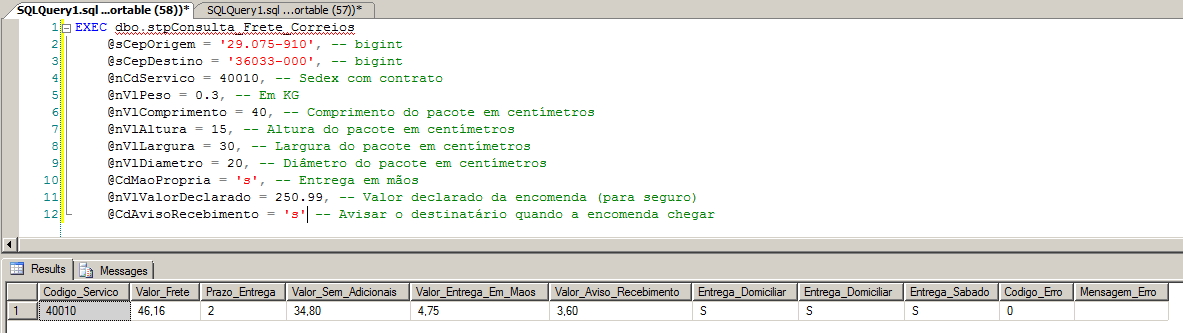
Carrying out a more complete test, filling in all SP parameters
Calling SP, but reporting an invalid ZIP code

That's it, folks!
Until the next post!

Comentários (0)
Carregando comentários…